Year: 2020

20 Oct 2020

Apple, Opera, and Yandex fix browser address bar spoofing bugs, but millions more still left vulnerable

Year after year, phishing remains one of the most popular and effective ways for attackers to steal your passwords. As users, we’re mostly trained to spot the telltale signs of a phishing site, but most of us rely on carefully examining the web address in the browser’s address bar to make sure the site is legitimate.

But even the browser’s anti-phishing features — often the last line of defense for a would-be phishing victim — aren’t perfect.

Security researcher Rafay Baloch found several vulnerabilities in some of the most widely used mobile browsers — including Apple’s Safari, Opera, and Yandex — which if exploited would allow an attacker to trick the browser into displaying a different web address than the actual website that the user is on. These address bar spoofing bugs make it far easier for attackers to make their phishing pages look like legitimate websites, creating the perfect conditions for someone trying to steal passwords.

The bugs worked by exploiting a weakness in the time it takes for a vulnerable browser to load a web page. Once a victim is tricked into opening a link from a phishing email or text message, the malicious web page uses code hidden on the page to effectively replace the malicious web address in the browser’s address bar to any other web address that the attacker chooses.

In at least one case, the vulnerable browser retained the green padlock icon, indicating that the malicious web page with a spoofed web address was legitimate — when it wasn’t.

An address bar spoofing bug in Opera Touch for iOS (left) and Bolt Browser (right). These spoofing bugs can make phishing emails look far more convincing. (Image: Rapid7/supplied)

Rapid7’s research director Tod Beardsley, who helped Baloch with disclosing the vulnerabilities to each browser maker, said address bar spoofing attacks put mobile users at particular risk.

“On mobile, space is at an absolute premium, so every fraction of an inch counts. As a result, there’s not a lot of space available for security signals and sigils,” Beardsley told TechCrunch. “While on a desktop browser, you can either look at the link you’re on, mouse over a link to see where you’re going, or even click on the lock to get certificate details. These extra sources don’t really exist on mobile, so the location bar not only tells the user what site they’re on, it’s expected to tell the user this unambiguously and with certainty. If you’re on palpay.com instead of the expected paypal.com, you could notice this and know you’re on a fake site before you type in your password.”

“Spoofing attacks like this make the location bar ambiguous, and thus, allow an attacker to generate some credence and trustworthiness to their fake site,” he said.

Baloch and Beardsley said the browser makers responded with mixed results.

So far, only Apple and Yandex pushed out fixes in September and October. Opera spokesperson Julia Szyndzielorz said the fixes for its Opera Touch and Opera Mini browsers are “in gradual rollout.”

But the makers of UC Browser, Bolt Browser, and RITS Browser — which collectively have more than 600 million device installs — did not respond to the researchers and left the vulnerabilities unpatched.

TechCrunch reached out to each browser maker but none provided a statement by the time of publication.

20 Oct 2020

Adobe Photoshop gets new AI smarts with neural filters, sky replacement and more

Adobe is betting big on its Sensei AI platform, and so it’s probably no surprise that the company also continues to build more AI-powered features into its flagship Photoshop applications. At its MAX conference, Adobe today announced a handful of new AI features for Photoshop, with Sky Replacement being the most obvious example. Other new AI-driven features include new so-called “Neural Filters” that are essentially the next-generation of Photoshop filters and new and improved tools for selecting parts of images, in addition to other tools to improve on existing features or simplify the photo-editing workflow.

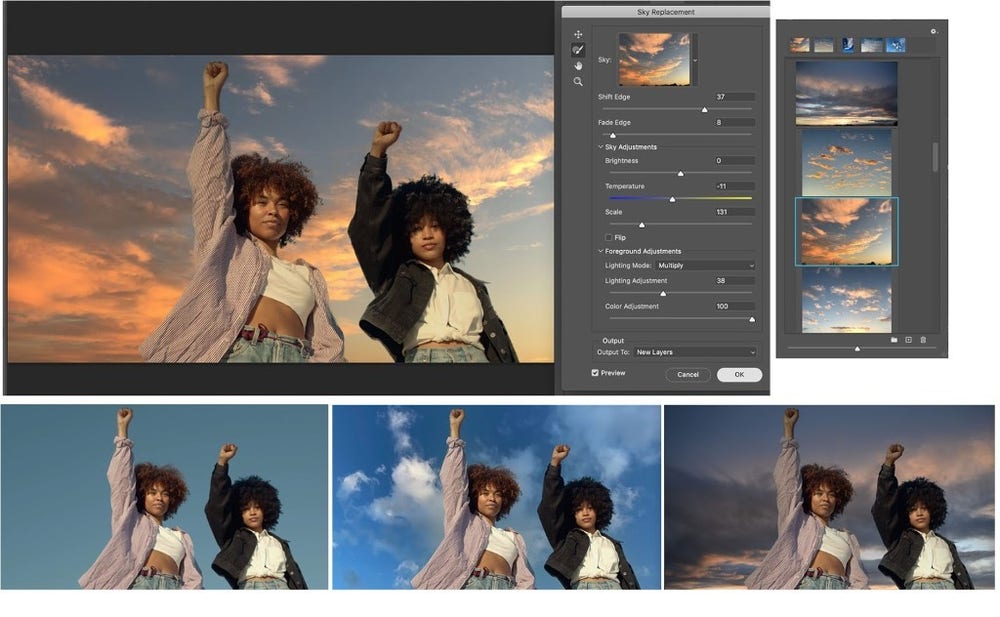
Photoshop isn’t the first tool to offer a Sky Replacement feature. Luminar, for example, has offered that for more than a year already, but it looks like Adobe took its time to get this one right. The idea itself is pretty straightforward: Photoshop can now automatically recognize the sky in your images and then replace it with a sky of your choosing. Because the colors of the sky also influence the overall scene, that would obviously result in a rather strange image, so Adobe’s AI also adjusts the colors of the rest of the image accordingly.

Image Credits: Adobe

How well all of this works probably depends a bit on the images, too. We haven’t been able to give it a try ourselves, and Adobe’s demos obviously worked flawlessly.

Photoshop will ship with 25 sky replacements, but you can also bring in your own.

Neural Filters are the other highlight of this release. They provide you with new artistic and restorative filters for improving portraits, for example, or quickly replacing the background color of an image. The portrait feature will likely get the most immediate use, given that it allows you to change where people are looking, change the angle of the light source and “change hair thickness, the intensity of a smile, or add surprise, anger, or make someone older or younger.” Some of these are a bit more gimmicky than others, and Adobe says they work best for making subtle changes, but either way — making those changes would typically be a lot of manual labor, and now it’s just a click or two.

Image Credits: Adobe

Among the other fun new filters are a style transfer tool and a filter that helps you colorize black and white images. The more useful new filters include the ability to remove JPEG artifacts.

As Adobe noted, it collaborated with Nvidia on these Neural Filters, and, while they will work on all devices running Photoshop 22.0, there’s a real performance benefit to using them on machines with built-in graphics acceleration. No surprise there, given how computationally intensive a lot of these are.

Image Credits: Adobe

While improved object selection may not be quite as flashy as Sky Replacement and the new filters, “intelligent refine edge,” as Adobe calls it, may just save a few photo editors’ sanity. If you’ve ever tried to use Photoshop’s current tools to select a person or animal with complex hair — especially against a complex backdrop — you know how much manual intervention the current crop of tools still need. Now, with the new “Refine Hair” and “Object Aware Refine Mode,” a lot of that manual work should become unnecessary.

Other new Photoshop features include a new tool for creating patterns, a new Discover panel with improved search, help and contextual actions, faster plugins and more.

Also new is a plugin marketplace for all Creative Cloud apps that makes it easier for developers to sell their plugins.

20 Oct 2020

Adobe Illustrator launches on iPad and Adobe Fresco comes to the iPhone

Adobe today launched the first public version of its Illustrator vector graphics app on the iPad. That’s no surprise, given that it was already available for pre-order and as a private beta, but a lot of Illustrator users were looking forward to this day.

In addition, the company also today announced that its Fresco drawing and painting app is now available on Apple’s iPhone, too. Previously, you needed either a Windows machine or an iPad to use it.

Illustrator on the iPad supports Apple Pencil — no surprise there either — and should offer a pretty intuitive user experience for existing users. Like with Photoshop, the team adapted the user interface for a smaller screen and promises a more streamlined experience.

Image Credits: Adobe

“While on the surface it may seem simple, more capabilities reveal themselves as you work. After a while you develop a natural rhythm where the app fades into the background, freeing you to express your creativity,” the company says.

Over time, the company plans to bring more effects, brushes and AI-powered features to Illustrator in general — including on the iPad.

Adobe Fresco on iPhone

Image Credits: Adobe

As for Fresco, it’ll be interesting to see what that user experience will look like on a small screen. Since it uses Adobe’s Creative Cloud libraries, you can always start sketching on an iPhone and then move to another platform to finish your work. It’s worth noting that the iPhone version will feature the same interface, brushes and capabilities you’d expect on the other platforms.

The company also today launched version 2.0 of Fresco, with new smudge brushes, support for personalized brushes from Adobe Capture and more.

20 Oct 2020

Jam raises $3.5 million to Figma-tize product collaboration

The web of collaboration apps invading remote work toolkits have led to plenty of messy workflows for teams that communicate in a language of desktop screenshots and DMs. Tracing a suggestion or flagging a bug in a company’s website forces engineers or designers to make sense of the mess themselves.  While task management software has given teams a funnel for the clutter, the folks at Jam question why this functionality isn’t just built straight into the product.

Jam co-founders Dani Grant and Mohd Irtefa tell TechCrunch they’ve closed on $3.5 million in seed funding and are ready to launch a public beta of their collaboration platform which builds chat, comments and task management directly onto a website, allowing developers and designers to track issues and make suggestions quickly and simply

The seed round was led by Union Square Ventures, where co-founder Dani Grant previously worked as an analyst. Version One Ventures, BoxGroup and Village Global also participated alongside some noteworthy angels including GitHub CTO Jason Warner, Cloudflare CEO Matthew Prince, Gumroad CEO Sahil Lavingia, and former Robinhood VP Josh Elman.

Like most modern productivity suites, Jam is heavy on integrations so users aren’t forced to upend their toolkits just to add one more product into the mix. The platform supports Slack, Jira, GitHub, Asana, Loom and Figma, with a few more in the immediate pipeline. Data syncs from one platform to the other bidirectionally so information is always fresh, Grant says. It’s all built into a tidy sidebar.

Grant and Irtefa met as product managers at Cloudflare, where they started brainstorming better ways to communicate feedback in a way that felt like “leaving digital sticky notes all over a product,” Grant says. That thinking ultimately pushed the duo to leave their jobs this past May and start building Jam.

The startup, like so many conceived during this period, has a remote founding story. Grant and Irtefa have only spent four days together in-person since the company was started, they raised their seed round remotely and most of the employees have never met each other in-person.

The remote team hopes their software can help other remote teams declutter their workflows and focus on what they’re building.

“On a product team, the product is the first tab everyone opens and closes,” Grant says. “So we’re on top of your product instead of on some other platform”

Jam’s interface

20 Oct 2020

Microsoft debuts Azure Space to cater to the space industry, partners with SpaceX for Starlink datacenter broadband

Microsoft is taking its Azure cloud computing platform to the final frontier – space. It now has a dedicated business unit called Azure Space for that purpose, made up of industry heavyweights and engineers who are focused on space-sector services including simulation of space missions, gathering and interpreting satellite data to provide insights, and providing global satellite networking capabilities through new and expanded partnerships.

One of Microsoft’s new partners for Azure Space is SpaceX, the progenitor and major current player in the so-called ‘New Space’ industry. SpaceX will be providing Microsoft with access to its Starlink low-latency satellite based broadband network for Microsoft’s new Azure Modular Datacenter (MDC) – essentially an on-demand container-based datacenter unit that can be deployed in remote locations, either to operate on their own or boost local cababilities.

Image Credits: Microsoft

The MDC is a contained unit, and can operate off-grid using its own satellite network connectivity add-on. It’s similar in concept to the company’s work on underwater data centres, but keeping it on the ground obviously opens up more opportunities in terms of locating it where people need it, rather than having to be proximate to an ocean or sea.

The other big part of this announcement focuses on space preparedness via simulation. Microsoft revealed the Azure Orbital Emulator today, which provides in a computer emulated environment the ability to test satellites constellation operations in simulation, using both software and hardware. It’s basically aiming to provide as close to in-space conditions as are possible on the ground in order to get everything ready for coordinating large, interconnected constellations of automated satellites in low Earth orbit, an increasing need as more defense agencies and private companies pursue this approach vs. the legacy method of relying on one, two or just a few large geosynchronous spacecraft.

Image Credits: Microsoft

Microsoft says the goal with the Orbital Emulator is to train AI for use on orbital spacecraft before those spacecraft are actually launched – from the early development phase, right up to working with production hardware on the ground before it takes its trip to space. That’s definitely a big potential competitive advantage, because it should help companies spot even more potential problems early on while they’re still relatively easy to fix (not the case on orbit).

This emulated environment for on-orbit mission prep is already in use by Azure Government customers, the company notes. It’s also looking for more partners across government and industry for space-related services, including communication, national security., satellite services including observation and telemetry and more.

20 Oct 2020

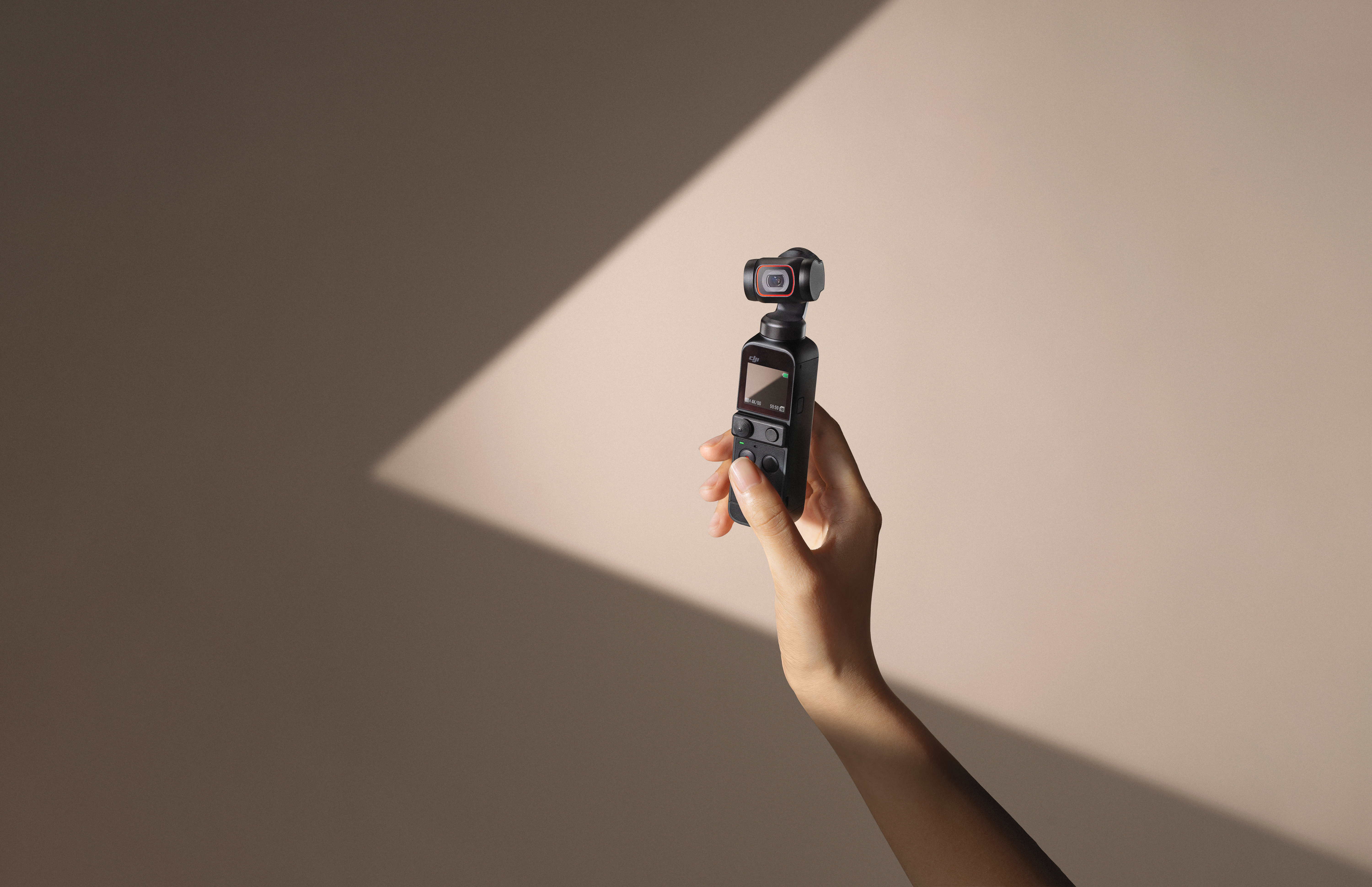
DJI’s clever little Pocket gimbal gets refreshed with improved video

It’s been nearly two years since DJI released the original Osmo Pocket. Honestly, the little gimbal is one of the most delightful products from a company that makes a lot of them. As — at best — an amateur smartphone photographer, I enjoyed my time with the product and am pretty psyched to get a little hands-on time with the sequel.

The new product streamlines the name a bit, dropping the “Osmo” to become, simply, the DJI Pocket 2. Like its predecessor, it works as both a standalone camera, or a smartphone accessory, using a handset and a large display to preview shots in real time. The three-axis gimbal can record 4K video at 60 frames a second. HDR video is now on board, as is a 8x hybrid zoom (or 4x optical). A four-mic system has been added to improve sound recording.

As ever with DJI, the software is a big piece. I was really impressed with the way the company was able to bring some of its drones’ more advanced shooting modes to the product, allowing for polished, cinematic shots on a pocket-sized device. The new version has a half-dozen or so different modes. Per DJI:

  • Pro Mode: Control advanced camera settings such as ISO, shutter speed, EV, and focus mode.
  • ActiveTrack 3.0: Select a subject and let DJI Pocket 2 keep it in the frame automatically.
  • Slow Motion: Capture the fast-moving world in slow motion with a max speed and resolution of 8x at 1080p.
  • Timelapse, Hyperlapse, Motionlapse: Speed up the world around you with the varying effects of three different time-lapse operations. Hyperlapse automatically integrates Electronic Image Stabilization (EIS) for added smoothness. Users have the ability to save individual images separately, record in RAW format, and use ActiveTrack 3.0.
  • Panoramas:
  • 180° Pano: Captures four photos for sweeping landscape images.
  • 3×3 Pano: Merges nine images for a wide and detailed view.
  • Livestreaming: Livestream directly to Facebook, YouTube, or RTMP.
  • Story Mode: Preset camera movements, color profiles, and music make it easier to choose a template, record the moment, and share to social media instantly

The hardware’s been redesigned a bit this time out, with a removable baseplate for attaching a bunch of new accessories, including an additional microphone, charging case and wireless housing. There’s a wireless module as well, which lets it connect to a smartphone without having to plug it in directly.

Image Credits: DJI

It’s a pricey little deal, as far as mobile gimbals go, owing to all of the hardware on board. It retains the original’s $349 starting price, which includes a control stick and tripod mount. The $499 Creator Combo adds a wide-angle lens, wireless mic with windscreen and a mini tripod. Both are available through DJI’s site starting November 1.

20 Oct 2020

Intel is providing the smarts for the first satellite with local AI processing on board

Intel detailed today its contribution to PhiSat-1, a new tiny small satellite that was launched into sun-synchronous orbit on September 2. PhiSat-1 has a new kind of hyperspectral-thermal camera on board, and also includes a Movidius Myriad 2 Vision Processing Unit. That VPU is found in a number of consumer devices on Earth, but this is its first trip to space – and the first time it’ll be handling large amounts of local data, saving researchers back on Earth precious time and satellite downlink bandwidth.

Specifically, the AI on board the PhiSat-1 will be handling automatic identification of cloud cover – images where the Earth is obscured in terms of what the scientists studying the data actually want to see. Getting rid of these images before they’re even transmitted means that the satellite can actually realize a bandwidth savings of up to 30%, which means more useful data is transmitted to Earth when it is in range of ground stations for transmission.

The AI software that runs on the Intel Myriad 2 on PhiSat-1 was created by startup Ubotica, which worked with the hardware maker behind the hyperspectral camera. It also had to be tuned to compensate for the excess exposure to radiation, though a bit surprisingly testing at CERN found that the hardware itself didn’t have to be modified in order to perform within the standards required for its mission.

Computing at the edge takes on a whole new meaning when applied to satellites on orbit, but it’s definitely a place where local AI makes a ton of sense. All the same reasons that companies seek to handle data processing and analytics at the site of sensors hear on Earth also apply in space – but magnified exponentially in terms of things like network inaccessibility and quality of connections, so expect to see a lot more of this.

PhiSat-1 was launched in September as part of Arianspace’s first rideshare demonstration mission, which it aims to use to show off its ability to offer launch services to smaller startups for smaller payloads at lower costs.

20 Oct 2020

Adobe Lightroom gets a new color grading tool, auto versions, graphical watermarking and more

At its MAX conference, Adobe today announced the launch of the latest version of Lightroom, its popular photo management and editing tool. The highlights of today’s release are the introduction of a new color grading tool that’s more akin to what you’d find in a video editor like Adobe Premiere or DaVinci Resolve, auto versioning that’s saved in the cloud (and hence not available in Lightroom Classic) and graphical watermarks, in addition to a number of other small feature updates across the application.

Adobe had already teased the launch of the new color grading feature last month, which was probably a good idea given how much of a change this is for photographers who have used Lightroom before. Adjusting color is, after all, one of the main features of Lightroom and this is a major change.

Image Credits: Adobe

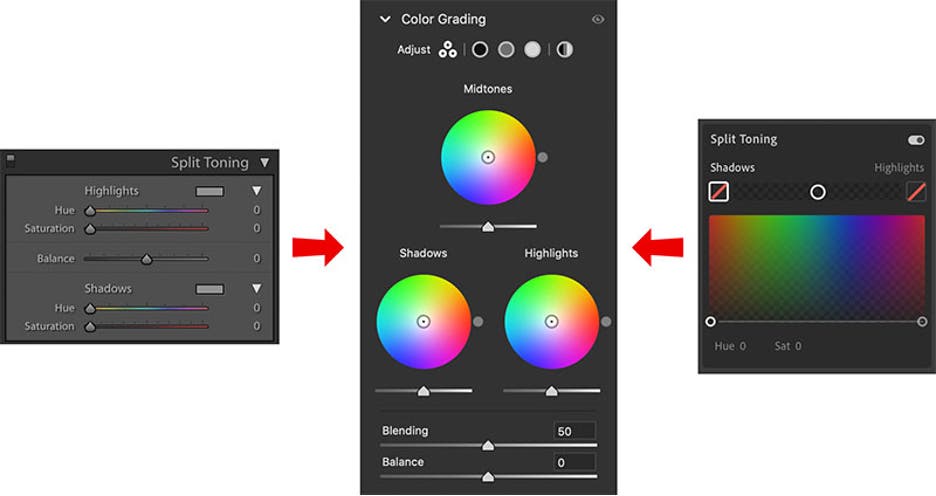
At its core, the new color wheels replace the existing ‘split toning’ controls in Lightroom.

“Color Grading is an extension of Split Toning — it can do everything Split Toning did, plus much more,” Adobe’s Max Wendt explains in today’s announcement. “Your existing images with Split Toning settings will look exactly the same as they did before, your old Split Toning presets will also still look the same when you apply them, and you can still get the same results if you had a familiar starting point when doing Split Toning manually.”

My guess is that it’ll take a while for many Lightroom users to get a hang of these new color wheels. Overall, though, I think this new system is more intuitive than the current split toning feature that a lot of users regularly ignored.

The new color grading feature will be available across platforms and in Lightroom Classic, as well as Camera Raw.

The other new feature Adobe is highlighting with this release is graphical watermarks (available on Windows, Mac, iOS, iPadOS, Android and Chrome OS), that augments the existing text-based watermarking in Lightroom. This does exactly what the name implies and the watermarks are automatically applied when you share or export and image.

Image Credits: Adobe

The most important overall quality of life feature the team is adding is auto versions (also available on Windows, Mac, iOS, iPadOS, Android and Chrome OS). This makes it far easier to save different versions of an image — and these versions are synced across platforms. That way, you can easily go back and forth between different edits and revert those as necessary, too.

Image Credits: Adobe

With its new ‘best photos’ feature, Adobe is now also using its Ai smarts to find the best photos you’ve taken, but only on iOS, iPadOS, and Android, Chrome OS and the web. It’ll look at the technical aspects of your photo, as well as whether your subjects have their eyes open and face forward, for example, and the overall framing of the image. Users can decide how many of their images make the cut by toggling a threshold slider.

Another nifty new feature for Canon shooters who use Lightroom Classic is the addition of a tethered live view for Canon – with support for other cameras coming soon. With this, you get a real-time feed from your camera, making it easier to collaborate with others in real time.


20 Oct 2020

There’s a housing crisis, and Abodu wants to solve it fast with quality backyard homes

Housing prices have soared in many markets across the United States over the past decades as populations have grown, square footage has increased, and new unit construction has languished. Houses that were once tens of thousands of dollars have transformed due to zoning restrictions into million-dollar manses, leaving millions without affordable housing.

Few regions have been as hard hit by housing prices as the Bay Area, where the median price for an existing home last year averaged just shy of $1 million. For John Geary, who grew up in Cupertino and whose father is a single-family home real estate developer, “I’ve seen the just under-building of housing occur my entire life here.”

He eventually linked up with Eric McInerney when the two worked at Bain, and the two quickly became friends, living together in Chicago. Both were housing nerds and talked about the housing crisis regularly, and eventually, they started looking at a way to solve the affordability problem.

While California has handled the crisis with the glacial fervor you would expect of the republic, one major change on housing has been new state laws that have made it easier to build an ADU (accessory dwelling unit), which are smaller home units tucked into existing properties (for example, a one-bedroom detached home in the backyard of an existing four-bedroom house).

The changes around these housing units became more visceral for Geary when his father, who was developing a subdivision in San Juan Bautista south of San Jose, was mandated to include 15 ADUs in a neighborhood plan for 45 lots. There weren’t great options for including the housing units at any reasonable price, and other homeowners who had attempted to construct ADUs came to a similar conclusion — indicating a gap in the market that could potentially be filled.

Geary and McInerney saw an opportunity to capitalize on the sudden openness for ADUs in California, and launched Abodu. The startup, which is based in Redwood City in the Bay Area, offers three customizable housing models that it then manufacturers to order and can deliver to homeowners in as little as about 12 weeks.

The startup raised $3.5 million for a seed round led by former TechCrunch writer Kim-Mai Cutler, who is now a partner at Initialized Capital. Her famous “vomiting anarchists” essay helped to propel housing issues to public consciousness in the Bay Area and throughout the tech industry.

A finished and installed Abodu home. Photo via Abodu.

Abodu offers three housing models today: a studio, a one-bedroom, and a two-bedroom, with prices starting at $189,000, $199,000 and $259,000 respectively. Those prices include standard installation, foundations, and utilities, but exclude city permit fees, which Geary says can range from $1,500 to $7,000. Additional, more premium options and finishes are available as well. Homeowners can buy the units online or visit the units in-person at the company’s showroom in Redwood City.

“They’re built entirely offsite to local building codes. So the same construction process, same materials, same requirements that you face building something in your backyard from the ground up. We meet all those, we just build them in a factory instead of someone’s backyard,” Geary explained.

From there, the house is put on a truck, driven to the destination, and a crane lifts the unit over the existing house on the property and places it into the intended location.

The interior of an Abodu home. Photo via Abodu.

Currently, it takes about 10 weeks to construct the unit in the factory, and 10 days to setup a backyard to host the unit. So as the unit starts to reach the finishing steps at the factory, construction crews begin to prep the property for installation. “From a homeowner’s perspective, the disruption that occurs in their life is really centered in that back quadrant of the project. So instead of months and months and months [with traditional construction], it’s only two weeks,” Geary explained.

Customers can work with Abodu to acquire standard home equity lines of credit (HELOCs) or cash-out mortgage refinancing to pay for their unit.

The company currently has 10 employees and shares its office in the same facility as its showroom in Redwood City.

Geary says that when the company first started, the focus was on homeowner-investors looking to extract rents from their backyards. But with the pandemic, there is now a greater need for families to have more flexible housing options, with kids returning home and older family members looking to separate from others to prevent infection.

20 Oct 2020

Soleadify secures seed funding for database what tracks 40M business using machine learning

Usually, databases about companies have to be painstakingly updated by humans. Soleadify is a startup that uses machine learning to create profiles for businesses in any industry. The first of the company’s products is a business search engine that keeps over 40 million business profiles updated, currently used by hundreds of companies in the USA, Europe and Asia for sales and marketing activities.

It’s now secured $1.5M in seed round funding from European venture firms GapMinder Venture Partners and DayOne Capital, as well as several prominent business angels, through Seedblink, an equity crowdfunding platform based out of Bucharest Romania.

The company plans to use the funds to further improve their technology, build partnerships and expand their marketing capabilities.

On top of Soleadify’s data, they build solutions for prospecting, market research, customer segmentation and industry monitoring.

The way it’s done is by frequently scanning billions of webpages, identifying and classifying relevant data points and creating connections between them. The result is a database of business data, that is normally only available through laborious, manual research.