Year: 2020

14 Jul 2020

The VCs who founders love the most

Over the past month, we have been asking founders to submit recommendations of VCs for The TechCrunch List, our newly-launched curated directory of investors who are ready to write first checks and lead venture rounds into startups. You can head over to the list itself to see all 391 investors across 22 verticals.

Beyond the final compiled list though, there was an even more elite group of investors who a wide number of founders just raved about in their recommendations. So while The TechCrunch List is a free resource for all founders, over here on Extra Crunch, we wanted to place special attention on a short list of 11 investors that founders were particularly effusive in their praise.

Let’s take a look.

Note: Recommendations were submitted “on the record.” However, out of an abundance of caution for the founders and their startups, we have elided certain specific details from these recommendations. They have also been edited for clarity.

Ben Ling of Bling Capital

14 Jul 2020

Identity platform Auth0 raises $120M Series F funding round at $1.92B valuation

Developer-centric identity platform Auth0 today announced that it has raised a $120 million Series F round led by Salesforce Ventures. Existing investors Bessemer Venture Partners, Sapphire Ventures, Meritech Capital, World Innovation Lab, Trinity Ventures, Telstra Ventures and K9 Ventures also participated in this round, as well as new investor DTCP.

With this, the company has now raised a total of $330 million, including its $103 million Series E round in 2019. The company says its valuation is now 1.92 billion.

Auth0’s marquee customers include the likes of Atlassian, AMD and Autotrader. The company, which now has 650 employees, says it grew both its revenue and customer base by 70 percent in 2019 and that it now has ‘thousands of customers’ who use the service to outsource their identity management.

“Achieving a Series F round of funding is an incredible milestone for our company, and we could not be more grateful to our new and existing investors for their support,” said Auth0 CEO and co-founder Eugenio Pace. “Nearly every app and service relies on secure authentication and seamless user experience. Our year-over-year growth is reflective of the persistent problem  that our technology is solving, and we are so proud to be part of our customers’ journey.”

The promise of Auth0 (pronounced auth-zero) is that developers only need to add a few lines of code to their applications to add access to its identity management service for external users and to give their own employees access to their intranet services, too.

“Auth0 is a leader in the large, fast-growing identity management market and has shown tremendous growth at scale,” said John Somorjai, EVP, Corporate Development & Salesforce Ventures at Salesforce. “Auth0’s expertise in end-to-end identity products is well-aligned with Salesforce’s Customer 360 platform. We look forward to supporting their growth with this new strategic investment from Salesforce Ventures to drive further innovation for customers.”

The company says it will use the new funding to “fuel continued innovation and go-to-market expansion” and the investors clearly believe that Auth0 is in a position to capture a good chunk of the identity and access management market, despite that fact that this is a competitive space with the likes of Okta, Ping Identity, Microsoft, IBM, Oracle and others all vying for a similar pool of customers.

14 Jul 2020

Google Play Pass expands outside the U.S., adds more titles and annual pricing

Google Play Pass, the Android alternative to subscription-based game store Apple Arcade, is expanding. Launched in September 2019 with over 350 apps and games, Play Pass today announced it’s added 150 new titles, including Sonic the Hedgehog, Golf Peaks, and kid-friendly content, like apps from Sesame Workshop, for example. In addition, the service will be offered in a range of new non-U.S. markets for the first time and is adding an annual subscription option.

Unlike Apple Arcade, Google Play Pass offered a combination of games and premium apps, like AccuWeather, Facetune and Pic Stitch, for example. It also included a notable list of launch titles, like Stardew Valley, Risk, Terraria, Monument Valley, Star Wars: Knights of the Old Republic, Reigns: Game of Thrones, Titan Quest and Wayward Souls.

The company has been steadily growing its lineup since its debut. Google says that over the past few months, it’s added over 150 titles and is preparing to roll out even more. A series of new titles will also premiere on Google Play Pass this year at launch, starting with the newly-released The Almost Gone from Playdigious, available now. This will be followed by The Gardens Between and Kingdom Rush, then new releases like Bright Paw from Rogue and Line Weight from The Label coming later this year.

With the expansion, Google Play Pass now included over 500 apps and games.

The company is also offering a different way to pay for the subscription. Play Pass first offered users a $1.99 per month promotional subscription for the first year, which would increase to $4.99 per month afterwards. As early adopters are nearing the price change, Google is instead giving them a chance to save by paying for a year’s subscription upfront. The new annual subscription option brings the price down to $29.99 per year in the U.S., which works out to roughly $2.50 per month.

Existing subscribers will be able to make the change to an annual subscription from the Play Pass tab in the Play Store app for Android this week.

The service is also launching internationally with availability in Australia, Canada, France, Germany, Ireland, Italy, New Zealand, Spain and the United Kingdom, starting this week.

Because Play Pass didn’t rely as heavily on exclusives and included non-game apps, it was able to offer a larger catalog than Apple Arcade did at launch. Today, Apple touts that Arcade offers over 100 games, while Google has added more apps than that in just the past several months.

Google also ties its payouts to developers based on Play Pass downloads, while Apple had offered upfront funding for Arcade titles, with more for exclusives. iOS developers are also under NDA about their agreements, but a revenue share is reportedly involved here, as well.

Both services cater to a growing audience interested in subscription-based entertainment, which is no longer limited to just streaming music and video. Outside of standard mobile game revenue, app subscriptions have been driving increased in consumer spend across the app stores for some time.

The Google Play Pass expansion to new markets and the (U.S.-only) annual subscription option are both rolling out this week.

14 Jul 2020

Brief’s mobile news app aims to tackle information overload and media bias

Brief, a newly launched news aggregator founded by former Google engineers, aims to tackle a number of problems with today’s news cycle, including information overload, burnout, media bias, and algorithms that prioritize engagement over news accuracy.

Today, there are so many places to read the news and many aggregators on the market offer access to a near-infinite number of sources. Meanwhile, algorithms profile you to determine your leanings, then serve up more of the news that fits your worldview, to keep you engaged with the product.

Brief’s founders wanted to make it easier to stay informed on key topics without having to spend hours reading the news from a variety of viewpoints to get the full picture.
Before Brief, co-founder and CEO Nick Hobbs was a Google product manager who had worked on AR, Google Assistant, Google’s mobile app, and self-driving cars, among other things during his time at the company. Co-founder and CTO Andrea Huey, meanwhile, was a Google senior software engineer.

The two met while building the Google iOS app and left, says Hobbs, “after becoming increasingly alarmed by the damage technology is doing to public discourse.”
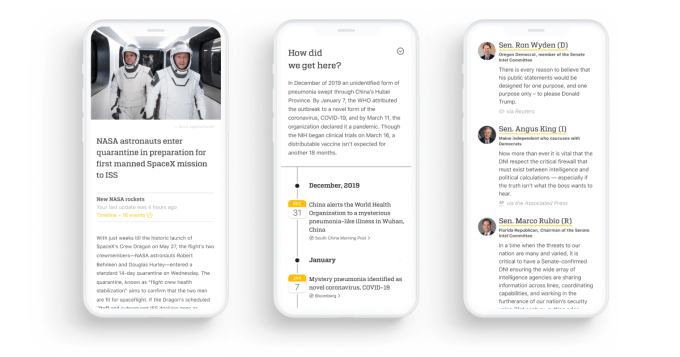
Image Credits: Brief

Brief (which was founded as Broadsheet), is staffed by similarly-minded, mission-driven team, including engineers from Apple and Google, and a small editorial team who had worked on curation and fact-checking at Snapchat and Wired.

Before today, the company tested a beta version of their news app on the Apple App Store. The version arriving on Tuesday offers a new design, feature set and overall experience.

Brief’s app is a lot different from what you might expect from a news aggregator like Apple News or Google News, for example. It’s not meant only as a tool that points you to news articles published elsewhere, that is. Instead, it summarizes the key fact, provides context, and offers viewpoints from both sides.
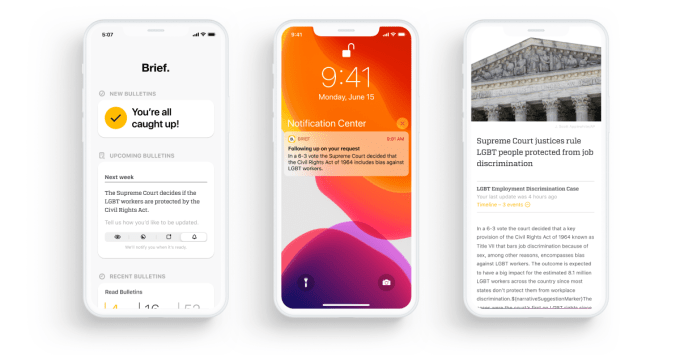
Image Credits: Brief

“Traditional aggregators were designed to help readers discover more and more content—a vestige of the days when it was actually hard to find enough interesting stuff to read online,” explains Hobbs. “However, now that the internet has ‘grown up,’ everyone faces the exact opposite problem: there are so many things clamoring for our attention we end up skimming everything and understanding nothing,” he says.

Brief takes the opposite approach. Instead of offering far too many articles to actually read, Brief gives you just a few, easily digested news bulletins crafted by journalists. These “front-page” story summaries will help you keep up with key developments in areas like U.S. news, politics, business and technology, among others. Much of the content for Brief comes from its licensing of AP wire feeds, but it will feature breaking news stories and exclusives from other sources, as needed.

These bulletins are also paired with timelines that help you understand the latest development in context and relevant quotes offering different perspectives.
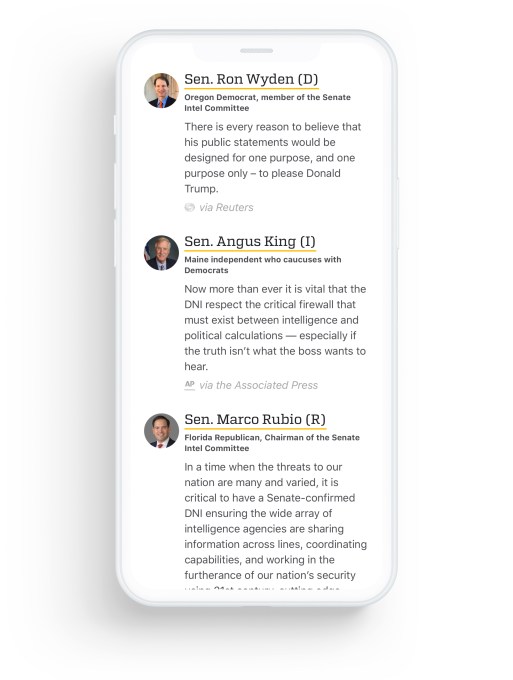
Image Credits:

The result is that you’re able to catch up with the most important news in only minutes, not hours — hence the app’s name, “Brief.”

One key area where Brief aims to differentiate itself is how it will heavily rely on human curation.

“We strongly believe that human editorial judgment is irreplaceable, which is why our newsroom decides which stories are covered and what priority they’re given,” notes Hobbs.

This is similar to how Apple News relies on a human editorial team to program its own News app, for instance. But in Brief’s case, journalists aren’t just selecting the news to feature, they’re also helping to translate it to this short-form news reading experience.

That said, Brief does lean on technology where it makes sense. Algorithms help to smartly organize the content in the app and its software will automatically archive the stories you’ve already read to keep you focused on what’s new to you.

Perhaps just as important as its efforts to address the information overload crisis, Brief also attempts to tackle issues around increased polarization of the news. This problem has led to readers isolating themselves within their own ideological bubbles and among their prefered set of either right-leaning or left-leaning sources.

Though it won’t stop news addicts from clicking on their prefered, if biased, cable TV news channel, Brief hopes to reach those who are, in fact, interested in hearing a more balanced perspective. It even aims to reach those who have largely given up on news altogether, due to being overwhelmed.
Image Credits: Brief

To counteract bias, Brief first ensures that all users receive the same information. Its algorithms will not attempt to profile you to determine your leanings, then feed you ever more of the content you’re naturally inclined to seek out.

And not only do all users see the same news, all content is ordered the same, too.

To tackle bias in the framing of news stories — including the selective uses of quotes and biased sources — Brief introduces a feature called “Perspectives” that presents a range of influential voices for every story. This, again, is viewed by all users in the same way.

For example, a story around U.S. politics may include relevant quotes from both the Republican and Democratic senators or representatives. That means users will see the way both sides are thinking and talking about the topic at hand, and they won’t be spared from the “other” side’s views, however distasteful.

In the case where one side is effectively being untruthful, the app’s timeline feature comes in handy. This feature aims to give the news more context, which can help highlight was was actually said and done and when that took place. The timeline can also be useful for tracking updates on a politicized issues where often much of the talking is being done by voices on one side, while the other stays quiet. At later times, who’s being vocal may shift from one side to the other. The timeline helps keep this in balance.

While Brief makes an admirable attempt to solves issues around news consumption and bias, these are not simple problems to solve by technology alone. There are often stories reported accurately by major publications, but those who don’t like the story simply choose to disagree with it.

In addition, for Brief’s app to actually have the impact it desires, it needs to attract a large mass of users. And it has to also figure out how to steer people away from getting their news on social media, where misinformation, disinformation, propaganda, and conspiracies thrive. That’s a far larger challenge — and one which the app doesn’t have a strategy to address. It’s only focused on what Brief itself can do, not on how to bring users to its less algorthimic-driven solution.

But Hobbs believes there’s a market for a news app that steers users away from the drama.

“I think we can do a pretty good job of finding a lot of people who are really tired of having their news come with a side of shouting relatives,” says Hobbs, noting also the app has gained its initial traction just through App Store search ads alone. Before its public debut, Brief made it to No. 12 Magazines & Newspapers on the App Store.

Another issue is that Brief limits its audience by way of its subscription model, which requires a $4.99 per month commitment. Those in most need of a news detox aren’t likely going to pay for the pleasure.

The company is backed by a million seed funding from SignalFire and handful of angel investors, including Sequoia Scouts like David LiebMaia Bittner, and Matt Macinnis.

The app itself is a free download on the App Store if you want to take a look, and there’s a waitlist for Android users. 


14 Jul 2020

Tesla holds onto to recent gains with bullish analyst target of $2,300

Wall Street darling Tesla is holding onto its recent gains today on the back of a bullish analyst report, despite some weakness in tech shares.

Tesla has seen its value skyrocket in recent quarters, rising from a 52-week low share price of $211 to $1,548.81 today. That figure, however, is low in the eyes of some. Enter Piper Sandler.

The Piper analyst report, which was first released late Monday, gives Tesla a new price target of $2,322, up from the group’s prior price target of a little over $900 per share. The stock still has room to run, some believe, perhaps explaining some of the mania that related companies have seen in recent weeks, including fellow electric car manufacturers Nikola, Nio, and others.

It was enough to prompt a “wow” from Tesla CEO Elon Musk via a tweet Monday evening.

The Piper report cites two key factors for its new Tesla price target: The company’s edge in manufacturing and resulting unit volume, and the possibility that software will allow the company to eventually generate operating margins in the mid-20s.

On the manufacturing front, Piper increased its 2020 delivery estimates based on Tesla’s recent second-quarter numbers. The firm believes Tesla can hit its original 2020 delivery guidance of 500,000 units, which it notes is impressive given factory closures due to COVID-19.

Piper suggested Tesla can scale rapidly in the coming years. The constraint isn’t customer demand, but instead capacity, the analyst suggested. Of course, building out production capacity is no small and cheap feat. Still, with customer demand wide open, Piper sees big revenue gains moving forward.

The latter argument feels more speculative. A 25% operating margin implies that the automotive company’s gross margins would need to be far higher, a seeming stretch for a company that sells molded metal and plastic in a competitive market.

The basis of Piper’s argument centers on Tesla’s software, specifically its FSD, or “full self-driving” feature, an $8,000 add-on that provides advanced driver assistance over its standard Autopilot system.

Let us provide some quick backstory so that everyone understands: Today, Tesla vehicles come standard with Autopilot, an advanced driver assistance system that offers a combination of adaptive cruise control and lane steering. Tesla once charged for this feature as well, but made it standard in April 2019.

The more robust and higher-functioning version of Autopilot is called full self-driving. FSD includes the parking feature Summon as well as Navigate on Autopilot, an active guidance system that navigates a car from a highway on-ramp to off-ramp, including interchanges and making lane changes. The system now recognizes and respond to traffic lights as well.

Still, Tesla vehicles are not self-driving cars. The system requires a human driver to remain engaged at all times.

Piper believes the FSD price will continue to rise, driving up margins. The firm predicted that the cost of FSD could rise as high as $40,000.

“Thanks to the high-margin nature of the FSD package, we think that by the 2030s, Tesla could conceivably be selling vehicles at cost — or even below cost — while still achieving higher operating margins,” Piper wrote.

There is a very material catch to all of this. Tesla is able to recognize FSD revenue on its balance sheet as it rolls out more features. In other words, Tesla has to keep improving the product to be able to capture that entire line item.

In the first-quarter earnings call, Tesla CFO Zachary Kirkhorn explained that the company takes “roughly half” of the FSD as revenue. The other half of it goes into deferred revenue.

“Our deferred revenue balance is continuing to grow,” he said at the time. “It’s a little bit over $600 million. And so as we release features with time, at the end of every quarter, we take a look at what features have been released, associated value and then we can release that from the deferred revenue into our financials for that quarter. And then cars going forward, once the feature is released, we can recognize that revenue.”

For Tesla shareholders, institutional and retail alike, Piper’s report is welcome. Now Tesla has to live up to raised expectations. The company reports earnings on July 22nd. TechCrunch will be tuned in.

14 Jul 2020

Logitech’s new Mac-specific mouse and keyboards are the new best choices for Mac input devices

Logitech has released new versions of its MX peripherals in Mac-friendly finishes, as well as a new K380 wireless Bluetooth keyboard designed for Apple devices. These aren’t dramatically different devices from the existing versions that Logitech offers – but that’s a good thing in this case, and it elevates what were already amazing peripherals to no-brainer default choices for Mac users.

MX Master 3 for Mac

Image Credits: Darrell Etherington

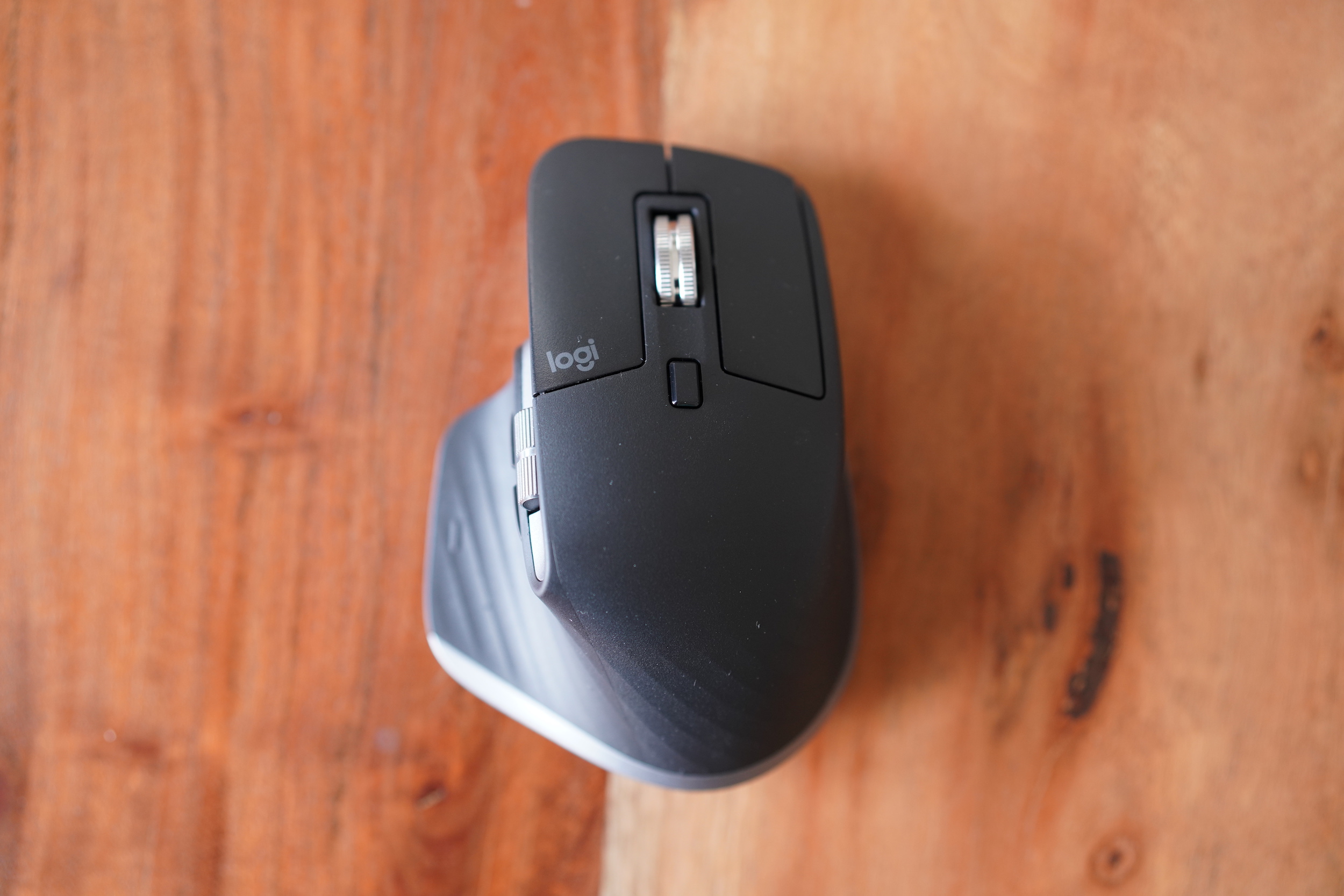
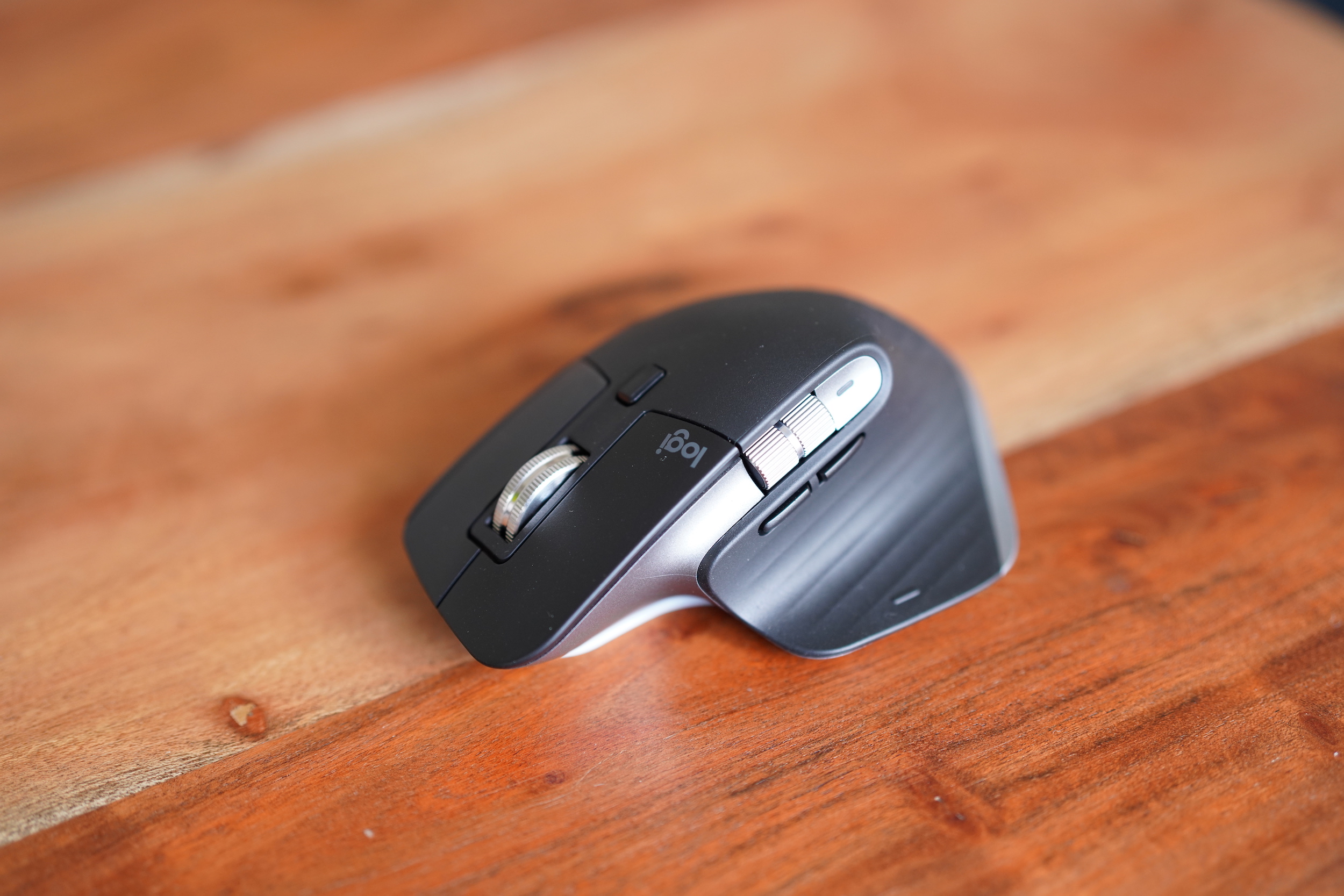
The MX Master 3 for Mac is a very slightly altered twist on the MX Master 3 – consisting mostly of a new paint job that actually pretty closely resembles the old one. Specs are the same for the Mac-specific version, including its quiet scroll wheel with 1,000 lines per second maximum scroll speed, and Logitech’s MagSpeed tech that dynamically enables freewheel scrolling when you’re going fast.

The MX Master 3 for Mac does ship with a USB-C to USB-C cord in the box, instead of the USB-A to USB-C cable that comes with the non-Mac version, and that’s much more convenient for charging and using it dongle-free with modern MacBook computers. It can run for 70 days on a full charge, and you can get three full hours of use out of just 60 seconds of charge time. The mouse uses Logitech’s Darkfield laser tracking which provides 1000 dpi on average of accuracy and the ability to track on virtually every surface, and it can also work across Macs and iPads with Logitech’s Easy-Switch technology for connecting to multiple devices.

In terms of major differences, the main one any owners of the MX Master 3 will notice is that the MX Master 3 for Mac is listed as only offering Bluetooth connectivity on Logitech’s website – and it doesn’t ship with Logitech’s Unifying USB receiver, which connects its peripherals via a dedicated RF network instead of Bluetooth for greater reliability. That’s odd, because the MX Master 3 for Mac definitely still works with Logitech’s Unifying Retriever, and that’s exactly how I had it set up, using the USB dongle that shipped with the MX Master Keys for Mac.

Image Credits: Darrell Etherington

This is noteworthy because Logitech is charging $129.99 for the MX Master 3 for Mac – the same as the non-Mac version, but it doesn’t include the receiver and bills itself as a Bluetooth mouse. It’s a bit of an odd choice, but if you’ve used Logitech gear over the years, you probably have an abundance of unifying receivers on hand, and the Space Gray colorway on the Mac version does match better with actual Mac hardware.

Performance-wise, the MX Master 3 for Mac is still one of the best full-size mice you can get. It’s extremely comfortable to use, features a healthy array of controls that are customizable with Logitech’s Options software, and provides smooth, high-precision tracking, with the ability to use it while charging.

MX Keys for Mac

Image Credits: Darrell Etherington

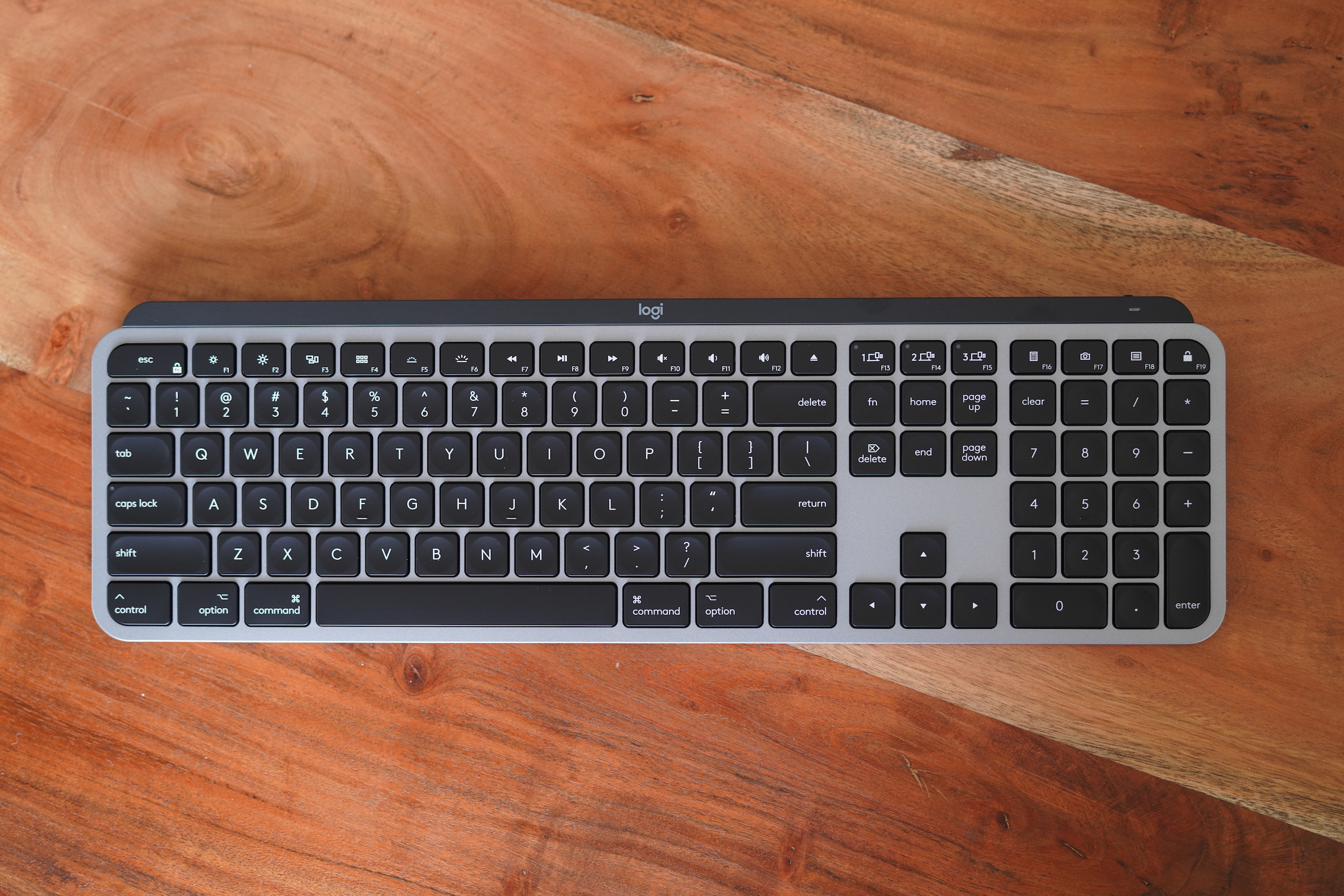
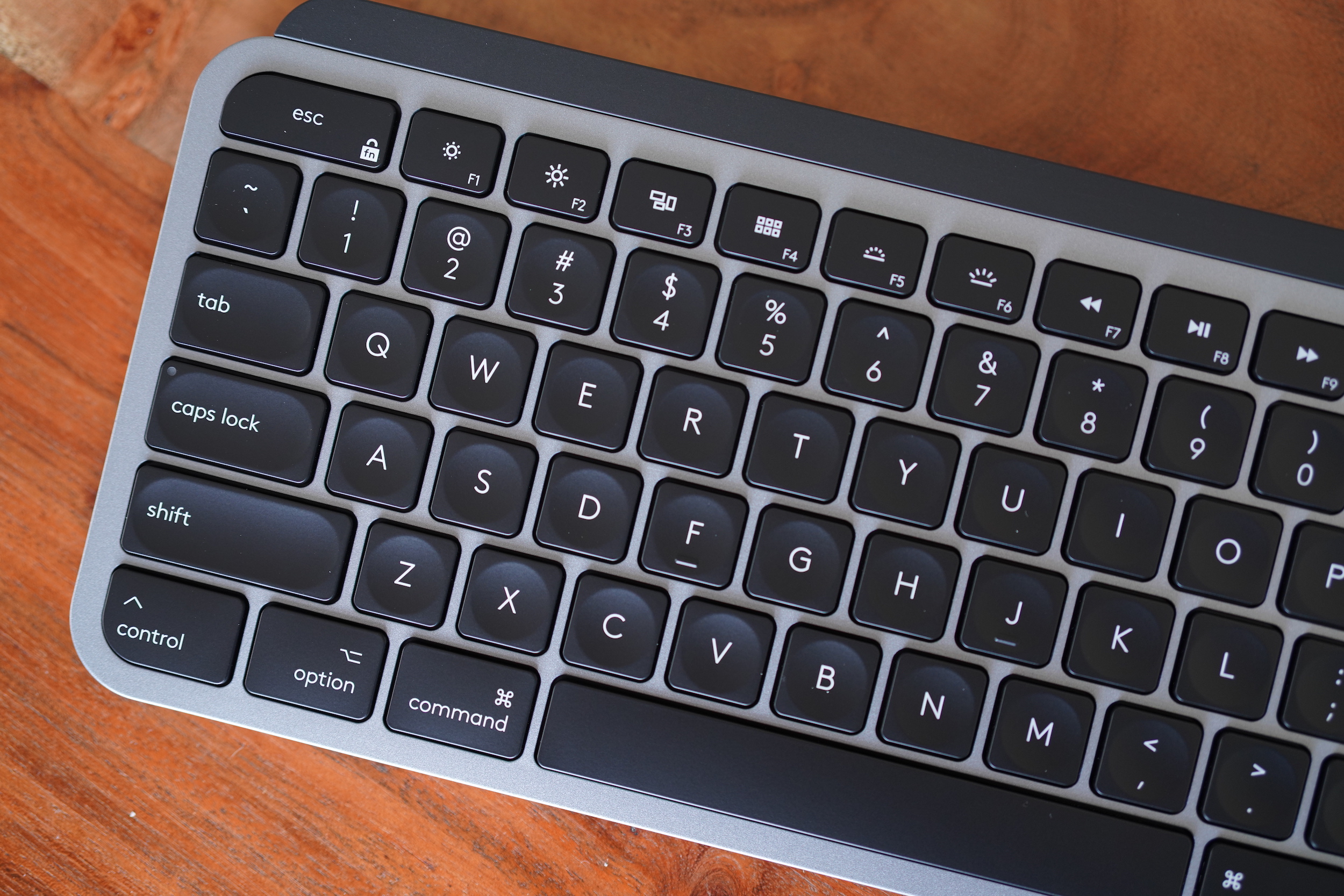
Like the mouse, the Mac version of the MX Keys is mostly an aesthetic change. It’s also done up in Space Gray to match Apple’s colorway of the same name, and it features contrast-coloured black keys and a top bar that houses the wireless and battery electronics. The key layout also gets Mac-specific, ditching the hybrid key labelling of Logitech’s existing MX Keys for actual dedicated Command and Option keys, as well as a hardware eject key.

Also like the Mac Master 3, the MX Keys can work across devices, including those running macOS, iPadOS and iOS. It ships with a USB-C to USB-C charging cable (again, more convenient than the USB-A to USB-C one in the standard MX Keys configuration) and a unifying receiver. It’s also able to connect via Bluetooth, and can be connected to up to 3 devices with dedicated keys to switch between each.

The MX Keys is already probably your best choice for a third-party keyboard that offers great performance and key feel, unless you’re specifically into clicky mechanical keyboards. It includes smart backlighting that activates automatically when your hands approach, and turns off automatically when not in use to preserve battery life. While it’s made of plastic, it still feels heavy in a good way, ensuring it’ll rest flat on your desk. Since it’s based on the MX Keys, I can also attest to its durability, as I’ve been using that keyboard since its launch and have not had any problems with it at all thus far.

Image Credits: Darrell Etherington

In terms of battery life, you can expect 10 days of use with the backlighting active – but if you go without the underlay lighting, it’ll stretch out to as much as five months. And as mentioned, it’s easy to charge up directly from your Mac with the included USB-C cable – which also allows you to use it while charging.

Logitech’s work on the color scheme here really does a good job of matching the look of Apple’s aluminum treatment, right down to the metal-like speckles on the Space Gray surfaces. If you’re already using an MX Keys, stick with it, but if you’re in the market for something new, this is the new best choice for a Mac user – at the same $129.99 price point as the original.

K380 Bluetooth Keyboard for Mac, iPad and iPhone

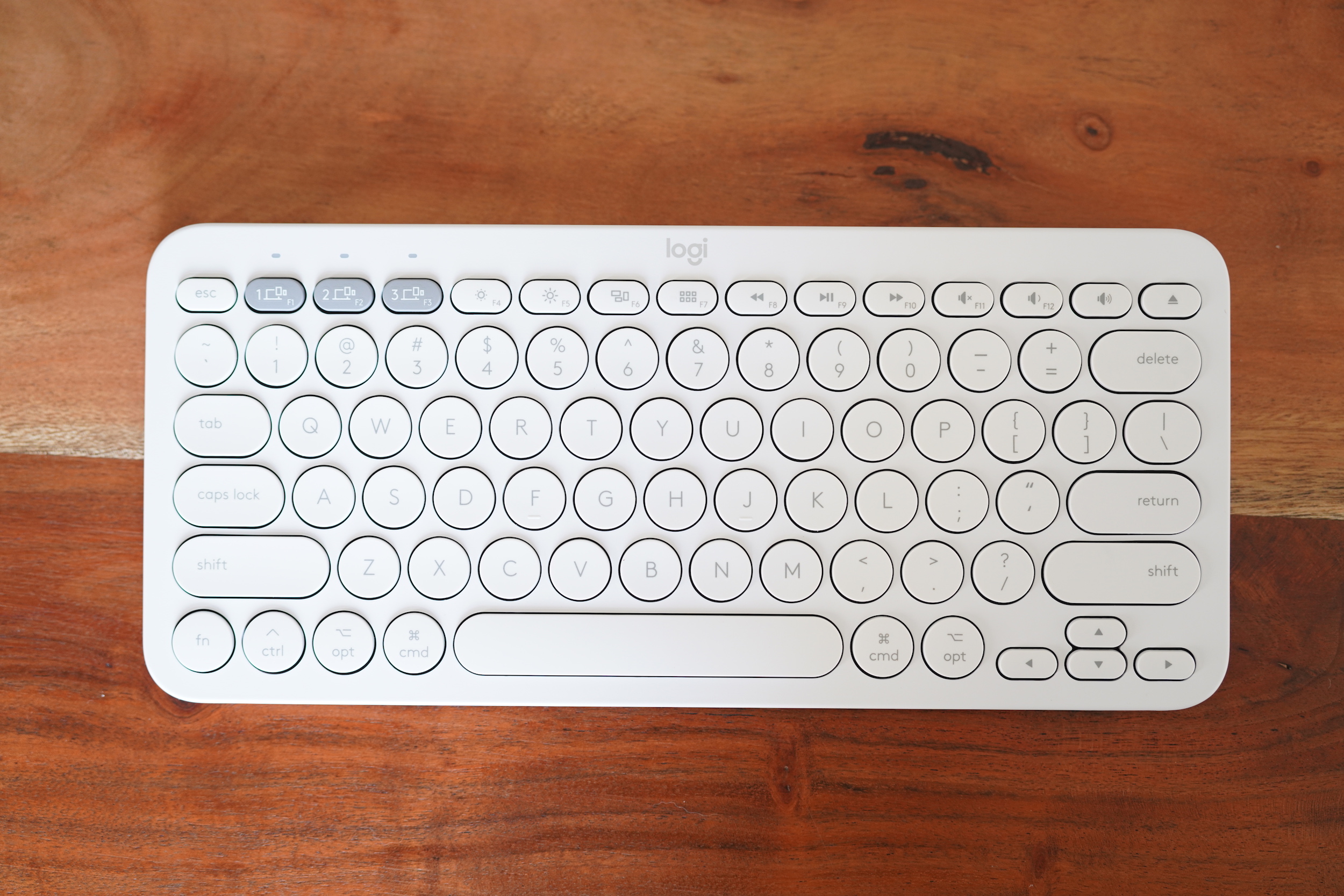
The K380 is a much more portable keyboard option, with rounded keys and a lighter plastic shell. It’s Bluetooth-only, but still offers the ability to connect up to there devices at once. The Mac version comes in either a white or pink version, and it features Mac-specific keys like the MX.

Image Credits: Darrell Etherington

It works across macOS, iOS and iPadOS, and can switch between each seamlessly, making it a great choice for working on the road with a setup that includes both a Mac and your iPad or iPhone. It’s powered by two AAA batteries (included), and is rated at around two years of use on a single pair.

The typing feel is a bit shallower than the MX series, but still impressive, and it’s near-silent which makes it better for use in shared or busy spaces. It’s available now for $49.99.

Bottom line

Logitech hasn’t reinvented the mouse wheel with any of these products (it already did that with the MX Master 3’s original launch) but these are all welcome updates that make its hardware feel more at home with Mac and other Apple devices. Even Apple itself charges a premium for the dark-coated versions of its input devices, too, so it’s nice to see pricing stay the same along with the facelift.

If you’re in the market for new peripherals and don’t already own the MX series, these are obvious choices. Ditto the K380 for Mac if you want a durable, all-in-one keyboard to use across your devices that won’t add too much weight to your pack, and that looks and feels great.

14 Jul 2020

Logitech’s new Mac-specific mouse and keyboards are the new best choices for Mac input devices

Logitech has released new versions of its MX peripherals in Mac-friendly finishes, as well as a new K380 wireless Bluetooth keyboard designed for Apple devices. These aren’t dramatically different devices from the existing versions that Logitech offers – but that’s a good thing in this case, and it elevates what were already amazing peripherals to no-brainer default choices for Mac users.

MX Master 3 for Mac

Image Credits: Darrell Etherington

The MX Master 3 for Mac is a very slightly altered twist on the MX Master 3 – consisting mostly of a new paint job that actually pretty closely resembles the old one. Specs are the same for the Mac-specific version, including its quiet scroll wheel with 1,000 lines per second maximum scroll speed, and Logitech’s MagSpeed tech that dynamically enables freewheel scrolling when you’re going fast.

The MX Master 3 for Mac does ship with a USB-C to USB-C cord in the box, instead of the USB-A to USB-C cable that comes with the non-Mac version, and that’s much more convenient for charging and using it dongle-free with modern MacBook computers. It can run for 70 days on a full charge, and you can get three full hours of use out of just 60 seconds of charge time. The mouse uses Logitech’s Darkfield laser tracking which provides 1000 dpi on average of accuracy and the ability to track on virtually every surface, and it can also work across Macs and iPads with Logitech’s Easy-Switch technology for connecting to multiple devices.

In terms of major differences, the main one any owners of the MX Master 3 will notice is that the MX Master 3 for Mac is listed as only offering Bluetooth connectivity on Logitech’s website – and it doesn’t ship with Logitech’s Unifying USB receiver, which connects its peripherals via a dedicated RF network instead of Bluetooth for greater reliability. That’s odd, because the MX Master 3 for Mac definitely still works with Logitech’s Unifying Retriever, and that’s exactly how I had it set up, using the USB dongle that shipped with the MX Master Keys for Mac.

Image Credits: Darrell Etherington

This is noteworthy because Logitech is charging $129.99 for the MX Master 3 for Mac – the same as the non-Mac version, but it doesn’t include the receiver and bills itself as a Bluetooth mouse. It’s a bit of an odd choice, but if you’ve used Logitech gear over the years, you probably have an abundance of unifying receivers on hand, and the Space Gray colorway on the Mac version does match better with actual Mac hardware.

Performance-wise, the MX Master 3 for Mac is still one of the best full-size mice you can get. It’s extremely comfortable to use, features a healthy array of controls that are customizable with Logitech’s Options software, and provides smooth, high-precision tracking, with the ability to use it while charging.

MX Keys for Mac

Image Credits: Darrell Etherington

Like the mouse, the Mac version of the MX Keys is mostly an aesthetic change. It’s also done up in Space Gray to match Apple’s colorway of the same name, and it features contrast-coloured black keys and a top bar that houses the wireless and battery electronics. The key layout also gets Mac-specific, ditching the hybrid key labelling of Logitech’s existing MX Keys for actual dedicated Command and Option keys, as well as a hardware eject key.

Also like the Mac Master 3, the MX Keys can work across devices, including those running macOS, iPadOS and iOS. It ships with a USB-C to USB-C charging cable (again, more convenient than the USB-A to USB-C one in the standard MX Keys configuration) and a unifying receiver. It’s also able to connect via Bluetooth, and can be connected to up to 3 devices with dedicated keys to switch between each.

The MX Keys is already probably your best choice for a third-party keyboard that offers great performance and key feel, unless you’re specifically into clicky mechanical keyboards. It includes smart backlighting that activates automatically when your hands approach, and turns off automatically when not in use to preserve battery life. While it’s made of plastic, it still feels heavy in a good way, ensuring it’ll rest flat on your desk. Since it’s based on the MX Keys, I can also attest to its durability, as I’ve been using that keyboard since its launch and have not had any problems with it at all thus far.

Image Credits: Darrell Etherington

In terms of battery life, you can expect 10 days of use with the backlighting active – but if you go without the underlay lighting, it’ll stretch out to as much as five months. And as mentioned, it’s easy to charge up directly from your Mac with the included USB-C cable – which also allows you to use it while charging.

Logitech’s work on the color scheme here really does a good job of matching the look of Apple’s aluminum treatment, right down to the metal-like speckles on the Space Gray surfaces. If you’re already using an MX Keys, stick with it, but if you’re in the market for something new, this is the new best choice for a Mac user – at the same $129.99 price point as the original.

K380 Bluetooth Keyboard for Mac, iPad and iPhone

The K380 is a much more portable keyboard option, with rounded keys and a lighter plastic shell. It’s Bluetooth-only, but still offers the ability to connect up to there devices at once. The Mac version comes in either a white or pink version, and it features Mac-specific keys like the MX.

Image Credits: Darrell Etherington

It works across macOS, iOS and iPadOS, and can switch between each seamlessly, making it a great choice for working on the road with a setup that includes both a Mac and your iPad or iPhone. It’s powered by two AAA batteries (included), and is rated at around two years of use on a single pair.

The typing feel is a bit shallower than the MX series, but still impressive, and it’s near-silent which makes it better for use in shared or busy spaces. It’s available now for $49.99.

Bottom line

Logitech hasn’t reinvented the mouse wheel with any of these products (it already did that with the MX Master 3’s original launch) but these are all welcome updates that make its hardware feel more at home with Mac and other Apple devices. Even Apple itself charges a premium for the dark-coated versions of its input devices, too, so it’s nice to see pricing stay the same along with the facelift.

If you’re in the market for new peripherals and don’t already own the MX series, these are obvious choices. Ditto the K380 for Mac if you want a durable, all-in-one keyboard to use across your devices that won’t add too much weight to your pack, and that looks and feels great.

14 Jul 2020

CMU develops a method to improve robotic grasping of transparent objects

Picking up transparent objects is hard when you’re a robot. Many of the traditional cameras and sensors just can’t get a good enough view to tell the grasper where to go. The light from infrared cameras passes through the objects and gets scattered in the process, and depth cameras have trouble determine the proper shape without opaque surfaces.

The result of all of this is a high failure rate as robot hands attempt to graph into something tactile. It can be a particular issue among those looking to employ robots for recycling, as so many plastic and glass bottles are clear.

Carnegie Mellon this week issued some new research that could refine the process, using standard consumer cameras. In this case, the team of researchers created a color camera that’s able to determine the shape of a transparent object based on color readings. It’s still imperfect — and not as accurate as with opaque objects — but the researchers say they can grasp the clear surfaces with a much higher rate of success than previous methods.

“We do sometimes miss,” CMU assistant robotics professor David Held said in a release tied to the announcement,  “but for the most part it did a pretty good job, much better than any previous system for grasping transparent or reflective objects.”

More of the findings will be reported in a virtual robotics conference later this summer.

14 Jul 2020

Peacock is the latest streaming service to skip Roku and Amazon Fire TV

While NBCUniversal is launching its Peacock streaming service tomorrow with support for a variety of platforms (including iOS and Android devices, Apple TV, Chromecast and Xbox One), two big names are missing from the list — the two largest connected TV platforms, Roku and Amazon Fire TV.

If this sounds familiar, it’s because WarnerMedia’s HBO Max similarly skipped both platforms. At the time, WarnerMedia simply said, “We look forward to reaching agreements with the few outstanding distribution partners left” — but nearly two months later, no agreements have been announced.

Today’s launch materials don’t mention Roku or Amazon, and an NBCUniversal spokesperson has not yet responded to my request for comment. However, a report last week on CNBC predicted the company was unlikely to reach deals with either platform before launch, and it suggested that there are different issues at play.

On Amazon Fire TV, CNBC reported that NBCUniversal does not want want Peacock to be included in Amazon Channels, where Amazon would get a cut of new subscriptions and would be the one collecting credit card information and other user data. (WarnerMedia is reportedly willing to have HBO Max included in Amazon Channels, but doesn’t want the content viewable in Amazon Prime Video.)

On Roku, the apparent issue is advertising. The smart TV platform has become increasingly focused on its ad business, so apparently the companies have not been able to agree on how much of Peacock’s ad inventory Roku can sell.

As large media companies see streaming as not just a new behavior, but also a way to get direct access to viewers’ wallets, inboxes and data, it’s shouldn’t be surprising that there’d be some friction with platforms hoping for to get the same access. In the meantime, Fire TV and Roku owners will have to wait for the companies to work out their differences.

14 Jul 2020

COVID-19 fails to stop the march of the unicorns

We’re digging into Q2 2020 venture capital results this week.

Today we are exploring U.S.-specific results after taking a broader perspective yesterday. As with every quarter, our goal is to understand how strong, or not, the domestic and global VC markets are so that we can better follow the pace of startup dealmaking.


The Exchange explores startups, markets and money. You can read it every morning on Extra Crunch, and now you can receive it in your inbox. Sign up for The Exchange newsletter, which will drop every Saturday starting July 25.


TechCrunch will explore specific metros in the coming days, but today we’re sticking to numbers that detail the whole United States’s second-quarter venture outcome.

The results may surprise you. Despite the COVID-19 pandemic and huge disruptions to how companies large and small work, VCs put lots of capital to work in American startups during Q2. While total dollars put to work were down compared to Q1 2020 and the year-ago period, the declines were modest. And unicorns appeared to have a moderately good quarter to boot.

This morning we’re leaning on fresh data from the MoneyTree Report, compiled by business data company CB Insights and its partner, PwC.

Our goal is not to perish under a crushing tower of numbers, but to snag only the most important trends and squeeze them for all they can tell us. Let’s go!