Category: UNCATEGORIZED

04 Nov 2019

Cortana wants to be your personal executive assistant and read your emails to you, too

Only a few years ago, Microsoft hoped that Cortana could become a viable competitor to the Google Assistant, Alexa and Siri . Over time, as Cortana failed to make a dent in the marketplace (do you ever remember that Cortana is built into your Windows 10 machine?), the company’s ambitions shrunk a bit. Today, Microsoft wants Cortana to be your personal productivity assistant — and to be fair, given the overall Microsoft ecosystem, Cortana may be better suited to that than to tell you about the weather.

At its Ignite conference, Microsoft today announced a number of new features that help Cortana to become even more useful in your day-to-day work, all of which fit into the company’s overall vision of AI as a tool that is helpful and augments human intelligence.

Screen Shot 2019 10 31 at 3.25.48 PM

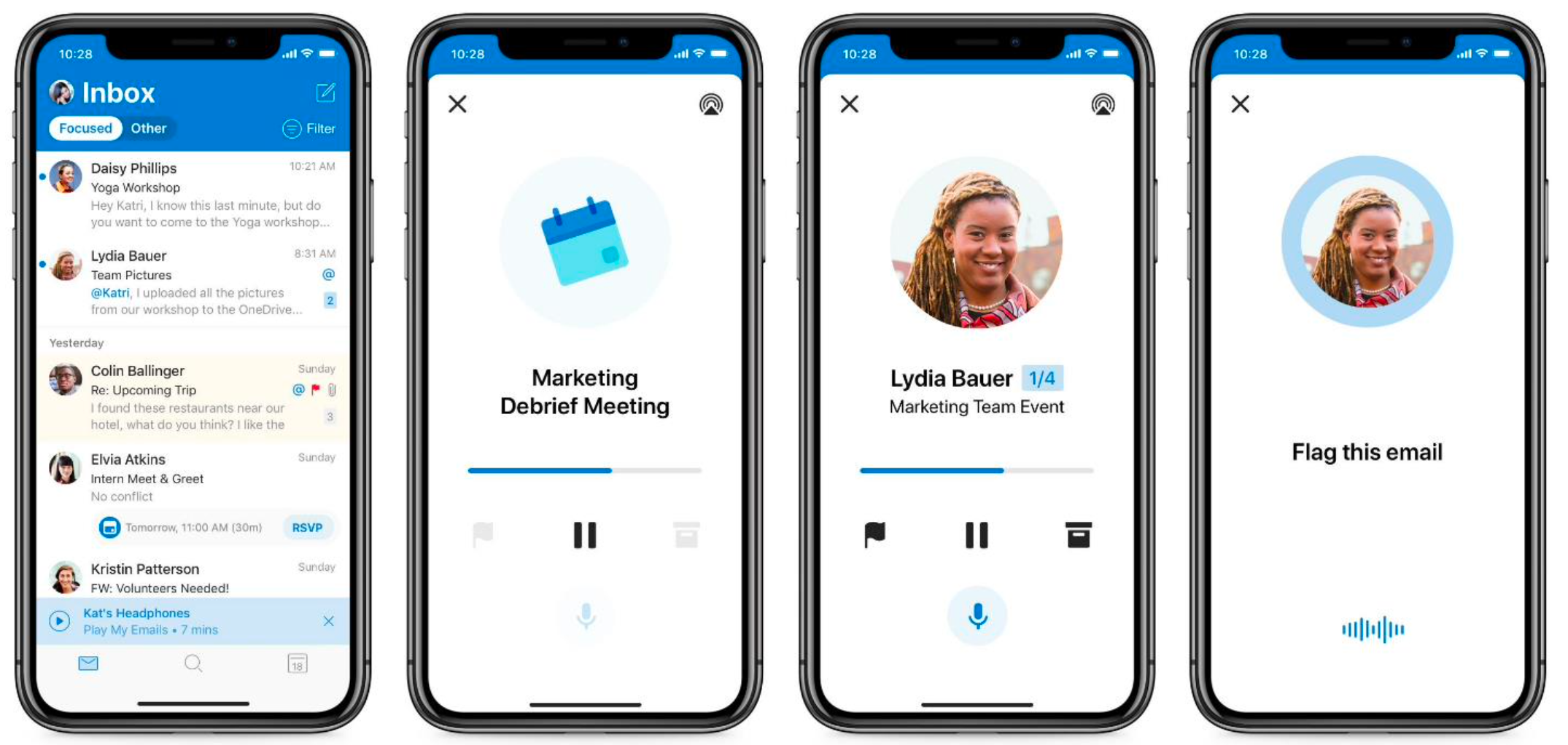
The first of these is a new feature in Outlook for iOS that uses Microsoft text-to-speech features to read your emails to you (using both a male and female voice). Cortana can also now help you schedule meetings and coordinate participants, something the company first demoed at previous conferences.

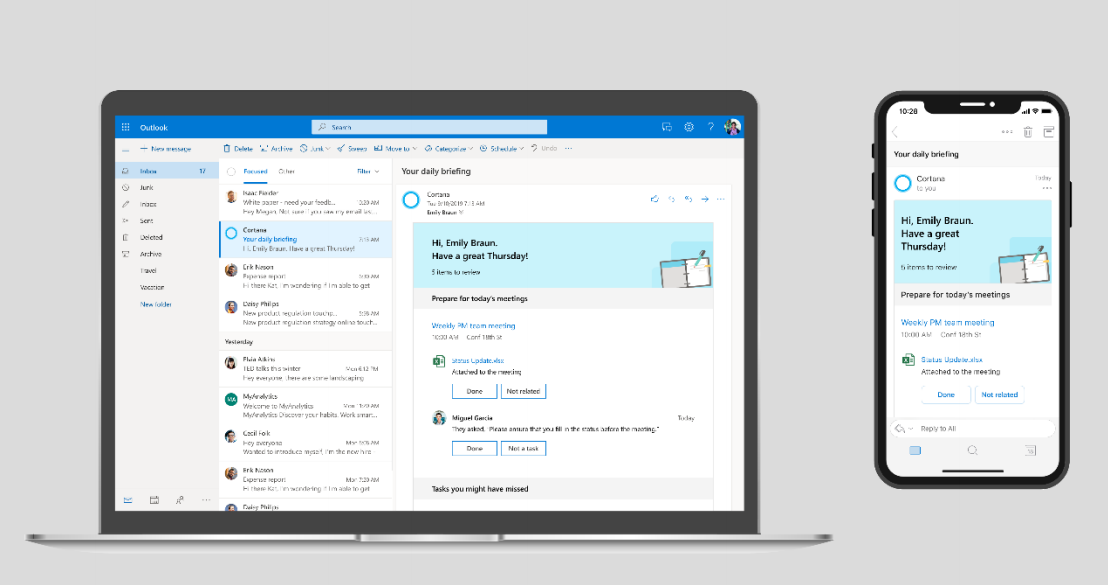
Starting next month, Cortana will also be able to send you a daily email that summarizes all of your meetings, presents you with relevant documents and reminders to “follow up on commitments you’ve made in email.” This last part, especially, should be interesting as it seems to go beyond the basic (and annoying) nudges to reply to emails in Google’s Gmail.

2019 11 01 0914

04 Nov 2019

You can now try Microsoft’s web-based version of Visual Studio

Earlier this year, at its Build developers conference, Microsoft announced that it was working on a web-based version of its Visual Studio IDE. At the time, Visual Studio Online went into a private preview, open to a select number of developers. Now, at its Ignite conference, the company has opened the service to all developers who want to give it a spin.

With Visual Studio Online, developers will be able to quickly spin up a fully configured development environment for their repositories. From there, they can use the web-based editor to work on their code.

“Visual Studio Online brings together Visual Studio, cloud-hosted developer environments and a web-based editor that’s accessible from anywhere to help developers be more productive than ever,” Microsoft notes in its press materials. “As development becomes more collaborative and open source workflows, like pull requests, become more pervasive, developers need to be able to switch between codebases and projects quickly without losing productivity.”

In its current form, the service is deeply integrated with Microsoft’s GitHub (no surprise there), but the company notes that developers can also attach their own physical and virtual machines to their Visual Studio-based environments. Developers can also create these online environments right from Visual Studio Code, the company’s increasingly popular free code editor for Windows, Mac and Linux.

The cloud-based environments, as well as extension support for Visual Studio Code are now in preview.

04 Nov 2019

Adobe launches Aero, its AR authoring app

Adobe’s ambitions around augmented reality (AR) are no secret — there’s plenty of potential for building the right design tools for AR developers, after all. At last year’s Max event, the company first demoed its Aero AR authoring app and today, it is launching it to the public as a free app on iOS and as a private beta on the desktop.

The general idea behind Aero is to allow designers to build AR experiences without coding. It offers a visual user interface and provides step-by-step directions for building AR scenes, which can incorporate existing assets from your Creative Cloud library, both in 2D and 3D. Once finished, publishing the scene to the Aero app only takes a few clicks.

Aero 6

“For marketing and branding, to retail and commerce, travel and leisure, learning and art, AR is expanding across all industries,” “However, today, the creation of high-quality AR content is expensive, time-consuming and complex. Our vision is to transform this process and enable all designers to explore what’s possible with 3D and AR.”

You can use the mobile app to create some basic experiences, but for the full slew of AR design tools, you’ll need the desktop app, which is coming next year, but which is now in private beta. This desktop app will allow you to build more interactive and custom experiences, Adobe says.

In the demo I’ve seen, Aero is indeed extremely easy to use. You can easily bring in Photoshop files with layers, for example, as a background and then space those layers out as needed to create a more 3D-like scene. Interacting with the object is done through touch interactions, with virtually no menus. You can add some basic animations as well and trigger movements, too.

04 Nov 2019

Microsoft Teams gets Yammer integration, secure private channels, and more

You’re forgiven if you thought Yammer, Microsoft’s proto-Slack, not quite realtime, chat application was dead. But it’s actually still alive (and well) — and still serves a purpose as a slower-moving social network-like channel for company- and team-wide announcements. Today, Microsoft announced that, among other updates, it will offer a Yammer integration in Teams, its Slack competitor. Yammer in Teams will live in the left-hand sidebar.

With this, Microsoft’s two main enterprise communications platforms are finally growing together and will give users the option to Teams for fast-moving chats and Yammer as their enterprise social network in the same way Facebook messenger and its news feed complement each other.

Screen Shot 2019 10 31 at 2.36.27 PM

Oh, and Yammer itself has been redesigned, too, using Microsoft’s Fluent Design System across all platforms. And Microsoft is also building it into Outlook, too, to let you respond to messages right from your inbox. This new Yammer will roll out as a private preview in December.

With this update, Teams is getting a number of other new features, too. These include secure private channels, multiwindow chats and meetings, pinned channels and task integration with Microsoft To Do and Planner (because having one todo app is never enough). Microsoft is also making a number of enhancements to Teams Room, with upcoming support for Cisco WebEx and Zoom meetings, the Teams Phone System, which is getting emergency calling, and the IT management features that help admins keep Teams secure.

A Teams client for Linux is also in the works and will be available in public preview later this year.

04 Nov 2019

You can now ask Excel questions about your data

Microsoft today announced an update to Excel that brings natural language queries to the venerable spreadsheet tool. Available now to Office Insiders, this new feature allows you to talk to Excel like you’re talking to a person and get quick answers to your queries without having to write a query.

“Natural language query is another step toward making data insights and visualization more approachable and accessible to users with various levels of Excel experience,” Microsoft explains. “Novice users will not need to know how to write a formula to gain useful insights from their data, while power users will be able to save time by automating the data discovery process by simply asking the right questions and quickly adding charts and tables they need for better and faster decisions.”

It’s worth noting that Google already offers similar features in Google Sheets. In my experience, Google sometimes does a pretty good job at finding data but also regularly fails to find even a single relevant data point, so it remains to be seen how good Excel is compared to that.

Today’s announcement is one in a series of recent launches for Excel that brought a number of new machine learning smarts to the spreadsheet. Among those is Excel’s ability to better understand your entries and provide you with additional information about stocks, geographical data and more.

04 Nov 2019

Microsoft launches Power Virtual Agents, its no-code bot builder

Microsoft today announced the public preview of its Power Virtual Agents tool, a new no-code tool for building chatbots that’s part of the company’s Power Platform, which also includes Microsoft Flow automation tool, which is being renamed to Power Automate today, and Power BI.

Built on top of Azure’s existing AI smarts and tools for building bots, Power Virtual Agents promises to make building a chatbot almost as easy as writing a Word document. With this, anybody within an organization could build a bot that walks a new employee through the onboarding experience for example.
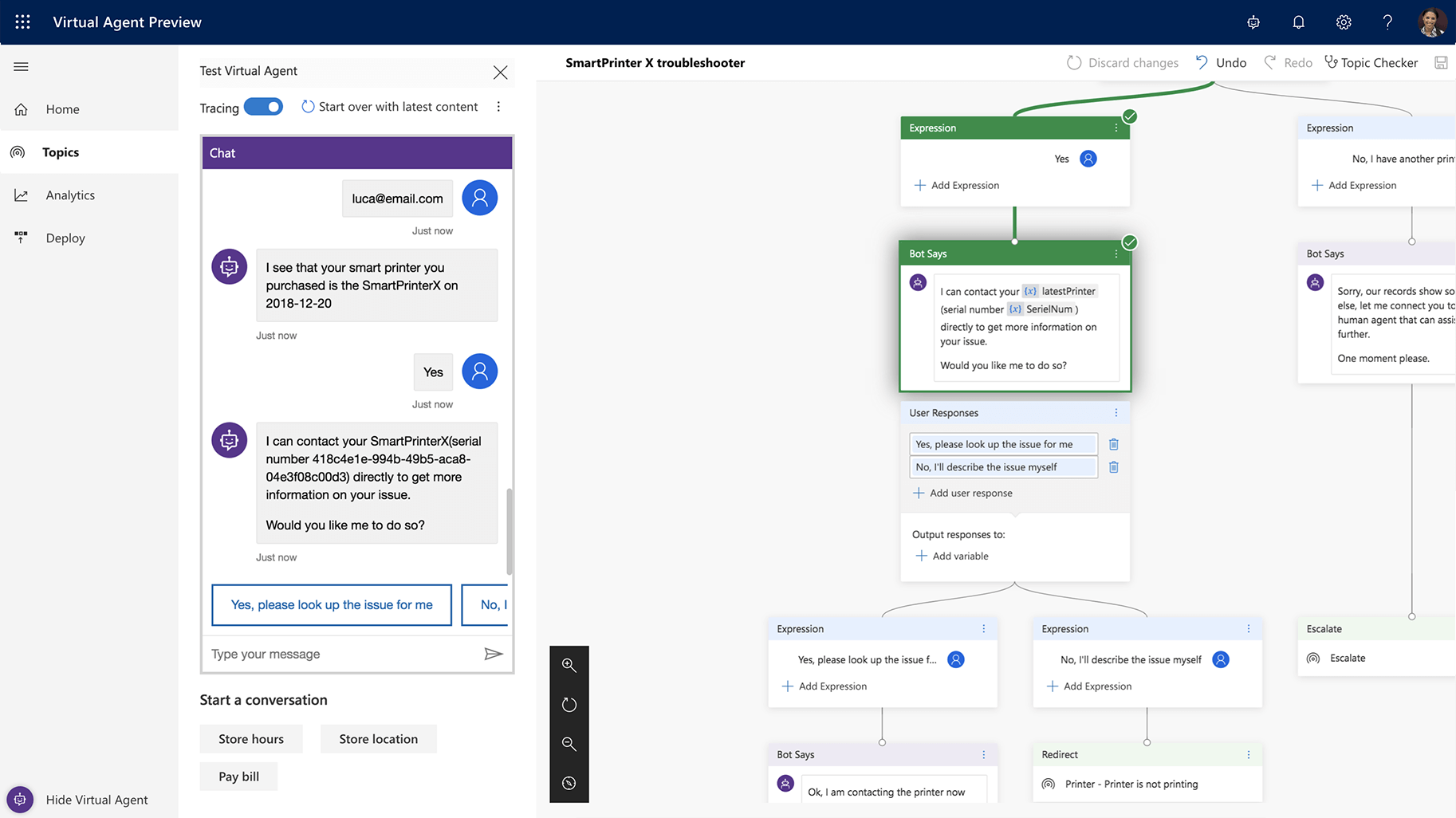
“Power virtual agent is the newest addition to the Power Platform family,” said Microsoft’s Charles Lamanna in an interview ahead of today’s announcement. “Power Virtual Agent is very much focused on the same type of low code, accessible to anybody, no matter whether they’re a business user or business analyst or professional developer, to go build a conversational agent that’s AI-driven and can actually solve problems for your employees, for your customers, for your partners, in a very natural way.”
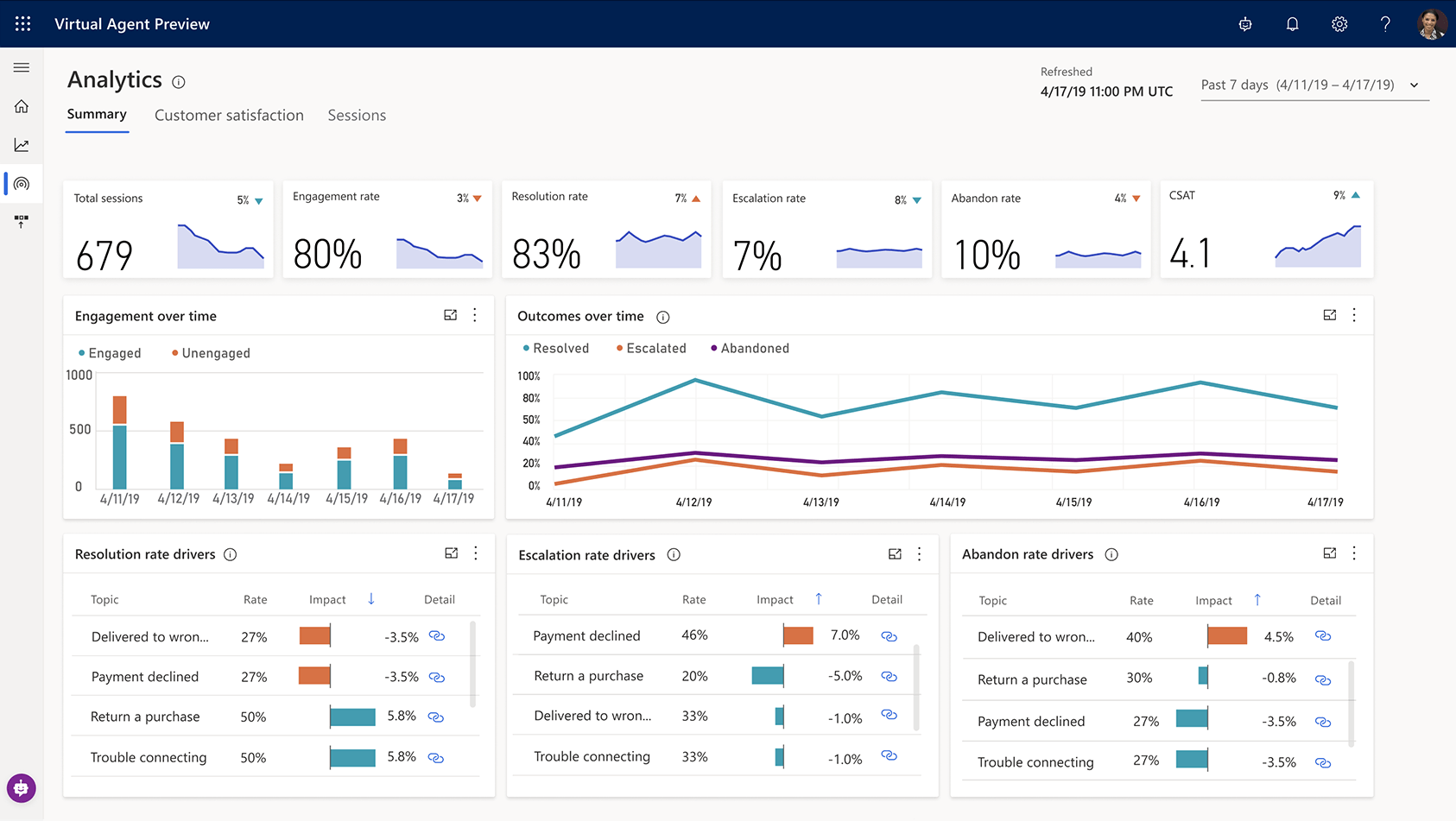
Power Virtual Agents handles the full lifecycle of the bot building experience, from the creation of the dialog to making it available in chat systems that include Teams, Slack, Facebook Messenger and others. Using Microsoft’s AI smarts, users don’t have to spend a lot of time defining every possible question and answer, but can instead rely on the tool to understand intentions and trigger the right action. “We do intent understanding, as well as entity extraction, to go and find the best topic for you to go down,” explained Lamanna. Like similar AI systems, the service also learns over time, based on feedback it receives from users.

One nice feature here is that if your setup outgrows the no-code/low-code stage and you need to get to the actual code, you’ll be able to convert the bot to Azure resources since that’s what’s powering the bot anyway. Once you’ve edited the code, you obviously can’t take it back into the no-code environment. “We have an expression for Power Platform, which is ‘no cliffs.’ […] The idea of ‘no cliffs’ is that the most common problem with a low-code platform is that, at some point, you want more control, you want code. And that’s frequently where low-code platforms run out of gas and you really have issues because you can’t have the pro dev take it over, you can’t make it mission-critical.”

The service is also integrated with tools like Power Automate/Microsoft Flow to allow users to trigger actions on other services based on the information the chatbot gathers.

Lamanna stressed that the service also generates lots of advanced analytics for those who are building bots with it. With this, users can see what topics are being asked about and where the system fails to provide answers, for example. It also visualizes the different text inputs that people provide so that bot builders can react to that.

Over the course of the last two or three years, we went from a lot of hype around chatbots to deep disillusionment with the experience they actually delivered. Lamanna isn’t fazed by that. In part, those earlier efforts failed because the developers weren’t close enough to the users. They weren’t product experts or part of the HR team inside a company. By using a low-code/no-code tool, he argues, the actual topic experts can build these bots. “If you hand it over to a developer or an AI specialist, they’re geniuses when it comes to developing code, but they won’t know the details and ins and outs of, say, the shoe business – and vice versa. So it actually changes how development happens.”

04 Nov 2019

Adobe is bringing real-time collaboration to its XD design tool

It’s Adobe Max this week, Adobe’s annual Creative Cloud event, and like every year, the company is announcing a slew of updates across its products. Sometimes these are only small tweaks and feature additions, but Adobe XD, the company’s design and prototyping tool for web and app development, is getting a number of interesting updates today that are worth highlighting.

The marquee feature of the update is real-time coediting of documents, which will surely make the lives of remote designers easier. This new coediting feature is now in beta and allows multiple designers to work on a document together, using Adobe’s Creative Cloud backend to sync updates in real time. To make a document available for coediting, you first have to save it to the cloud and then invite teammates to work with you.

The XD team has also taken the existing sharing features in XD, which designers can use to gather feedback and deliver their assets, and collated them into a single Share mode that sits next to the existing Design and Prototype modes in the application.

“Share mode is the place to go when you need to share your work with others,” the company explains. “Here, you can create and manage shareable web links to your work, using new sharing presets to customize the sharing experience for different use cases, including design reviews, development hand-off, presentations, and user testing.”

XD is one of the few Creative Cloud applications that include a completely free mode. Users on the free mode will get access to the new coediting feature until April 2020. All the other new sharing and collaboration tools, however, will be available without any time restrictions to free users on the XD Starter plan.

Also new in XD is enhanced support for component states, which make it easier for designers to create consistent user interfaces, as well as a hover triggers that invoke actions when you hover over an item in your design, and new tools for building basic prototype interactions. There’s also a redesigned plugin manager, which now features support for over 200 plugins like Jira Cloud to UI Faces, Stark and Arranger.

04 Nov 2019

Microsoft launches managed meeting rooms as a service

Whether you love them or hate them (and you probably hate them), meetings are a fact of corporate life. And how many meetings have you attended that didn’t start on time because of technical difficulties? Microsoft wants to change that by managing your meeting rooms for you — starting at $50 per room. ‘Managed Meeting Rooms,’ as the company calls the service, are now in private preview, but ahead of today’s announcement, Microsoft already quietly worked with more than 100 customers to manage more than 1,500 meetings rooms for them.

As Brad Anderson, Microsoft’s corporate VP for Microsoft 365, told me, the Teams team did a lot of work to optimize its software to make starting video- and audio-based meetings easy.

“But when you think about a room for a minute, there’s a bunch of hardware in the room, in addition to the software that’s operating Teams. There’s the device on the table, you’ve got screens, you got microphones, you’ve got cameras, you’ve got projectors, you’ve got all the cabling,” Anderson said. “And in order for a meeting to be seamless and great, all that hardware also has to be functional. So what we have done with the managed meeting room solution is we have now instrumented all the hardware.”

The solution supports Microsoft Teams Rooms and Skype for Business room systems, but Microsoft can also help companies select the right tools to set up a meeting room. With all of that in place, the company can then monitor all of that through a cloud service and ensure that everything is up and running. When there are issues — at least issues that can be fixed remotely — the team can also fix those and the meeting can start on time.

“Very few organizations have enough rooms to actually get proficient in meeting room management,” Anderson explained. “So it’s one of these things where organizations have to make that choice: do I go and actually try to build up the expertise when it sounds like Microsoft has a solution, which is actually very affordable […] If we just avoid one meeting from going south for ten minutes, you actually make your money back.”

04 Nov 2019

Microsoft launches Project Cortex, a knowledge network for your company

At its annual Ignite IT conference in Orlando, Florida, Microsoft today announced Project Cortex, its first new commercial product since the launch of Teams. The general idea here is to allow employees to quickly find information that’s spread out across documents in Microsoft’s various services and make it available both through searches and, when its algorithms deem it appropriate, in the form of hover-links inside of Microsoft products like the Office apps, Outlook and Teams.

“As we have thought about people getting work done together, as we have thought about productivity — really broadly defined — for more than 10 years we have had this vision of being able to not only help people transactionally get things done but also allowing them to take a step back and capture what the organization knows and put that to use, put that to work,” said Jared Spataro, Microsoft’s corporate vice president of its Microsoft 365 business, in a pre-recorded press briefing the company made available to the media ahead of today’s announcement.

So with Project Cortex, which Microsoft referred to simply as “Knowledge Network” in earlier materials it provided to the press, the company built a system that can ingest all of these artifacts, including all of the Office documents, email, chat logs and transcripts from meeting recordings that a company generates, and that then uses machine learning to classify all of this information into topics and topics collections to form this network.

“The whole idea here is that it’s kind of a spelunker that’s going down into all your content repositories, whether they’re in Microsoft 365, on-prem and file shares and other systems,” explained Spataro. “And it’s searching these things out and putting them together and saying, ‘hey, you have a project here,’ for instance a project or something you’re working on. I can put documents and videos and meetings together, calendar appointments. I can pull people and I can tell you what the organization knows in a 360-degree view about this topic.”

All of this data can then be surfaced inside Microsoft’s products. If you’re writing and email and Microsoft detects that it’s about a project that the Knowledge Network knows about, it’ll link that term so that you can hover over the words and see additional information about it. It’ll show you who is working on this, when the work started, and a map that shows you this project or topic in relation to others. Ideally, this helps you identify the experts about a given topic inside your organization and make connections you would otherwise miss.

All of these are lofty ideas and we’ve heard some of these promises before, in relation to the Microsoft Graph, which is a slightly different project but which was also meant to make all of the data inside an organization more accessible, though mostly by developers.

Project Cortex is now in private preview. It’ll be generally available in the first half of 2020.

04 Nov 2019

Microsoft’s Azure Synapse Analytics bridges the gap between data lakes and warehouses

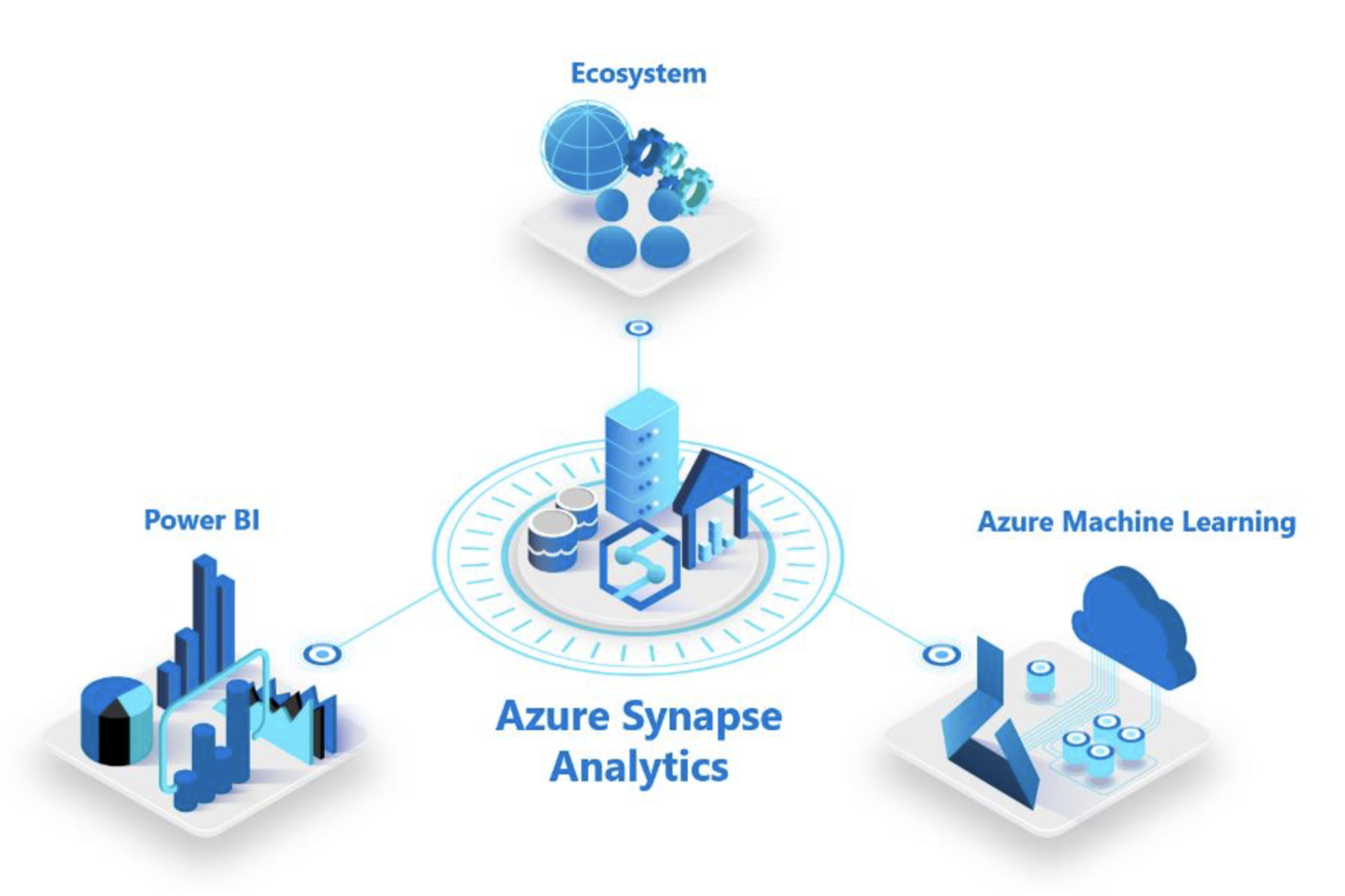
At its annual Ignite conference in Orlando, Florida, Microsoft today announced a major new Azure service for enterprises: Azure Synapse Analytics, which Microsoft describes it as “the next evolution of Azure SQL Data Warehouse.” Like SQL Data Warehouse, it aims to bridge the gap between data warehouses and data lakes, which are often completely separate. Synapse also taps into a wide variety of other Microsoft services, including Power BI and Azure Machine Learning, as well as a partner ecosystem that includes Databricks, Informatica, Accenture, Talend, Attunity, Pragmatic Works, and Adatis. It’s also integrated with Apache Spark.

The idea here is that Synapse allows anybody working with data in those disparate places can manage and analyze it from within a single service. It can be used to analyze relational and unstructured data, using standard SQL.

Screen Shot 2019 10 31 at 10.11.48 AM

Microsoft also highlights Synapse’s integration with Power BI, its easy to use business intelligence and reporting tool, as well as Azure Machine Learning for building models.

With the Azure Synapse studio, the service provides data professionals with a single workspace for prepping and managing their data, as well as for their big data and AI tasks. There’s also a code-free environment for managing data pipelines.

As Microsoft stresses, businesses that want to adopt Synapse can continue to use their existing workloads in production with Synapse and will automatically get all of the benefits of the service. “Businesses can put their data to work much more quickly, productively, and securely, pulling together insights from all data sources, data warehouses, and big data analytics systems,” writes Microsoft CVP of Azure Data, Rohan Kumar.