Year: 2019

19 Sep 2019

Lime is shutting down car rental service, LimePod

Transportation startup Lime is shutting down LimePod, its car-sharing service that it launched last November in Seattle. Lime plans to start removing its vehicles from the streets of Seattle next month and will completely shut down the service by the end of the year. The news was first reported by GeekWire.

Lime has operated a pilot program in Seattle since last year and is set to conclude at the end of the year. Throughout the program, more than 18,000 people took more than 200,000 trips in LimePods, according to a Lime spokesperson. At launch, the plan was to explore carsharing for short distances and eventually replace its vehicles with an all-electric fleet. Lime, however, is not looking to make LimePods a permanent fixture of the city at this point.

“While the program was a great learning experience,  at our core, we are an electric mobility company first,” Lime wrote in an email to LimePod users. “We are committed — like Seattle is —  to sustainability, lower carbon emissions, and to make cities more livable, all of which require reduced car travel.”

Additionally, Lime said it was not able to find the right partner for its LimePod’s electric fleet, which led to the decision to end the program at the end of the pilot period.

“We deeply appreciate our partnership with the Seattle community and the opportunity to collaborate on our LimePod Pilot Program,” a Lime spokesperson told TechCrunch. “The experience is a testament to the city’s forward-looking position on the future of transportation and the necessity of sustainable options for citizens. We are similarly committed to that goal and the information gained during our pilot will support the work necessary should we decide to expand and improve this service with an all-electric fleet in the future.”

Lime, which got its beginnings as a bike-share company, has deployed its scooters and bikes in more than 100 cities in the U.S. and more than 20 international cities. Recently, Lime hit 100 million rides across its micromobility vehicles. Clearly, Lime sees more a future with shared bikes and scooters than it does with cars.

Earlier this year, Lime raised a $310 million Series D round led by Bain Capital Ventures and others. That round valued the startup at $2.4 billion.

19 Sep 2019

Ricoh’s Theta Z1 is the first truly premium consumer 360 camera

Ricoh has a well-earned good reputation when it comes to building smart, technically excellent photographic equipment – including the almost legendary Ricoh GR series of pocketable APS-C cameras, which are a favorite among street photographers everywhere. Earlier this year, the company released the Ricoh Theta Z1, which builds on its success with its pioneering Theta line of 360-degree cameras and delivers a step-up in terms of image quality and build that will feel at home in the hands of enthusiast and pro photographers.

The Theta Z1 is what happens when you push the limits of what’s possible in a portable form factor 360 camera, both in terms of build materials and what’s going on on the inside. Like its more affordable, older sibling the Theta V, it shoots both stills and video in 360 degrees – but unlike the V, it does so using two 1-inch sensors – unprecedented for a 360 camera in this category. Sony’s celebrated RX100 series was pushing boundaries with its own 1-inch sensor in a traditional compact camera, and the Ricoh is similarly expanding the boundaries of 360 photography by including not just one, but two such sensors in its Z1. That translates to unmatched image quality for 360 photographers – provided you’re willing to pay a premium price to get it.

Design and build

The Ricoh Theta Z1 feels a lot like previous iterations of the Theta line – it’s essentially a handle with two big lenses on top, which is a pretty optimal design overall for a device you’re mostly going to be using to hold up and take 360 photos and video. It’s a bit bulkier than previous generations, and heavier, too, but it’s still a very portable device despite the increased size.

Ricoh Theta Z1 7

With the bulkier build, you also get a magnesium outer case, which is textured and which feels fantastic when held. If you’ve ever held a pro DSLR or mirrorless camera, then the feel will be familiar, and that says a lot about Ricoh’s target audience with this $1,000 device. The magnesium alloy shell isn’t only for making it feel like it’s worth what it costs, however; you also get big durability benefits, which is important on a device that you’re probably going to want to use in remote locales and off the beaten path.

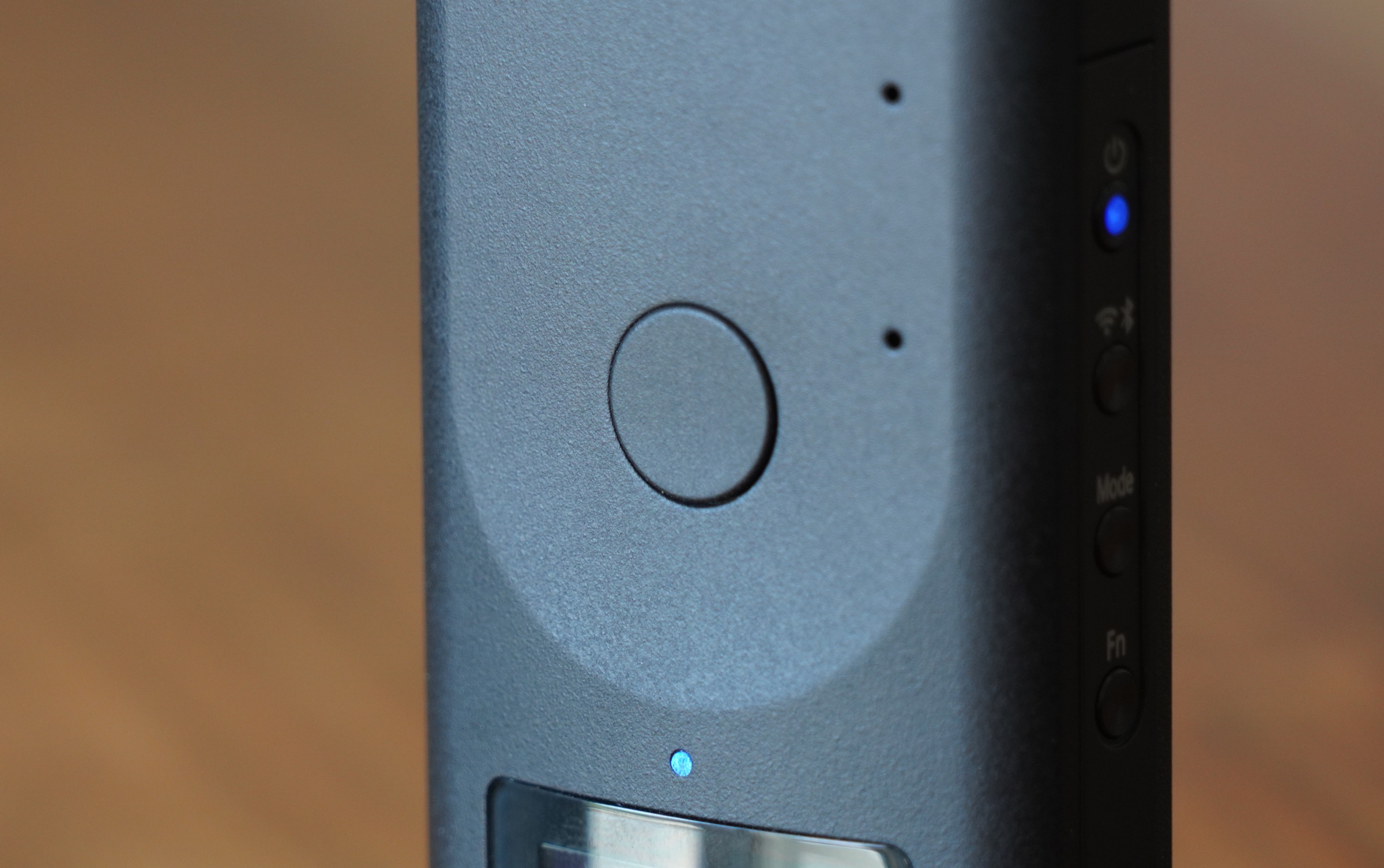
The build quality also feels incredibly solid, and the button layout is simple and easy to understand. There’s a single shutter button on the front of the camera, just above an OLED display that provided basic info about remaining space for images or video, battery life and connection status. A single LED indicates both mode and capture status information, and four buttons on the side control power on/off, Wifi and Bluetooth connections, photo and video mode switching and enabling basic functions like a shutter countdown timer.

[gallery ids="1884065,1884067,1884066"]

Using the hardware buttons to control the Theta Z1 independent of your smartphone, where you can remotely control all aspects of the camera when connected via WiFi and using the app, is intuitive and easy, and probably the way you’ll use the Z1 more often than not when you’re actually out and about. There’s little to worry about when it comes to framing, for instance, because it captures a full 360 image, and since you can handle all of that after the fact with Ricoh’s editing tools prior to sharing.

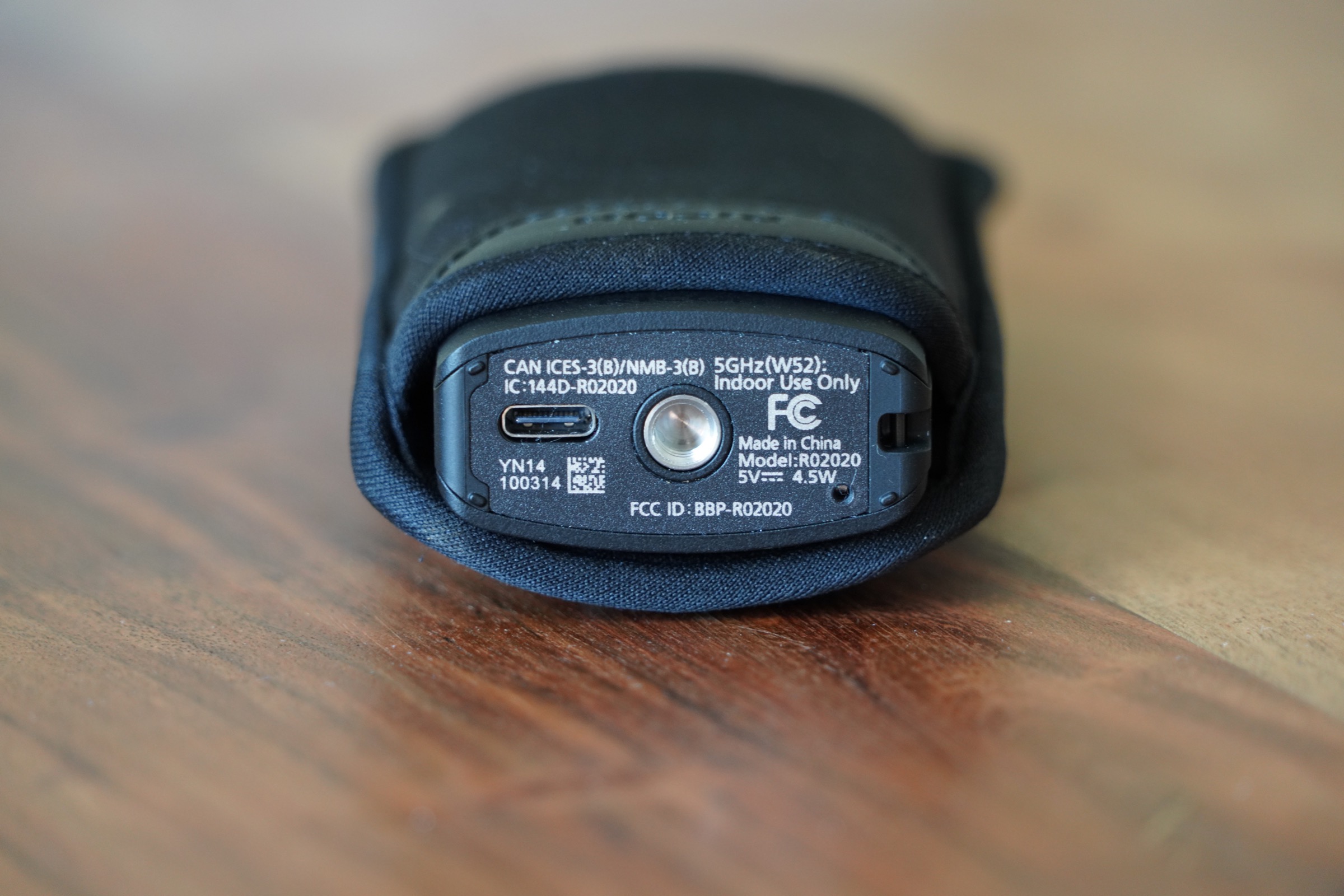
On the bottom, there’s a USB-C port for charging and wired data transfer, and a 1/4″ standard tripod mount for attaching the Z1 to tripods or other accessories. This is useful, because if you use a small handle you’ll get a better overall image, since the Z1’s software automatically edits out the camera, and, to some extent, the thing that’s supporting it. There’s also a small lug for attaching a wrist strap, but what you won’t find is a flap or door for a micro SD card – the Theta Z1 relies entirely on built-in storage, and offers just under 20GB of usable storage.

Ricoh Theta Z1 9

Still images

Ricoh’s Theta Z1 has two 1-inch sensors on board, as mentioned, and those combine to provide an image resolution of 670×3360. The camera caputres two 180-degree fields of view from each lens, and automatically stitches them together in software to produce the final image. The result is the sharpest, most color-accurate still photos I’ve ever seen from a 360-degree camera, short of the kind of content shot by professionals on equipment costing at least 10x more.

The resulting images do incredibly well when viewed through VR headsets, for instance, or when you use Theta’s own 360 viewer for web in full-screen mode on high-resolution displays. They also make it possible to export flat images that still look sharp, which you can crop and edit in the Theta+ app. You can create some truly amazing images with interesting perspective that would be hard to get using a traditional camera.

A769B0EF 55C0 483E 82AE 19EFF4212B2D 3

Indoors in low light situations, the Ricoh Theta Z1 still performs pretty well, especially compared to its competitors, thanks to those big 1-inch sensors. Especially in well-lit indoor environments, like in the restaurant example below, details are sharp and crisp across the frame and colors come out great.

In settings where a lot of the frame is dark or unevenly lit, as in the example at the Robot Restaurant in Tokyo below, the results aren’t nearly as good when operating in full automatic mode. You can see that there is some blur in the parts of the scene with motion, and there’s more grain apparent in parts of the frame, too. Overall though, the audience is pretty well captured and the colors still look accurate and good despite the many different tones from different sources.

The Ricoh Theta Z1 still does its best work in bright outdoor settings, however – which is true for any camera, but especially for cameras with sensors smaller than full-frame or APS-C. It’s still definitely capable enough to capture images you can work with, and that provide a great way to revisit great events or memories in a more immersive way than standard 2D images can accomplish.

You can adjust settings including aperture to optimize your photo capture, including choosing between f/2.1, f/3.5 and f/5.6, with higher apertures offering higher resolution images. The built-in lens has been designed to reduce ghosting, purple fringe artifacts and flare, and it does an outstanding job at this. RAW capture allows you to edit DNG files using Lightroom, and it works amazingly well with Lightroom mobile for advanced tweaks right on the same device.

Video

The Ricoh Theta Z1 does video, too – though the specs for the video it produces are essentially unchanged from the Theta V on paper. It can capture 4K video at 30 fps/56 mbps or 2K video at 30fps/16mbps, and live stream in both 4K and 2K. There’s a four-channel built in microphone for immersive audio recording, and it can record as much as 40 minutes of 4K or 130 minutes of 2K footage, though each individual recording session is capped at 5 minutes and 25 minutes for 4K and 2K respectively.

Ricoh has tougher competition when it comes to video in the 360 camera game – Insta 360’s One X has been a clear winner in this category, and has led to this camera even finding some fans when compared to action cameras like the GoPro Hero 7 and the DJI Osmo Action, thanks in large part to its fantastic built-in image stabilization.

The Ricoh Theta Z1 just frankly doesn’t impress in this regard. The sensors do allow for potentially better image quality overall, but the image stabilization is definitely lacking, as you can see below, and overall quality just isn’t there when measured against the Insta360 One X. For a fixed installation for real-time live-streaming, the Ricoh probably makes more sense, but video isn’t the device’s strength, and it’s a little disappointing given its still shooting prowess.

Features and sharing

The range of editing options available either via Theta+ or using the DNG files in both mobile and desktop phot editing software for the Theta Z1 is outstanding. You can really create and compose images in a wide variety of ways, including applying stickers and text that stick to the frame as a viewer navigates around the image. Sharing from the Theta app directly works with a number of platforms, including YouTube, Twitter, Facebook and theta360.com, where you can get embeddable 360 images like those found in this post above.

Ricoh has done a great job making sure you can not only capture the best possible 360 images with this camera, but also share them with others. It’s also leading the pack when it comes to the range of options you have for getting creative with slicing up those 7K spherical images in a variety of ways for traditional flat image output, which is not surprising given the company’s heritage.

Bottom line

Simply put, the Ricoh Theta Z1 is the best 360 camera for still photos that you can buy for under $1000 – even if just squeaks under that line. It’s the best still photo 360 camera you can pick up for considerably more than that, too, given its sensor arrangement and other technical aspects of the device including its selectable aperture settings and RAW output.

The $999.95 asking price is definitely on the high end for this category – the Theta V retails for less than half that, as does the Insta360 One X. But I mentioned the Sony RX100 above, and the pricing is similar: You can get a compact camera for much less money, including very good ones, but the latest RX100 always commands a premium price, which people are willing to pay for the very best in-class device.

If want you want is the best still photography 360 camera on the market, than the Ricoh Theta Z1 is easily it, and if that’s the specific thing you’re looking for, than Ricoh has packed a lot of cutting edge tech into a small package with the Z1.

19 Sep 2019

Google announces 18 new renewable energy deals

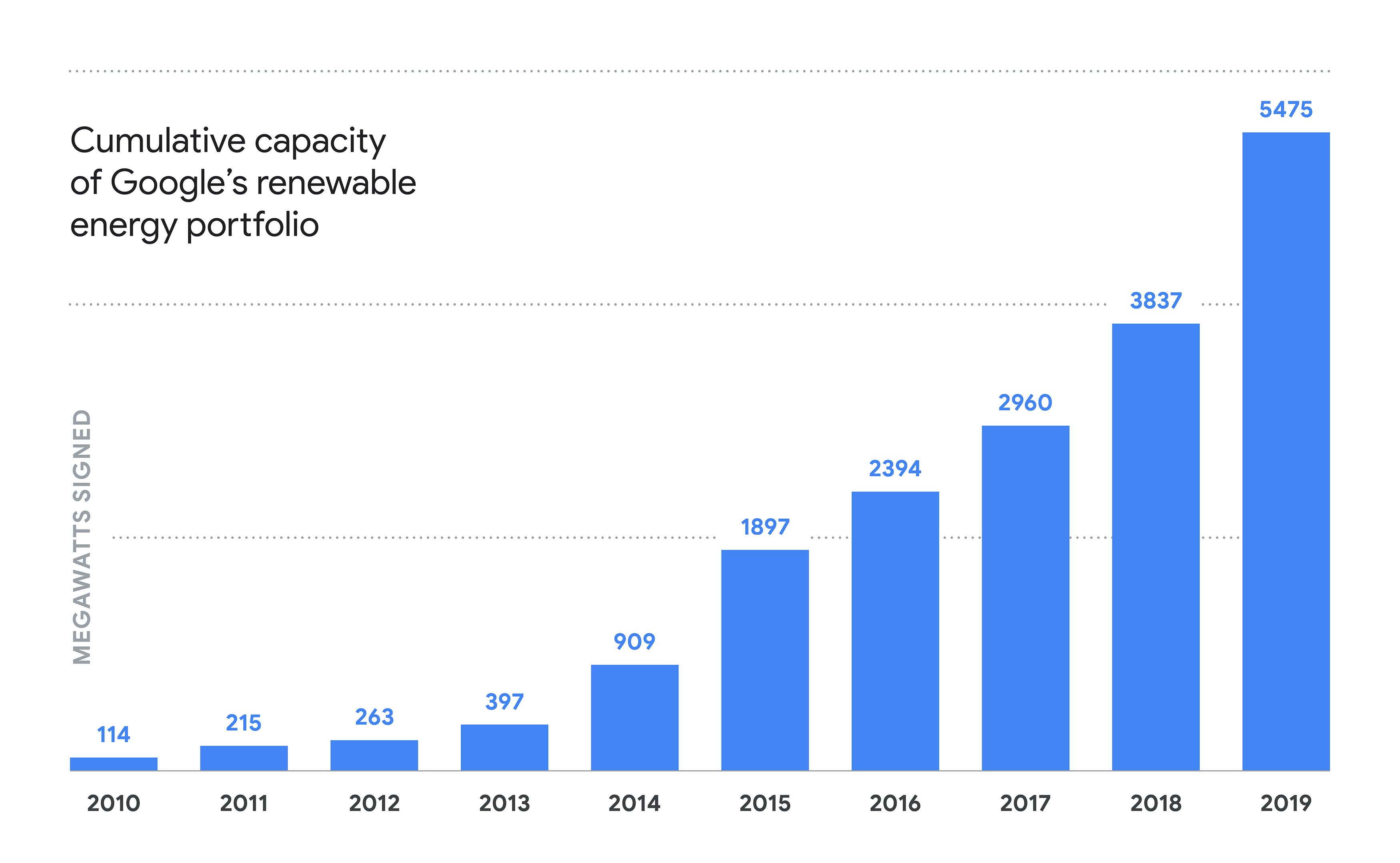
Google today announced its largest package of renewable energy deals yet. Worth a total of 1,600-megawatts, the package includes 18 deals in the U.S., Chile and Europe. This brings Google’s current set of wind and solar agreements to about 5,500 megawatts (MW) and the company’s number of total renewables projects it’s involved in to 52. Google argues that these new projects it announced today will drive about $2 billion in investments in new energy infrastructure.

In the U.S., Google says it’ll purchase a total of 720 MW from solar farms in North Carolina, South Carolina and Texas. In Chile, it’s buying an additional 125 MW to power its data center there. For reasons only known to Google PR, the company will only announce details of its plans for Europe tomorrow, at an event in Finland, where Google CEO Sundar Pichai will be present.

RE americas v3

In today’s announcement, Pichai notes that many of Google’s earlier investments were in wind energy. Its new investments in the U.S. are mostly in solar, though. The reason for that, he notes, is the declining cost of solar. In Chile, the company is investing in a hybrid solar and wind deal for the first time. “Because the wind often blows at different times than the sun shines, pairing them will allow us to match our Chilean data center with carbon-free electricity for a larger portion of each day,” Pichai writes.

Google’s announcements follow Amazon’s pledge to run its business on 100% renewable energy by 2030 and buy 100,000 electric vans earlier today.

RE graph

19 Sep 2019

Finding sustainable success with Blackstone CEO Stephen Schwarzman

“We were so low that people would take advantage of us. People we knew well would just lie to us. One of my favorites was a company we did an enormous amount of work for and really helped save. We then went to see the CEO and he said, ‘I really love you guys but we just don’t make these kinds of investments.’”

When you hear an investment banker recounting the tribulations of raising a private equity fund, your first response might be to get out the metaphorical small violin in your head. But when I met-up recently with Stephen Schwarzman, The Blackstone Group’s Chairman, CEO and co-founder, and heard several statements like the one above, I came to appreciate that he and his co-founder, gentlemen capitalist (and former Commerce Secretary) Pete Petersen, endured their fair share of indignities and near-fatal setbacks on the road to establishing Blackstone as an alternative investment management powerhouse.

At 38 years old at the time of Blackstone’s founding, Schwarzman was already successful and celebrated for having played an integral role in orchestrating a rescue of Lehman Brothers from a set of risky trades spurred on by its then-trader-CEO Lew Glucksman. But Schwarzman’s journey from banker to Wall Street entrepreneur to head of a $500-billion-plus asset manager is more interesting and nuanced than I had realized. On that basis alone, Schwarzman’s new book easily clears the hurdle rate for the entrepreneurially minded, and especially for those interested in the unique challenges of scaling a financial services business from scratch.

Feature image by John Moore/Getty Images

19 Sep 2019

Thinkful confirms data breach days after Chegg’s $80M acquisition

Thinkful, an online education site for developers, has confirmed a data breach, just days after it confirmed it would be acquired.

“We recently discovered that an unauthorized party may have gained access to certain Thinkful company credentials so, out of an abundance of caution, we are notifying all of our users,” said Erin Rosenblatt, the company’s vice-president of operations, in an email to users.

“As soon as we discovered this unauthorized access, we promptly changed the credentials, took additional steps to enhance the security measures we have in place, and initiated a full investigation,” the executive said.

At the time of writing, there has been no public acknowledgement of the breach beyond the email to users.

Thinkful, based in Brooklyn, New York, provides education and training for developers and programmers. The company claims the vast majority of its graduates get jobs in their field of study within a half-year of finishing their program. Earlier this month, education tech giant Chegg bought Thinkful for $80 million in cash.

But the company would not say when the breach happened — or if Chegg knew of the data breach prior to the acquisition announcement.

A spokesperson for Chegg did not respond to a request for comment. Thinkful spokesperson Catherine Zuppe did not respond to several emails of questions about the breach.

The email to users said the stolen credentials could not have granted the hacker access to certain information, such as government-issued IDs and Social Security numbers, or financial information. But although the company said it’s seen “no evidence” of any unauthorized access to user’s account data, it did not rule out any improper access to user data.

Thinkful said it is requiring all users to change their passwords.

We also asked Thinkful what security measures it has employed since the credentials breach, such as employing two-factor authentication, but did not hear back.

Just months earlier, Chegg confirmed a data breach, which forced the online technology giant to reset the passwords of its 40 million users.

At least Thinkful is now in good company.

19 Sep 2019

Founders, get to Disrupt SF for answers to the really hard questions

One lesson from TechCrunch’s Disrupt SF is that founders can’d get enough programming on the really hard questions.  How do I get into Y Combinator? How do I hire a technical lead? How do I raise my first round? That’s why we created a special stage at Disrupt SF for the sole purpose of bringing the top Silicon Valley experts on stage to go deep on those questions with TechCrunch editors and also take audience  questions. We call this the Extra Crunch stage, in a tip of the hat to TechCrunch’s Extra Crunch subscription service, which has the same, founder-centric mission.

Please check out the agenda for all three days of the Extra Crunch stage below. You can see the full agenda here (including new additions Will Smith and Steph Curry), which includes the main and Q&A stages as well. Get your Disrupt SF pass here – but remember that only Innovator, Founder and Investor passes get access to the programming at Disrupt.

AGENDA for the Extra Crunch Stage

WEDNESDAY, OCTOBER 2

10:05 am – 10:45 am How to Build a Billion-Dollar SaaS Company with Neeraj Agrawal (Battery Ventures), Jyoti Bansal (AppDynamics) and Whitney Bouck (HelloSign) 

Growing your SaaS company to a billion dollars in revenue is no easy task. It takes patience, perseverance and a strong team. Often it doesn’t happen until well after a company has gone public. We will talk to three people who have experience working with SaaS startups and understand the unique challenges they face getting to a billion dollars and beyond.

11:05 am – 11:45 am Could the U.S. Government Be Your Next Investor? with Steve Isakowitz (The Aerospace Corporation) and Raj Shah (DIU) 

No founder likes dilution, which is why the U.S. government is becoming an increasingly popular source for early-stage, ambitious venture capital. Hear from leaders who have navigated the process to discover your next source of non-dilutive capital.

11:45 am – 12:15 pm How to Evaluate Talent and Make Decisions with Ray Dalio (Bridgewater)

Ray Dalio knows a thing or two about building successful startups. As founder of the firm Bridgewater, he helped build it into one of the most successful investment companies ever, managing a whopping $150 billion in assets. He recently wrote a book called Principles, and he’s here on the TechCrunch Disrupt Extra Crunch stage to discuss the book and companion mobile app on how building a strong culture can lead to a flourishing startup.

1:35 pm – 2:15 pm How to Take a Digital Brand Offline with Rich Fulop (Brooklinen), James Reinhart (thredUP) and Susan Tynan (Framebridge)

E-commerce has fundamentally changed the way we browse and buy physical goods. But even though online sales have taken a huge bite out of brick-and-mortar, it doesn’t mean that digital brands aren’t interested in the prospect of offline channels. Hear from three founders who have taken their own unique approach to launching a store.

2:15 pm – 2:55 pm How to Hire at Breakneck Speed with Scott Cutler (StockX), Harj Taggar (Triplebyte) and Liz Wessel (WayUp)

Nothing is better than striking product-market fit and suddenly finding a path to rapid, venture-scale growth. But as that growth accelerates, how do you create the conditions to rapidly find, attract and hire the talent you need to reach unicorn status? Hear from some of the leading recruiters and services on how they have successfully scaled recruiting and avoided key pitfalls.

3:15 pm – 3:45 pm How to Get into Y Combinator with Ali Rowghani (Y Combinator) and Michael Seibel (Y Combinator)

The seed-stage venture firm has come to form its own startup economy over the years, with its network of companies and founders interconnecting across the tech industry and beyond. Find out how Y Combinator works today, and how you can become a part of it, in this discussion with CEO of YC Continuity Ali Rowghani and CEO and partner Michael Seibel.

3:45 pm – 4:25 pm How to Build a Subscription Product with Alex Friedman (LOLA), Eurie Kim (Forerunner Ventures) and Sandra Oh Lin (KiwiCo)

The direct-to-consumer landscape has exploded in the past year, but the keys to making a subscription product indispensable are still up in the air, as few have discovered a path to success. This chat with LOLA’s Alex Friedman, Forerunner partner Eurie Kim and KiwiCo’s Sandra Oh Lin will address the constant struggles of getting a subscription service off the ground and retaining customers.

4:25 pm – 4:45 pm How to Locate the Value with Dennis Crowley (Foursquare)

Foursquare has pulled off a monumental pivot over the last decade, going from a silly location-based social network to an integral enterprise business with the chops to take on Google and Facebook. Hear founder Dennis Crowley discuss the journey the company has taken over the past ten years and what the next ten years looks like for New York’s tech sweetheart.

THURSDAY, OCTOBER 3

10:00 am – 10:40 am How to Raise My First Dollars with Russ Heddleston (DocSend), Charles Hudson (Precursor) and Annie Kadavy (Redpoint Ventures)

Venture funding may have boomed over the last decade, but the decisions around your initial funding are as tricky as ever. Hear how to take advantage of the current landscape from top Silicon Valley early-stage thinkers, including pre-seed investor Charles Hudson of Precursor Ventures, early-stage investor Annie Kadavy of Redpoint Ventures and Russ Heddleston, CEO of DocSend.

11:00 am – 11:40 am How to Build a Secure Startup without Slowing Growth with Heather Adkins (Google), Jennifer Sunshine Steffens (IOActive) and Dug Song (Duo)

Leading security experts from Google, Duo and IOActive discuss some of the challenges startups and enterprises face in security. How do companies navigate the litany of issues and threats without hampering growth?

12:40 pm – 1:20 pm How to Build a Sex Tech Startup with Cyan Banister (Founders Fund), Cindy Gallop (MakeLoveNotPorn) and Lora Haddock (Lora DiCarlo)

As the old adage goes, sex sells. A panel of investors and founders will discuss the opportunities — and challenges — of building a successful sex tech startup, and how to capitalize on a market that’s projected to be worth more than $123 billion by 2026.

1:40 pm – 2:20 pm How to Build a Space Economy with Tess Hatch (Bessemer Venture Partners), Sara Spangelo (Swarm Technologies) and Adrian Steckel (OneWeb)

From thousand-satellite constellations to space tourism, orbit is a fresh and inspiring source of new startup ideas and evolutions of established ones. Swarm’s Sara Spangelo is taking on low-cost global connectivity and Bessemer Ventures’ Tess Hatch provides the perspective of investors looking to make bets like these happen.

2:20 pm – 3:00 pm How Do I Exit and What Happens Next with Justin Kan (Atrium), Jess Lee (Sequoia Capital) and Mike Marquez (Code Advisors)

Most good startup outcomes are acquisitions, and most good acquisitions happen because a buyer needs your company for a specific reason. Hear from Justin Kan (sold Twitch), Jess Lee (sold Polyvore) and top Silicon Valley banker Mike Marquez of Code Advisors about how to make them happen the right way.

3:20 pm – 4:00 pm How to be a Positive Force in the Gig Economy with Sarah Cannon (Index Ventures), Derecka Mehrens (Working Partnerships USA) and Amanda de Cadanet (GirlGaze Network)

As gig workers continue to struggle with financial instability, inadequate labor protections and few alternatives, hear from leaders and companies that are now trying to figure out how to create an equitable, just and sustainable economic system for gig workers.

4:00 pm – 4:40 pm How Do You Decide Between Bootstrapping and Raising Venture Capital? with Ben Chestnut (Mailchimp) and Kathryn Petralia (Kabbage)

In this panel, we host two founders who have each grown their respective startups to stratospheric levels, but with very different funding approaches. Kathryn Petralia, co-founder and president of SMB lender Kabbage, has raised prodigious venture capital, including $500 million in equity from the likes of the SoftBank Vision Fund and an additional $2 billion in debt financing to underwrite Kabbage’s loan products. Meanwhile, Ben Chestnut, co-founder and CEO of MailChimp, has built a massive and well-known marketing automation business entirely by bootstrapping. Why did they choose their different financing strategies? Come hear from two leading founders about how they thought through their fundraises and the lessons we can all learn from their experiences.

FRIDAY, OCTOBER 4

10:05 am – 10:55 am How to Iterate Your Product with Manik Gupta (Uber), Diya Jolly (Okta), Ravi Mehta (Tinder) and Robby Stein (Instagram)

Launching an MVP and finding early product-market fit are just the first steps in the journey to build a great startup. Learn from leading product thinkers from Instagram, Okta, Tinder and Uber on how they expand, grow and refine their products to increase their value without alienating existing users.

10:55 am – 11:15 am How to Take a Hardware Company Public with James Park (Fitbit) and Eric Friedman (Fitbit)

Ten years after launching their product at TechCrunch 50, Fitbit co-founders James Park and Eric Friedman join us to discuss the company’s ups and downs.

11:35 am – 12:15 pm How to Build a Brand that Gets Attention with Brooke Hammerling (Brew Media Relations), Chelsea Cain Maclin (Bumble) and Ben Pham (Character)

Brooke Hammerling is the founder of one of the most iconic tech startup PR firms of the past decade, Brew Media Relations, which was sold for $15 million in 2016. Chelsea  Cain Maclin is VP of Marketing at Bumble, one of the most recognizable brands in the app world today. And Ben Pham is the founder of Character, a brand design firm that’s worked with the likes of Oculus, Nike, DoorDash and Peet’s Coffee. The three will discuss how to think about brand design and what gets and keeps the attention of users.

1:25 pm – 1:50 pm How to be a Serial Founder with David Cancel (Drift) 

So your first company worked out well. Let’s say you have a burning desire to do another one — what’s the right way to do it the next time around? Hear from frequent founder David Cancel (formerly of Performable/HubSpot, Lookery, Ghostery, Compete) on what he’s done.

1:50 pm – 2:30 pm How to Build a Better Banking Startup with Chris Britt (Chime), Adam Dell (Clarity Money; Goldman Sachs) and Angela Strange (Andreessen Horowitz)

Chris Britt, the chief executive of Chime, Goldman Sachs’ Adam Dell and Andreessen Horowitz’s Angela Strange know that money is what everyone wants. The problem is how to make it more accessible to everyone in the world. Hear them discuss how to build a better bank for everyone.

2:50 pm – 3:10 pm What’s Growing on the Consumer Internet with Andrew Chen (Andreessen Horowitz)

You may know Andrew Chen as a widely read startup growth strategist, but today he’s investing in his expertise. As a partner at top venture firm Andreessen Horowitz, he is focused on consumer internet companies, seeking out the new growth in this maturing tech sector. Come hear the latest on what he’s seeing in the industry both from the growth and investing perspective.

3:10 pm – 4:10 pm Disrupt Hackathon Finals

The top contenders of the Disrupt Hackathon demo their projects that they spent the last two days creating to compete for sponsor prizes and the $10K TechCrunch best of show award.


19 Sep 2019

Inside Apple’s reimagined Fifth Ave. store

After two years of work, the wrapper comes off the giant glass cube this week, as Apple’s Fifth Avenue flagship opens to the public this Friday. The big reveal coincides with the company’s latest releases, including new iPhones and an Apple Watch — an appropriately grandiose homecoming for new gear.

This morning, the company offered a sneak preview to select media, ourselves included. Apple pulled back the curtain as a handful of curious onlookers stood by on the sidewalk. The cube itself appears largely unchanged, aside from a new shine. The colorful concealer wrap was, sadly, just temporary.

DSCF7877

But then, why mess with what’s become a New York City landmark in its decade and a half of existence? The store is positioned in one of the most highly trafficked corners of the city, at the southeast corner of Central Park, directly across from the Plaza (and perhaps less attractively to some, two blocks north of a certain presidential tower). Until a few years back, it fittingly shared the square with the iconic FAO Schwarz.

DSCF7881

Now, however, Apple’s completely taken over the space. The plaza surrounding the cube has changed a good deal to accommodate a new lighting system that leverages a combination of sunlight and the power of 500,000 LEDs. More on that here.

Underground, the store occupies the full area of the plaza, as well. That extra space allows for a larger Genius Bar that stretches the length of the store and a special HomePod listening area sealed behind glass that brings to mind the once-popular world of hi-fi stereo stores.

DSCF7901

Most surprising, the signature spiral staircase is no longer purely glass. The steps now have a stainless steel covering — for safety purposes, one assumes. One attendee this morning confided to me that he nearly bit it walking down the steps the first time he visited the store. As cool as the glass looked, it always felt like a disaster waiting to happen whenever it rained.

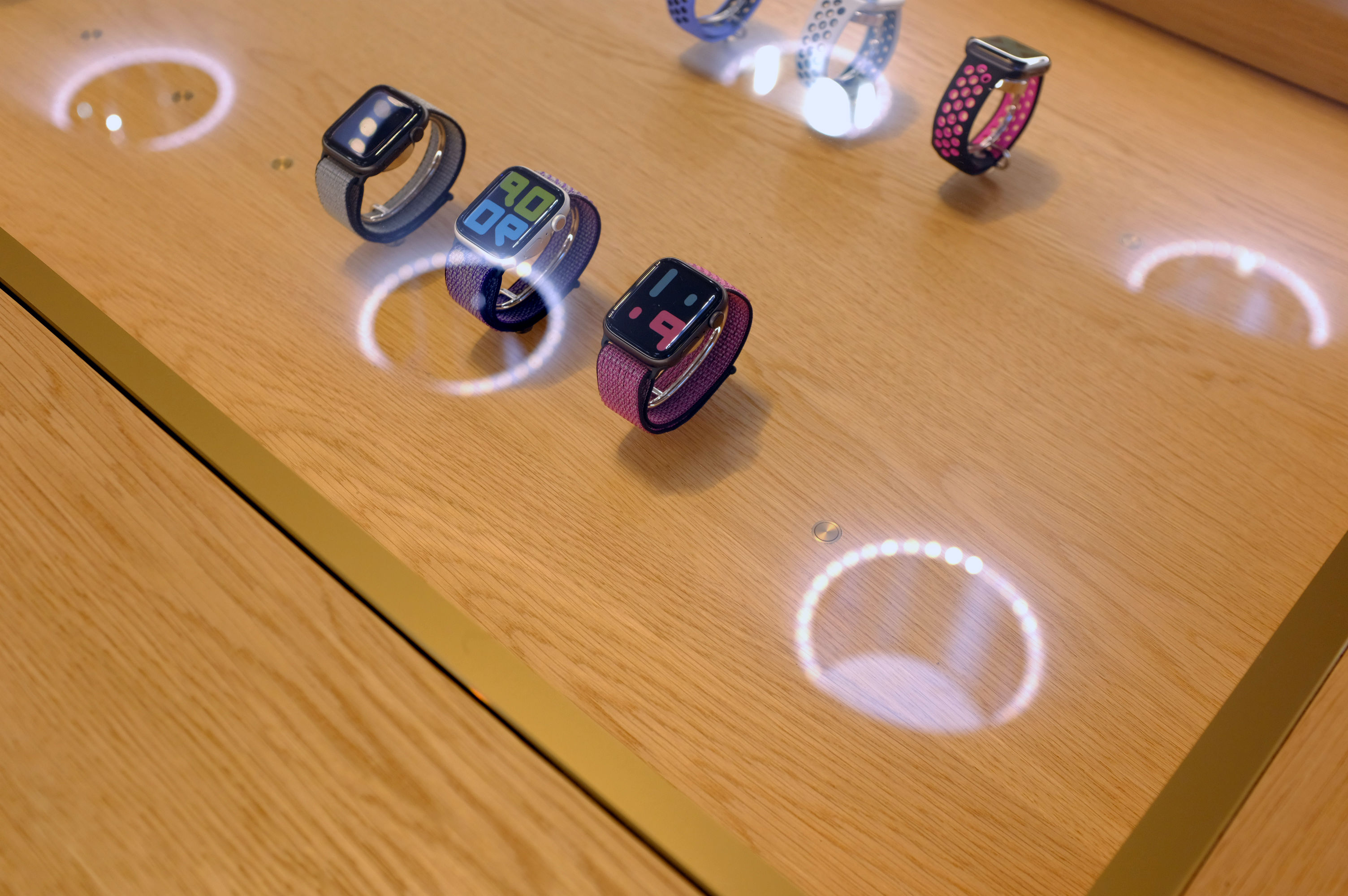
As promised, the lighting system was employed to great effect. It’s a cool combination, the sunlight streaming through the fogged portholes along with the lighting rings around them. Check the reflection below:

DSCF7856

The sunlight, in turn, is used by eight full-sized trees divided in two rows on the east and west sides of the store, along with a long, live green wall to the east (near the AirPods, FWIW). It’s also apparently the coolest during sunrise and sunset when it takes on a glowing effect. 

The new store opens to public this Friday at 8AM.

[gallery ids="1883936,1883934,1883933,1883932,1883931,1883930,1883929,1883928,1883927,1883926,1883925,1883924,1883923,1883922,1883920,1883918,1883917,1883916"]

19 Sep 2019

iOS 13 pushes the envelope across the board

Apple released iOS 13, the new major version of iOS. This isn’t a groundbreaking release that is going to change the way you use your phone. But Apple has done some tremendous work across the board to improve some low-level features as well as most Apple apps.

In many ways, iOS 13 feels like a quality-of-life update. In developer lingo, quality-of-life updates are all about refining things that already work. It helps you save a second here, do something more easily there.

I’m going to talk about many of those small refinements, but I want to focus on two things that are going to matter more than the rest — Dark Mode and Apple’s focus on privacy.

Dark Mode is here

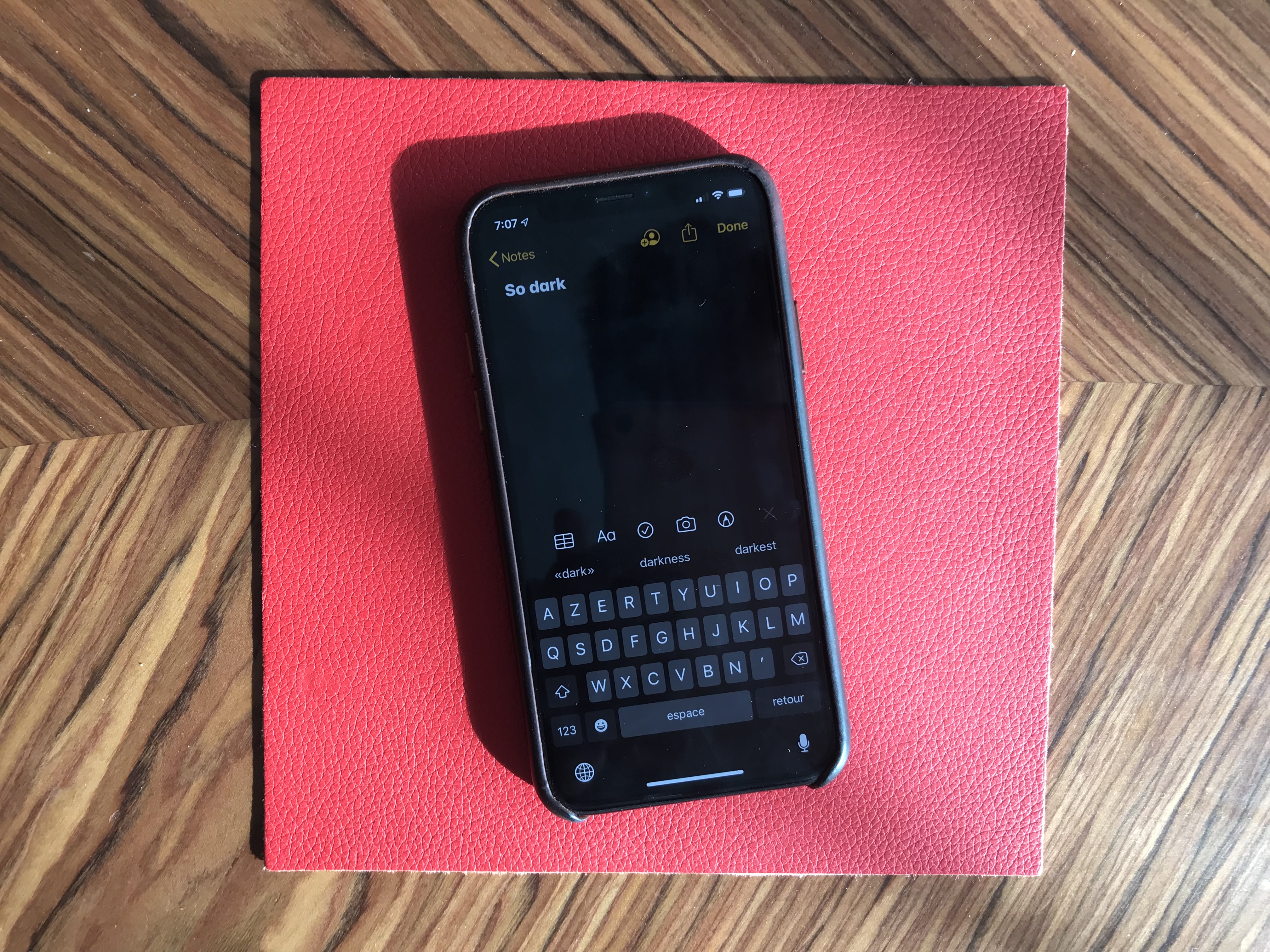
At some point, smartphone manufacturers started making bigger phones. And if you don’t want to become blind at night, Dark Mode is a must. It took a while, but it is finally here and it looks great.

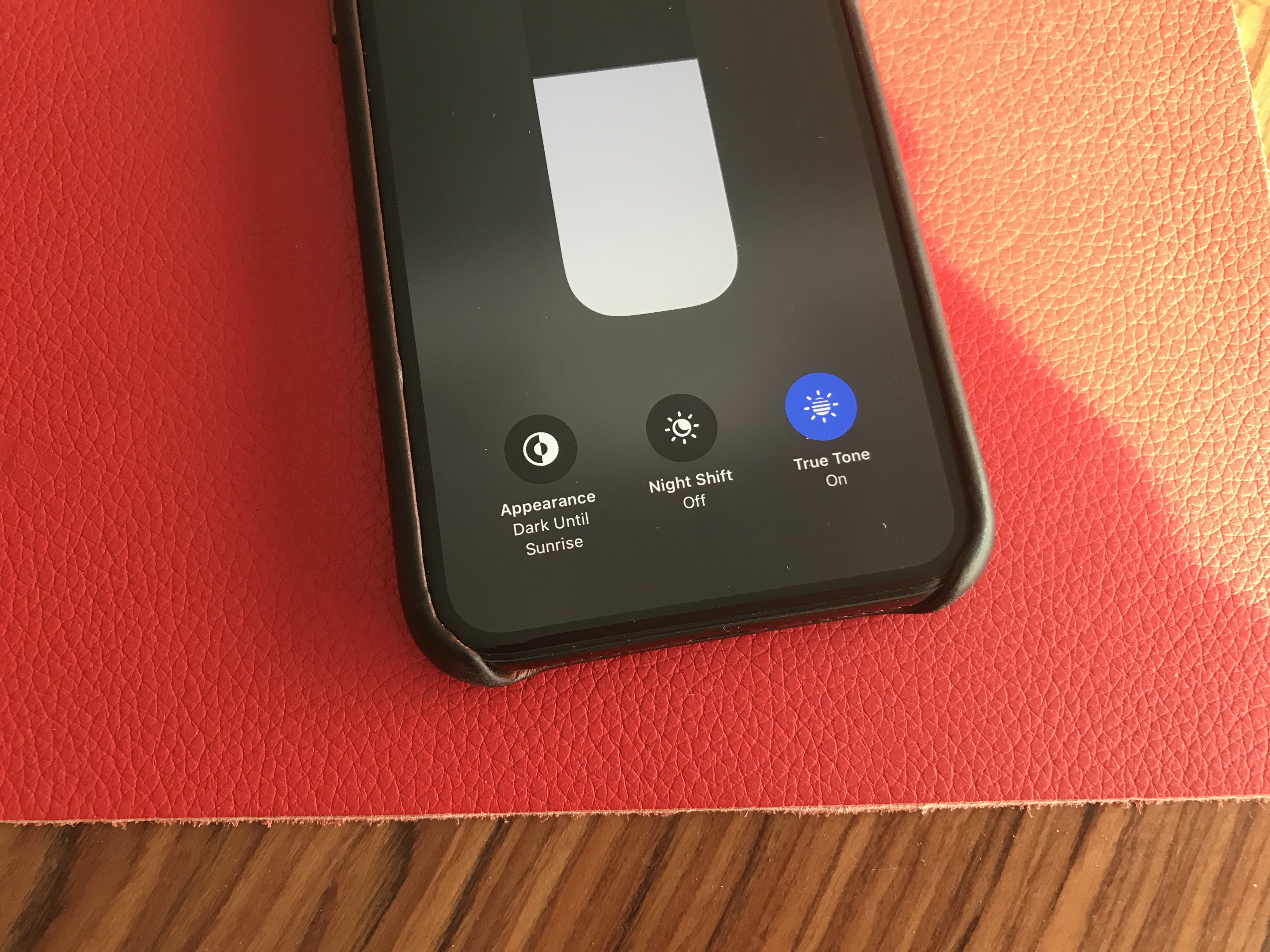
Dark Mode on iOS 13 is a system-wide trigger. You can activate it from the Settings app or by opening up the Control Center panel and long-pressing on the brightness indicator. And it completely transforms the look and feel of your iPhone.

While some third-party apps have been updated, many developers still have to release updates to make their apps work with this new setting. I hope in six months, you’ll be able to turn on Dark Mode and jump from one app to another without any white interface.

I would recommend turning on the automated mode in the settings. iOS uses your current location to time the change with sunset and sunrise — your iPhone goes dark at night and it lights up in the morning.

Dark Mode doesn’t just affect apps. Widgets, notifications and other buttons in the user interface become dark. Apple uses pure black, which looks great on OLED displays. And you can optionally dim your custom wallpapers at night.

The privacy hammer

Many geeks have tried iOS 13 over the summer. But it’s going to be a completely different story when tens of millions of people download it this fall. iOS 13 brings some much-needed changes on the privacy front, and it’s going to be nasty for some companies.

Apple is adding more ways to control your personal information. If an app needs your location for something, you can now grant access to your location just once. The app will have to ask for your permission the next time.

Similarly, iOS 13 can tell you when an app has been silently tracking your location in the background with a map of those data points.

Apple is shaming app developers directly by saying “This app has used 40 locations in the background in the past 2 days” and showing you a map. You can turn off location tracking directly in the popup. Facebook is already freaking out and wrote a blog post last week to tell you that it cares about your privacy.

iOS 13 also blocks Bluetooth scanning by default in all apps. Many apps scan for nearby Bluetooth accessories and compare that with a database of Bluetooth devices around the world. In other words, it’s a way to get your location even if you’re not sharing your location with this app.

You now get a standard permission popup for apps that actually need to scan for Bluetooth devices. Some apps actually need Bluetooth to communicated with connected devices, initiate peer-to-peer payments with nearby users, etc.

But the vast majority of them have been abusing Bluetooth scanning. To be clear, you can disable Bluetooth scanning and still use Bluetooth headphones. Audio will still be routed to your headphones just fine.

I hope many app developers will review the third-party SDKs that they use. Many ad-supported apps embed code from adtech companies. But they don’t always that those SDKs are hostile to your privacy.

Finally, Apple is adding “Sign In with Apple”. It is an alternative to “Sign In with Google” or “Sign In with Facebook”. Customers can choose whether or not to share their email address and developers get little personal data. It’s going to be interesting to see if it takes off.

Low-level improvements

There are a few changes at the operating system level. First, in addition to optimizations, animations have been slightly sped up. Swiping, opening and closing apps feels faster.

Second, the keyboard now supports swipe-to-type. If you’ve used Android phones or third-party keyboards in the past, you already know how it works. You can move your finger across the display from one letter to another without lifting it. It feels like magic.

Third, the share sheet has been updated. It is now separated in three areas: a top row with suggested contacts to send photos, links and more depending on your most important contacts.

Under that row of contacts, you get the usual row of app icons to open something in another app. If you scroll down, you access a long list of actions that vary from one app to another.

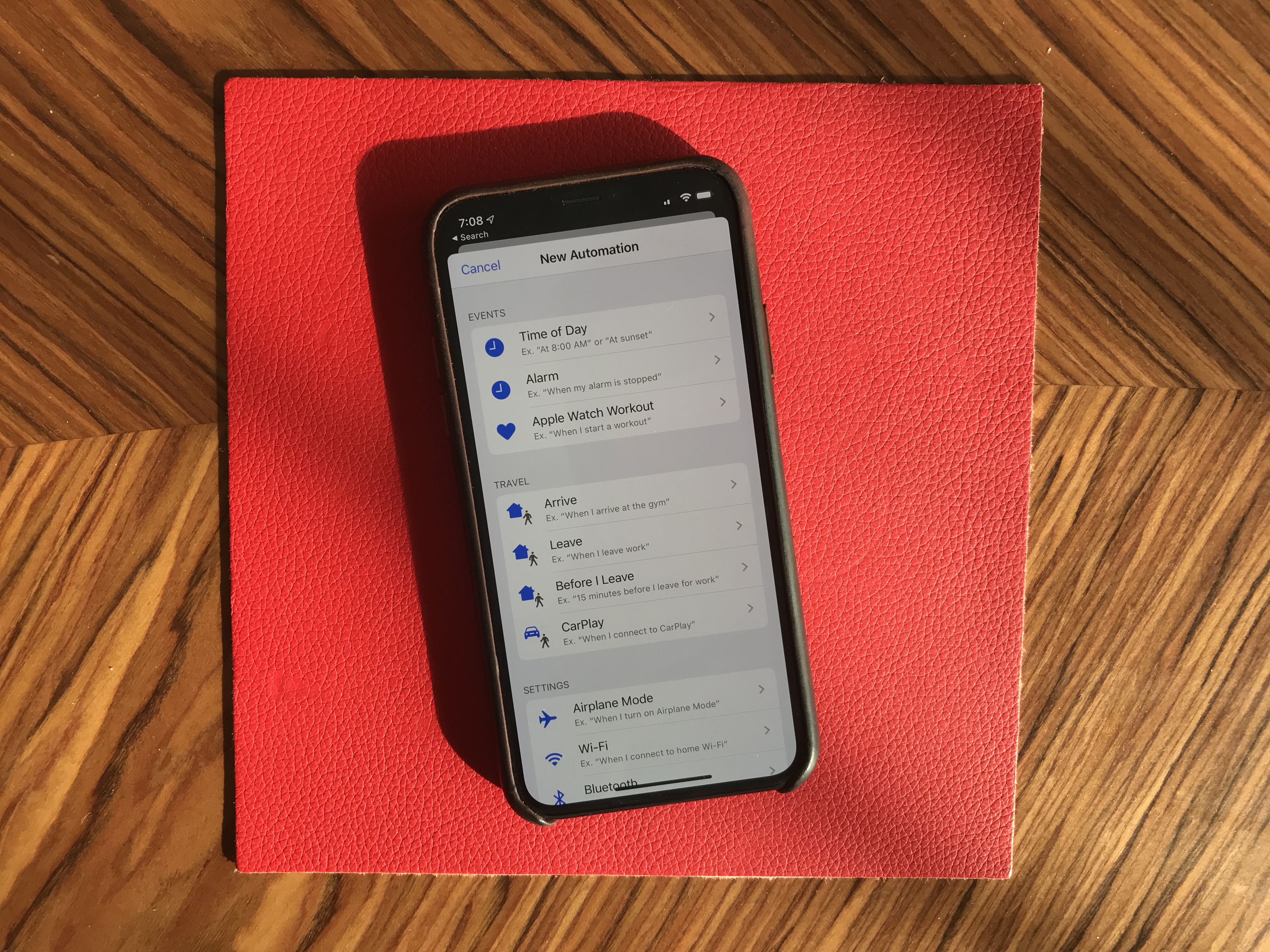
When it comes to automation, the Shortcuts is installed by default with iOS 13. Many people are going to discover Shortcuts for the first time by opening the app. Voice-activated Siri Shortcuts are now also available in the Shortcuts app.

More interestingly, you can now create automated triggers to launch a shortcut. For instance, you can create scenarios related to CarPlay, a location or even a cheap NFC tag. Here are some examples:

  • Launch a music playlist when I connect my phone to CarPlay or to my car using Bluetooth.
  • Dim my screen and turn on low power mode when I activate airplane mode.
  • Turn off my Philips Hue lights when I put my phone on an NFC sticker on my nightstand.

New app features

I’m going to go through some of the major changes in Apple’s apps.

Apple Arcade is here. You have to download iOS 13 to access it. I’ll let you read our first impressions in our separate article.

iOS 13 5

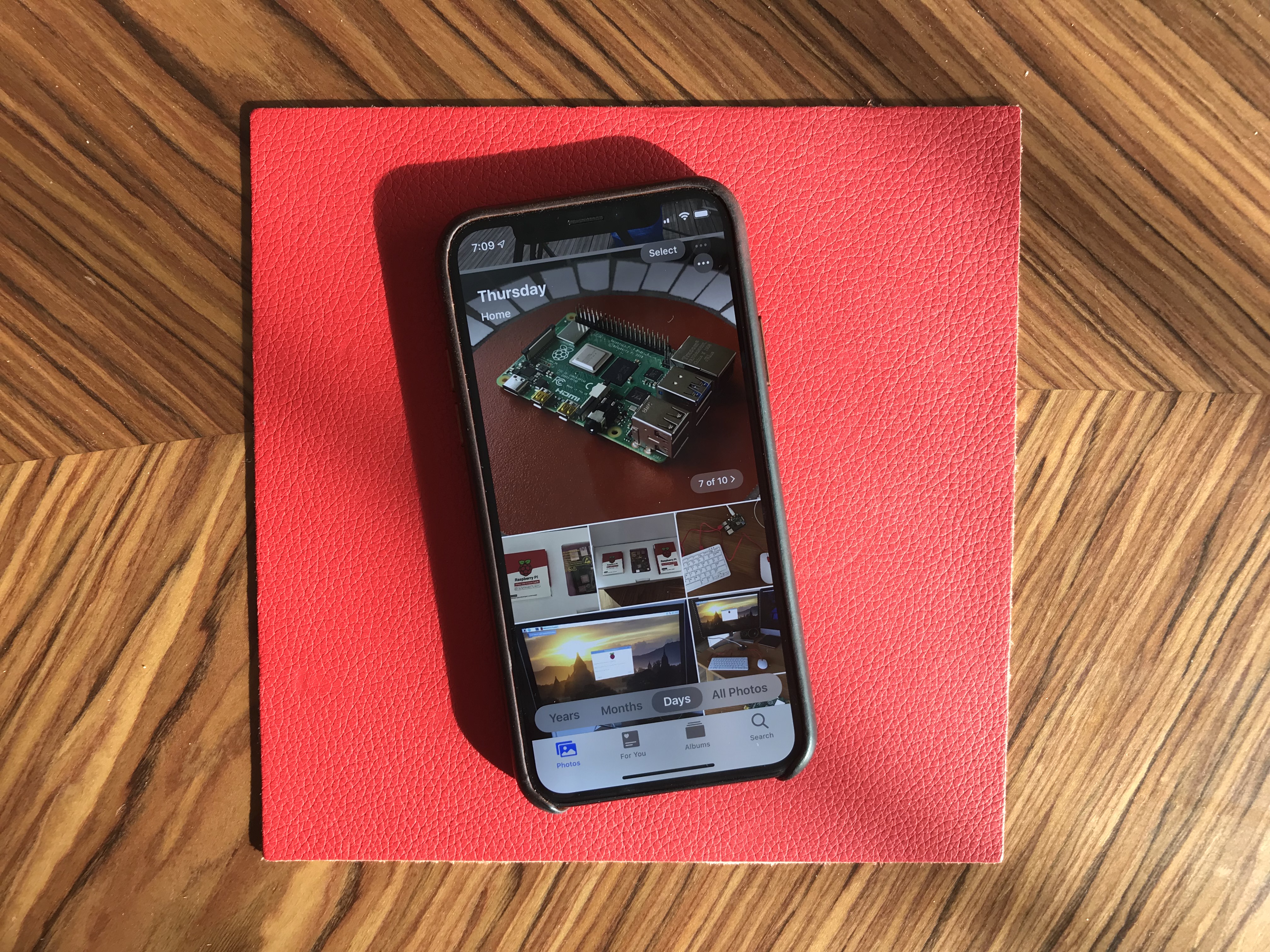
Photos has received some of the biggest improvements. The main tab has been completely redesigned. You now get four sub-tabs that lets you see a curated photo library.

In addition to ‘All Photos’, you can tap on ‘Years’ to jump straight to a specific year, ‘Months’ to see some smart albums based on dates and locations. You can then open those events. It’ll jump to the ‘Days’ tab and show you the best photos.

I’m not sure I like the wording of those sub-tabs, but it’s definitely a lot more efficient if you’re looking for an old photo from a few years.

Photo editing is also much better on iOS 13. It feels like you can do pretty much all the basic editing you’d do with a third-party app.

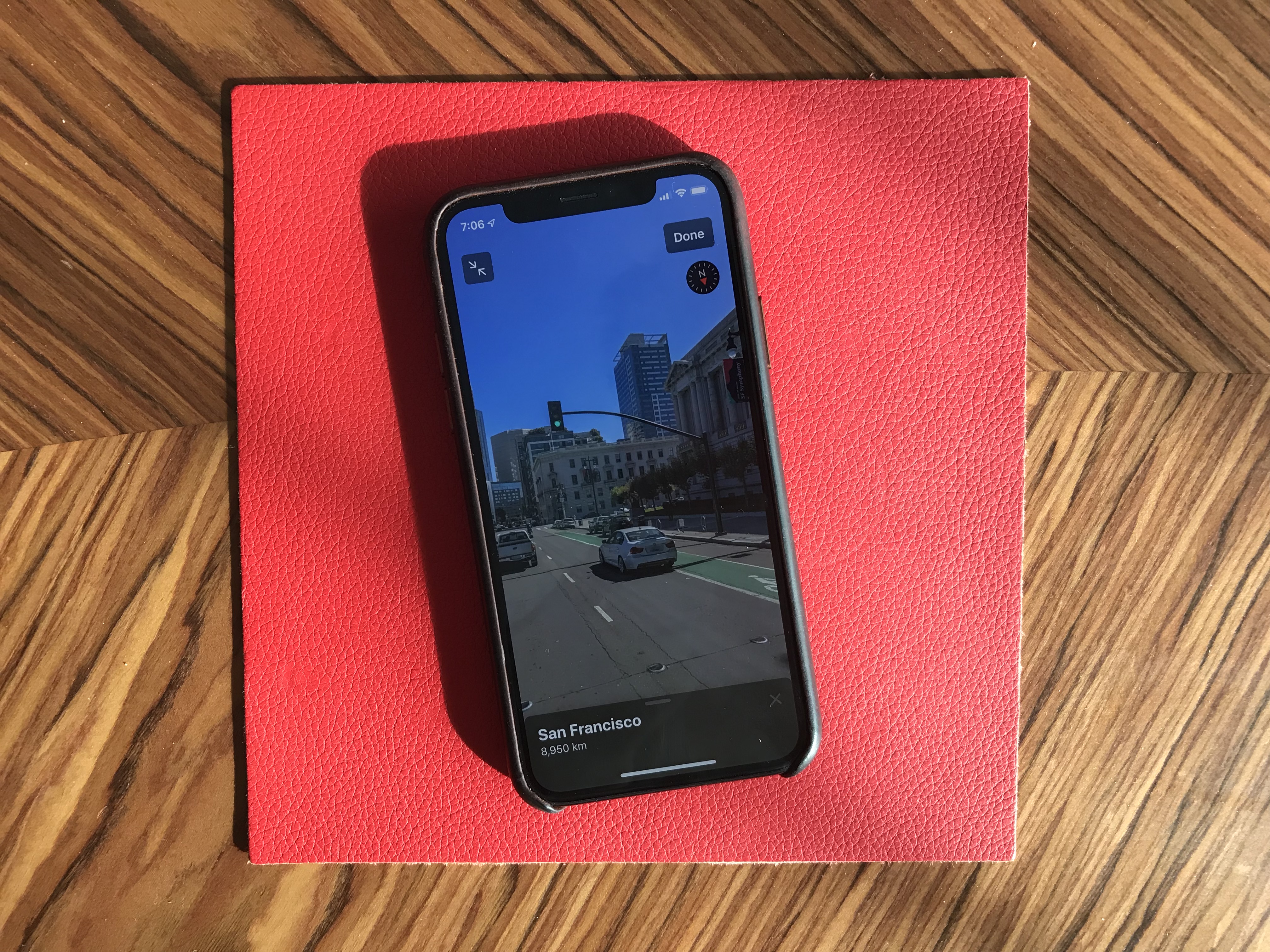
Maps is an interesting app. While Apple has been working on improved mapping data, it’s going to be hard to notice if you don’t live in California. But Look Around, a feature that works pretty much like Google Street View, is quite impressive. This isn’t just 360 photo shots — those are 3D representations of streets with foregrounds and backgrounds. I’d recommend finding a street in San Francisco and opening Look Around.

Messages now works a bit more like WhatsApp. By that, I mean that you can pick a profile name and picture and share those with your friends and family. Apple also tells you to use Memoji, but you can pick any photo. Search in Messages is also much better.

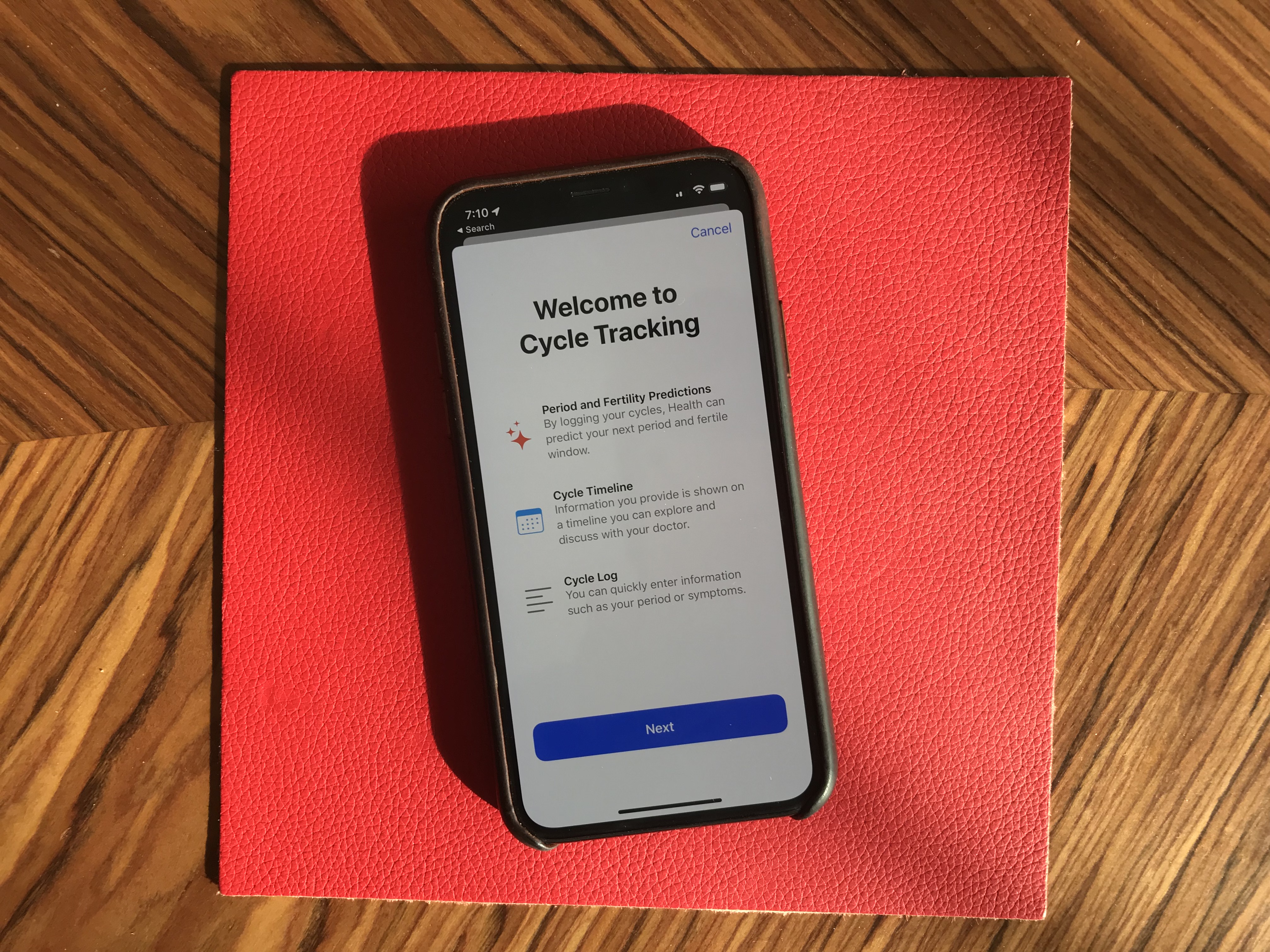
Health has been slightly redesigned. But the big addition is that you can track your menstrual cycles in the Health app. You don’t need to install any third-party app.

Reminders has gained some new features. There’s a quick toolbar to add times, dates, locations and more. You can indent items, create smart lists and more. To-do apps are highly personal, but I’m sure some people will like it.

Find My is the new name for Find My Phone and Find My Friends. Maybe you’ll be able to find your objects soon when Apple launches Tile-like trackers?

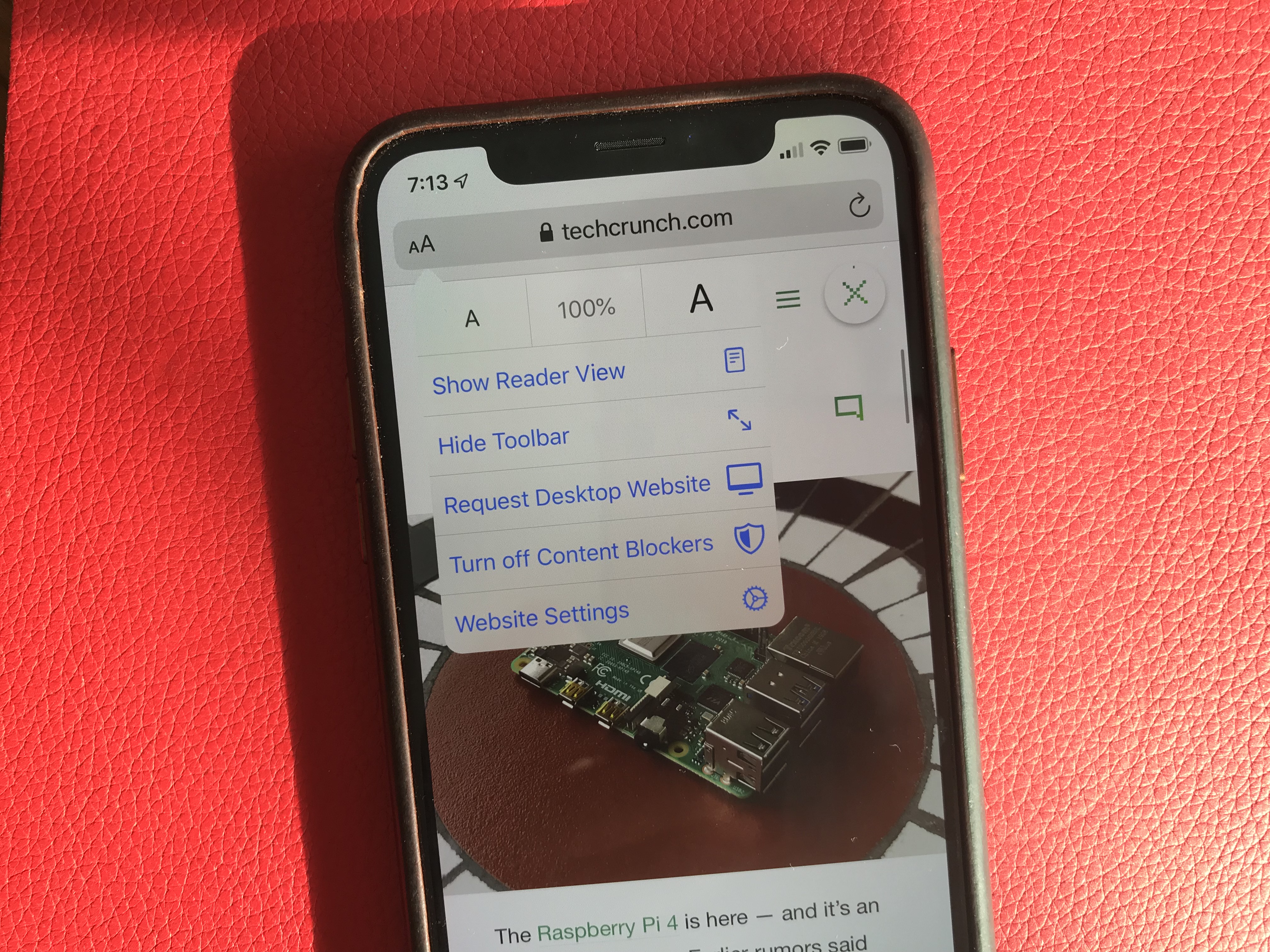
Mail, Notes and Safari received small improvements, such as rich-text editing in Mail, a gallery view in Notes, a new site settings popup in Safari to request the desktop site, disable a content blocker or enable reader view.

Files works with Samba file servers and you can zip/unzip files directly in the app — no shortcut needed. You can also install custom fonts.

As you can see, there are a lot of big and tiny improvements across the board with iOS 13. Sure, this version feels buggy at times. It’s an ambitious update with Apple telling everyone that they’re not ready to slow down the pace of iOS releases. And Apple is making some welcome progress on the privacy front.

19 Sep 2019

iOS 13 pushes the envelope across the board

Apple released iOS 13, the new major version of iOS. This isn’t a groundbreaking release that is going to change the way you use your phone. But Apple has done some tremendous work across the board to improve some low-level features as well as most Apple apps.

In many ways, iOS 13 feels like a quality-of-life update. In developer lingo, quality-of-life updates are all about refining things that already work. It helps you save a second here, do something more easily there.

I’m going to talk about many of those small refinements, but I want to focus on two things that are going to matter more than the rest — Dark Mode and Apple’s focus on privacy.

Dark Mode is here

At some point, smartphone manufacturers started making bigger phones. And if you don’t want to become blind at night, Dark Mode is a must. It took a while, but it is finally here and it looks great.

Dark Mode on iOS 13 is a system-wide trigger. You can activate it from the Settings app or by opening up the Control Center panel and long-pressing on the brightness indicator. And it completely transforms the look and feel of your iPhone.

While some third-party apps have been updated, many developers still have to release updates to make their apps work with this new setting. I hope in six months, you’ll be able to turn on Dark Mode and jump from one app to another without any white interface.

I would recommend turning on the automated mode in the settings. iOS uses your current location to time the change with sunset and sunrise — your iPhone goes dark at night and it lights up in the morning.

Dark Mode doesn’t just affect apps. Widgets, notifications and other buttons in the user interface become dark. Apple uses pure black, which looks great on OLED displays. And you can optionally dim your custom wallpapers at night.

The privacy hammer

Many geeks have tried iOS 13 over the summer. But it’s going to be a completely different story when tens of millions of people download it this fall. iOS 13 brings some much-needed changes on the privacy front, and it’s going to be nasty for some companies.

Apple is adding more ways to control your personal information. If an app needs your location for something, you can now grant access to your location just once. The app will have to ask for your permission the next time.

Similarly, iOS 13 can tell you when an app has been silently tracking your location in the background with a map of those data points.

Apple is shaming app developers directly by saying “This app has used 40 locations in the background in the past 2 days” and showing you a map. You can turn off location tracking directly in the popup. Facebook is already freaking out and wrote a blog post last week to tell you that it cares about your privacy.

iOS 13 also blocks Bluetooth scanning by default in all apps. Many apps scan for nearby Bluetooth accessories and compare that with a database of Bluetooth devices around the world. In other words, it’s a way to get your location even if you’re not sharing your location with this app.

You now get a standard permission popup for apps that actually need to scan for Bluetooth devices. Some apps actually need Bluetooth to communicated with connected devices, initiate peer-to-peer payments with nearby users, etc.

But the vast majority of them have been abusing Bluetooth scanning. To be clear, you can disable Bluetooth scanning and still use Bluetooth headphones. Audio will still be routed to your headphones just fine.

I hope many app developers will review the third-party SDKs that they use. Many ad-supported apps embed code from adtech companies. But they don’t always that those SDKs are hostile to your privacy.

Finally, Apple is adding “Sign In with Apple”. It is an alternative to “Sign In with Google” or “Sign In with Facebook”. Customers can choose whether or not to share their email address and developers get little personal data. It’s going to be interesting to see if it takes off.

Low-level improvements

There are a few changes at the operating system level. First, in addition to optimizations, animations have been slightly sped up. Swiping, opening and closing apps feels faster.

Second, the keyboard now supports swipe-to-type. If you’ve used Android phones or third-party keyboards in the past, you already know how it works. You can move your finger across the display from one letter to another without lifting it. It feels like magic.

Third, the share sheet has been updated. It is now separated in three areas: a top row with suggested contacts to send photos, links and more depending on your most important contacts.

Under that row of contacts, you get the usual row of app icons to open something in another app. If you scroll down, you access a long list of actions that vary from one app to another.

When it comes to automation, the Shortcuts is installed by default with iOS 13. Many people are going to discover Shortcuts for the first time by opening the app. Voice-activated Siri Shortcuts are now also available in the Shortcuts app.

More interestingly, you can now create automated triggers to launch a shortcut. For instance, you can create scenarios related to CarPlay, a location or even a cheap NFC tag. Here are some examples:

  • Launch a music playlist when I connect my phone to CarPlay or to my car using Bluetooth.
  • Dim my screen and turn on low power mode when I activate airplane mode.
  • Turn off my Philips Hue lights when I put my phone on an NFC sticker on my nightstand.

New app features

I’m going to go through some of the major changes in Apple’s apps.

Apple Arcade is here. You have to download iOS 13 to access it. I’ll let you read our first impressions in our separate article.

iOS 13 5

Photos has received some of the biggest improvements. The main tab has been completely redesigned. You now get four sub-tabs that lets you see a curated photo library.

In addition to ‘All Photos’, you can tap on ‘Years’ to jump straight to a specific year, ‘Months’ to see some smart albums based on dates and locations. You can then open those events. It’ll jump to the ‘Days’ tab and show you the best photos.

I’m not sure I like the wording of those sub-tabs, but it’s definitely a lot more efficient if you’re looking for an old photo from a few years.

Photo editing is also much better on iOS 13. It feels like you can do pretty much all the basic editing you’d do with a third-party app.

Maps is an interesting app. While Apple has been working on improved mapping data, it’s going to be hard to notice if you don’t live in California. But Look Around, a feature that works pretty much like Google Street View, is quite impressive. This isn’t just 360 photo shots — those are 3D representations of streets with foregrounds and backgrounds. I’d recommend finding a street in San Francisco and opening Look Around.

Messages now works a bit more like WhatsApp. By that, I mean that you can pick a profile name and picture and share those with your friends and family. Apple also tells you to use Memoji, but you can pick any photo. Search in Messages is also much better.

Health has been slightly redesigned. But the big addition is that you can track your menstrual cycles in the Health app. You don’t need to install any third-party app.

Reminders has gained some new features. There’s a quick toolbar to add times, dates, locations and more. You can indent items, create smart lists and more. To-do apps are highly personal, but I’m sure some people will like it.

Find My is the new name for Find My Phone and Find My Friends. Maybe you’ll be able to find your objects soon when Apple launches Tile-like trackers?

Mail, Notes and Safari received small improvements, such as rich-text editing in Mail, a gallery view in Notes, a new site settings popup in Safari to request the desktop site, disable a content blocker or enable reader view.

Files works with Samba file servers and you can zip/unzip files directly in the app — no shortcut needed. You can also install custom fonts.

As you can see, there are a lot of big and tiny improvements across the board with iOS 13. Sure, this version feels buggy at times. It’s an ambitious update with Apple telling everyone that they’re not ready to slow down the pace of iOS releases. And Apple is making some welcome progress on the privacy front.

19 Sep 2019

Stripe is raising another $250M at a $35B pre-money valuation

After a week of launching new services to bring payments giant Stripe into the areas of lending and credit, the company is announcing another big step forward to fuel its growth: it’s raising another $250 million in funding at a pre-money valuation of $35 billion, money to fuel more international expansion, launching more products and targeting larger enterprise-sized businesses.

The startup said that General Catalyst, Andreessen Horowitz, and Sequoia are all in the round already. We’ve also heard that SoftBank is considering an investment. “It was a big miss when SoftBank didn’t invest two years ago,” one source close to the VC said to TechCrunch.

This is a huge jump in valuation for the company: it was valued at $22.5 billion just earlier this year when it raised $100 million.

The company spent the first several years of its life slowly building up its payments business — which primarily consisted of providing an API to e-commerce businesses so that they could easily integrate a payments option in their apps or websites. In more recent years, it’s started to accelerate its growth with a significantly larger range of financial services and now describes its business as a “Global Payments and Treasury Network”, with the latest products — cash advances and credit cards — coming on the heels of other services that include incorporation services, fraud protection, and and more. While the US remains its main market especially for new launches, it’s getting increasingly global. The company last week expanded its payments out to eight more countries and that is set to expand again to total 40 in the coming months. 

The company says it processes “hundreds of billions of dollars a year for millions of businesses worldwide,” although it declines to give specific numbers. Wayfair, Airbnb, Twilio, GitHub, and The RealReal are among its customers.

“Even now, in 2019, less than eight percent of commerce happens online,” said John Collison, President and Co-founder of Stripe, in a statement. “We’re investing now to build the infrastructure that’ll power internet commerce in 2030 and beyond. If we get it right, we can help the internet fulfill its potential as an engine for global economic progress.”

We’ll hopefully be talking to him in the next 10 minutes and will update this story with more as we learn it.