Year: 2020

29 May 2020

How to upgrade your at-home videoconference setup: Lighting edition

In this instalment of our ongoing series around making the most of your at-home video setup, we’re going to focus on one of the most important, but least well understood or implemented parts of the equation: Lighting. While it isn’t actually something that requires a lot of training, expertise or even equipment to get right, it’s probably the number one culprit for subpar video quality on most conference calls – and it can mean the difference between looking like someone who knows what they talk about, and someone who might not inspire too much confidence on seminars, speaking gigs and remote broadcast appearances.

Basics

You can make a very big improvement in your lighting with just a little work, and without spending any money. The secret is all in being aware of your surroundings and optimizing your camera placement relative to any light sources that might be present. Consider not only any ceiling lights or lamps in your room, but also natural light sources like windows.

Ideally, you should position yourself so that the source of brightest light is positioned behind your camera (and above it, if possible). You should also make sure that there aren’t any strong competing light sources behind you that might blow out the image. If you have a large window and it’s daytime, face the window with your back to a wall, for instance. And if you have a moveable light or a overhead lamp, either move it so it’s behind and above your computer facing you, or move yourself if possible to achieve the same effect with a fixed position light fixture, like a ceiling pendant.

Ideally, any bright light source should be positioned behind and slightly above your camera for best results.

Even if the light seems aggressively bright to you, it should make for an even, clear image on your webcam. Even though most webcams have auto-balancing software features that attempt to produce the best results regardless of lighting, they can only do so much, and especially lower-end camera hardware like the webcam built into MacBooks will benefit greatly from some physical lighting position optimization.
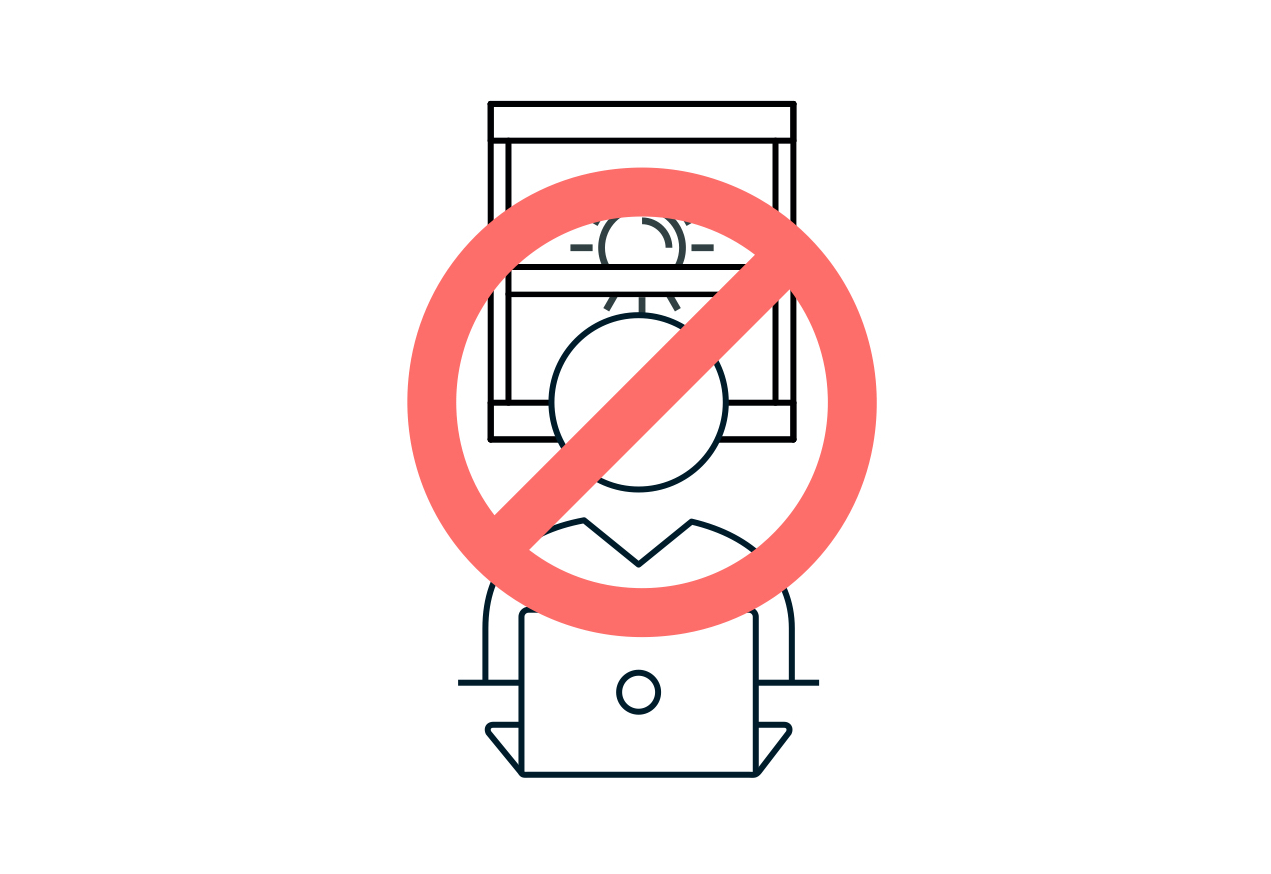
This is an example of what not to do: Having a bright light source behind you will make your face hard to see, and the background blown out.

Simple ways to level-up

The best way to step up beyond the basics is to learn some of the fundamentals of good video lighting. Again, this doesn’t necessarily require any purchases – it could be as simple as taking what you already have and using it in creative ways.

Beyond just the above advice about putting your strongest light source behind your camera pointed towards your face, you can get a little more sophisticated by adopting the principles of two- and three-point lighting. You don’t need special lights to make this work – you just need to use what you have available and place them for optimal effect.

  • Two-point lighting

A very basic, but effective video lighting setup involves positioning not just one, but two lights pointed towards your face behind, or parallel with your camera. Instead of putting them directly in line with your face, however, for maximum effect you can place them to either side, and angle them in towards you.
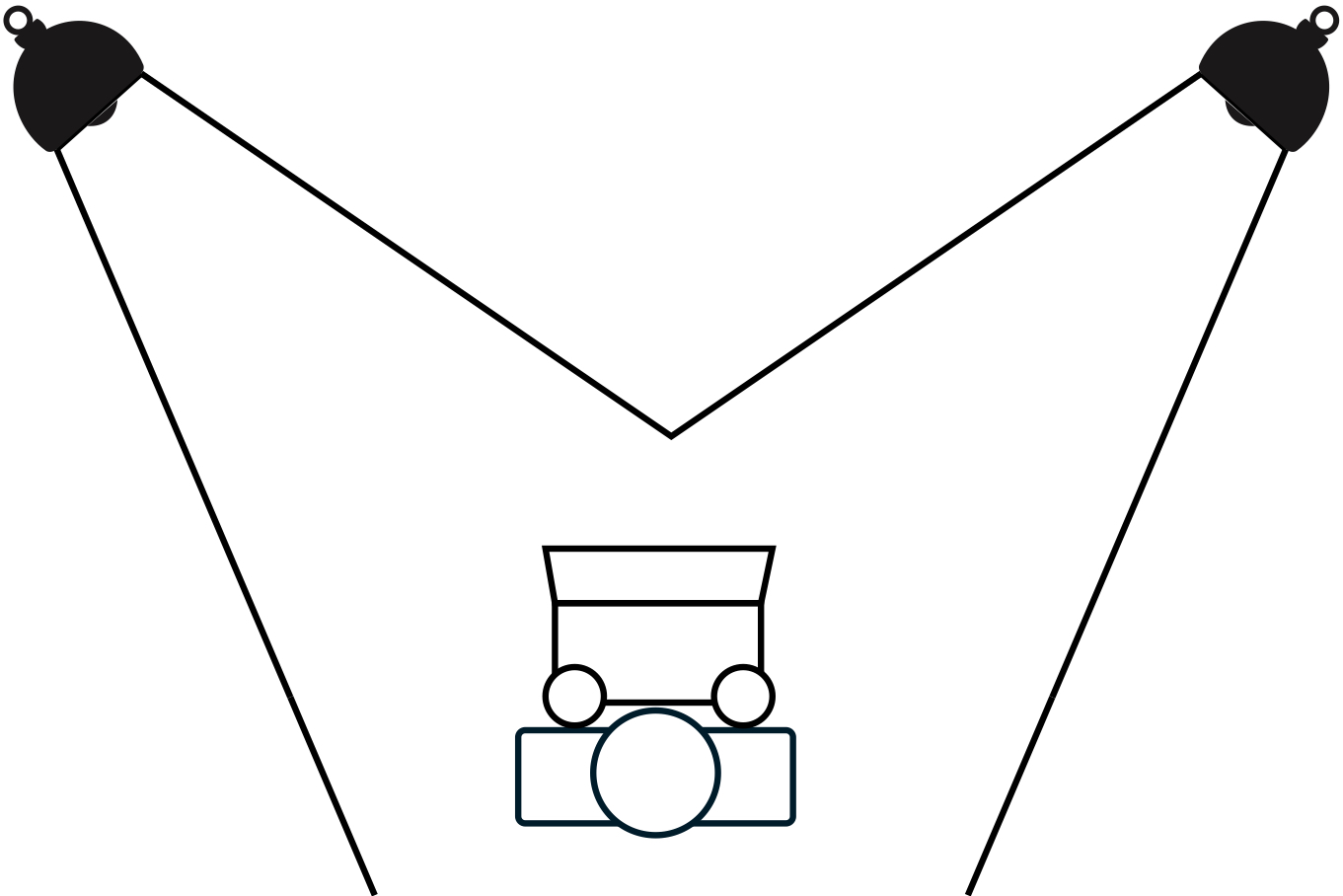
A simple representation of how to position lights for a proper two-point video lighting setup.

Note that if you can, it’s best to make one of these two lights brighter than the other. This will provide a subtle bit of shadow and depth to the lighting on your face, resulting in a more pleasing and professional look. As mentioned, it doesn’t really matter what kind of light you use, but it’s best to try to make sure that both are the same temperature (for ordinary household bulbs, how ‘soft,’ ‘bright’ or ‘warm’ they are) and if your lights are less powerful, try to position them closer in.

  • Three-point lighting

Similar to two-point lighting, but with a third light added positioned somewhere behind you. This extra light is used in broadcast interview lighting setups to provide a slight halo effect on the subject, which further helps separate you from the background, and provides a bit more depth and professional look. Ideally, you’d place this out of frame of your camera (you don’t want a big, bright light shining right into the lens) and off to the side, as indicated in the diagram below.
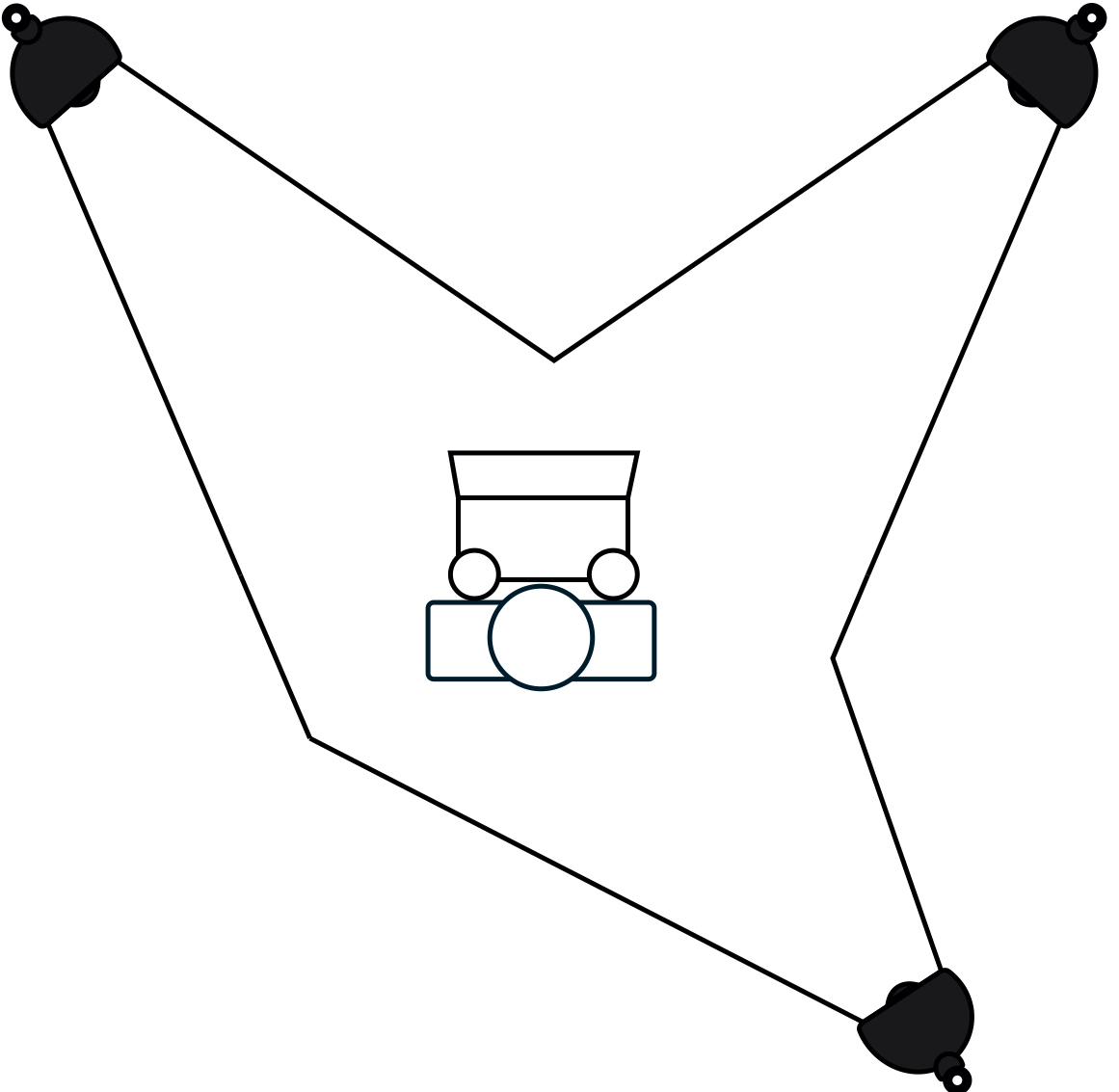
In a three-point lighting setup, you add a third light behind you to provide a bit more subject separation and pop.

If you’re looking to improve the flexibility of this kind of setup, a simple way to do that is by using light sources with Philips Hue bulbs. They can let you tune the temperature and brightness of your lights, together or individually, to get the most out of this kind of arrangement. Modern Hue bulbs might produce some weird flickering effects on your video depending on what framerate you’re using, but if you output your video at 30fps, that should address any problems there.

Go pro

All lights can be used to improve your video lighting setup, but dedicated video lights will provide the best results. If you really plan on doing a bunch of video calls, virtual talks and streaming, you should consider investing in some purpose-built hardware to get even better results.

At the entry level, there are plenty of offerings on Amazon that work well and offer good value for money, including full lighting kits like this one from Neewer that offers everything you need for a two-point lighting setup in one package. These might seem intimidating if you’re new to lighting, but they’re extremely easy to set up, and really only require that you learn a bit about light temperature (as measured in kelvins) and how that affects the image output on your video capture device.
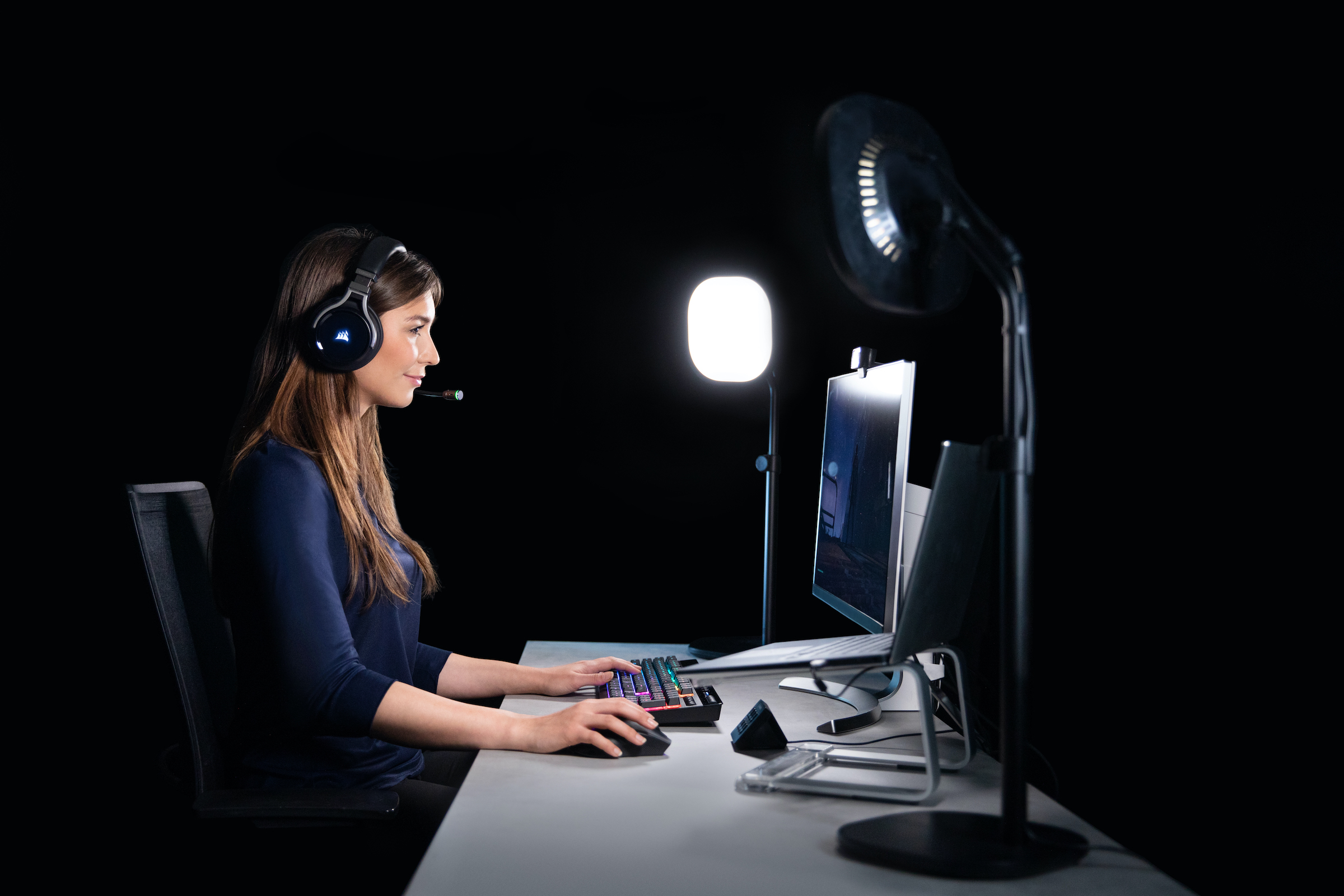
If you’re willing to invest a bit more money, you can get some better quality lights that include additional features including wifi connectivity and remote control. The best all-around video lights for home studio use that I’ve found are Elgato’s Key Lights . These come in two variants, Key Light and Key Light Air, which retail for $199.99 and $129.99 respectively. The Key Light is larger, offers brighter maximum output, and comes with a sturdier, heavy-duty clamp mount for attaching to tables and desks. The Key Light Air is smaller, more portable, puts out less light at max settings and comes with a tabletop stand with a weighted base.

Both versions of the Key Light offer light that you can tune form very warm white (2900K) to bright white (7000K) and connect to your wifi network for remote control, either from your computer or your mobile device. They easily work together with Elgato’s Stream Deck for hardware controls, too, and have highly adjustable brightness and plenty of mounting options – especially with extra accessories like the Multi-Mount extension kit.
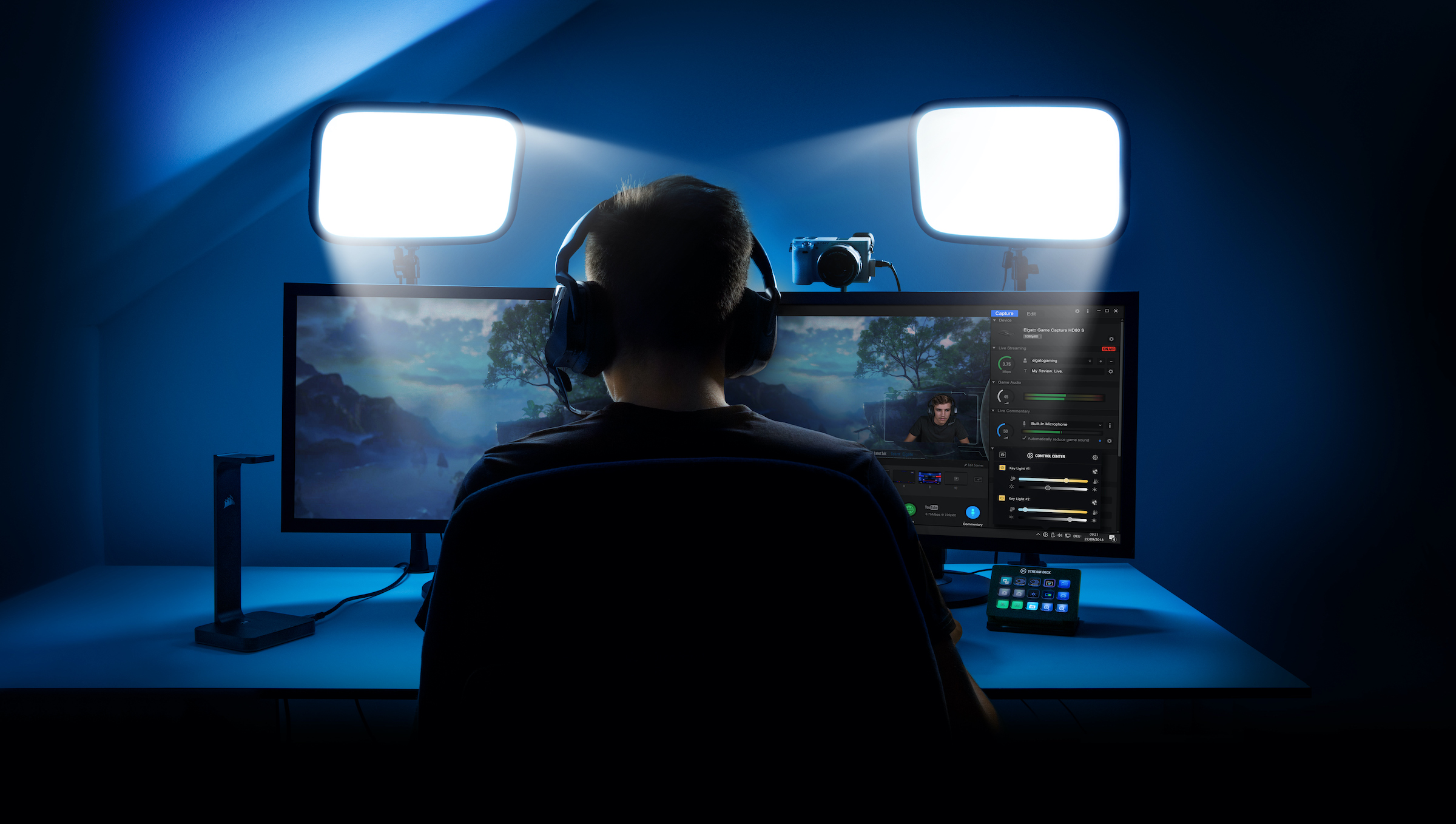
With plenty of standard tripod mounts on each Key Light, high-quality durable construction and connected control features, these lights are the easiest to make work in whatever space you have available. The quality of the light they put out is also excellent, and they’re great for lighting pros and newbies alike since it’s very easy to tune them as needed to produce the effect you want.

Accent your space

Beyond subject lighting, you can look at different kinds of accent lighting to make your overall home studio more visually interesting or appealing. Again, there are a number of options here, but if you’re looking for something that also complements your home furnishings and won’t make your house look too much like a studio set, check out some of the more advanced versions of Hue’s connected lighting system.

The Hue Play light bar is a great accent light, for instance. You can pick up a two pack, which includes two of the full-color connected RGB lights. You’ll need a Hue hub for these to work, but you can also get a starter pack that includes two lights and the hub if you don’t have one yet. I like these because you can easily hide them behind cushions, chairs, or other furniture. They provide awesome uplight effects on light-colored walls, especially if you get rid of other ambient light (beyond your main video lights).
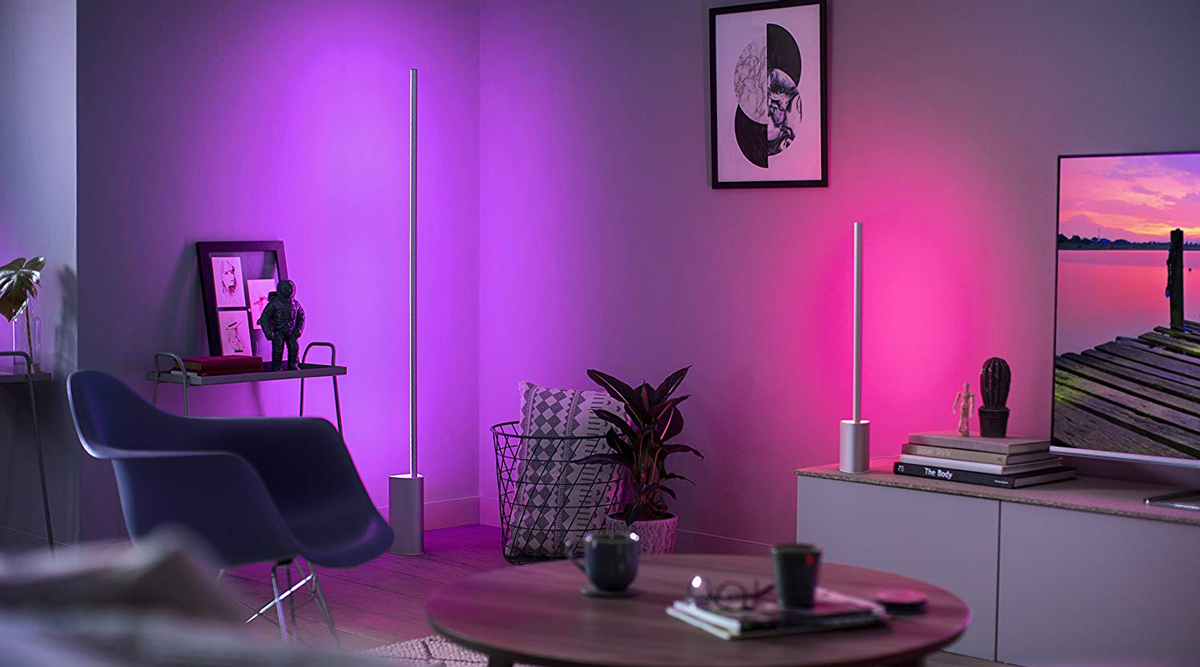
To really amplify the effect, consider pairing these up with something one the Philips Hue Signe floor or table lamps. The Signe series is a long LED light mounted to a weighted base that provide strong, even accent light with any color you choose. You can sync these with other Hue lights for a consistent look, or mix and max colors for different dynamic effects.

On video, this helps with subject/background separation, and just looks a lot more polished than a standard background, especially when paired with defocused effects when you’re using better quality cameras. As a side benefit, these lights can be synced to movie and video playback for when you’re consuming video, instead of producing it, for really cool home theater effects.

If you’re satisfied with your lighting setup but are still looking for other pointers, check out our original guide, as well as our deep dive on microphones for better audio quality.
29 May 2020

Uber latest features lets riders book by the hour and make multiple stops

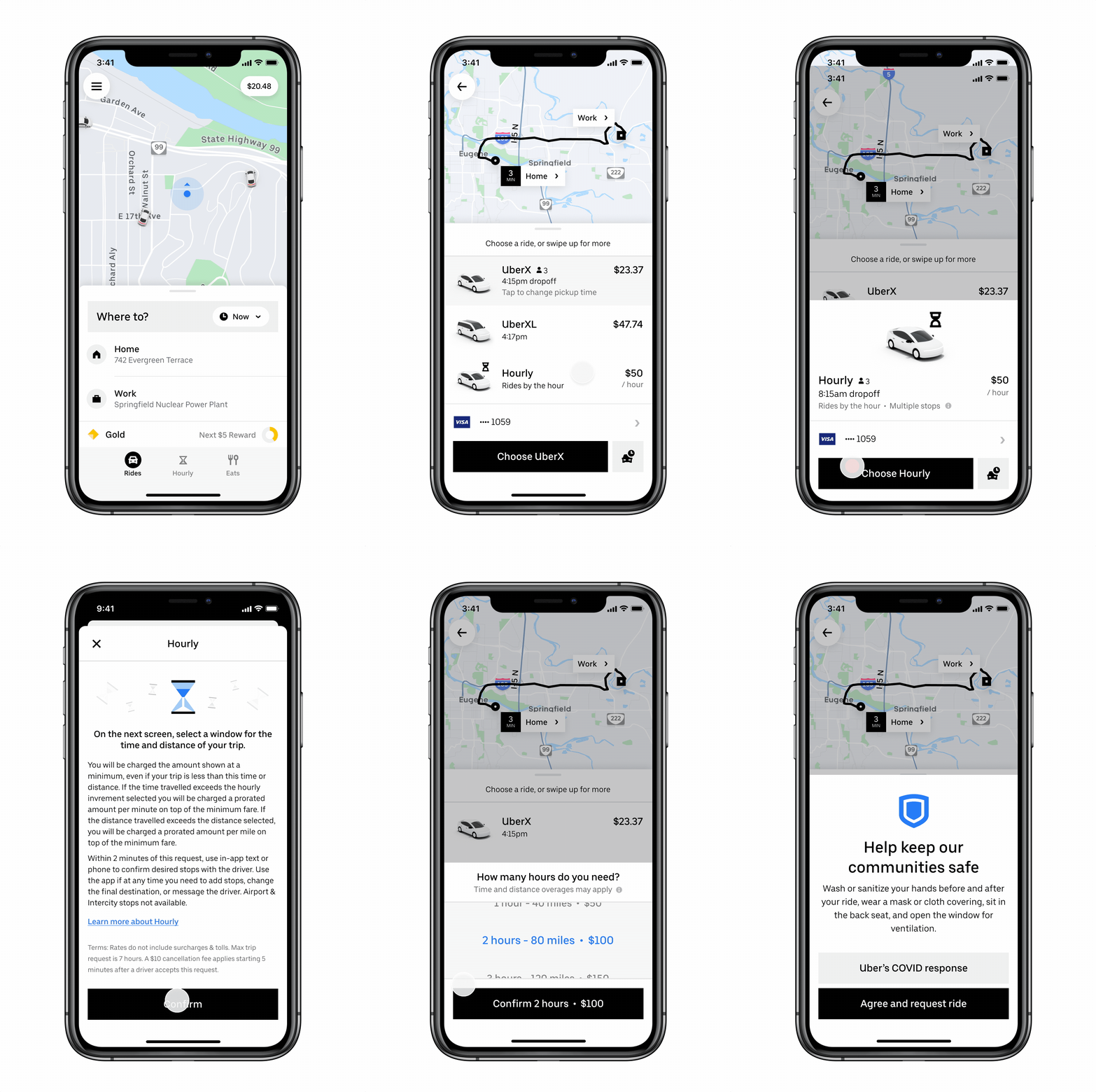
Uber is bringing a new feature to the U.S. that lets users book rides for $50 an hour and make multiple stops as the ride-hailing company tries to respond to changing consumer needs during the COVID-19 pandemic.

The hourly booking feature, which is already available in a handful of international cities in Australia, Africa, Europe, and the Middle East, will launch in a dozen U.S. cities beginning Monday. The product will be available in Atlanta, Chicago, Dallas, Houston, Miami, Orlando, Tampa Bay, Philadelphia, Phoenix, Tacoma, Seattle and Washington D.C. Uber said it expects to expand into other U.S. cities in the coming weeks.

Uber made the move in an effort to offer riders a more convenient way to get things done, and to provide an additional earnings opportunity for drivers as we move forward in this ‘new normal,’ Niraj Patel, director of rider operations at Uber said in a statement.

Riders who want to use the new feature start by selecting “hourly” in the app and then entering their initial stop. Riders can see the $50 hourly rate at a glance and compare to other options before committing to the trip. The rider selects the expected hours and can enter in multiple stops — as many as three including the destination.

Uber Hourly for Rider feature

Image Credits: Uber

There are limitations to the feature, including mileage. In some cities, the hourly booking feature only allows drivers to travel up to 40 miles. Trips that travel farther than the mileage limit will be charged to the rider at a per mile rate. The same rule applies to trips the run over the booked hour; riders will be charged per minute over the hour.

Hourly booking cannot be used to travel to or from airports and trips must be within a city service area. The $50 hourly rate excludes tolls and surcharges.


29 May 2020

How startups can leverage elastic services for cost optimization

Due to COVID-19, business continuity has been put to the test for many companies in the manufacturing, agriculture, transport, hospitality, energy and retail sectors. Cost reduction is the primary focus of companies in these sectors due to massive losses in revenue caused by this pandemic. The other side of the crisis is, however, significantly different.

Companies in industries such as medical, government and financial services, as well as cloud-native tech startups that are providing essential services, have experienced a considerable increase in their operational demands — leading to rising operational costs. Irrespective of the industry your company belongs to, and whether your company is experiencing reduced or increased operations, cost optimization is a reality for all companies to ensure a sustained existence.

One of the most reliable measures for cost optimization at this stage is to leverage elastic services designed to grow or shrink according to demand, such as cloud and managed services. A modern product with a cloud-native architecture can auto-scale cloud consumption to mitigate lost operational demand. What may not have been obvious to startup leaders is a strategy often employed by incumbent, mature enterprises — achieving cost optimization by leveraging managed services providers (MSPs). MSPs enable organizations to repurpose full-time staff members from impacted operations to more strategic product lines or initiatives.

Why companies need cost optimization in the long run

29 May 2020

Google’s latest experiment encourages social distancing through AR

Several months into this pandemic, you can no doubt already eyeball six feet/two meters with the best of them. But if you’re still having trouble — and happen to have an Android device handy — Google’s got you covered, I guess.

The latest project out of the company’s Experiments With Google collection, Sodar is a simple browser-based app that uses WebXR to offer a mobile augmented reality social distance. Visiting the site in Chrome on an Android handset will bring up the app. From there you’ll need to point your camera at the ground and move it around as the device recognizes the plane with a matrix of dots.

Move it up, and you’ll get a visual perimeter of two meters (that’s 6.6 feet for us imperial unit loving Americans) — the CDC-recommended length to help curb the spread of COVID-19. The organization also handily lists it as “about two arms’ length. The app is probably more clever than it is useful at this point. Perhaps some day in the future, if smart glasses ever really take off. A big if, of course. 

Meantime, holding a phone up to make sure you’re a proper distance away from your fellow human/disease vector is a bit less practical than good old fashioned common sense.

29 May 2020

Tech talent is flocking to smaller cities, but investors aren’t

Hello and welcome back to Equity, TechCrunch’s venture capital-focused podcast, where we unpack the numbers behind the headlines. This week’s show took a break from regularly scheduled programming. Our co-host Alex Wilhelm, who usually leads us through the show, was on some deserved vacation, so Danny Crichton and Natasha Mascarenhas took the reigns and invited Floodgate Capital’s Iris Choi to join in on the fun. It’s Choi’s fourth time being on the podcast, which officially makes her our most tenured guest yet (in case the accomplished investor needs another bullet point on her bio page).

This week’s docket features scrappiness, a seed round, and a Startup battlefield alumnus.

Here’s what we chewed through:

  • LeverEdge raised seed funding to get you and your friends a volume discount on student loans. Fintech has been booming for years now, and startups often crop up around the painful wolrd of student loans. Yet this startup still caught our eye, and it has a little something to do with its choice to use collective bargaining power as its modus operandi.
  • Stackin’ raises $12.6M Series B for a text-messaging service that connects millennials to money tips, and eventually other fintech apps. According to CEO Scott Grimes, Stackin’ wants to be the “pipes that port people around fintech.” We get into if the world needs a fintech app marketplace and how it targets younger users.
  • D-ID, a Startup Battlefield alumnus, digitally de-identifies faces in videos and still images and just raised $13.5 million. We’re all worried about our privacy concerns, so the funding news was a refreshing change of pace from the usual headlines we see around surveillance. Now the company just needs to find a successful use case beyond the goodness in people’s hearts.
  • ByteDance, the Chinese parent company that owns TikTok, hit $3 Billion in net profit last year, reports Bloomberg. TikTok also recently snagged former Disney executive Kevin Mayer for its CEO. This one, as you can expect, made for an interesting conversation around privacy and bandwidth. We even asked Choi to weigh in on Donald J. Trump’s recent tweet threatening to regulate social media companies, since Floodgate was an early angel investor in Twitter.
  • We ended with a round table of sorts on how the future of work will look and feel in our new world, from college campuses to offices. We get into the vulnerability that comes with being on Zoom, the ever-increasing stupidity of “manels”, and how tech talent might be flocking to smaller cities but investors aren’t just yet.

And that was the show! Thanks to our producer Chris Gates for helping us put to this together, thanks to you all for listening in on this quirky episode, and thanks to Iris Choi for always bringing a fresh, candid perspective. Talk next week.

29 May 2020

Facebook takes on Twitter with Venue, a ‘second screen’ companion for live events

Facebook’s R&D group, NPE Team, is launching a new app for engaging fellow fans around live events, Venue. This is the third new app to launch just this week from Facebook’s internal team focused on experimenting with new concepts in social networking. With Venue, the company aims to offer a digital companion for live events, starting with this Sunday’s NASCAR race.

The new app appears to be a challenge to Twitter, which today serves as the de facto “second screen” for commenting on live events and engaging with fellow fans. On Twitter, fans often use hashtags to add their commentary to live events that can range from TV show premieres to sports competitions to major political happenings, like live-streamed congressional hearings or the “State of the Union” presidential address, for example.

Twitter’s in-house curation team also rounds up the highlights from major events (e.g.), which are quick summaries featuring notable tweets, video clips, photos, comments and more about an event or related news story.

While there are some similarities with Twitter, Facebook’s Venue takes a different approach to the second screen.

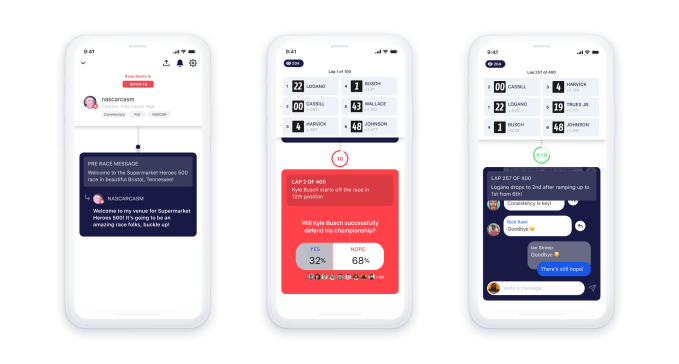
Instead of having everyone viewing the event constantly chiming in with their own thoughts and reactions, the commentators for a given event hosted in Venue will only include well-known personalities — like journalists, current or former athletes, or aspiring “fan-analysts.” The latter could include popular social media personalities, for example.

These commentators will provide their own takes on the event and pose interactive questions and polls for those watching. The event host may also open up short, constrained chats around specific moments during the event — but fan commentary isn’t the main focus of the app.

In addition, fans don’t stay glued to their phone during the entire event when using Venue. Instead, the app sends out a notification to users when there’s a new “moment” available in the app. These “moments” aren’t like Twitter’s summaries. They’re one of the short, digital opportunities where fans can participate.

Facebook will first test Venue with NASCAR’s Food City presents the Supermarket Heroes 500 race on Sunday, May 31, 2020. Social media personality, nascarcasm, will host the in-app “venue.”

Future NASCAR races will also be hosted in Venue, with commentators including nascarcasm, FOX Sports NASCAR reporter Alan Cavanna, and NASCAR driver Landon Cassill.

“As NASCAR makes its return to action over the coming weeks, Venue will provide users with a unique and exciting way to connect with fellow race fans from around the globe – all from the safety and comfort of their own homes,” said Tim Clark, NASCAR SVP and Chief Digital Officer, in a statement. “NASCAR was built on innovation, and we couldn’t be more excited to help a great partner like Facebook’s New Product Experimentation team innovate around new platforms,” he added.

Facebook believes the new app will give viewers the chance to better engage with live events and fellow fans.

“Live broadcasts still offer the rare opportunity for millions of people to consume content simultaneously,” Facebook explained in its announcement. “Despite drawing large concurrent viewership, live broadcasts are still a mostly solo viewing experience,” it noted.

That’s a bit of stretch. Fans certainly engage with one another when chatting about live events on Twitter. And when Twitter streams the video from a live event — something Venue doesn’t do, by the way — Twitter will offer a dedicated space where users can easily see the tweets from fellow viewers. Other live video platforms, including Facebook’s own Facebook Live and Instagram Live, also include chat experiences as do YouTube Live and Twitch.

The real difference between Venue and Twitter is that it shifts the balance of power. On Twitter, everyone’s comments are given equal footing. In Venue, it’s the expert hosts leading and curating the conversation.

Facebook hasn’t announced what future events Venue may host beyond NASCAR but it sounds like it has plans to expand Venue further down the road as it refers to NASCAR as its “first” sports partner.

The Venue app is live today on iOS and Android.

29 May 2020

Cisco to acquire internet monitoring solution ThousandEyes

When Cisco bought AppDynamics in 2017 for $3.7 billion just before the IPO, the company sent a clear signal it wanted to move beyond its pure network hardware roots into the software monitoring side of the equation. Yesterday afternoon the company announced it intends to buy another monitoring company, this time snagging internet monitoring solution ThousandEyes.

Cisco would not comment on the price when asked by TechCrunch, but published reports from CNBC and others pegged the deal at around $1 billion. If that’s accurate, it means the company has paid around $4.7 billion for a pair of monitoring solutions companies.

Cisco’s Todd Nightingale, writing in a blog post announcing the deal said that the kind of data that ThousandEyes provides around internet user experience is more important than ever as internet connections have come under tremendous pressure with huge numbers of employees working from home.

ThousandEyes keeps watch on those connections and should fit in well with other Cisco monitoring technologies. “With thousands of agents deployed throughout the internet, ThousandEyes’ platform has an unprecedented understanding of the internet and grows more intelligent with every deployment, Nightingale wrote.

He added, “Cisco will incorporate ThousandEyes’ capabilities in our AppDynamics application intelligence portfolio to enhance visibility across the enterprise, internet and the cloud.”

As for ThousandEyes, co-founder and CEO Mohit Lad told a typical acquisition story. It was about growing faster inside the big corporation than it could on its own. “We decided to become part of Cisco because we saw the potential to do much more, much faster, and truly create a legacy for ThousandEyes,” Lad wrote.

It’s interesting to note that yesterday’s move, and the company’s larger acquisition strategy over the last decade is part of a broader move to software and services as a complement to its core networking hardware business.

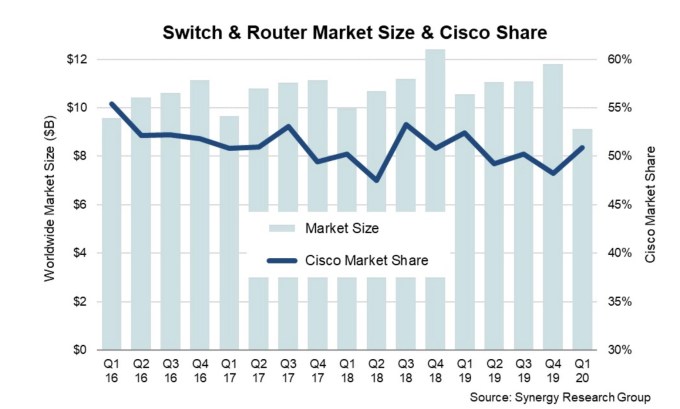
Just yesterday, Synergy Research released its network switch and router revenue report and it wasn’t great. As companies have hunkered down during the pandemic, they have been buying much less network hardware, dropping the Q1 numbers to seven year low. That translated into a $1 billion less in overall revenue in this category, according to Synergy.

While Cisco owns the vast majority of the market, it obviously wants to keep moving into software services as a hedge against this shifting market. This deal simply builds on that approach.

ThousandEyes was founded in 2010 and raised over $110 million on a post valuation of $670 million as of February 2019, according to Pitchbook Data.

29 May 2020

Uber UK launches Work Hub for drivers to find other gig jobs during COVID-19

Uber UK has launched a Work Hub for drivers to view a selection of temporary work opportunities with other companies as a way to supplement pandemic-hit ride-hailing earnings during the coronavirus crisis.

The Work Hub sits within the Uber driver app and displays offers of work from third party providers — including jobs that involve using a car to make deliveries — offering alternative gigs to drivers whose earnings have been affected by weak demand for ride-hailing during the COVID-19 pandemic.

The ride-hailing giant rolled out a similar feature in the US back in April, offering drivers there the ability to respond to job postings from around a dozen other companies, as well as the ability to receive orders through other Uber units: Eats, Freight and Works.

The UK flavor of the feature has fewer external suppliers (three at launch) — and seemingly no other internal Uber work gigs on offer.

From today, Uber said UK drivers can access “thousands” of “temporary job postings” and “flexible earning opportunities” with other companies — initially delivery firms Hermes and Yodel.

The recruiter, Adecco Group, is also offering temp work via the UK Work Hub for drivers.

“We’ll continue to add new partnerships and listings to the Work Hub as we find more opportunities for you, so check the Driver app regularly for updates,” Uber adds in a blog post announcing the launch.

The company has previously emailed UK drivers encouraging them to sign up for delivery work with the online supermarket Ocado, as demand for grocery delivery has surged during the COVID-19 pandemic.

But it’s now made this signposting more formal, via the Work Hub — and says the “thousands” of jobs are additional to any Ocado opportunities it had already emailed to UK drivers.

It’s not clear why Uber UK is not offering drivers the ability to pick up Uber Eats orders to tide themselves over.

However the Eats vs Uber ride-hailing labor force in the country likely has relatively little overlap, with cycle and motorbike couriers dominating UK Eats deliveries. Additionally, no UK cities keen to encourage extra cars to hit the streets right now — so Uber may have multiple reasons not to want to cross those streams in Europe.

“Drivers are doing essential work to keep our communities moving as we fight this virus, but with fewer trips happening they need more ways to earn. With the Work Hub, drivers can find these additional earning opportunities with other companies, working flexibly around driving on the Uber app if they choose to do so,” said Jamie Heywood, Uber’s regional GM for Northern and Eastern Europe, in a statement.

The Work Hub initiative generally looks intended to encourage drivers to supplement (pandemic-hit) Uber earnings with other gig jobs. And — cynics might say — discourage an essential platform workforce from looking elsewhere for permanent work.

Uber will need its pool of drivers to be there still, owning a car and available for gig work, when normalcy returns if it’s ride-hailing business is to bounce back.

Aside from the US and the UK, other markets where Uber has already launched the Work Hub for drivers are Australia, Chile, Costa Rica, Canada, Mexico, Portugal and South Africa.

While the feature has been born in a crisis, Uber had already made moves into the broader temp work space — launching a shift finder app, called Uber Works, in Chicago last year. And the company told us it sees longer term opportunity for the Work Hub, as a vehicle to broaden the type of earning opportunities it can put in front of drivers, saying the initiative will continue to evolve.

29 May 2020

SoftBank pours $500M into Didi in China’s biggest autonomous driving round

The race to automate vehicles on China’s roads is heating up. Didi, the Uber of China, announced this week an outsized investment of over $500 million in its freshly minted autonomous driving subsidiary. Placing the bet — the single largest fundraising round in China’s autonomous driving sector — is its existing investor Softbank, the Japanese telecom giant and startup benefactor that has also backed Uber.

The proceeds came through Softbank’s second Vision Fund, which was reportedly lagging in fundraising as its Fund I recorded massive losses in part due to the collapsing valuation of WeWork.

As China’s largest ride-hailing provider with mountains of traffic data, Didi clearly has an upper hand in developing robotaxis, which could help address driver shortage in the long term. But it was relatively late to the field. In 2018, Didi ranked eighth in kilometers of autonomous driving tests carried out in Beijing, far behind search giant Baidu which accounted for over 90% of the total mileage that year.

It’s since played aggressive catchup. Last August, it spun off its then three-year-old autonomous driving unit into an independent company to focus on R&D, building partnerships along the value chain, and promoting the futuristic technology to the government. The team now has a staff of 200 across its China and U.S. offices.

As an industry observer told me, “robotaxis will become a reality only when you have the necessary operational skills, technology and government support all in place.”

Didi is most famous for its operational efficiency, as facilitating safe and pleasant rides between drivers and passengers is no small feat. The company’s leadership hails from Alibaba’s legendary business-to-business sales team, also known as the “Alibaba Iron Army” for its ability in on-the-ground operation.

On the tech front, the subsidiary is headed by chief executive Zhang Bo, a Baidu veteran, and chief technology officer Wei Junqing, who joined last year from self-driving software company Aptiv.

The autonomous segment can also benefit from Didi’s all-encompassing reach in the mobility industry. For instance, it’s working to leverage the parent company’s smart charging networks, fleet maintenance service and insurance programs for autonomous fleets.

The fresh capital will enable Didi’s autonomous business to improve safety — an area that became a focal point of the company after two deadly accidents — and efficiency through conducting R&D and road tests. The financing will also allow it to deepen industry cooperation and accelerate the deployment of robotaxi services in China and abroad.

Over the years, Didi has turned to traditional carmakers for synergies in what it dubs the “D-Alliance,” which counts more than 31 partners. It has applied autonomous driving technology to vehicles from Lincoln, Nissan, Volvo, BYD, to name a few.

Didi has secured open-road testing licenses in three major cities in China as well as California. It said last August that it aimed to begin picking up ride-hailing passengers with autonomous cars in Shanghai in a few months’ time. It’s accumulated 300,000 kilometers of road tests in China and the U.S. as of last August.

29 May 2020

Twitter screens Trump’s Minneapolis threat-tweet for glorifying violence

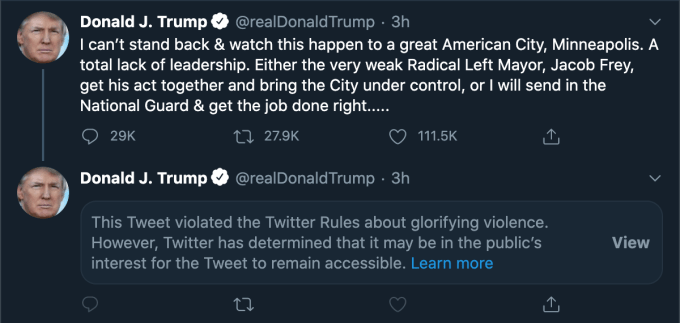
After applying a fact-checking label Tuesday to a misleading vote-by-mail tweet made by US president Donald Trump, Twitter is on a roll and has labeled another of the president’s tweets — this time screening his words from casual view with what it calls a “public interest notice” that states the tweet violated its rules about glorifying violence. 

Here’s how the tweet appears without further interaction (second tweet in the below screengrab):

The public interest notice replaces the substance of what Trump wrote, meaning a user has to actively click through to view the offending tweet.

Engagement options are also limited as a result by this label, meaning users can only retweet the offending tweet with a comment; they cannot like it, reply to it or vanilla retweet it.

Twitter’s notice goes on to explain why it has not removed the offending tweet entirely — and this is where the public interest element of the policy kicks in — with the company writing: “Twitter has determined that it may be in the public’s interest for the Tweet to remain accessible.” 

Twitter appears to be shrugging off the president’s decision yesterday to sign an executive order targeting the legal shield which internet companies rely on to protect them from liability for user-created content — doubling down on displeasing Trump who has accused social media platforms generally of deliberately suppressing conservative views, despite plenty of evidence that ad-targeting platform algorithms actually boost outrage-fuelled content and views — which tends, conversely, to amplify conservative viewpoints.

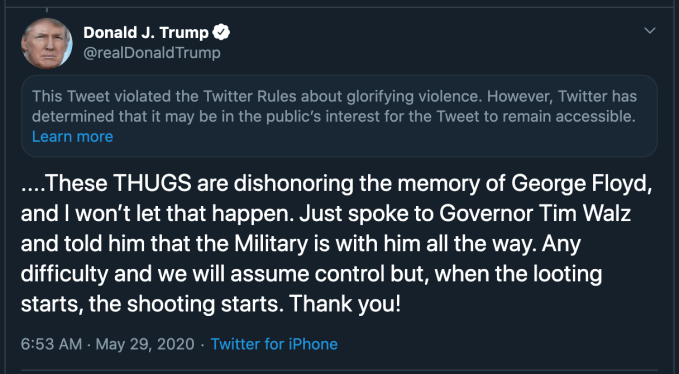
In the latest clash, Trump had tweeted in reference to violent demonstrations taking place in Minneapolis sparked by the killing of a black man, George Floyd, by a white police officer — with the president claiming that “THUGS are dishonoring the memory of George Floyd” before threatening to send in the “Military”.

“Any difficulty and we will assume control but, when the looting starts, the shooting starts. Thank you!” Trump added — making a bald threat to use military force against civilians.

Twitter has wrestled with the issue of how to handle world leaders who break its content rules for years. Most often as a result of Trump who routinely uses its platform to bully all manner of targets — from rival politicians to hated journalists, disobedient business leaders, and even actors who displease him — as well as to dispense direct and sometimes violent threats.

Since being elected, Trump has also used Twitter’s global platform as a foreign policy weapon, firing military threats at the likes of North Korea and Iran in tweet form.

Back in 2018, for example, he teased North Korean leader Kim Jong-Un with button-pushing nuclear destruction (see below tweet) — before going on to “fall in love” with the dictator when he met him in person.

Twitter’s go-to defence for not taking offending Trump tweets down in the past has been that, as US president, the substance of what the man tweets — however mad, bad and dangerous — is inherently newsworthy.

However, more recently, the company has created a policy tool that allows it to intervene — defining terms last summer around “public interest” content on Twitter.

It warned then (almost a full year ago, in June 2019) that it might place a public interest notice on tweets that would otherwise violate its rules (and therefore merit a takedown) — in order to “to provide additional context and clarity”, rather than removing the offensive tweet.

Fast forward a year and the tech giant has started applying labels to Trump’s tweets — beginning with a fact-check label earlier this week, related to the forthcoming US election, and following up now with a public interest notice related to Trump glorifying violence.

So, finally, the tech giant seems to be inching towards drawing a limit-line around Trump in near real-time.

Explaining its decision to badge the US president’s threat to order the military to shoot looters in Minneapolis, the company writes: “This Tweet violates our policies regarding the glorification of violence based on the historical context of the last line, its connection to violence, and the risk it could inspire similar actions today.”

“We’ve taken action in the interest of preventing others from being inspired to commit violent acts, but have kept the Tweet on Twitter because it is important that the public still be able to see the Tweet given its relevance to ongoing matters of public importance,” Twitter goes on.

It also links to its policy against tweets that glorify violence — which states unequivocally [in bold]: “You may not threaten violence against an individual or a group of people.”

Back in June, when Twitter announced the ‘abusive behavior’ label, it also warned that tweets which get screened with a public interest notice will not benefit from any algorithmic acceleration, writing: “We’ll also take steps to make sure the Tweet is not algorithmically elevated on our service, to strike the right balance between enabling free expression, fostering accountability, and reducing the potential harm caused by these Tweets.”

However the newsworthiness of Twitter’s decision to finally apply its own rules vis-a-vis Trump will ensure there’s plenty of non-algorithmic amplification (and no little irony).

We reached out to the company with questions about its decision to apply a public interest screen on Trump’s latest tweet but at the time of writing it had not responded.

On Wednesday night, Twitter CEO and co-founder, Jack Dorsey, put out a series of tweets defending its decision to apply a fact-check label to Trump’s earlier misleading tweets about vote-by-mail.

“This does not make us an “arbiter of truth”,” wrote Dorsey. “Our intention is to connect the dots of conflicting statements and show the information in dispute so people can judge for themselves. More transparency from us is critical so folks can clearly see the why behind our actions.”

Dorsey’s remarks followed pointed comments made by Facebook CEO Mark Zuckerberg to Fox News, seeking to contrast Facebook’s claimed ‘neutrality’ when policing its platform with Twitter’s policy of taking a stance on issues such as political advertising (which Twitter does not allow).

“I just believe strongly that Facebook shouldn’t be the arbiter of truth of everything that people say online,” Zuckerberg told the conservative news station. “Private companies… especially these platform companies, shouldn’t be in the position of doing that.”

It’s notable that Dorsey used Zuckerberg’s exact turn of phrase — “arbiter of truth” — to reject Facebook’s attack on Twitter’s policy as a straw man argument.