Category: UNCATEGORIZED

10 Apr 2019

Google Cloud announces Traffic Director, a networking management tool for service mesh

With each new set of technologies comes a new set of terms. In the containerized world, applications are broken down into discrete pieces or micro services. As these services proliferate, it creates a service mesh, a network of services and the interactions that take place as they interact. For each new technology like this, it requires a management layer, especially for the network administrators to understand and control the new concept, in this case, the service mesh.

Today at Google Cloud Next, the company announced the Beta of Traffic Director for open service mesh, specifically to help network managers understand what’s happening in their service mesh.

“To accelerate adoption and reduce the toil of managing service mesh, we’re excited to introduce Traffic Director, our new GCP-managed, enterprise-ready configuration and traffic control plane for service mesh that enables global resiliency, intelligent load balancing, and advanced traffic control capabilities like canary deployments,” Brad Calder, VP of engineering for technical infrastructure at Google Cloud, wrote in a blog post introducing the tool.

Traffic Director provides a way for operations to deploy a service mesh on their networks and have more control over how it works and interacts with the rest of the system. The tool works with Virtual Machines, Compute Engine on GCP, or in a containerized approach, GKE on GCP.

The product is just launching into Beta today, but the road map includes additional security features and support for hybrid environments, and eventually integration with Anthos, the hybrid management tool the company introduced yesterday at Google Cloud Next.

10 Apr 2019

Google Cloud Data Fusion lets you see all your data sets before ingesting them in BigQuery

Google is announcing several updates to its data analytics products at its Google Cloud Next developer conference today. The company wants to make it easier to move data to Google’s cloud, manipulate data and turn this data into insights.

First, Google wants to make it easier to access all your data from Google’s platform. The company is launching Cloud Data Fusion in beta. As the name suggests, this service lets you aggregate all your data sets in a single interface.

Even if your data is hosted on other cloud services, you can view it from the Cloud Data Fusion interface. You can then figure out which data set you’ll need to process in BigQuery for instance — BigQuery is Google’s cloud-based service for analyzing large amounts of data using SQL queries.

After selecting your data sets, you need to make sure BigQuery can ingest all this data. You might need to transfer some data to Google’s cloud.

Even if you already store data on Google Cloud Storage, chances are your data is spread out across multiple systems and data formats. For instance, you could already be uploading terabytes of raw data to Google’s servers, but it’s no use if you can’t process it with data in Salesforce or Workday.

The company already lets you transfer data automatically using the BigQuery Data Transfer Service. And Google says that this service now supports over 100 SaaS applications, including Salesforce, Marketo, Workday and Stripe.

This service already lets you transfer your data warehouse data. So if you want to switch from Amazon Redshift or Teradata, you can migrate everything.

Now that all your data is available, you need to visualize it. Google already lets you create interactive dashboards and reports in Google Data Studio. That service is powered by BigQuery BI engine. Google says that many complex queries now take less than a second to process.

Soon, Google will open up BigQuery BI Engine to other data visualization services, such as Looker and Tableau. BigQuery BI Engine will run behind the scene to process your data.

If you don’t want to learn SQL queries, chances are you use Microsoft Excel or Google Sheets to sort and process data. Google already lets you connect BigQuery with Google Sheets. The company goes one step further by creating a new type of infinite spreadsheet — connected sheets. Even if you have billions of rows of data, Google Sheets can now display your BigQuery-powered spreadsheet.

Last year, Google introduced BigQuery ML. That service lets customers build models on top of their data warehouse using SQL. Google is adding AutoML tables in beta. It lets you build machine learning models in a few clicks instead of a few lines of code.

Finally, Google is launching a metadata management service called Data Catalog. I’m sure telecom companies are going to love this. Customers will be able to restrict access to sensitive data assets using Google’s Cloud IAM interface.

And that’s it for Google’s data analytics news at Google Cloud Next.

10 Apr 2019

Google launches new security tools for G Suite users

Google today launched a number of security updates to G Suite, its online productivity and collaboration platform. The focus of these updates is on protecting a company’s data inside G Suite, both through controlling who can access it and through providing new tools for prevening phishing and malware attacks.

To do this, Google is announcing the beta launch of its advanced phishing and malware protection, for example. This is meant to help admins protect users from malicious attachment and inbound email spoofing, among other things.

The most interesting feature here, though, is the new security sandbox, another beta feature for G Suite enterprise users. The sandbox allows admins to add an extra layer of protection on top of the standard attachment scans for known viruses and malware. Those existing tools can’t fully protect you against zero-day ransomware or sophisticated malware, though. So instead of just letting you open the attachment, this tool executes the attachment in a sandbox environment to check if there are any security issues.

With today’s launch, Google is announcing the beta launch of its new security and alert center for admins. These tools are meant to create a single services that features best practice recommendations, but also a unified notifications center and tools to triage and take actions against threats, all with focus on collaboration among admins. Also new is a security investigation tool that mostly focuses on allowing admins to create automated workflows for sending notifications or assigning ownership to security investigations.

10 Apr 2019

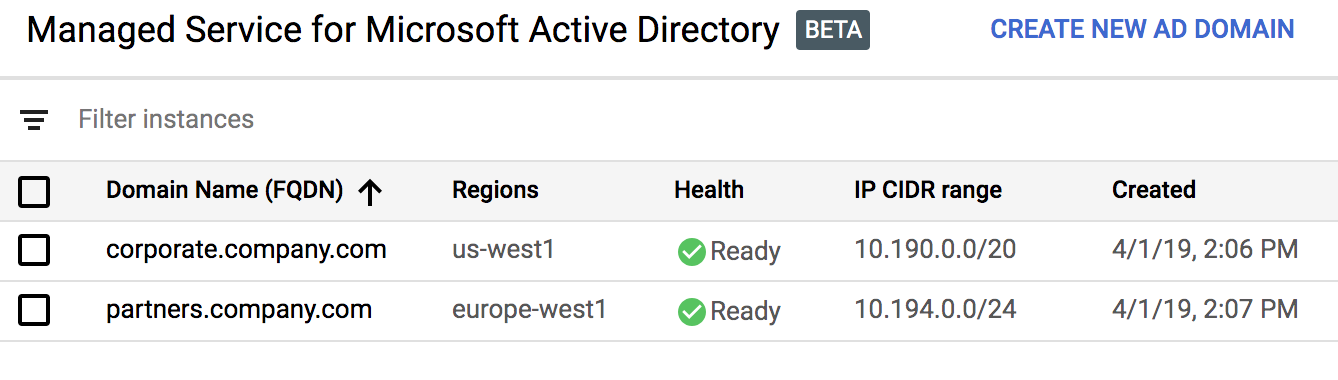
Google Cloud adds a managed service for Microsoft’s Active Directory

Love it or hate it, Microsoft’s Active Directory remains one of the most-used identity services in the enterprise. Google’s Cloud Platform has long allowed you to manually set up an Active Directory deployment, but today, Google is taking this a step further by announcing the beta of a managed service. As the name implies, Google will manage this service for you and automate everything from server maintenance to security configurations.

Unsurprisingly, given Google’s recent focus on hybrid-cloud deployments, you also can use this service to extend your existing on-premises Active Directory domains to the cloud.

As Google notes, the number of apps and servers that rely on Active Directory and that are moving to the cloud continues to increase. Many of these are legacy applications, but plenty of new apps also rely on it because it’s simply the standard in a given company. This also introduces new challenges for IT teams, which now have to manage additional latency and security requirements, for example. The new managed service is meant to make all of this easier and, as Google says, allow “the IT and security teams to focus on higher-value projects.”

10 Apr 2019

Google launches an end-to-end AI platform

As expected, Google used the second day of its annual Cloud Next conference to shine a spotlight on its AI tools. The company made a dizzying number of announcements today, but at the core of all of these new tools and services is the company’s plan to democratize AI and machine learning with pre-built models and easier to use services, while also giving more advanced developers the tools to build their own custom models.

The highlight of today’s announcements is the beta launch of the company’s AI Platform. The idea here is to offer developers and data scientists an end-to-end service for building, testing and deploying their own models. To do this, the service brings together a variety of existing and new products that allow you to build a full data pipeline to pull in data, label it (with the help of a new built-in labeling service) and then either use existing classification, object recognition or entity extraction models, or use existing tools like AutoML or the Cloud Machine Learning engine to train and deploy custom models.

“The AI Platform is this place where, if you are taking this terrifying journey from a journeyman idea of how you can use AI in your enterprise, all the way through launch and a safe, reliable deployment, the AI Platform help you move between each of these stages in a safe way so that you can start with exploratory data analysis, start to build models using your data scientists, decide that you want to use this specific model, and then with essentially one click be able to deploy it,” a Google spokesperson said during a press conference ahead of today’s official announcement.
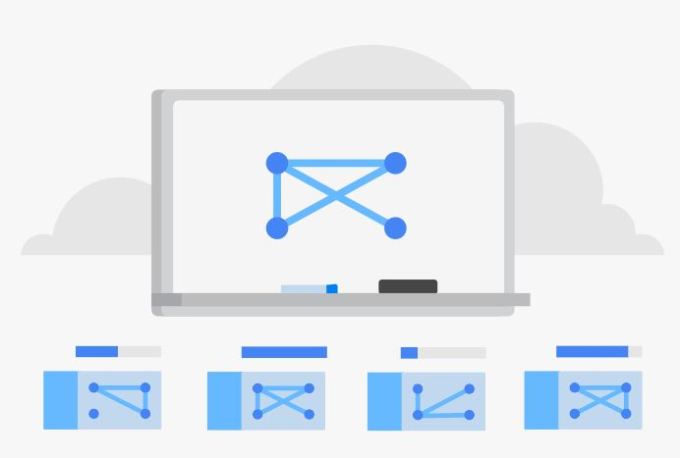
But there is plenty more AI news, too, mostly courtesy of Cloud AutoML, Google’s tool for automating the model training process for developers with limited machine learning expertise.

One of these new features is AutoML Tables, which takes existing tabular data that may sit in Google’s BigQuery database or in a storage service and automatically creates a model that will predict the value of a given column.

Also new is AutoML Video Intelligence (now in beta), which can automatically annotate and tag video, using object recognition to classify video content and make it searchable. For detecting objects in photos, Google also today launched the beta of AutoML Vision and for applications that run at the edge, Google launched the beta AutoML Vision Edge, which includes the ability to then deploy these models to edge devices.

A lot of enterprise data comes in the form of straightforward, unstructured text, though. For these use cases, Google today launched the betas of its custom entity extraction service and a custom sentiment analysis service. Both of these tools can be customized to fit the needs of a given organization. It’s one thing to use a generic entity extraction service to understand documents, but for most businesses, the real value here is to be able to pull out information that may be very specific to their needs and processes.

Talking about documents, Google also today announced the beta of its Document Understanding API. This is a new platform that can automatically analyze scanned or digital documents. The service basically combines the ability to turn a scanned page into machine-readable text and then use Google’s other machine learning services to extract data from it.

After introducing it in preview last year, the company also today launched the beta of its Contact Center AI. This service, which was built with partners like Twilio, Vonage, Cisco, Five9, Genesys and Mitel, offers a full contact center AI solution that uses tools like Dialogflow and Google’s text-to-speech capabilities to allow its users to build a virtual agent system (and when things go awry, it can pass the customer to a human agent).

It’s no secret that many enterprises struggle to combine all of these tools and services into a coherent platform for their own needs. Maybe it’s no surprise then that Google also today launched it first AI solution for a specific vertical: Google Cloud Retail. This service combines the company’s Vision Product Search, Recommendations AI and AutoML Tables into a single solution for tackling retail use cases. Chances are, we will see more of the packages for other verticals in the near future.

10 Apr 2019

Google launches its coldest storage service yet

At its Cloud Next conference, Google today launched a new archival cold storage service. This new service, which doesn’t seem to have a fancy name, will complement the company’s existing Nearline and Coldline services for storing vast amounts of infrequently used data at an affordable low cost.

The new archive class takes this one step further, though. It’s cheap, with prices starting at $0.0012 per gigabyte and month. That’s $1.23 per terabyte and month.

The new service will become available later this year.

What makes Google cold storage different from the likes of AWS S3 Glacier, for example, is that the data is immediately available, without millisecond latency. Glacier and similar service typically make you wait a significant amount of time before the data can be used. Indeed, in a thinly veiled swipe at AWS, Google directors of product management Dominic Preuss and Dave Nettleton note that “unlike tape and other glacially slow equivalents, we have taken an approach that eliminates the need for a separate retrieval process and provides immediate, low-latency access to your content.”

To put that into context, a gigabyte stored in AWS Glacier will set you back $0.004 per month. AWS, however, has also pre-announced a Deep Archive storage class, too, though the pricing for that service hasn’t been announced yet and the promised retrival time here is “within 12 hours.”

Gogole’s new object storage service uses the same APIs as Google’s other storage classes and Google promises that the data is always redundantly stored across availability zones, with eleven 9’s of annual durability.

In a press conference ahead of today’s official announcement, Preuss noted that this service mostly a replacement for on-premise tape backups, but now that many enterprises try to keep as much data as they can to then later train their machine learning models, for example, the amounts of fresh data that needs to be stored for the long term continues to increase rapidly, too.

With low latency and the promise of high availability, there obviously has to be a drawback here, otherwise Google wouldn’t (and couldn’t) offer this service at this price. “Just like when you’re going from our standard [storage] class to Nearline or Coldline, there’s a committed amount of time that you have to remain in that class,” Preuss explained. “So basically, to get a lower price you are committing to keep the data in the Google Cloud Storage bucket for a period of time.”

10 Apr 2019

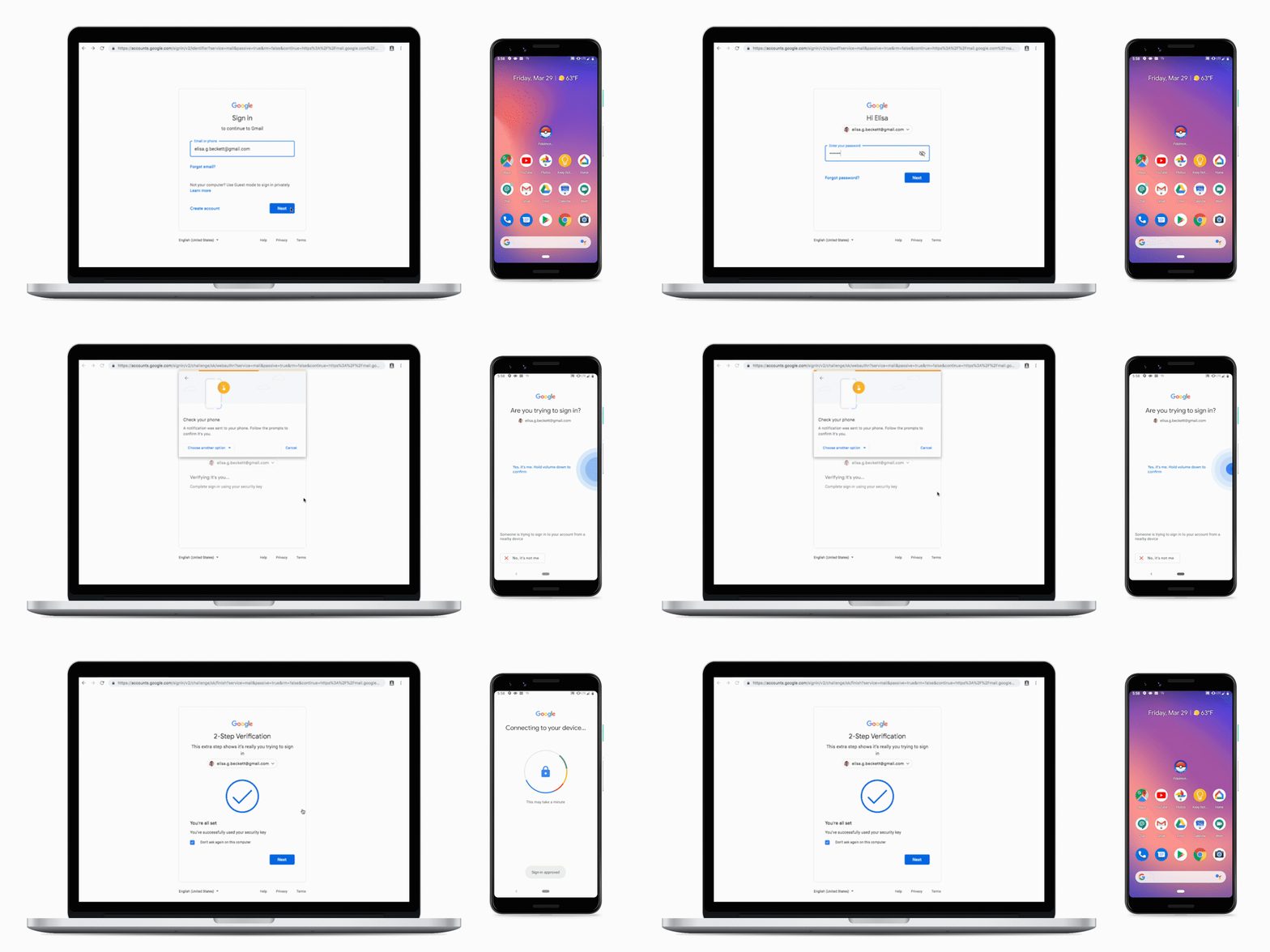
Google turns your Android phone into a security key

Your Android phone could soon replace your hardware security key to provide two-factor authentication access to your accounts. As the company announced at its Cloud Next conference today, it has developed a Bluetooth-based protocol that will be able to talk to its Chrome browser and provide a standards-based second factor for access to its services, similar to modern security keys.

It’s no secret that two-factor authentication remains one of the best ways to secure your online accounts. Typically, that second factor comes to you in the form of a push notification, text message or through an authentication app like the Google Authenticator. There’s always the risk of somebody intercepting those numbers or phishing your account and then quickly using your second factor to log in, though. Because a physical security key also ensures that you are on the right site before it exchanges the key, it’s almost impossible to phish this second factor. The key simply isn’t going to produce a token on the wrong site.

Because Google is using the same standard here, just with different hardware, that phishing protection remains intact when you use your phone, too.

Bluetooth security keys aren’t a new thing, of course, and Google’s own Titan keys include a Bluetooth version (though they remain somewhat controversial). The user experience for those keys is a bit messy, though, since you have to connect the key and the device first. Google, however, says that it has done away with all of this thanks to a new protocol that uses Bluetooth but doesn’t necessitate the usual Bluetooth connection setup process. Sadly, though, the company didn’t quite go into details as to how this would work.

Google says this new feature will work with all Android 7+ devices that have Bluetooth and location services enabled. Pixel 3 phones, which include Google’s Titan M tamper-resistant security chip, get some extra protections, but the company is mostly positioning this as a bonus and not a necessity.

As far as the setup goes, the whole process isn’t all that different from setting up a security key (and you’ll still want to have a second or third key handy in case you ever lose or destroy your phone). You’ll be able to use this new feature for both work and private Google accounts.

For now, this also only works in combination with Chrome. The hope here, though, is to establish a new standard that will then be integrated into other browsers, as well. It’s only been a week or two since Google enabled support for logging into its own service with security keys on Edge and Firefox. That was a step forward. Now that Google offers a new service that’s even more convenient, though, it’ll likely be a bit before these competing browsers will offer support, too, once again giving Google a bit of an edge.

10 Apr 2019

Salesforce and Google want to build a smarter customer service experience

Anyone who has dealt with bad customer service has felt frustration with the lack of basic understanding of who you are as a customer and what you need. Google and Salesforce feel your pain, and today the two companies expanded their partnership to try and create a smarter customer service experience.

The goal is to combine Salesforce’s customer knowledge with Google’s customer service-related AI products and build on the strengths of the combined solution to produce a better customer service experience, whether that’s with an agent or a chatbot..

Bill Patterson, executive vice president for Salesforce Service Cloud, gets that bad customer service is a source of vexation for many consumers, but his goal is to change that. Patterson points out that Google and Salesforce have been working together since 2017, but mostly on sales- and marketing-related projects. Today’s announcement marks the first time they are working on a customer service solution together.

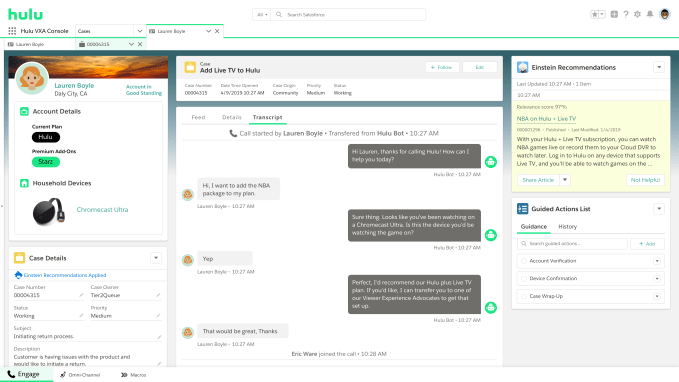
For starters, the partnership is looking at the human customer service agent experience.”The combination of Google Contact Center AI, which highlights the language and the stream of intelligence that comes through that interaction, combined with the customer data and the business process information that that Salesforce has, really makes that an incredibly enriching experience for agents,” Patterson explained.

The Google software will understand voice and intent, and have access to a set of external information like weather or news events that might be having an impact on the customers, while Salesforce looks at the hard data it stores about the customer such as who they are, their buying history and previous interactions.

The companies believe that by bringing these two types of data together, they can surface relevant information in real time to help the agent give the best answer. It may be the best article or it could be just suggesting that a shipment might be late because of bad weather in the area.

Customer service agent screen showing information surfaced by intelligent layers in Google and Salesforce

The second part of the announcement involves improving the chatbot experience. We’ve all dealt with rigid chatbots, who can’t understand your request. Sure, it can sometimes channel your call to the right person, but if you have any question outside the most basic ones, it tends to get stuck, while you scream “Operator! I said OPERATOR!” (Or at least I do.)

Google and Salesforce are hoping to change that by bringing together Einstein, Salesforce’s artificial intelligence layer and Google Natural Language Understanding (NLU) in its Google Dialogflow product to better understand the request, monitor the sentiment and direct you to a human operator before you get frustrated.

Patterson’s department, which is on a $3.8 billion run rate, is poised to become the largest revenue producer in the Salesforce family by the end of the year. The company itself is on a run rate over $14 billion.

“So many organizations just struggle with primitives of great customer service and experience. We have a lot of passion for making everyday interaction better with agents,” he said. Maybe this partnership will bring some much needed improvement.

10 Apr 2019

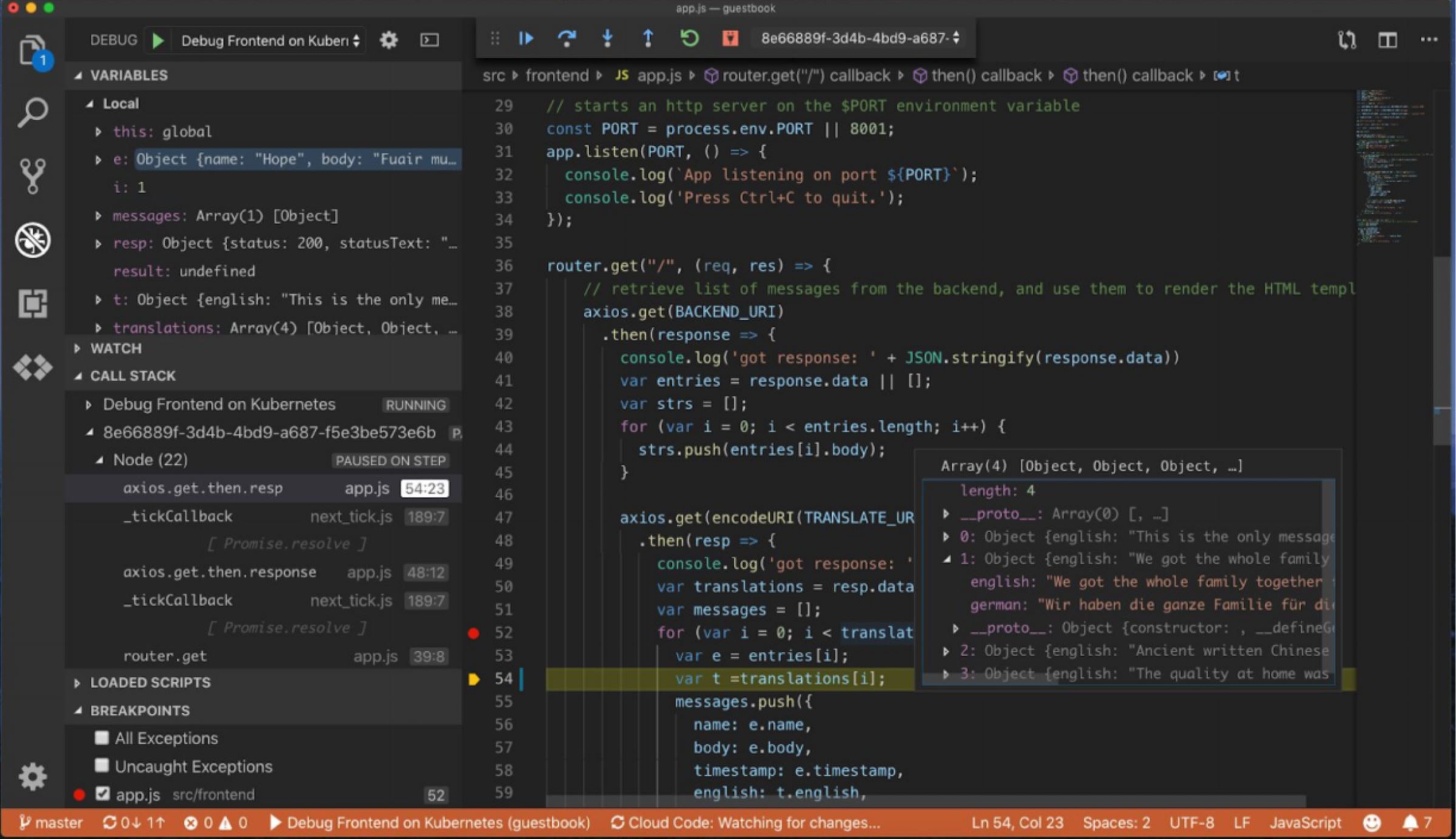
Google launches Cloud Code to make cloud-native development easier

Google today launched a set of plugins for popular development environments like IntelliJ and Visual Studio Code that promise to make building cloud-native applications significantly easier. You can’t say ‘cloud-native’ without saying Kubernetes, so it’s no surprise that the focus here is on helping developers build, debug and deploy their code to a Kubernetes cluster right from their IDE.

Typically, Google argues, developers edit, compile and debug their code locally. That’s often just fine, but it can also create issues when the production environment doesn’t quite match the local one. But building containers comes with its own challenges — and nobody really enjoys writing YAML files by hand just to test code. Indeed, the promise here is that the developer doesn’t have to write a single line of YAML.

The promise then, is that you can continue to develop your code just like you used to, while Cloud Code handles all of the work of turning it into a cloud-native application. The tools are also integrated with Google’s DevOps tools like Cloud Build and Stackdriver.

Cloud Code combines a number of existing open-source tools, including Kubectl, the command-line tools for working with the Kubernetes API, Jib for building containers for Java applications, and Skaffold for setting up the continuous deploying pipeline for Kubernetes applications.

The service will works virtually all popular programming languages and Google says that support for .NET is also in the works.

“This essentially gives you turbocharged, cloud-native app development, right in your IDE,” Google Cloud VP of product and design Pali Bhat told me. “It brings remote app development right into your developer loop right in the IDE. This unlocks the power of all of these developers and lets them build for Kubernetes, build for cloud-native, without having to worry about all fo the different pieces that they had to learn.”

10 Apr 2019

The Google Assistant can now finally manage your G Suite Calendar

As part of its Cloud Next conference, Google today announced a small but welcome new Google Assistant feature that allows Google’s virtual assistant to finally help you manage your work calendar in G Suite.

Traditionally, as Google rightly notes, the Assistant has mostly been about helping you keep track of your personal life. Now, however, you’ll also be able to sign in with your G Suite account and ask the Assistant for information about your work day. This integration should work across all Google Assistant surfaces, including the car and Assistant displays like the Google Home Hub.

Right now, this feature mostly focuses on asking for calendar events, though. As far as we can tell, you won’t be able to create an event through the Assistant just yet. Google does note, though, that you can use this feature to, for example, ask about an upcoming event and then send an email to the other attendees.

What’s interesting here is that so far, Google has never positioned the Assistant as a productivity tool in the workplace. Names like ‘Google Home’ and ‘Home Hub’ pretty much make that clear. Sometimes, though, work and home life overlap and at its core, the same technology that allows you to turn on your kitchen lights with your voice could also be used to pull interesting data out of a spreadsheet.

It’ll be interesting to see if Google plans to expand on this theme in the future or if this is a one-off integration.