Year: 2019

04 Nov 2019

Adobe’s Photoshop Camera is an AI-powered photo editor for your phone


Instagram and Snapchat have changed the way people look at photo editing. What was once a task limited to those with wildly expensive tools and years of training has become accessible to anyone with a smartphone. These apps and their filters aren’t going to replace Photoshop for the pros… but for people just looking to upload a quick selfie to their story, they’re Good Enough™.

Adobe realizes this — and now they’re looking to flex a bit.

This morning the company announced Photoshop Camera, an AI-driven photo editing app for iOS and Android. Take a picture, and Photoshop Camera will near-instantly analyze it and offer up a drawer full of potential enhancements, from basics like shadows/highlight tweaks, to more complicated things like swapping out the sky in a complicated cityscape.

It recognizes what’s in the photo — be it food, people, or distant mountains — and bubbles the most relevant “lenses” (think filters) up to the top. All lenses and effects are non-destructive, so you can quickly roll back any changes it makes.

Powering the AI is years and years of data. Adobe has hundreds of millions of photos in its stock photo collection, along with the data on which of these photos people tend to buy and use. Perhaps most importantly, they have the tooling data on how photo editors take a picture and get it from point A to point B.


Adobe tells me that it’s working with artists — Billy Eilish, for example — to create custom filters and lens. Adobe CTO Abhay Parasnis also hinted to me at the possibility of limited edition, region-locked lenses — like, say, those that only appear when you’re at a music festival or conference.

One catch: if you want to use the app any time in 2019, you’ll have to get Adobe’s thumbs-up. It’s going to be in private “preview” mode until sometime in 2020, when it rolls out to everybody. You can sign up for the preview here.

04 Nov 2019

Lemonade gets a nastygram from Deutsche Telekom over its use of magenta, says it will fight

Deutsche Telekom is perhaps best known around the world as the telco behind mobile carrier T-Mobile, but today it’s making an appearance in a lesser-known yet also regular role: trademark troll.

The company’s German lawyers have sent a letter to Lemonade, the AI-based insurance startup headquartered in New York, demanding it cease using magenta — a color that appears across Lemonade’s logo and marketing material — globally. DT also filed for and received an injunction on Lemonade operating in Germany — a block Lemonade has temporarily worked around by dropping magenta for the moment in the country.

But that is not the whole story: Lemonade, which said the letter came in the wake of its launch in Germany this summer, said that it will put up a fight. Today, it filed a motion with EUIPO (the European intellectual property office) to invalidate DT’s claim to a trademark on magenta; and it has further petitioned the German trademark office to remove DT’s claim to holding a right on magenta in the insurance sector.

“We thought this seemed like a massive over-reach,” Daniel Schreiber, Lemonade’s CEO and cofounder, said in an interview. “Then when we started digging, we found that they’ve been doing this across a number of countries, covering big companies to the smallest businesses. It’s mind boggling. We are in insurance.”

To be sure, this is far from Deutsche Telekom’s first efforts to defend its pink hue. The company has gone after carriers like AT&T and Telia, our sister publication Engadget (before the days when it was owned by another DT competitor, Verizon), Apple device management specialist dataJar, invoice services provider Compello, and a now-defunct smartwatch maker.

The track record so far should give Lemonade some hope. In some cases — such as Telia’s and dataJar’s — DT has lost and magenta has run free. In others, DT has had the upper hand, and has danced a little in celebration:


Who’s the bully now, John?

“We feel like we’re a character in a Disney movie, fighting a baddie,” Schreiber said.

Lemonade’s CEO added that although DT’s legal papers specify that the startup stop using magenta globally, he thinks that the carrier waited until the startup entered Germany to take legal action because it put the startup squarely in German jurisdiction, where DT might get treated more favorably because of its ubiquity. (Indeed, the cases where it has lost have all be outside of its home market.)

Schreiber defended the use of magenta for Lemonade — incidentally, not typically a drink that is magenta — as part of its bigger ethos.

“We’ve been pink since launch because we wanted to give a sense of being trusting and fun and approachable. It’s a very prominent part of our brand, ” he said. “The backdrop to that is the monochrome of our industry, insurance.”

The company based more than just its logo on the color. Since being founded in 2015, all of its promotional materials have featured magenta, and its social media campaigns on services like Instagram are built around the color, with various household and other everyday objects dipped into magenta paint. (This is a reference to Lemonade’s insurance services: it offers home owner and rental insurance services that cover all your belongings.)

Lemonade’s Instagram effort in particular has gone somewhat viral: the company says that its posts have collectively been viewed 18 million times. Lemonade will now try to turn up the volume on that, with a new effort to defend its use of magenta with a #freethepink hashtag. As the saying goes, when life hands you lemons…

T-Mobile’s specific form of magenta that it has trademarked for its brand is RAL 4010, a color that is not exactly the same as Lemonade’s, Schreiber said. T-Mobile has been going after a number of companies using colors close to this as well.

One issue that might make this case not so clear cut is that Detsche Telekom, it seems, dabbles in insurance, both on services like cybersecurity, as well as on tech and specifically devices — carriers, of course, being major resellers of handsets. Not the same as household insurance, but perhaps an area that might see the two moving closer together as Lemonade grows.

And growth is something that is likely to keep happening. Schreiber said that while the company will not disclose any plans today, it will be expanding into more regions within the US and Europe, where it is now active, as well as further afield, and it is also considering entering into more product lines beyond home owners and home renters insurance.

Lemonade earlier this year raised $300 million on a $2 billion valuation led by the SoftBank Group — most of which, Schreiber said, is still in the bank.

Meanwhile, a small note on PitchBook dated October 28 noted that the company is now starting to look at a further $500 million fundraise, although if this is true, it’s very early days. “News to me,” Schreiber said when I asked him about it.

We’re reaching out to Deutsche Telekom and will update this post as we learn more.

04 Nov 2019

Adobe’s Premiere Rush can now publish to TikTok

Adobe is launching a slew of updates to its various Creative Cloud video production tools today. For the most part, these are aimed at professionals (or at least YouTubers). Premiere Rush, however, has always been positioned as Adobe’s tool for anybody who wants to dabble in video and so it’s maybe no surprise that the company today announced that it will now also support sharing videos directly to TikTok, the red hot (yet not uncontroversial) video sharing platform for sharing short clips. That makes Adobe the first third-party app that can publish directly to TikTok.

Rush launched last October, with support for sharing to all of the usual video publishing services. Now, thanks to this new partnership with TikTok, the company is bringing all of the built-in and easy to use editing features of Rush to the TikTok community as well. With that, TikTok users now get access to video editing features like auto-ducking, transitions and color filters, timelapse and slo-mo.

Thanks to some of Adobe’s machine learning smarts, video producers — especially those who don’t usually shoot the kind of vertical videos that TikTok prefers — can switch to a different aspect ratio with just the click of a button and Premiere Rush will automatically reframe these shots for you.

“We spoke to video-makers around the world and the thing we heard over and over was a need for speed, ease, and sharability,” Adobe notes in today’s announcement. “Enter your ability to share on yet another favorite platform, TikTok.”

The new feature is now live in Premiere Rush, which is available to all Creative Cloud users, as well as in a free version.

04 Nov 2019

Microsoft launches the first public preview of its Fluid Framework for collaborative editing

One of the most interesting (and confusing) news announcements of Microsoft’s Build developer conference earlier this year was the first public demo of the company’s Fluid Framework. Fluid is meant to make building collaborative real-time editing experiences easier for developers, but Microsoft is also building it into some of its own tools like Office and Outlook. It’s nothing less than a reimagining of what documents should look at feel like.

Today, at its Ignite conference in Orlando, Florida, Microsoft launched the first public preview of the Fluid Framework end-user experience, as well as a private preview for developers.

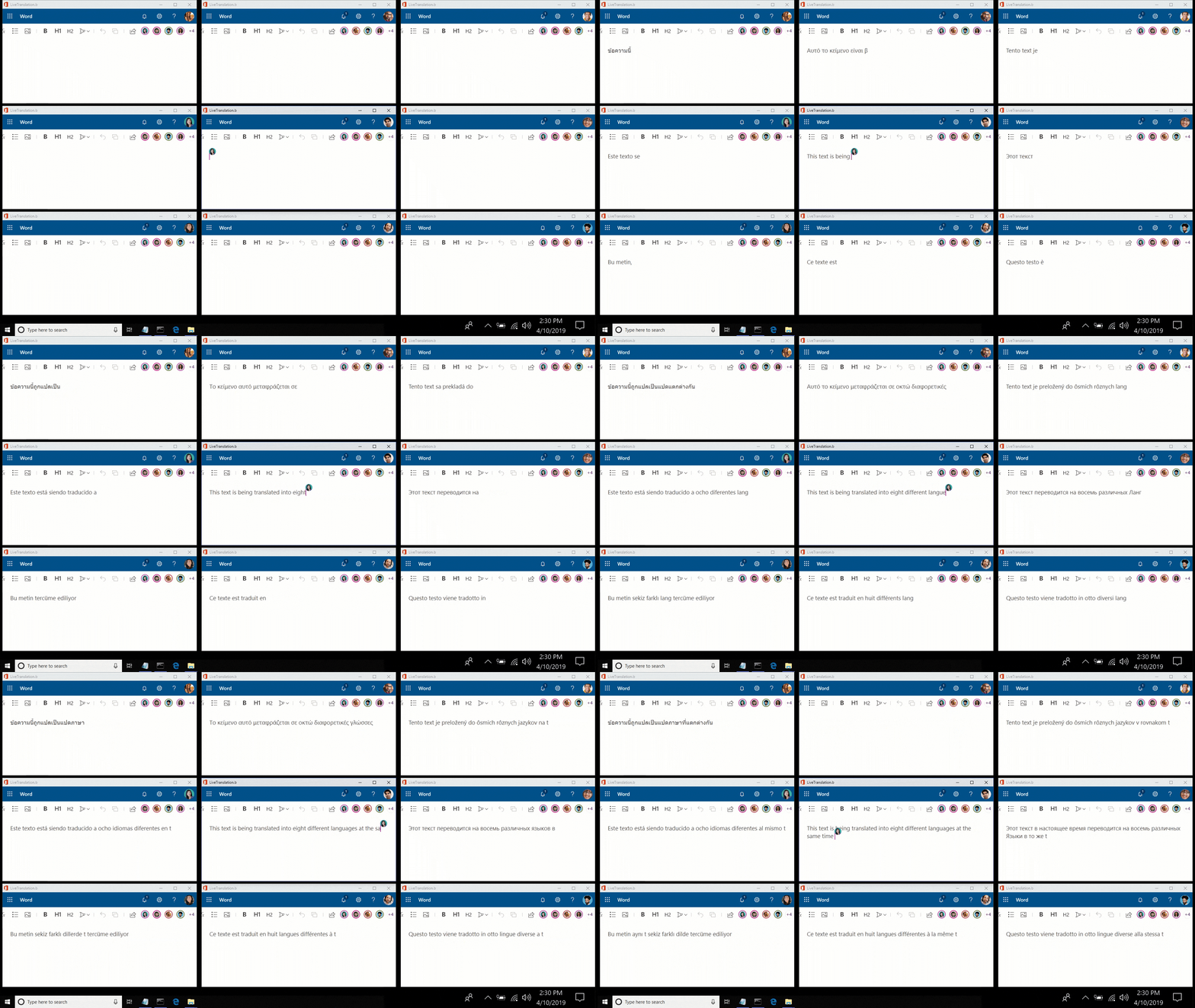
As Microsoft notes, the Fluid Framework has three main capabilities: the multi-person coauthoring features, the componentized document model, and the ability to plug in intelligent agents that can, for example, translate text in real-time or suggest edits. To some degree, this isn’t all that different from a Google Docs or even Microsoft’s own collaboration features in Office. But what’s new is that Microsoft is opening this up to developers and that it is looking at the Fluid Framework as a new way to deconstruct and componentize documents, which can then be used across applications.

Microsoft plans to build the Fluid Framework into lots of experiences across Microsoft 365, including Teams, Outlook, SharePoint, OneNote and Office. If you want to see it in action, you can now try the public preview to see what editing documents with it feels like.

04 Nov 2019

Cortana wants to be your personal executive assistant and read your emails to you, too

Only a few years ago, Microsoft hoped that Cortana could become a viable competitor to the Google Assistant, Alexa and Siri . Over time, as Cortana failed to make a dent in the marketplace (do you ever remember that Cortana is built into your Windows 10 machine?), the company’s ambitions shrunk a bit. Today, Microsoft wants Cortana to be your personal productivity assistant — and to be fair, given the overall Microsoft ecosystem, Cortana may be better suited to that than to tell you about the weather.

At its Ignite conference, Microsoft today announced a number of new features that help Cortana to become even more useful in your day-to-day work, all of which fit into the company’s overall vision of AI as a tool that is helpful and augments human intelligence.

Screen Shot 2019 10 31 at 3.25.48 PM

The first of these is a new feature in Outlook for iOS that uses Microsoft text-to-speech features to read your emails to you (using both a male and female voice). Cortana can also now help you schedule meetings and coordinate participants, something the company first demoed at previous conferences.

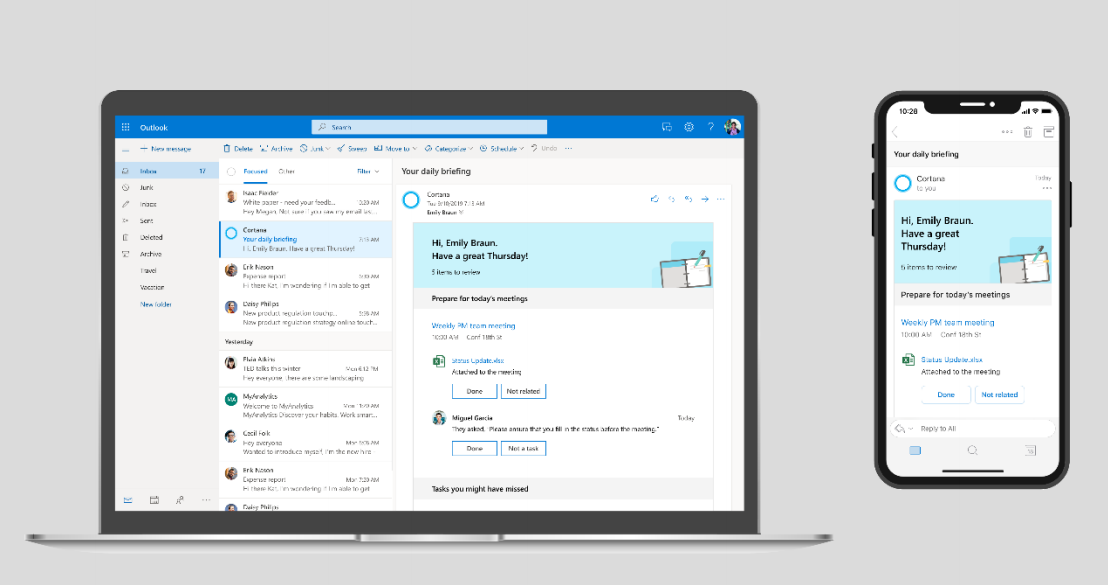
Starting next month, Cortana will also be able to send you a daily email that summarizes all of your meetings, presents you with relevant documents and reminders to “follow up on commitments you’ve made in email.” This last part, especially, should be interesting as it seems to go beyond the basic (and annoying) nudges to reply to emails in Google’s Gmail.

2019 11 01 0914

04 Nov 2019

You can now try Microsoft’s web-based version of Visual Studio

Earlier this year, at its Build developers conference, Microsoft announced that it was working on a web-based version of its Visual Studio IDE. At the time, Visual Studio Online went into a private preview, open to a select number of developers. Now, at its Ignite conference, the company has opened the service to all developers who want to give it a spin.

With Visual Studio Online, developers will be able to quickly spin up a fully configured development environment for their repositories. From there, they can use the web-based editor to work on their code.

“Visual Studio Online brings together Visual Studio, cloud-hosted developer environments and a web-based editor that’s accessible from anywhere to help developers be more productive than ever,” Microsoft notes in its press materials. “As development becomes more collaborative and open source workflows, like pull requests, become more pervasive, developers need to be able to switch between codebases and projects quickly without losing productivity.”

In its current form, the service is deeply integrated with Microsoft’s GitHub (no surprise there), but the company notes that developers can also attach their own physical and virtual machines to their Visual Studio-based environments. Developers can also create these online environments right from Visual Studio Code, the company’s increasingly popular free code editor for Windows, Mac and Linux.

The cloud-based environments, as well as extension support for Visual Studio Code are now in preview.

04 Nov 2019

Adobe launches Aero, its AR authoring app

Adobe’s ambitions around augmented reality (AR) are no secret — there’s plenty of potential for building the right design tools for AR developers, after all. At last year’s Max event, the company first demoed its Aero AR authoring app and today, it is launching it to the public as a free app on iOS and as a private beta on the desktop.

The general idea behind Aero is to allow designers to build AR experiences without coding. It offers a visual user interface and provides step-by-step directions for building AR scenes, which can incorporate existing assets from your Creative Cloud library, both in 2D and 3D. Once finished, publishing the scene to the Aero app only takes a few clicks.

Aero 6

“For marketing and branding, to retail and commerce, travel and leisure, learning and art, AR is expanding across all industries,” “However, today, the creation of high-quality AR content is expensive, time-consuming and complex. Our vision is to transform this process and enable all designers to explore what’s possible with 3D and AR.”

You can use the mobile app to create some basic experiences, but for the full slew of AR design tools, you’ll need the desktop app, which is coming next year, but which is now in private beta. This desktop app will allow you to build more interactive and custom experiences, Adobe says.

In the demo I’ve seen, Aero is indeed extremely easy to use. You can easily bring in Photoshop files with layers, for example, as a background and then space those layers out as needed to create a more 3D-like scene. Interacting with the object is done through touch interactions, with virtually no menus. You can add some basic animations as well and trigger movements, too.

04 Nov 2019

Microsoft Teams gets Yammer integration, secure private channels, and more

You’re forgiven if you thought Yammer, Microsoft’s proto-Slack, not quite realtime, chat application was dead. But it’s actually still alive (and well) — and still serves a purpose as a slower-moving social network-like channel for company- and team-wide announcements. Today, Microsoft announced that, among other updates, it will offer a Yammer integration in Teams, its Slack competitor. Yammer in Teams will live in the left-hand sidebar.

With this, Microsoft’s two main enterprise communications platforms are finally growing together and will give users the option to Teams for fast-moving chats and Yammer as their enterprise social network in the same way Facebook messenger and its news feed complement each other.

Screen Shot 2019 10 31 at 2.36.27 PM

Oh, and Yammer itself has been redesigned, too, using Microsoft’s Fluent Design System across all platforms. And Microsoft is also building it into Outlook, too, to let you respond to messages right from your inbox. This new Yammer will roll out as a private preview in December.

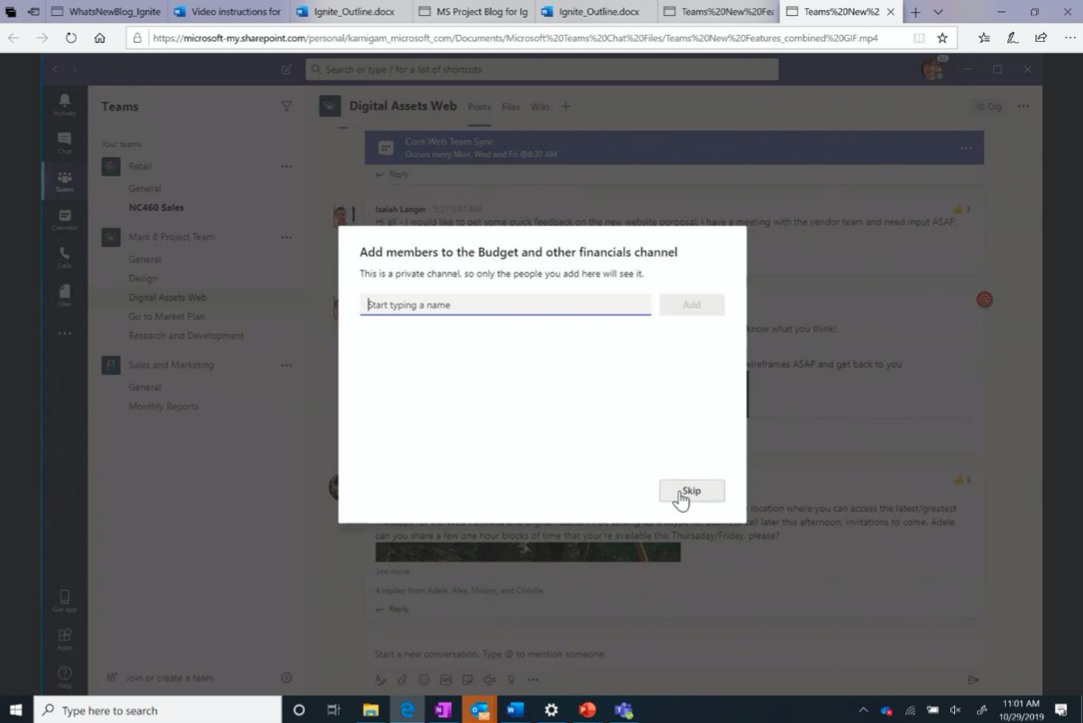
With this update, Teams is getting a number of other new features, too. These include secure private channels, multiwindow chats and meetings, pinned channels and task integration with Microsoft To Do and Planner (because having one todo app is never enough). Microsoft is also making a number of enhancements to Teams Room, with upcoming support for Cisco WebEx and Zoom meetings, the Teams Phone System, which is getting emergency calling, and the IT management features that help admins keep Teams secure.

A Teams client for Linux is also in the works and will be available in public preview later this year.

04 Nov 2019

You can now ask Excel questions about your data

Microsoft today announced an update to Excel that brings natural language queries to the venerable spreadsheet tool. Available now to Office Insiders, this new feature allows you to talk to Excel like you’re talking to a person and get quick answers to your queries without having to write a query.

“Natural language query is another step toward making data insights and visualization more approachable and accessible to users with various levels of Excel experience,” Microsoft explains. “Novice users will not need to know how to write a formula to gain useful insights from their data, while power users will be able to save time by automating the data discovery process by simply asking the right questions and quickly adding charts and tables they need for better and faster decisions.”

It’s worth noting that Google already offers similar features in Google Sheets. In my experience, Google sometimes does a pretty good job at finding data but also regularly fails to find even a single relevant data point, so it remains to be seen how good Excel is compared to that.

Today’s announcement is one in a series of recent launches for Excel that brought a number of new machine learning smarts to the spreadsheet. Among those is Excel’s ability to better understand your entries and provide you with additional information about stocks, geographical data and more.

04 Nov 2019

Microsoft launches Power Virtual Agents, its no-code bot builder

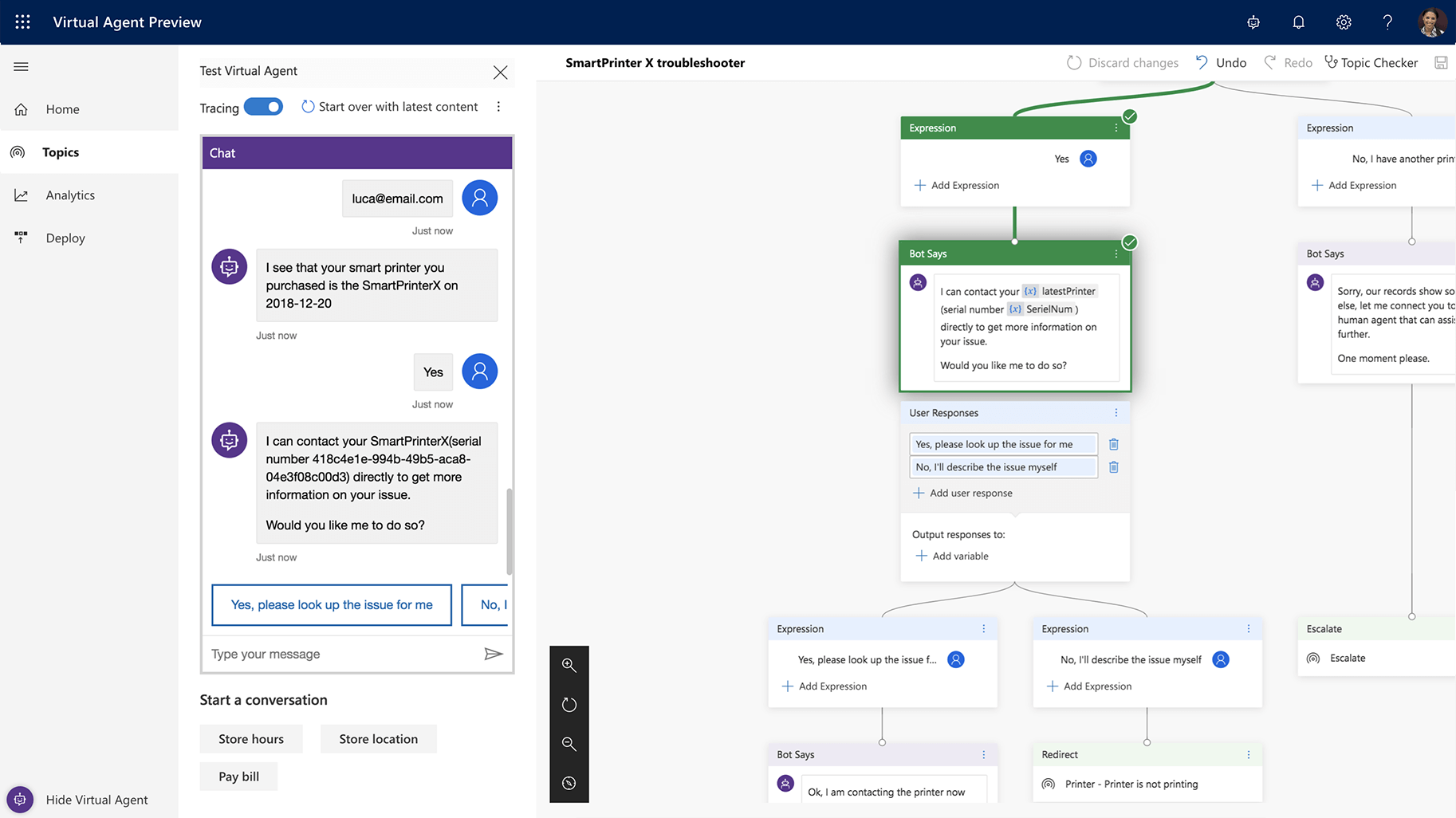
Microsoft today announced the public preview of its Power Virtual Agents tool, a new no-code tool for building chatbots that’s part of the company’s Power Platform, which also includes Microsoft Flow automation tool, which is being renamed to Power Automate today, and Power BI.

Built on top of Azure’s existing AI smarts and tools for building bots, Power Virtual Agents promises to make building a chatbot almost as easy as writing a Word document. With this, anybody within an organization could build a bot that walks a new employee through the onboarding experience for example.

“Power virtual agent is the newest addition to the Power Platform family,” said Microsoft’s Charles Lamanna in an interview ahead of today’s announcement. “Power Virtual Agent is very much focused on the same type of low code, accessible to anybody, no matter whether they’re a business user or business analyst or professional developer, to go build a conversational agent that’s AI-driven and can actually solve problems for your employees, for your customers, for your partners, in a very natural way.”

Power Virtual Agents handles the full lifecycle of the bot building experience, from the creation of the dialog to making it available in chat systems that include Teams, Slack, Facebook Messenger and others. Using Microsoft’s AI smarts, users don’t have to spend a lot of time defining every possible question and answer, but can instead rely on the tool to understand intentions and trigger the right action. “We do intent understanding, as well as entity extraction, to go and find the best topic for you to go down,” explained Lamanna. Like similar AI systems, the service also learns over time, based on feedback it receives from users.

One nice feature here is that if your setup outgrows the no-code/low-code stage and you need to get to the actual code, you’ll be able to convert the bot to Azure resources since that’s what’s powering the bot anyway. Once you’ve edited the code, you obviously can’t take it back into the no-code environment. “We have an expression for Power Platform, which is ‘no cliffs.’ […] The idea of ‘no cliffs’ is that the most common problem with a low-code platform is that, at some point, you want more control, you want code. And that’s frequently where low-code platforms run out of gas and you really have issues because you can’t have the pro dev take it over, you can’t make it mission-critical.”

The service is also integrated with tools like Power Automate/Microsoft Flow to allow users to trigger actions on other services based on the information the chatbot gathers.

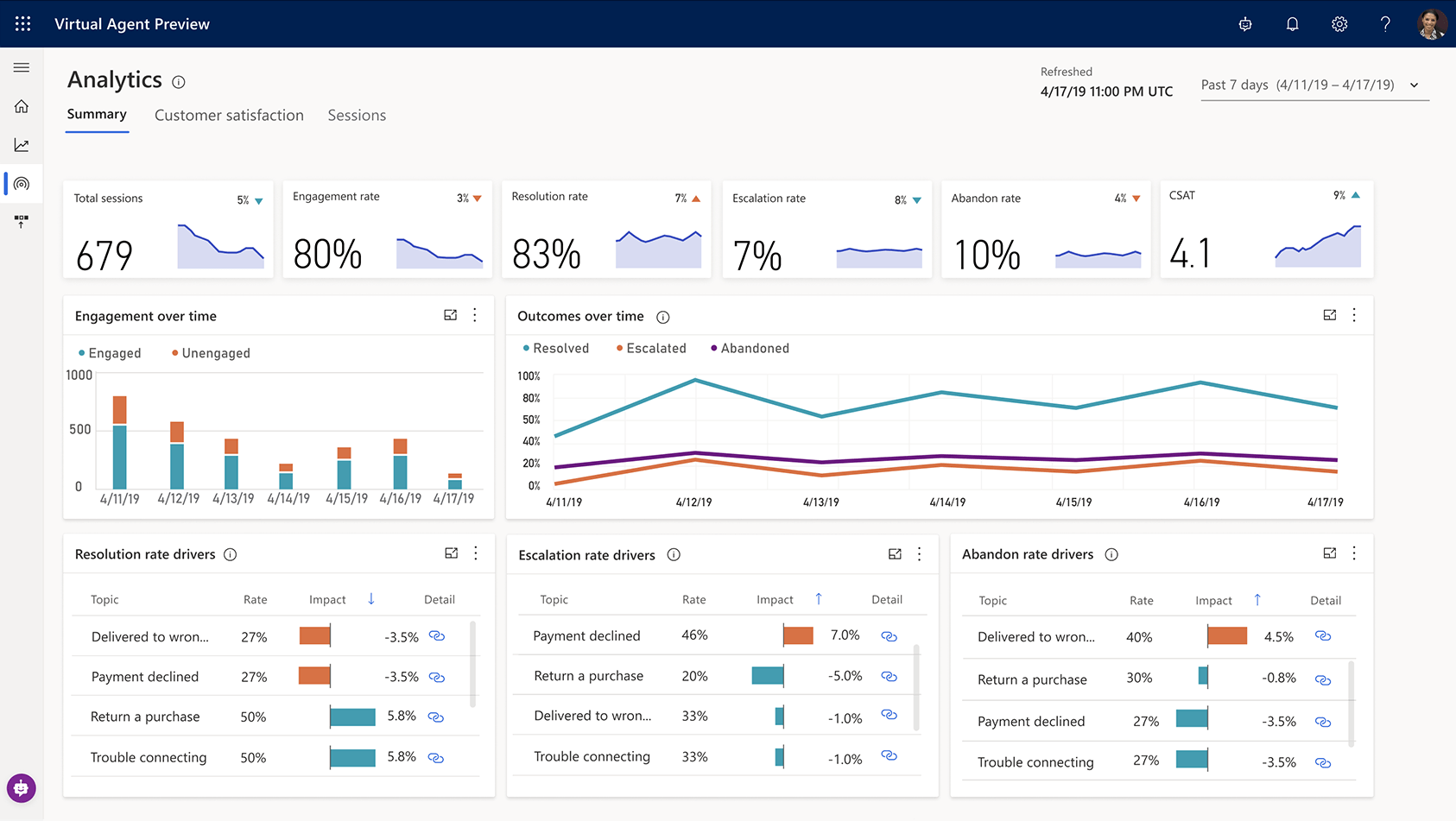
Lamanna stressed that the service also generates lots of advanced analytics for those who are building bots with it. With this, users can see what topics are being asked about and where the system fails to provide answers, for example. It also visualizes the different text inputs that people provide so that bot builders can react to that.

Over the course of the last two or three years, we went from a lot of hype around chatbots to deep disillusionment with the experience they actually delivered. Lamanna isn’t fazed by that. In part, those earlier efforts failed because the developers weren’t close enough to the users. They weren’t product experts or part of the HR team inside a company. By using a low-code/no-code tool, he argues, the actual topic experts can build these bots. “If you hand it over to a developer or an AI specialist, they’re geniuses when it comes to developing code, but they won’t know the details and ins and outs of, say, the shoe business – and vice versa. So it actually changes how development happens.”