Year: 2019

04 Nov 2019

Adobe is bringing real-time collaboration to its XD design tool

It’s Adobe Max this week, Adobe’s annual Creative Cloud event, and like every year, the company is announcing a slew of updates across its products. Sometimes these are only small tweaks and feature additions, but Adobe XD, the company’s design and prototyping tool for web and app development, is getting a number of interesting updates today that are worth highlighting.

The marquee feature of the update is real-time coediting of documents, which will surely make the lives of remote designers easier. This new coediting feature is now in beta and allows multiple designers to work on a document together, using Adobe’s Creative Cloud backend to sync updates in real time. To make a document available for coediting, you first have to save it to the cloud and then invite teammates to work with you.

The XD team has also taken the existing sharing features in XD, which designers can use to gather feedback and deliver their assets, and collated them into a single Share mode that sits next to the existing Design and Prototype modes in the application.

“Share mode is the place to go when you need to share your work with others,” the company explains. “Here, you can create and manage shareable web links to your work, using new sharing presets to customize the sharing experience for different use cases, including design reviews, development hand-off, presentations, and user testing.”

XD is one of the few Creative Cloud applications that include a completely free mode. Users on the free mode will get access to the new coediting feature until April 2020. All the other new sharing and collaboration tools, however, will be available without any time restrictions to free users on the XD Starter plan.

Also new in XD is enhanced support for component states, which make it easier for designers to create consistent user interfaces, as well as a hover triggers that invoke actions when you hover over an item in your design, and new tools for building basic prototype interactions. There’s also a redesigned plugin manager, which now features support for over 200 plugins like Jira Cloud to UI Faces, Stark and Arranger.


04 Nov 2019

Microsoft launches managed meeting rooms as a service

Whether you love them or hate them (and you probably hate them), meetings are a fact of corporate life. And how many meetings have you attended that didn’t start on time because of technical difficulties? Microsoft wants to change that by managing your meeting rooms for you — starting at $50 per room. ‘Managed Meeting Rooms,’ as the company calls the service, are now in private preview, but ahead of today’s announcement, Microsoft already quietly worked with more than 100 customers to manage more than 1,500 meetings rooms for them.

As Brad Anderson, Microsoft’s corporate VP for Microsoft 365, told me, the Teams team did a lot of work to optimize its software to make starting video- and audio-based meetings easy.

“But when you think about a room for a minute, there’s a bunch of hardware in the room, in addition to the software that’s operating Teams. There’s the device on the table, you’ve got screens, you got microphones, you’ve got cameras, you’ve got projectors, you’ve got all the cabling,” Anderson said. “And in order for a meeting to be seamless and great, all that hardware also has to be functional. So what we have done with the managed meeting room solution is we have now instrumented all the hardware.”

The solution supports Microsoft Teams Rooms and Skype for Business room systems, but Microsoft can also help companies select the right tools to set up a meeting room. With all of that in place, the company can then monitor all of that through a cloud service and ensure that everything is up and running. When there are issues — at least issues that can be fixed remotely — the team can also fix those and the meeting can start on time.

“Very few organizations have enough rooms to actually get proficient in meeting room management,” Anderson explained. “So it’s one of these things where organizations have to make that choice: do I go and actually try to build up the expertise when it sounds like Microsoft has a solution, which is actually very affordable […] If we just avoid one meeting from going south for ten minutes, you actually make your money back.”

04 Nov 2019

Microsoft launches Project Cortex, a knowledge network for your company

At its annual Ignite IT conference in Orlando, Florida, Microsoft today announced Project Cortex, its first new commercial product since the launch of Teams. The general idea here is to allow employees to quickly find information that’s spread out across documents in Microsoft’s various services and make it available both through searches and, when its algorithms deem it appropriate, in the form of hover-links inside of Microsoft products like the Office apps, Outlook and Teams.

“As we have thought about people getting work done together, as we have thought about productivity — really broadly defined — for more than 10 years we have had this vision of being able to not only help people transactionally get things done but also allowing them to take a step back and capture what the organization knows and put that to use, put that to work,” said Jared Spataro, Microsoft’s corporate vice president of its Microsoft 365 business, in a pre-recorded press briefing the company made available to the media ahead of today’s announcement.

So with Project Cortex, which Microsoft referred to simply as “Knowledge Network” in earlier materials it provided to the press, the company built a system that can ingest all of these artifacts, including all of the Office documents, email, chat logs and transcripts from meeting recordings that a company generates, and that then uses machine learning to classify all of this information into topics and topics collections to form this network.

“The whole idea here is that it’s kind of a spelunker that’s going down into all your content repositories, whether they’re in Microsoft 365, on-prem and file shares and other systems,” explained Spataro. “And it’s searching these things out and putting them together and saying, ‘hey, you have a project here,’ for instance a project or something you’re working on. I can put documents and videos and meetings together, calendar appointments. I can pull people and I can tell you what the organization knows in a 360-degree view about this topic.”

All of this data can then be surfaced inside Microsoft’s products. If you’re writing and email and Microsoft detects that it’s about a project that the Knowledge Network knows about, it’ll link that term so that you can hover over the words and see additional information about it. It’ll show you who is working on this, when the work started, and a map that shows you this project or topic in relation to others. Ideally, this helps you identify the experts about a given topic inside your organization and make connections you would otherwise miss.

All of these are lofty ideas and we’ve heard some of these promises before, in relation to the Microsoft Graph, which is a slightly different project but which was also meant to make all of the data inside an organization more accessible, though mostly by developers.

Project Cortex is now in private preview. It’ll be generally available in the first half of 2020.

04 Nov 2019

Microsoft’s Azure Synapse Analytics bridges the gap between data lakes and warehouses

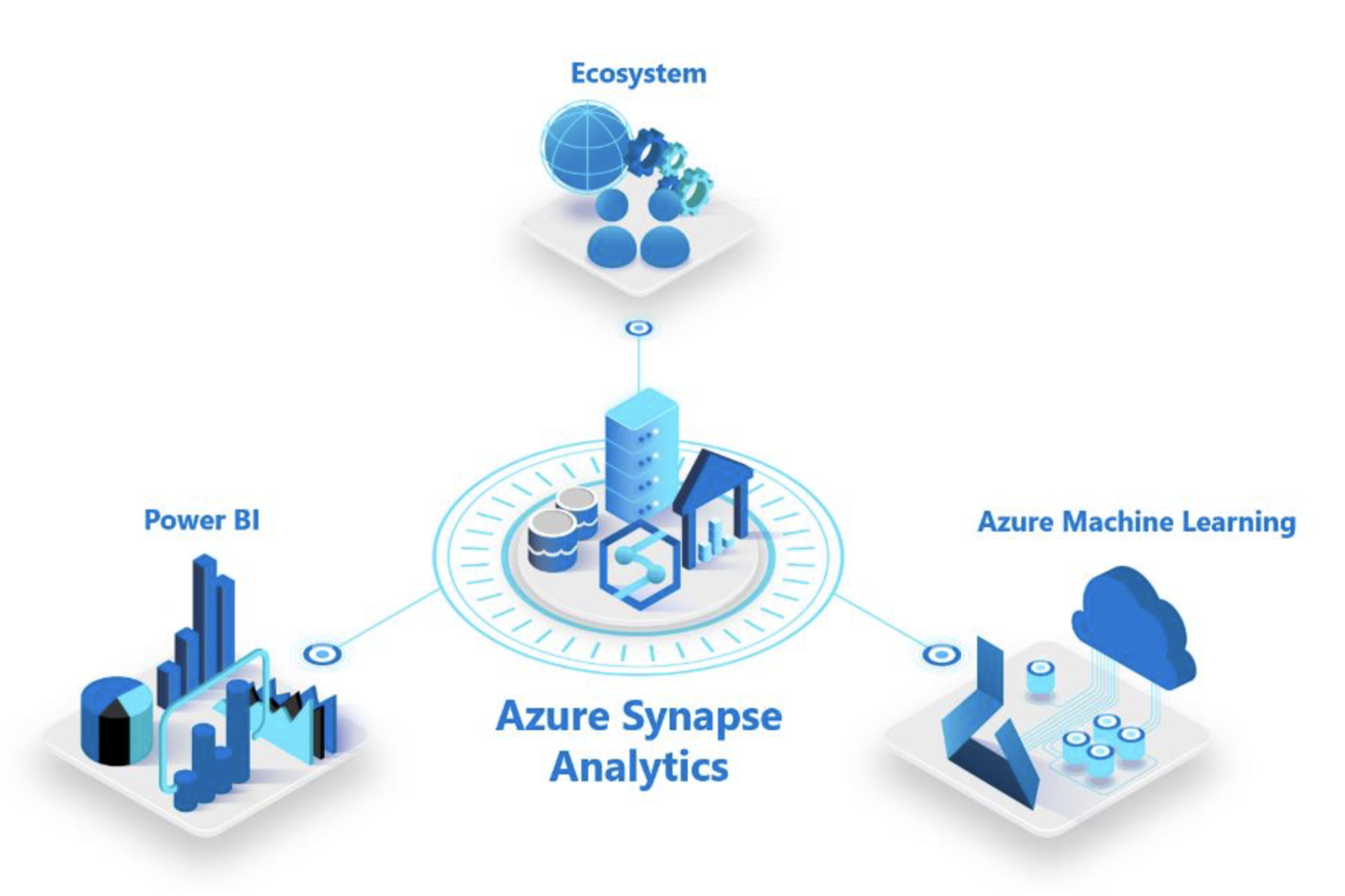
At its annual Ignite conference in Orlando, Florida, Microsoft today announced a major new Azure service for enterprises: Azure Synapse Analytics, which Microsoft describes it as “the next evolution of Azure SQL Data Warehouse.” Like SQL Data Warehouse, it aims to bridge the gap between data warehouses and data lakes, which are often completely separate. Synapse also taps into a wide variety of other Microsoft services, including Power BI and Azure Machine Learning, as well as a partner ecosystem that includes Databricks, Informatica, Accenture, Talend, Attunity, Pragmatic Works, and Adatis. It’s also integrated with Apache Spark.

The idea here is that Synapse allows anybody working with data in those disparate places can manage and analyze it from within a single service. It can be used to analyze relational and unstructured data, using standard SQL.

Screen Shot 2019 10 31 at 10.11.48 AM

Microsoft also highlights Synapse’s integration with Power BI, its easy to use business intelligence and reporting tool, as well as Azure Machine Learning for building models.

With the Azure Synapse studio, the service provides data professionals with a single workspace for prepping and managing their data, as well as for their big data and AI tasks. There’s also a code-free environment for managing data pipelines.

As Microsoft stresses, businesses that want to adopt Synapse can continue to use their existing workloads in production with Synapse and will automatically get all of the benefits of the service. “Businesses can put their data to work much more quickly, productively, and securely, pulling together insights from all data sources, data warehouses, and big data analytics systems,” writes Microsoft CVP of Azure Data, Rohan Kumar.

04 Nov 2019

Sumo Logic acquires JASK to fill security operations gap

Sumo Logic, a mature security event management startup with a valuation over $1 billion, announced today that it has acquired JASK, a security operations startup that raised almost $40 million. The companies did not share the terms of the deal.

Sumo’s CEO Ramin Sayer, says that the combined companies give customers a complete security solution. Sumo offers what’s known in industry parlance as a security information and event management (SIEM) tool, while JASK provides a security operations center or SOC (pronounced “sock“). Both are focused on securing workloads in a cloud native environment and can work in tandem.

Sayer says that as companies shift workloads to the cloud they need to reevaluate their security tools. “The interesting thing about the market today is that the traditional enterprises are much more aggressively taking a security-first posture as they start to plan for new workloads in the cloud, let alone workloads that they are migrating. Part of that requires them to evaluate their tools, teams, and more importantly a lot of their processes that they’ve built in and around their legacy systems as well as their SOC,” he said.

He says that combining the two organizations helps customers moving to the cloud automate a lot of their security requirements, something that’s increasingly important due to the lack of highly skilled security personnel. That means the more that software can do, the better.

“We see a lot of dysfunction in the marketplace and the whole movement towards automation really compliments and supplements the gap that we have in the workforce, particularly in terms of security folks. This what JASK has been trying to do for four plus years, and it’s what Sumo has been trying to do for nearly 10 years in terms of using various algorithms and machine learning techniques to suppress a lot of false alerts, triage the process and help drive efficiency and more automation,” he said.

JASK CEO and co-founder Greg Martin says the shift to the cloud has also precipitated two major changes in the security space that have driven this growing need for security automation. “The perimeter is disappearing and that fundamentally changes how we have to perform cyber security. The second is that the footprint of threats and data are so large now that security operations is no longer a human scalable problem” he said. Echoing Sayer, he says that requires a much higher level of automation.

JASK was founded in 2015, raising $39 million, according to Crunchbase data. Investors included Battery Ventures, Dell Technologies Capital, TenEleven Ventures and Kleiner Perkins. Its last round was a $25 million Series B led by Kleiner in June 2018.

Deepak Jeevankumar, managing director at Dell Technologies Capital, whose company was part of JASK’s Series A investment and who invests frequently in security startups, sees  the two companies joining forces as a strong combination.

Sumo Logic and JASK have the same mission to disrupt today’s security industry which suffers from legacy security tools, siloed teams and alert fatigue. Both companies are pioneers in cloud-native security and share the same maniacal customer focus. Sumo Logic is therefore a great culture and product fit for JASK to continue its journey,” Jeevankumer told TechCrunch.

Sumo has raised $345 million, according to the company. It was valued at over $1 billion in its most recent funding round last May when it raised $110 million.

CRN first reported that this deal was in the works in an article on October 22nd.

04 Nov 2019

You can now use Azure to manage resources anywhere, including on AWS and Google Cloud

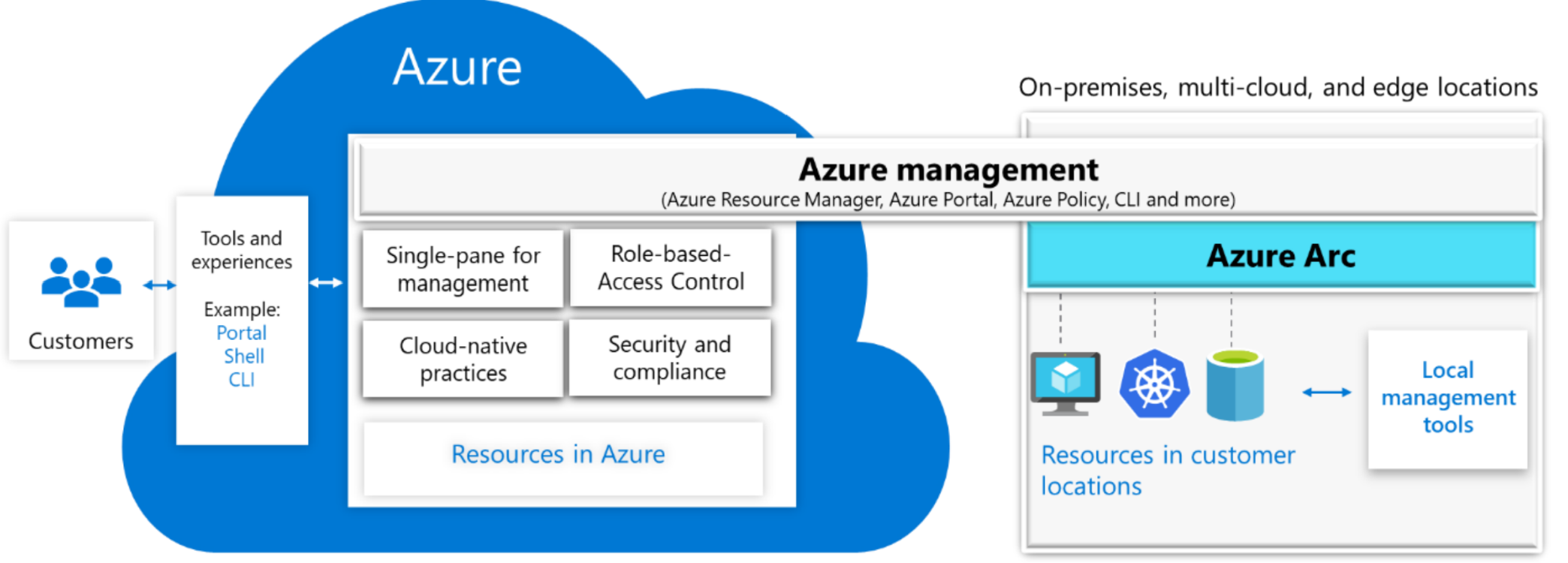
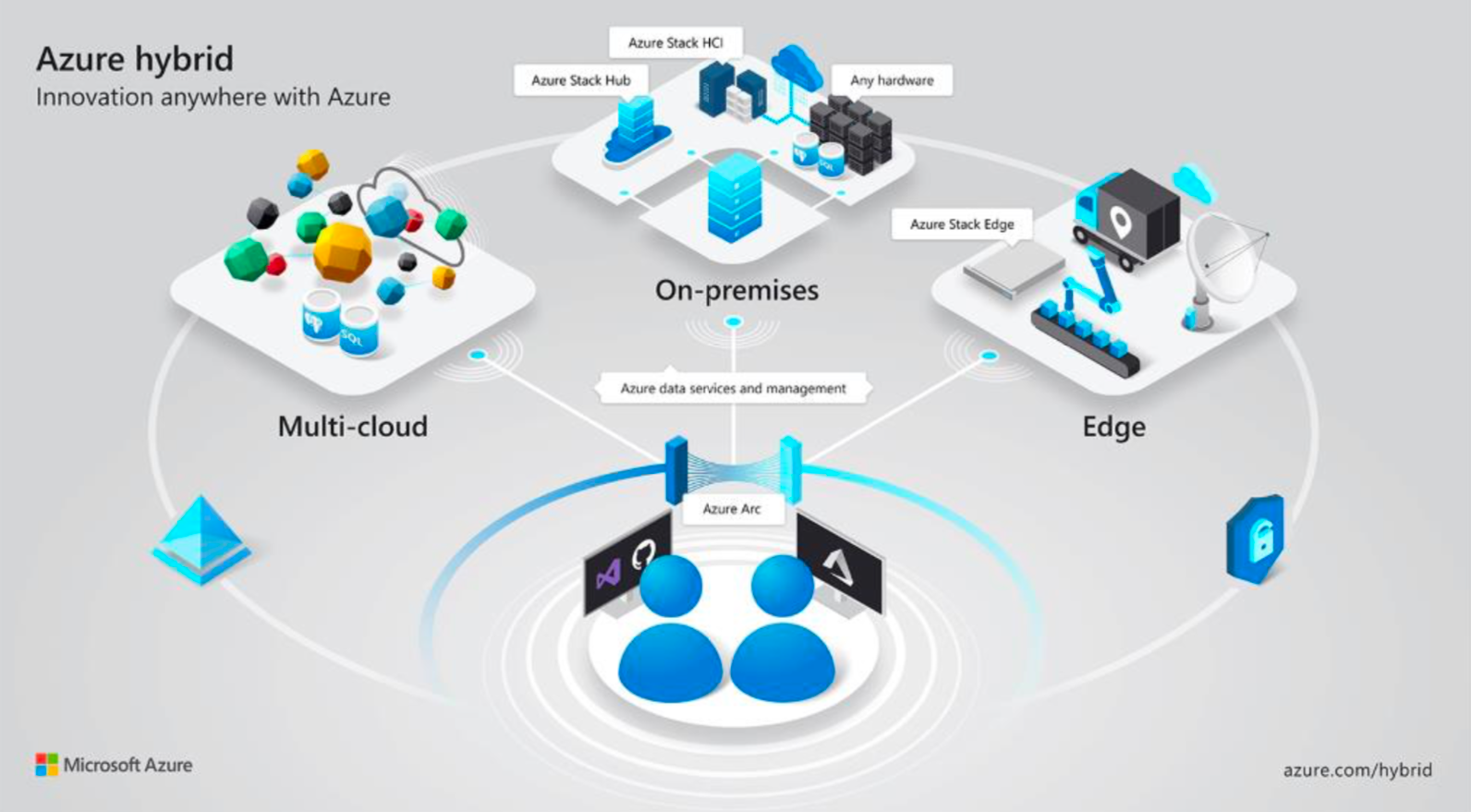
With the preview of Azure Arc, Microsoft today announced a major step in the evolution of its hybrid cloud story. Azure Arc takes the work the company has done on projects like Azure Stack, throws in containers and Kubernetes, as well as new infrastructure management features, and then allows its users to use Azure’s management tools and data services like Azure SQL Database and Azure Database for PostgreSQL Hyperscale on virtually any platform — including that of its competitors. As long as there is a Kubernetes cluster, you’ll be able to deploy applications to them and manage them using the Azure portal. Arc also supports any Windows and Linux servers.

“Hundreds of millions of Azure resources are organized, governed and secured daily by customers using Azure management,” writes Julia White, Microsoft’s CVP of Azure, in today’s announcement. “Azure Arc extends these proven Azure management capabilities to Linux and Windows servers, as well as Kubernetes clusters on any infrastructure across on-premises, multi-cloud and edge. Customers can now have a consistent and unified approach to managing their different environments using robust, established capabilities such as Azure Resource Manager, Azure Shell, Azure Portal, API, and Azure Policy.”

On these platforms, Azure looks and feels just like on Microsoft’s own. It provides admins a unified way to handle auditing, compliance and role-based access controls across environments and allows developers to build their containerized apps and deploy them across infrastructures.

Screen Shot 2019 10 31 at 10.30.53 AM

“Azure Arc enables customers to have a central, unified, and self-service approach to manage their Windows and Linux Servers, Kubernetes clusters, and Azure data services wherever they are,” writes Jeremy Winter, Director of Program Management for Microsoft Azure. “Azure Arc also extends adoption of cloud practices like DevOps and Azure security across on-premises, multi-cloud and edge.”

If this sounds a bit like Google Cloud’s Anthos, that’s probably because it is. Both projects use Kubernetes to enable their customers to build hybrid cloud deployments across platforms.

For now, it looks like Azure SQL Database and Azure Database for PostgreSQL Hyperscale are the only two Azure services you can take with you to these other infrastructure providers. I would be very surprised if Microsoft didn’t extend this to other Azure services over time.

In a related announcement, Microsoft also today launched new features and form factors for Azure Stack Edge, hardware appliance with built-in GPU and FPGA support for AI-enabled edge applications. Azure Stack Edge will get a new ruggedized form factor for harsh environments for users in the defense and energy sector, for example, as well as virtual machine support for edge compute, support for Kubernetes clustering and automatic fail-over when you lose a server in a cluster of machines.

04 Nov 2019

Microsoft’s Chromium-based Edge browser gets new privacy features, will be generally available January 15

Microsoft today announced that its Chromium-based Edge browser will be generally available on January 15 and that the release candidate for Windows and macOS is now available for download (and that it features a new icon).

The development of the new Edge has progressed pretty rapidly and the latest build have been very stable, even as Microsoft started building in some more differentiated features like Collections into its more experimental builds.

With today’s release, Microsoft is also announcing new privacy features. The marquee feature here is probably the new InPrivate browsing mode that now, in combination with Bing, will keep your online searches and identities private. InPrivate, as the name implies, already deleted any information about your browsing session on your local machine when you closed the window. But now, when you search with Bing, Microsoft’s search engine you’ve probably forgotten about, your search history on Bing and any personally identifiable data will also not be saved or associated back to you.

By default, Edge will also now enable tracking prevention. “One of the things that’s hard on the web is how to balance the desire for privacy and the protection of your data — and yet you still want the web to be personalized,” said Yusuf Mehdi, the corporate vice president of Microsoft’s Modern Life, Search and Devices Group, in a pre-recorded briefing ahead of today’s announcement. “The problem today is, nobody has really nailed it. You’ve got some good companies doing some really innovative work to try and have super-strict privacy controls. The problem is, they break the web. And then you’ve got other ones who say, hey, don’t worry about it, we’re just going to make it all work for you. But in the background, your data is getting tracked.” Mehdi, of course, thinks that Microsoft’s approach is the better one here — and more balanced.

04 Nov 2019

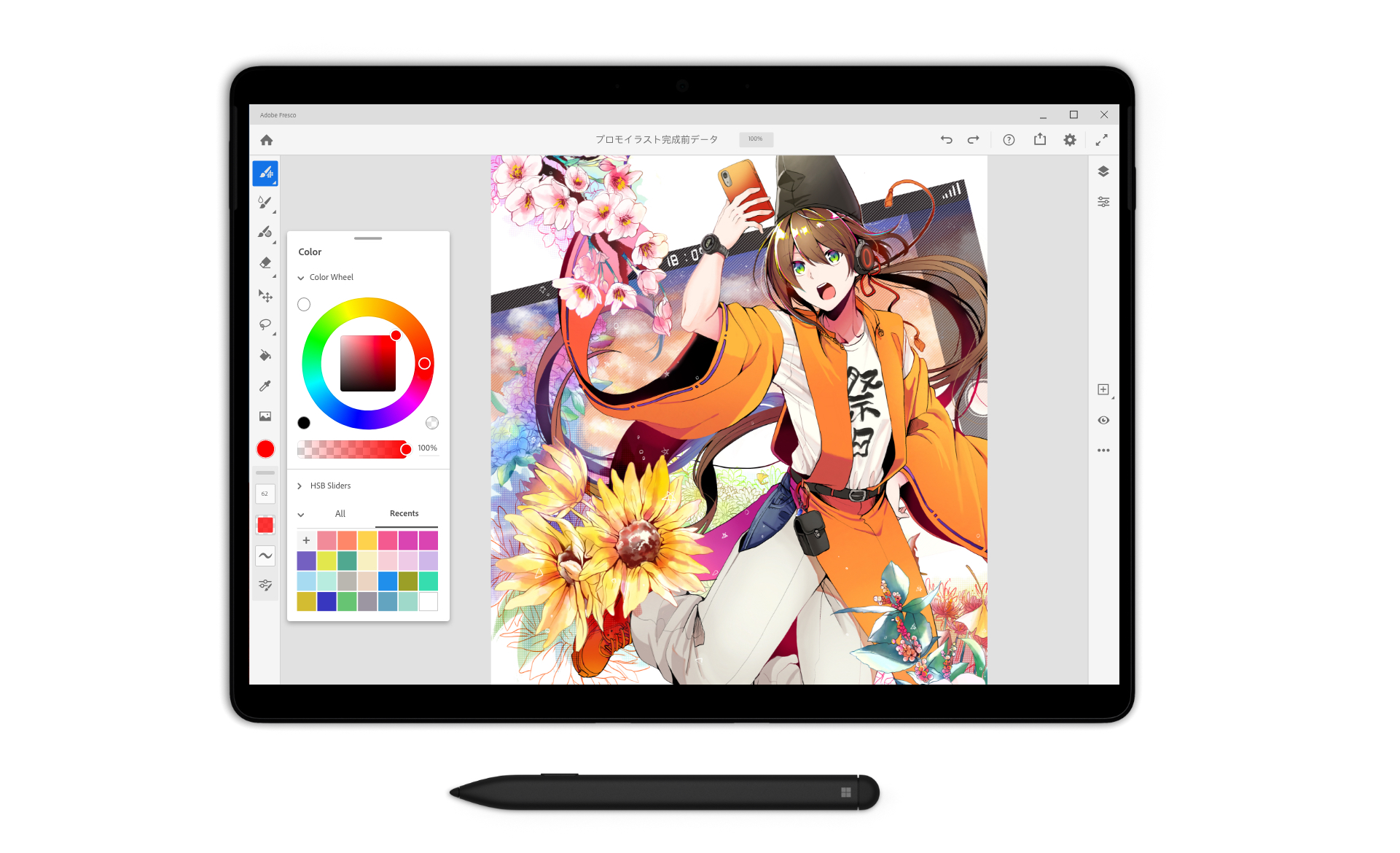
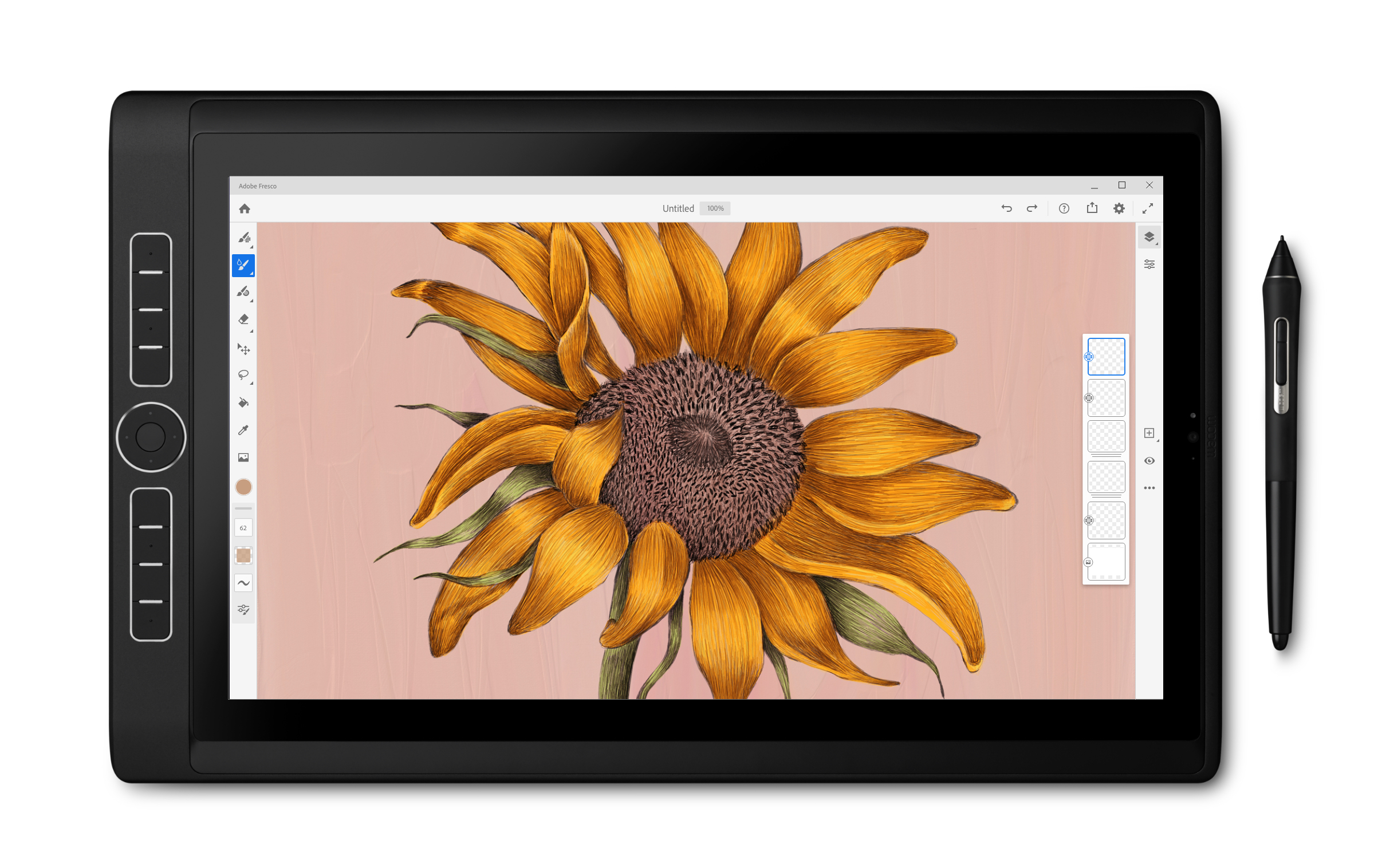
Adobe’s Fresco drawing app is now available on Windows

In September, Adobe launched Fresco, its next-gen drawing and painting app, for the iPad. Today, Fresco is also coming to Windows, starting with Microsoft’s Surface line (starting with the Surface Pro 4, the Surface Go and all Surface Studio and Book devices) and Wacom Mobile Studio devices. Like its iPad brethren, Fresco for Windows features Adobe’s vector and raster tools for painting, drawing and sketching.

The company says it built Fresco for Windows from the ground up. “It wasn’t an easy build but we worked closely with Microsoft and Intel to get the brushes right, and to squeeze from the hardware and software as much performance as possible,” the company notes in today’s announcement. Like on the iPad, the Windows version will also feature deep integrations with Adobe’s cloud storage to allow you to move seamlessly between machines and take your drawings to Photoshop and Illustrator.

Fresco for Windows, however, currently has fewer features than the iPad version. Adobe says it’s working to bring those into the app soon. “Because Fresco’s features matter, and we want them to be available no matter the platform, we’re working to get those remaining features in the app—quickly.”

There will be a free version for Windows as well. It’s slightly limited but will give you a good idea of the app’s capabilities.

04 Nov 2019

Microsoft launched Endpoint Manager to modernize device management

Ever since the days of Windows NT, the Microsoft System Center Configuration Manager (better known as ConfigMgr) has allowed companies to manage the increasingly large number of devices they issue to their employees. Then, back in 2011, the company also launched Intune, its cloud-based endpoint management system for corporate and BYOD devices. These days, most enterprises that use Microsoft’s tools use ConfigMgr to manage their PCs and then opt for Intune for mobile devices — and that’s a complex system to manage, even for sophisticated IT departments. So today, at its annual Ignite conference for IT professionals, Microsoft is announcing a way forward for these users to modernize their systems with the launch of the unified Microsoft Endpoint Manager.

As Brad Anderson, Microsoft’s corporate VP for Microsoft 365, told me, he takes some blame for this. “A lot of this falls on my shoulders because we just allowed everything to get complex. So we’re just simplifying everything,” he said. “So really at the core, what we think modern management is that modern management is it’s management that is driven by cloud intelligence.”

The general idea here, Anderson explained, is that in earlier eras of IT management, Microsoft and its partners didn’t have the tools to collect and analyze all of the signals it received from these management tools. That’s obviously not a problem anymore today and see the company can use the telemetry it gets from a company’s PC deployments, for example, to figure out where there are problems.

“One of the things that we’re able to do is be learned as cloud-scale as we can help organizations improve their end-user experience,” Anderson noted. Common issues with that experience could be extremely long boot times, which slow down and frustrate employees, or issues with the delivery of important security patches. Today, all of this is often still managed by spreadsheets and complex security policies that are administrated manually — and Anderson argues that these days, you always have to think about security and management together anyway.

To quantify this user experience, Microsoft is also introducing what it calls the Microsoft Productivity Score, which looks at both how employees are working and using their tools, as well as how their technology is enabling them (or not) to do so. “The Productivity Score is all about helping an organization understand the experience their users are having — and then giving them the insights and the actions on what they can do to improve that,” explained Anderson.

Over the course of the last few months, Microsoft actually worked with some large customers and took over the management of their Windows 365 and Office deployments, meaning those machines ran nothing but Microsoft 365 agents (and a control group that was managed in a more traditional way). The devices with the modern management system saw an 85 percent reduction in boot time and an 85 percent reduction in crashes and a doubling of battery life. Unsurprisingly, the employees that used the devices were also far happier.

As far as the device management experience goes, the new Endpoint Manager and the licensing changes that come with that are meant to not just simplify the branding but also the experience. And Microsoft definitely wants people to move to this modern system, so it’s giving everybody who has ConfigMgr licenses Intune licenses, too, so that they can co-manage their PCs with both tools and get access to the cloud-based features of Intune. The Microsoft Endpoint Manager console will show a single view of all devices managed by either product. “It’s all about simplifying — and we’re taking that simplifying deep and broad from a branding, licensing and product perspective,” said Anderson.

Today, ConfigMgr and Intune manage well over 190 million Windows, iOS and Android devices. Yet Microsoft knows that not every company is ready to move to this modern device management system just yet. That’s why it’s making these licensing changes to help get people on board, but also leaving the existing systems in place and giving them an onramp to move to provisioning new machines to be cloud-managed, for example.

04 Nov 2019

Microsoft Azure gets into agtech with the preview of FarmBeats

At its annual Ignite event in Orlando, Florida, Microsoft today announced that  AzureFarmBeats, a project that until now was mostly a research effort, will be available as a public preview and in the Azure Marketplace, starting today. FarmBeats is Microsoft’s project that combines IoT sensors, data analysis and machine learning.

The goal of FarmBeats is to augment farmers’ knowledge and intuition about their own farm with data and data-driven insights,” Microsoft explained in today’s announcement. The idea behind FarmBeats is to take in data from a wide variety of sources, including sensors, satellites, drones and weather stations, and then turn that into actionable intelligence for farmers, using AI and machine learning. 

In addition, FarmBeats also wants to be somewhat of a platform for developers who can then build their own applications on top of this data that the platform aggregates and evaluates.

As Microsoft noted during the development process, having satellite imagery is one thing, but that can’t capture all of the data on a farm. For that, you need in-field sensors and other data — yet all of this heterogeneous data then has to be merged and analyzed somehow. Farms, also often don’t have great internet connectivity. Because of this, the FarmBeats team was among the first to leverage Microsoft’s efforts in using TV white space for connectivity and, of course, Azure IoT Edge for collecting all of the data.