Year: 2019

03 Sep 2019

USB4 brings better speeds and compatibility — but loses the space in the name

The organizations behind the widely used USB standard have released some new info on the latest iteration of the interface, and it’s nothing but good news for consumers. It’ll be faster and bring improved compatibility, with no need to pay close attention to which cable or port you’re using. And pedants take note: there’s no longer a space after “USB” and the number.

USB4, as it’s now styled (versus USB 4), was announced in March with a few promises regarding features, but now the actual technical specifications have been released to anyone who cares to inspect them. It’s another step in the process of bringing a major standard from idea to reality.

There are three main improvements in USB4 over USB 3 (or 3.2, or 3.1 gen2v2… the naming system is a mess):

Better speed. USB4 tops out at 40 gigabits per second, twice the speed of the latest version of USB 3 and 8 times the speed of the original USB 3 standard, which was of course itself way faster than what it was replacing. It’ll also support the max speed of previous cables and interfaces.

Universal Thunderbolt 3 compatibility. Thunderbolt 3 is Intel’s proprietary implementation of USB 3, which you’d find on Intel boards and those of any company that had licensed the tech. But Intel has come to realize that it was counterproductive to split things off like this, so they’re providing the Thunderbolt 3 spec for free. Anyone making a USB4 device or cable can make it compatible with Intel’s standard; it’s possible, but unlikely, that some will choose not to. There’s no reason for it, but who knows?

Improved display/data splitting. USB 3 introduced the ability to use a single cable to send power, data, and a video signal (basically just more but specialized data) over a single cable. Great! But sometimes, depending on how you set it up, it could only send one or the other, or speeds were greatly reduced. USB4 does this much better, so if you have a monitor that uses up 8 Gbps for its video bandwidth, the full 32 Gbps will be available for other purposes. It’s just one of those behind the scenes changes that will make things better and easier for everyone.

The other good news about USB4 is that it doesn’t use a new connector. We’re still in the transition period from the big rectangular port, the small trapezoidal one, the big trapezoidal one, and so on, to the sleek USB-C plugs that you can’t do wrong even if you try. Changing that again would be disastrous — so the connector will be the same.

Two not-so-good pieces of news, though: It won’t be here for a while and it might be a little more expensive. These ports are complicated things and the ability to send more data, power, and so on means it’s a little harder to make. And despite the spec being published today, it’ll almost certainly be at least a year before any products come out that use it.

Lastly is the name. The computing hardware industry is notoriously bad at naming stuff, and USB 3 was no exception to the rule. It was always annoying trying to figure out what version of USB was supported, what that meant, and so on. So from now on, USB4 is the name until they come up with USB5.

Speaking to Tom’s Hardware, USB Promoter Group CEO Brad Saunders said they just wanted to simplify things, and prevent the profusion of products sporting version number badges that could confuse consumers.

“We don’t plan to get into a 4.0, 4.1, 4.2 kind of iterative path,” he explained. “We want to keep it as simple as possible. When and if it goes faster, we’ll simply have the faster version of the certification and the brand.”
 

03 Sep 2019

Is your Google Calendar flooded with spam? Google says it’s working on it

If you opened up Google Calendar sometime in the last few weeks only to find your schedule filled with things like “WIN A FREE iPHONE!” or “CHEAP RAYBANS HERE”, you’re by no means the only one.

Spammers have found a way to trick Google Calendar into adding these things to your calendar without you doing anything. Google says it’s aware of the issue, and is working on it.

So what’s going on here?

At some point, Google Calendar picked up a feature that automatically adds any event you’re invited to right onto your calendar, presumably to keep the invite from getting lost in your inbox. The problem: there… doesn’t seem to be much of a filter. If a bot gets your email address and throws it on an invite which gets past Google’s anti-spam system, bam — it’s on your calendar as if you added it yourself.

Google’s acknowledgement of the issue, first spotted by Engadget, comes in the form of a pinned post on the Google Calendar support forum. It reads, simply:

We’re aware of the spam occurring in Calendar and are working diligently to resolve this issue. We’ll post updates to this thread as they become available. Learn how to report and remove spam. Thank you for your patience.

In the meantime: if your calendar is filled with repeating spam events, you should be able to remove them in batches by going to Google Calendar on your computer, clicking one of the recurring spam events in question, clicking the three dot button near the top right of the pop up, and hitting “Report as spam”.

You can also outright disable the feature that is auto-adding invites to your calendar until Google figures out a better way to keep spammers out.

To disable the “automatically add invite” function:

  • Go to Google Calendar on your computer
  • Click the cog in the upper right, then hit settings
  • On the list on the left, click “Event settings”.
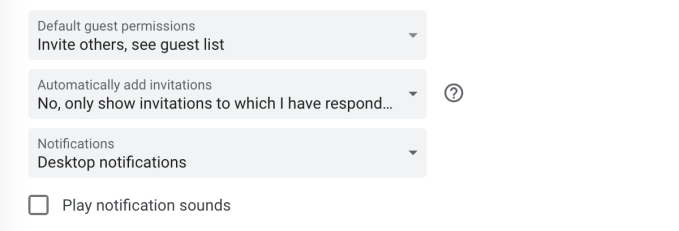
  • Look for the “Automatically add invitations” option. Change this to “No, only show invitations to which I have responded.”

google calendar spam

As security researcher Brian Krebs points out, a lot of these invites come with URLs attached. For a whole list of reasons (like avoiding malicious pages, phishing sites, etc), you probably don’t want to go clicking those.

03 Sep 2019

Is your Google Calendar flooded with spam? Google says it’s working on it

If you opened up Google Calendar sometime in the last few weeks only to find your schedule filled with things like “WIN A FREE iPHONE!” or “CHEAP RAYBANS HERE”, you’re by no means the only one.

Spammers have found a way to trick Google Calendar into adding these things to your calendar without you doing anything. Google says it’s aware of the issue, and is working on it.

So what’s going on here?

At some point, Google Calendar picked up a feature that automatically adds any event you’re invited to right onto your calendar, presumably to keep the invite from getting lost in your inbox. The problem: there… doesn’t seem to be much of a filter. If a bot gets your email address and throws it on an invite which gets past Google’s anti-spam system, bam — it’s on your calendar as if you added it yourself.

Google’s acknowledgement of the issue, first spotted by Engadget, comes in the form of a pinned post on the Google Calendar support forum. It reads, simply:

We’re aware of the spam occurring in Calendar and are working diligently to resolve this issue. We’ll post updates to this thread as they become available. Learn how to report and remove spam. Thank you for your patience.

In the meantime: if your calendar is filled with repeating spam events, you should be able to remove them in batches by going to Google Calendar on your computer, clicking one of the recurring spam events in question, clicking the three dot button near the top right of the pop up, and hitting “Report as spam”.

You can also outright disable the feature that is auto-adding invites to your calendar until Google figures out a better way to keep spammers out.

To disable the “automatically add invite” function:

  • Go to Google Calendar on your computer
  • Click the cog in the upper right, then hit settings
  • On the list on the left, click “Event settings”.
  • Look for the “Automatically add invitations” option. Change this to “No, only show invitations to which I have responded.”

google calendar spam

As security researcher Brian Krebs points out, a lot of these invites come with URLs attached. For a whole list of reasons (like avoiding malicious pages, phishing sites, etc), you probably don’t want to go clicking those.

03 Sep 2019

Tesla Autopilot was engaged before 2018 California crash, NTSB finds

A Tesla Model S was in Autopilot mode —the company’s advanced driver assistance system — when it crashed into a fire truck in Southern California last year, according to a preliminary report released Tuesday by the National Transportation Safety Board.

Reuters was the first to the report on the contents of the public documents. A final accident brief, including NTSB’s determination of probable cause, is scheduled to be published Wednesday.

The crash, involving a 2014 Tesla Model S, occurred Jan. 22, 2018 in Culver City, Calif.  The Tesla had Autopilot engaged for nearly 14 minutes when it struck a fire truck that was parked on Interstate 405. The driver was not injured in the crash and the fire truck was unoccupied.

The report found that the driver’s hands were not on the wheel for the vast majority of that time despite receiving numerous alerts. Autopilot was engaged in the final 13 minutes and 48 seconds of the trip and the system detected driver-applied steering wheel torque for only 51 seconds of that time, the NTSB said. Other findings include:

  • The system presented a visual alert regarding hands-off operation of the Autopilot on 4 separate occasions.
  • The system presented a first level auditory warning on one occasion; it occurred following the first visual alert.
  • The longest period during which the system did not detect driver-applied steering wheel torque was 3 minutes and 41 seconds.

In the 2018 crash into a fire truck, the vehicle was operating a “Hardware Version 1” and a firmware version that had been installed via an over-the-air software update on December 28, 2017. The technology provided a number of convenience and safety features, including forward, lane departure and side collision warnings and automatic emergency braking as well as its adaptive cruise control and so-called Autosteer features, which when used together

While the report didn’t find any evidence that the driver was texting or calling in the moments leading up to the crash, a witness told investigators that he was looking down at what appear to be a smartphone. It’s possible that the driver was holding a coffee or bagel at the time of the crash, the report said.

Autopilot has come under scrutiny by the NTSB, notably a 2016 fatal crash in Florida and a more recent one involving a Walter Huang, who died after his Model X crashed into a highway median in California. The National Highway Traffic Safety Administration also opened an inquiry into the 2016 fatal crash and ultimately found no defects in the Autopilot system. NTSB determined the 2016 fatal crash was caused by a combination of factors that included limitations of the system.

The family of Huang filed in May 2019 a lawsuit against Tesla and the State of California Department of Transportation. The wrongful death lawsuit, filed in California Superior Court, County of Santa Clara, alleges that errors by Tesla’s Autopilot driver assistance system caused the crash.

03 Sep 2019

How Zhihu’s become one of China’s biggest hubs for experts

Zhihu may not be as well known outside of China as WeChat or ByteDance’s Douyin, but over the past eight years, it has cultivated a reputation for being one of the country’s most trustworthy social media platforms. Originally launched as a question-and-answer site similar to Quora, Zhihu has grown to be a central hub for professional knowledge, allowing users to interact with experts and companies in a wide range of industries.

Headquartered in Beijing, Zhihu recently raised a $434 million Series F, its biggest round since 2011. The funding also brought Zhihu two important new partners: video and live-streaming app Beijing Kuaishou, which led the round, and Baidu, owner of China’s largest search engine (other participants in the round included Tencent and CapitalToday).

Launched in 2011, Zhihu (the name means “do you know”) is most frequently compared to Quora and Yahoo Answers. While it resembled those Q&A platforms at first, it has grown in scope. Now it would be more accurate to say that the platform is like a combination of Quora, LinkedIn and Medium’s subscription program.

For example, Zhihu has an invitation-only blogging platform for verified experts and since launching official accounts, it has become a channel for companies and organizations to communicate with users. A representative for Zhihu told TechCrunch that the platform had 220 million users and 30,000 official accounts as of January 2019 (for context, there are currently about 800 million Internet users in China), who have posted a total of 130 million answers so far.

The company’s growth will be closely watched since Zhihu is reportedly preparing for an initial public offering. Last November, the company hired its first chief financial officer, Sun Wei, heightening speculation. A representative for the company told TechCrunch the position was created because of Zhihu’s business development needs and that there is currently no timeline for a public listing.

At the same time, the company has also dealt with reports that its growth has slowed.

03 Sep 2019

WarnerMedia CEO John Stankey becomes COO of AT&T

WarnerMedia CEO John Stankey is taking on even broader responsibilities with a promotion to president and chief operating officer at AT&T (which acquired and renamed Time Warner last year).

According to the official announcement, this is a new position reporting directly to AT&T CEO Randall Stephenson. Stankey will take on the new position on October 1 while continuing to serve as WarnerMedia CEO.

“Now is the time to more tightly align our collection of world-class content, scaled consumer relationships, technical know-how and innovative advertising technology,” Stephenson said in a statement. He also described Stankey — who’s been at AT&T since 1985 — as “an outstanding executive who has led nearly every area of our business, helped shape our strategy and excelled at operations throughout his career.”

The company also announced that Jeff McElfresh will become CEO of AT&T Communications, replacing John Donovan, who is retiring. (FYI: TechCrunch is owned by AT&T competitor Verizon.)

These shifts come as WarnerMedia is preparing to launch its big streaming play HBO Max next year. The service will include HBO proper, along with other streaming content. It also comes after some notable departures at WarnerMedia, including HBO’s Richard Plepler and Kevin Tsujihara of Warner Bros.

03 Sep 2019

Bunq simplifies group payment tracking and adds analytics

European challenger bank Bunq is announcing a handful of updates today. You now get a better overview of your account with more insights on how you spend money. If you’re going on vacation with someone else, you can now choose to automatically add transactions to a Slice Group. There are also improvement to VAT management for business users.

Slice Groups are shared accounts for owners of the Bunq Travel Card. You can create a group with multiple Bunq users and then add expenses to the group. You can’t add money to a Slice Group directly. It is essentially a group accounting feature that lets you keep track of who paid for what, who has a positive balance and who has a negative balance.

While you could easily add Bunq transactions to a group, you still had to manually add them every time there are some new transactions. You can now turn on AutoSlice, a feature that lets you temporarily add all card transactions to a Slice Group.

In other news, Bunq wants to give you more information about your spending habits. It starts with a new feature called Bunq Insights. As the name suggests, your payments are now automatically categorized so that you can see a breakdown of what you do with your money.

When you travel, Bunq now gives you information about your travel destination, such as the exchange rate as well as tips and tricks for that country. Bunq users can add recommendations for other Bunq users.

And if you’re always wondering if you’re spending too much money after getting paid, Bunq now tries to predict how much money you’ll have left at the end of the month. The company analyzes your past transactions to predict how much you’re going to spend over the coming weeks.

Finally, Bunq is updating AutoVAT for business users who have to deal with VAT in Europe. In addition to setting aside VAT you’ll have to pay back, the app now counts how much VAT you’ve paid so far so that you know how much you can reclaim. By combining these two figures, you get the exact VAT amount for your taxes.

03 Sep 2019

Apple patents Watch band that could ID you from your wrist skin

It looks like Apple is playing with the idea of making the Apple Watch’s band a bit smarter.

As spotted by PatentlyApple, the company was granted a handful of patents this morning, all focused on bringing new tricks to the Watch by way of the band.

apple watch wrist 2

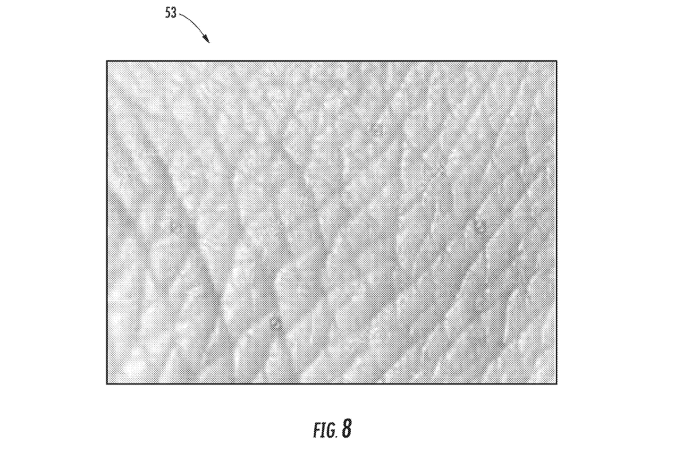
The first patent describes a sensor built into the Watch or the watch’s band that could use infrared to build a thermal image of your wrist and its identifying traits (like skin texture/arm hair) to identify who is wearing it — sort of like a fingerprint, but from your wrist.

Unlike most of Apple’s other devices, the Apple Watch doesn’t currently have any sort of built-in biometrics for unlocking — there’s no thumb print sensor for TouchID, or camera for Face ID. Unlocking your Apple Watch means poking at the screen to punch in a PIN (or, if you’ve configured it to unlock when you unlock your phone, doing that.) A sensor setup like this could make the unlocking process automatic without the need to unlock your phone.

apple watch band

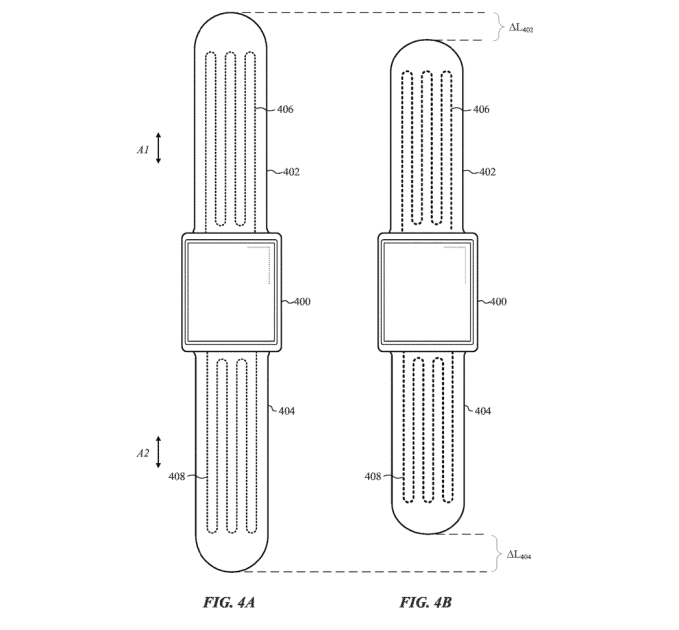
The second granted patent describes a Watch band that can adjust itself on the fly — think Nike’s self-tightening shoes, but on your wrist. If the Watch detects that it’s sliding while you’re running (or if the aforementioned thermal sensors need a closer look at your wrist skin) tensioners in the device could tighten or loosen the band on command.

apple watch meters

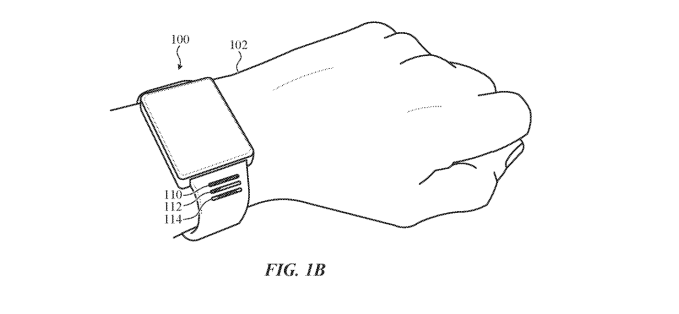
Finally, a third granted patent tinkers with the idea of a Watch band with built-in light up indicators — like, say, a notification light for incoming texts, or a meter that fills up to tell you at-a-glance how much distance you’ve got left on your run, or a stripe that glows yellow when you’ve got something on your calendar in the next hour. All of this can already be done on the Watch’s screen, of course — this would just allow for it without having to power up the entire display.

As always, it’s worth noting that patents being granted doesn’t guarantee that such any such features will make it to the final product — just that Apple found something cool in its R&D labs, and decided to lock it down.

Apple has kept its bands relatively simple so far for the sake of keeping them swappable; they come in all sorts of materials and colors, but the electronic bits are contained within the Watch itself. Adding sensors and indicators to the band complicates that. As the user you’d have to decide: do you want the band you like the most on your wrist, or the one with the fancy notification lights?

03 Sep 2019

Apple patents Watch band that could ID you from your wrist skin

It looks like Apple is playing with the idea of making the Apple Watch’s band a bit smarter.

As spotted by PatentlyApple, the company was granted a handful of patents this morning, all focused on bringing new tricks to the Watch by way of the band.

apple watch wrist 2

The first patent describes a sensor built into the Watch or the watch’s band that could use infrared to build a thermal image of your wrist and its identifying traits (like skin texture/arm hair) to identify who is wearing it — sort of like a fingerprint, but from your wrist.

Unlike most of Apple’s other devices, the Apple Watch doesn’t currently have any sort of built-in biometrics for unlocking — there’s no thumb print sensor for TouchID, or camera for Face ID. Unlocking your Apple Watch means poking at the screen to punch in a PIN (or, if you’ve configured it to unlock when you unlock your phone, doing that.) A sensor setup like this could make the unlocking process automatic without the need to unlock your phone.

apple watch band

The second granted patent describes a Watch band that can adjust itself on the fly — think Nike’s self-tightening shoes, but on your wrist. If the Watch detects that it’s sliding while you’re running (or if the aforementioned thermal sensors need a closer look at your wrist skin) tensioners in the device could tighten or loosen the band on command.

apple watch meters

Finally, a third granted patent tinkers with the idea of a Watch band with built-in light up indicators — like, say, a notification light for incoming texts, or a meter that fills up to tell you at-a-glance how much distance you’ve got left on your run, or a stripe that glows yellow when you’ve got something on your calendar in the next hour. All of this can already be done on the Watch’s screen, of course — this would just allow for it without having to power up the entire display.

As always, it’s worth noting that patents being granted doesn’t guarantee that such any such features will make it to the final product — just that Apple found something cool in its R&D labs, and decided to lock it down.

Apple has kept its bands relatively simple so far for the sake of keeping them swappable; they come in all sorts of materials and colors, but the electronic bits are contained within the Watch itself. Adding sensors and indicators to the band complicates that. As the user you’d have to decide: do you want the band you like the most on your wrist, or the one with the fancy notification lights?

03 Sep 2019

Employee survey startup Culture Amp closes $82M round led by Sequoia China

Each unhappy startup may be unhappy in its own way, but there’s still wisdom in understanding what drives employee satisfaction and dissatisfaction across companies.

Culture Amp is just one the companies aiming to help employees anonymously express how they feel about their place of work, but the Melbourne company is using the anonymized employee survey data from thousands of customers to help them learn from each other and chart what initiatives made a dent.

The eight-year-old startup has picked up a new bout of funding to help it extend its base of customers further.

Culture Amp just closed a sizable $82 million funding round led by Sequoia Capital China with participation from Sapphire Ventures, Felicis Ventures, Index Ventures, Blackbird Ventures, Hostplus, Skip Capital and Grok Ventures, Global Founders Capital and TDM Growth Partners.

The company’s Series E doubles the company’s total funding raised to date, which now sits at $158 million. Culture Amp closed its last major round of funding — a $40 million Series D — in July of last year.

The company’s subscription survey software gives customers all of the templates, questions and analytics that they need to track employee sentiment and visualize the data that they get back. The software can be used for things like quarterly engagement surveys, but it can also power performance reviews, goal-setting and self-reflections.

Employee surveys are certainly nothing revolutionary, but Culture Amp is trying to improve the process by helping its customers start to bring anonymous feedback to the team-level so that employees can give more direct feedback to their managers.

CEO Didier Elzinga tells me the company now has 2,500 customers with a collective 3 million Culture Amp employee surveys under their belts. Elzinga tells TechCrunch that harnessing the collective intelligence of its network to predict things like employee turnover is perhaps one of its strongest value propositions.

“Once you understand the experience that people are having, once you know where you should focus, how do we actually help you act on it?” he tells TechCrunch. “A large part is bringing to bear the collective intelligence of the thousands of companies we already have so that you can learn from people that have suffered from the same sorts of problems.”

The 400-person company’s customers include McDonald’s, Salesforce, Slack and Airbnb.