Year: 2021

07 Jun 2021

After contentious debate, FDA approves first Alzheimer’s drug since 2003

On Monday, the US Food and Drug Administration granted approval to a keenly-watched Alzheimer’s drug, aducanumab, developed by the drugmaker Biogen. The decision to approve the drug, which was once abandoned as a failure, has been the subject of debate within the scientific and regulatory community for months.

Aducanumab, which will be marketed as Aduhelm, is the first novel Alzheimer’s treatment to be approved since 2003, the FDA noted in a press release. Aducanumab is also the first novel treatment designed to address one of several proposed underlying causes of Alzheimer’s: the buildup of beta-amyloid plaques in the brain that disrupt the communication of neurons. 

Critically, the drug received a conditional form of FDA approval called the ‘Accelerated Approval Program.’ The accelerated approval pathway is designed to provide early access to drugs for serious conditions if they address markers of disease – even when the FDA has misgivings about the overall results of clinical trials. Because of this, Biogen will still have to conduct a post-approval confirmatory trial of aducanumab. 

If the drug does not work as intended, we can take steps to remove it from the market. But hopefully, we will see further evidence of benefit in the clinical trial and as greater numbers of people receive Aduhelm,” the FDA statement reads. 

TechCrunch has contacted Biogen for comment on the upcoming confirmatory trial, and will update this story with Biogen’s response. 

The use of the accelerated approval pathway is clearly intended to address lingering controversies that have plagued aducanumab in the months leading up to the FDA’s ruling. 

In early-stage trials, there were promising signs that aducanumab might slow cognitive decline, a major Alzheimer’s symptom. In a 2016 trial published in the journal Nature, 125 patients with mild or moderate Alzheimer’s who received monthly infusions of the drug saw levels of plaques decrease, as did symptoms of cognitive decline. 

The decline of the plaques in the brain were “robust and unquestionable” as one Lancet Neurology paper puts it, but the clinical findings were more modest – it wasn’t clear exactly how much people’s cognitive ability benefitted from the treatment. 

These early trials eventually led the FDA to allow the drug to skip phase 2 clinical trials, which are designed to identify dosages of the drug, and proceed directly to phase 3 clinical trials. This move was criticized by some physicians. 

Those phase 3 clinical trials, called ENGAGE and EMERGE, have become the center of tension. Both trials tested monthly intravenous injections of the drug on about 1600 patients with early Alzheimer’s. In 2019, both trials were halted because the drug didn’t appear to be slowing cognitive decline, the primary endpoint of the trials. 

Additional data analyzed in late 2019 from the EMERGE trial suggested that the drug was linked with a 23 percent less cognitive decline, compared to a placebo. There were side effects: namely swelling and inflammation of the brain. This was seen in about 40 percent of Phase 3 trial participants, though most were symptomatic and most of those with symptoms (headache, nausea, visual disturbances) resolved after 4-16 weeks. 

Still, even the new data wasn’t enough to convince an independent FDA advisory committee, who, in November 2020 did not endorse approval of the drug. 

On Monday, The FDA, argued that the drug’s effects on beta-amyloid plaques were strong enough to suggest that benefit outweighed the risk. Critically, the FDA did not comment on the strength of clinical outcomes – in short, the agency is basing this approval on the drug’s ability to address beta-amyloid plaques, not how well each patient cognitive function responds to the drug. The followup study will need to address that outcome directly. 

Still, about 6 million people have Alzheimer’s in the US, and patient organizations have rallied in response to this drug. The Alzheimer’s Association has hailed the drug as a “victory for people living with Alzheimer’s.” 

Ahead of the FDA’s decision on Monday, it was clear that, should aducanumab be approved, it would soon become a “blockbuster drug.” The financial picture around the drug seems to support that idea. 

Trading of Biogen shares were initially halted, but have since jumped 40 percent today, following the announcement. Shares of Eisai Co. Ltd, a Japanese company working with Biogen jumped over 46 percent in the first three hours following the FDA’s approval. 

Certainly, Biogen was banking on this approval as a long-term strategy. In an April 2021, earnings presentation, the company estimated that there were 600 sites ready to launch the treatment post-approval. Biogen has also submitted marketing authorization applications for aducanumab in Brazil, Canada, Switzerland and Australia. On June 7, the company announced that a year’s supply of the drug would cost $56,000

In the wider world of Alzheimer’s drugs, it’s possible other companies may see this approval as proof-of-concept for other drugs targeting beta amyloid plaques. 

In an editorial that accompanied the 2016 Nature paper on aducanumab, Eric Reiman, executive director of Banner Alzheimer’s Institute, argued that scientific confirmation that beta-amyloid-targeted treatment slows cognitive decline would be a “game changer.” The aducanumab trials have been likened to a test of this idea. Speaking to The Financial Times, Howard Filit, founding executive director of the Alzheimer’s Drug Discovery Foundation, called aducanumab “the first rigorous test of the beta-amyloid hypothesis.”

In that sense, conditional approval may indicate that the FDA is sympathetic to this form of Alzheimer’s treatment. 

There’s at least one more beta-amyloid targeted drug from a major drugmaker (Eli Lilly) clinical trials. We may see some more of them emerge soon, provided that Biogen’s confirmatory study of aducanumab doesn’t prompt the FDA to withdraw approval. 


07 Jun 2021

Apple’s new App Store Guidelines aim to crack down on fraud and scams

Apple today is releasing a new version of its App Store Review Guidelines, its lengthy document which dictates the rules which apps must abide by in order to be published to its App Store. Among the more notable changes rolling out today are several sections that will see Apple taking a harder stance on App Store fraud, scams and developer misconduct, including a new process that aims to empower other developers to hold bad actors accountable.

One of the key updates on this front involves a change to Apple’s Developer Code of Conduct (Section 5.6 and 5.6.1-5.6.4 of the Review Guidelines).

This section has been significantly expanded to include guidance stating that repeated manipulative or misleading behavior or other fraudulent conduct will lead to the developer’s removal from the Apple Developer Program. This is something Apple has done for repeated violations, it claims, but wanted to now ensure was clearly spelled out in the guidelines.

In an entirely new third paragraph in this section, Apple says that if a developer engages in activities or actions that are not in accordance with the developer code of conduct, they will have their Apple Developer account terminated.

It also details what, specifically, must be done to restore the account, which includes providing Apple with a written statement detailing the improvements they’ve made, which will have to be approved by Apple. If Apple is able to confirm the changes has been made, it may then restore the developer’s account.

Apple explained in a press briefing that this change was meant to prevent a sort of catch and release scenario where a developer gets caught by Apple, but then later reverts their changes to continue their bad behavior.

As part of this update, Apple added a new section about developer identity (5.6.2). This is meant to ensure the contact information for developers provided to Apple and customers is accurate and functional, and that the developer isn’t impersonating other, legitimate developers on the App Store. This was a particular issue in a high-profile incident of App Store fraud which involved a crypto wallet app that scammed a user out of his life savings (~$600,000) in Bitcoin. The scam victim had been deceived because the app was using the same name and icon as a different company that made a hardware crypto device, and because the scan app was rated 5 stars. (Illegitimately, that is).

Related to this, Apple clarified the language around App Store discovery fraud (5.6.3) to more specifically call out any type of manipulations of App Store charts, search, reviews and referrals. The former would mean to crack down on the clearly booming industry of fake App Store ratings and reviews, which can send scam app up higher in charts and search.

Meanwhile, the referral crackdown would address consumers being shown incorrect pricing outside the App Store in an effort to boost installs.

Another section (5.6.4) addresses issues that come up after an app is published, including negative customer reports and concerns and excessive refund rates, for example. If Apple notices this behavior, it will investigate the app for violations, it says.

Of course, the question here is: will Apple actually notice the potential scammers? In recent months, a growing number of developers believe Apple is allowing far too many scammers to fall through the cracks of App Review.

One particular thorn in Apple’s side has been Fleksy keyboard app founder Kosta Eleftheriou, who is not only suing Apple for the revenue he’s personally lost to scammers, but also formed a sort of one-man bunco squad to expose some of the more egregious scams to date. This has included the above-mentioned crypto scam; a kids game that actually contained a hidden online casino; and a VPN app scamming users out of $5 million per year, among many others.

The rampant fraud taking place on the App Store was also brought up during Apple’s antitrust hearing, when Georgia’s Senator Jon Ossoff asked Apple’s Chief Compliance Officer Kyle Andeer why Apple was not able to locate scams, given they’re “trivially easy” to identify.

Apple downplayed the concerns then, and continues to do so through press releases like this one which noted how the App Store stopped over $1.5 billion in fraudulent transactions in 2020.

But a new update to these Guidelines seems to be an admission that Apple may need a little help on this front. It says developers can now directly report possible violations they find in other developers’ apps. Through a new form that standardizes this sort of complaint, developers can point to guideline violations and any other trust and safety issues they discover. Often, developers notice the scammers whose apps are impacting their own business and revenue, so they’ll likely turn to this form now as a first step in getting the scammer dealt with.

Another change will allow developers to appeal a rejection if they think there was unfair treatment of any kind, including political bias. Previously, Apple had allowed developers to appeal App Store decisions and suggest changes to guidelines.

These are only a handful of the many changes rolling out with today’s updated App Store Review Guidelines.

There are a few others, however, also worth highlighting:

  • Apple clarified rules around “hookup” apps to ensure developers understand porn and prostitution are not allowed on the App Store — often an issue with the fly-by-night hookup apps, which bait and switch users.
  • Creator content apps are instructed that they must follow rules for user-generated content, when applicable, meaning they must have content blocking, reporting and robust moderation.
  • Apple added the ability for licensed pharmacies and licensed cannabis dispensaries to facilitate purchasing provided they’re legal and geogated.
  • Apps that report criminal activity require the developers to work with local law enforcement. (Citizen is a recent example of an app gone awry when users hunted down the wrong person. That level of carelessness may be coming to an end now.)
  • Bait-and-switch marketing and ads about app pricing isn’t allowed.
  • Cellular carrier apps can now include other kinds of subscription apps besides music and video services.
  • Apple clarifies that developers can communicate on email with anyone, but says they can’t target customers acquired through the App Store with messages about how to make purchases outside of the App Store.
  • Apple has enough drinking game apps. Stop sending them in.
  • Apps that offer account creation also have to offer account deletion.
  • Other clarity was added around in-app purchases for gift cards, app metadata, bug fix submissions, and more. But these were not major changes.

read more about Apple's WWDC 2021 on TechCrunch

07 Jun 2021

Apple releases torrent of updates, and Wall Street yawns

Today’s WWDC keynote from Apple covered a huge range of updates. From a new macOS to a refreshed watchOS to a new iOS, better privacy controls, FaceTime updates, and even iCloud+, there was something for everyone in the laundry list of new code.

Apple’s keynote was essentially what happens when the big tech companies get huge; they have so many projects that they can’t just detail a few items. They have to run down their entire parade of platforms, dropping packets of news concerning each.

But despite the obvious indication that Apple has been hard at work on the critical software side of its business, especially its services-side (more here), Wall Street gave a firm, emphatic shrug.

This is standard but always slightly confusing.

Investors care about future cash flows, at least in theory. Those future cash flows come from anticipated revenues, which are born from product updates, driving growth in sales of services, software, and hardware. Which, apart from the hardware portion of the equation, is precisely what Apple detailed today.

And lo, Wall Street looked upon the drivers of its future earnings estimates, and did sayeth “lol, who really cares.”

Shares of Apple were down a fraction for most of the day, picking up as time passed not thanks to the company’s news dump, but because the Nasdaq largely rose as trading raced to a close.

Here’s the Apple chart, via YCharts:

And here’s the Nasdaq:

Presuming that you are not a ChartMaster™, those might not mean much to you. Don’t worry. The charts say very little all-around so you are missing little. Apple was down a bit, and the Nasdaq up a bit. Then the Nasdaq went up more, and Apple’s stock generally followed. Which is good to be clear, but somewhat immaterial.
So after yet another major Apple event that will help determine the health and popularity of every Apple platform — key drivers of lucrative hardware sales! — the markets are betting that all their prior work estimating the True and Correct value of Apple was dead-on and that there is no need for any sort of up-or-down change.

That, or Apple is so big now that investors are simply betting it will grow in keeping with GDP. Which would be a funny diss. Regardless, more from the Apple event here in case you are behind.


07 Jun 2021

The hidden benefits of adding a CTO to your board

The pandemic forced companies around the world to adjust to a “new normal,” which caused many leaders to pivot their business strategies and adopt new technologies to continue operations. In a time of chaos and change, there is no senior leader that can navigate this sort of change better than a CTO.

Not only do CTOs understand the ever-changing tech landscape, they also provide invaluable insights to help organizations go beyond traditional IT conversations and leverage technology to successfully scale businesses.

Boards are facing pressure to be strategic and thoughtful on how to evolve in the rapidly iterating world of technology, and a CTO is uniquely positioned to address specific challenges.

There are now more reasons than ever to consider adding a CTO to your board. As a CTO myself, I know how important and impactful it can be to have technical-minded leaders on a company’s board of directors. At a time when companies are accelerating their digital transformation, it’s critical to have diverse technical perspectives and people from varying backgrounds, as transformations are a mix of people, process and technology.

Drawing on my experience on Lightbend’s board of directors, here are five hidden benefits of making space at the table for a CTO.

A unique mind (and skill) set

Currently, most boards of directors are composed of former CEOs, CFOs and investors. While such executives bring vast experience, they have very specific expertise, and that frequently does not include technical proficiency. In order for a company to be successful, your board needs to have people with different backgrounds and expertise.

Inviting different perspectives forces companies out of the groupthink mentality and find new, creative solutions to their problems. Diverse perspectives aren’t just about the title –– racial ethnicity and gender diversity are clearly a play here as well.

Deep understanding of tech

For a product-led company, having a CTO who has been close to product development and innovation can bring deep insights and understanding to the boardroom. Boards are facing pressure to be strategic and thoughtful on how to evolve in the rapidly iterating world of technology, and a CTO is uniquely positioned to address specific challenges.

07 Jun 2021

Here’s everything Apple announced at the WWDC 2021 keynote

It’s that time again! This morning Apple kicked off its annual Worldwide Developer Conference the same way it does each year: a keynote jammed to the brim with new stuff.

Didn’t have time to tune in to the liveblog or watch the stream? We get it. That’s why we’ve boiled all of the biggest news down to the bulletpoints for you below. Skim at your leisure!

iOS 15

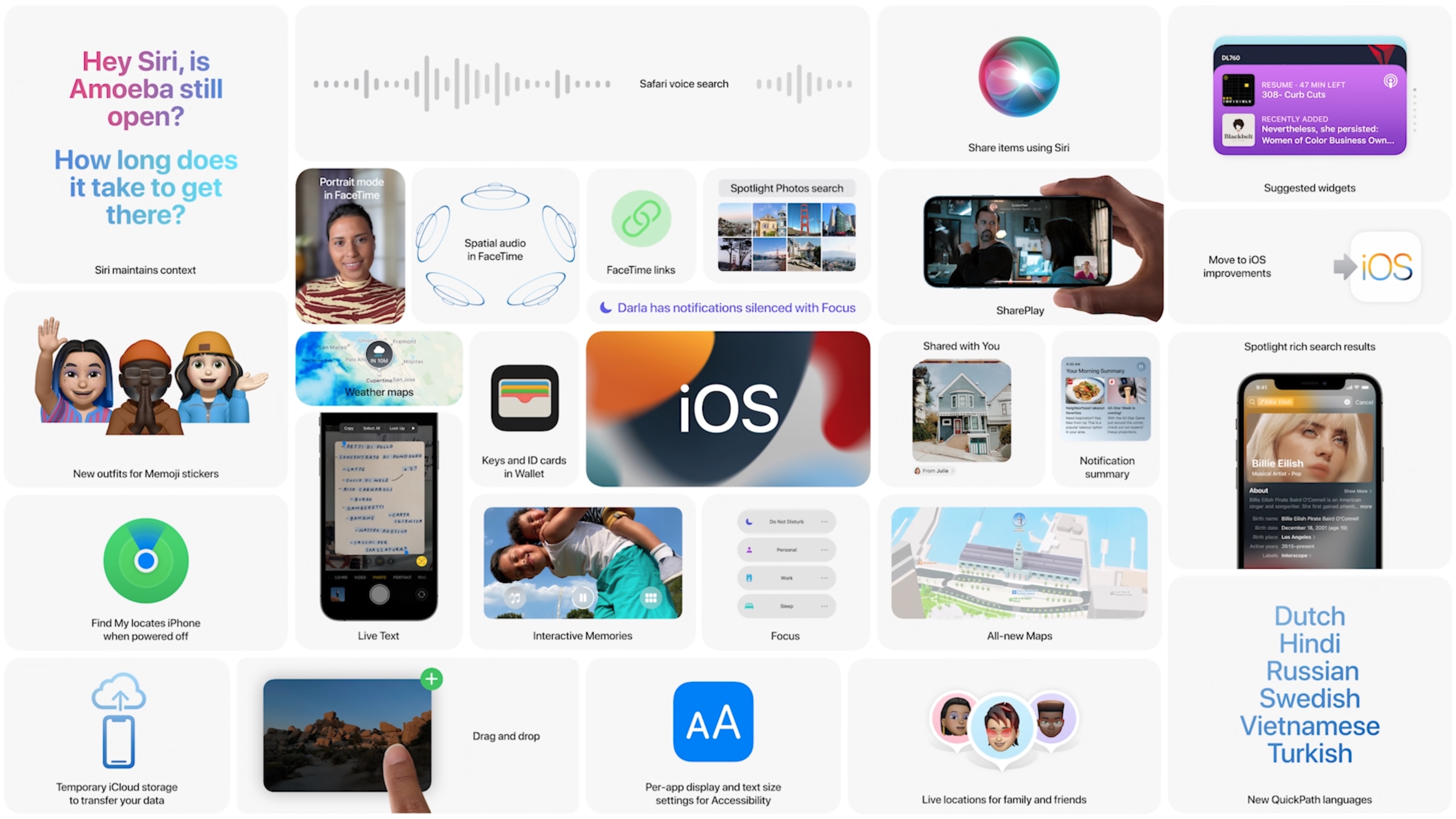
WWDC iOS overview screen

Craig Federighi started things off with details on the latest major update to iOS, noting that this release focuses on four points: staying connected, finding focus, using intelligence, and exploring the world. iOS 15 will roll into public beta in July, with a full release “this fall.”

FaceTime updates

  • Spatial audio: When using a compatible audio setup, spatial audio will make it seem more like your friends voices are coming from their on-screen position.
  • Voice isolation: Better (and toggle-able) voice isolation for when you’re FaceTiming from a loud environment.
  • Portrait mode: The portrait mode from the camera app is coming to FaceTime — in other words, pretty background blurring.
  • FaceTime links: You’ll now be able to generate shareable FaceTime links to let others (including desktop and Android users via the browser!) join FaceTime calls.
  • SharePlay: Shared audio/video streams to allow you to listen to music, watch video (select video partners initially, including Disney+, Hulu, HBO Max, and TikTok), and control apps in sync with friends. You can pushed the shared videos to your AppleTV, keeping it all synced up between devices and households.

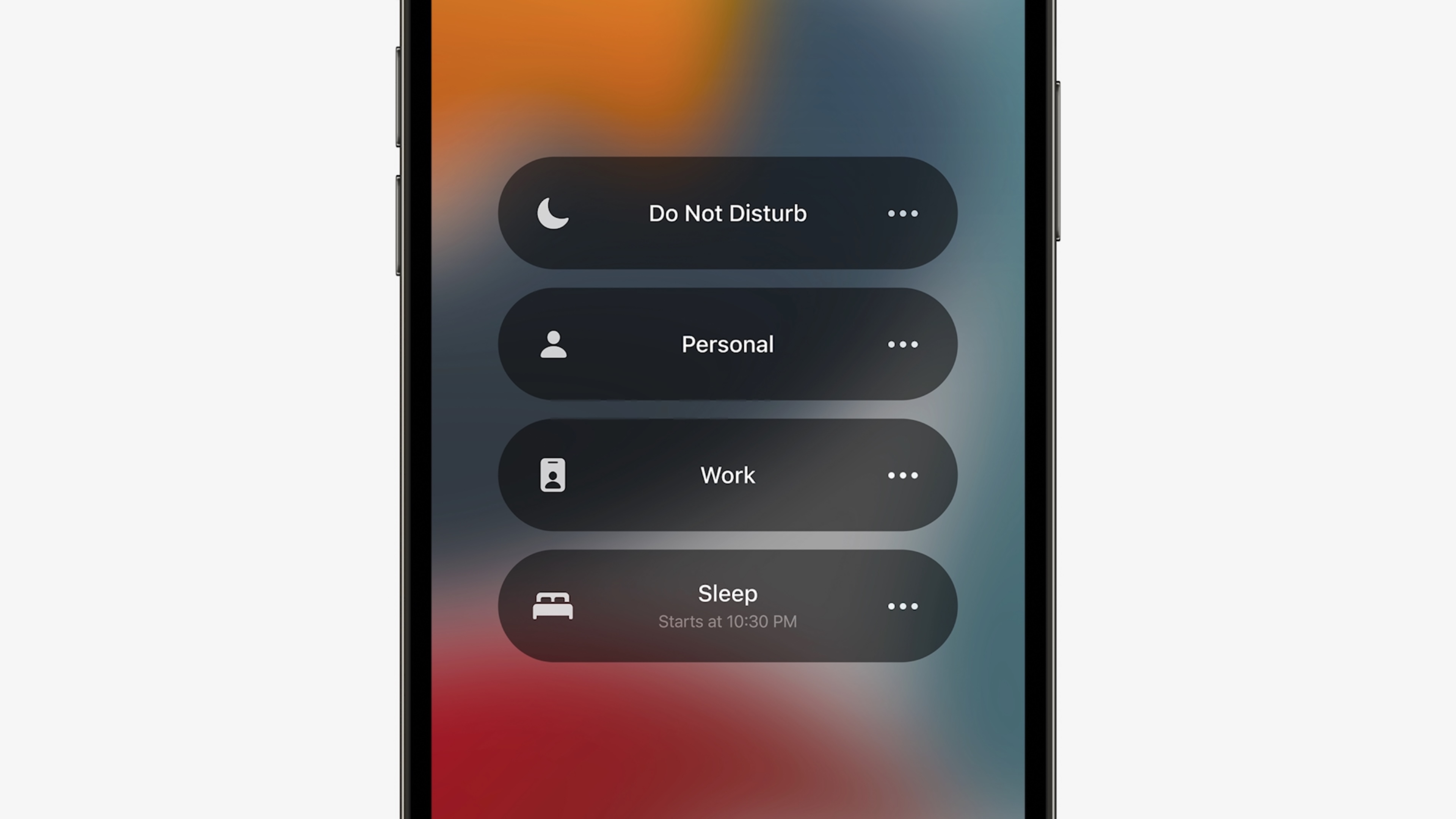
“Focus” mode

  • You’ll be able to shift your phone into different, customizable modes — like “work”, where only your work related apps will show up, or “personal” which could tuck all those work apps and widgets to the background. Vacation mode, activate!
  • Notifications batching: You can now tell iOS to batch less important notifications together, delivering them all at a specific time.

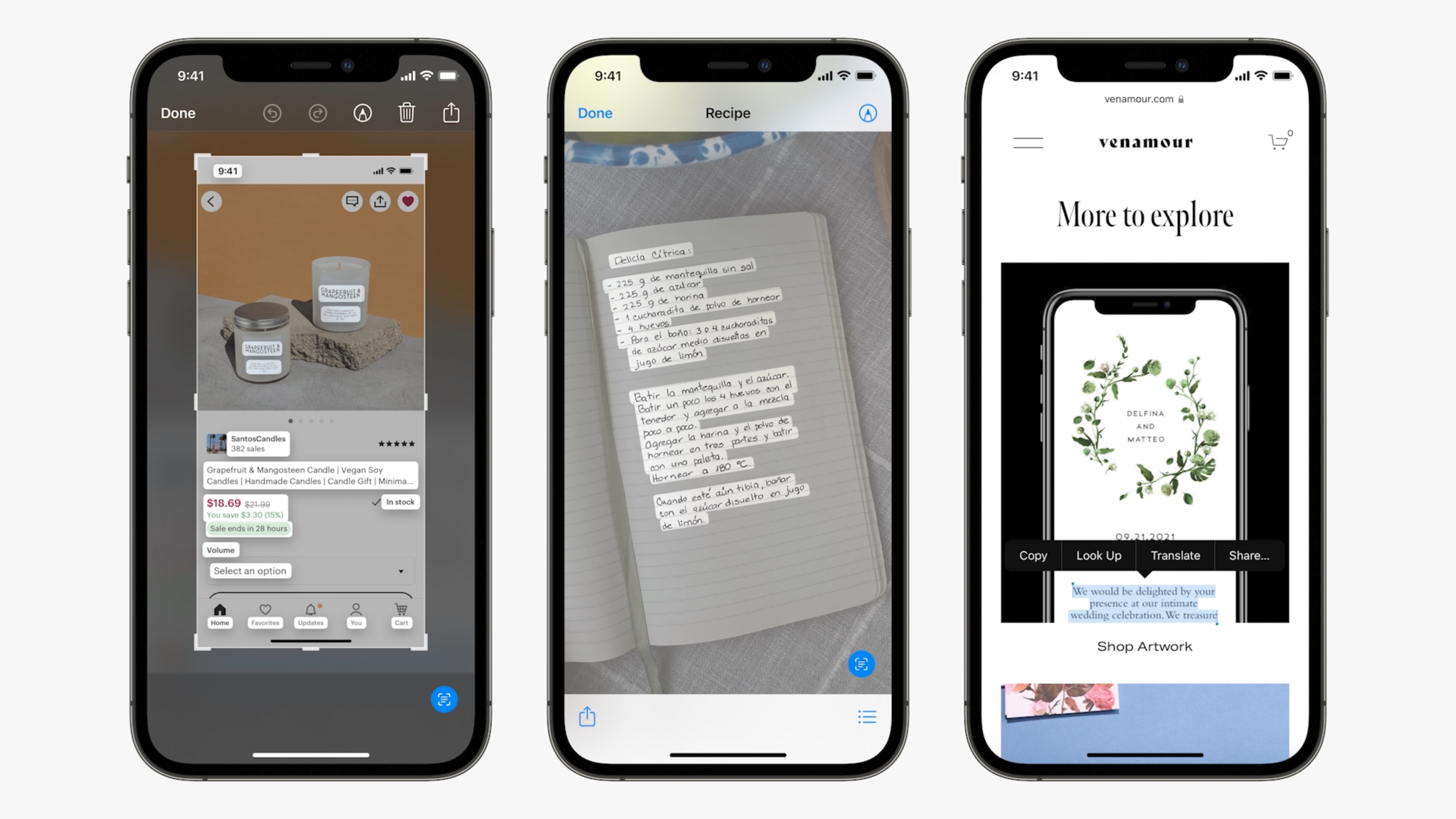
Live Text

WWDC 2021 - Photos - Live Text

The camera can now recognize text in photos (handwritten or printed) and make it selectable, searchable, copy/pastable, etc. It can recognize things beyond text, as well, including animal breeds, landmarks, etc.

Apple Wallet

Apple is incorporating home, office, and hotel keys into Apple Wallet, allowing you to unlock doors in those places with your phone. You’ll be able to check into select hotels, for example, and have your room key show up on your phone as soon as your room is ready.

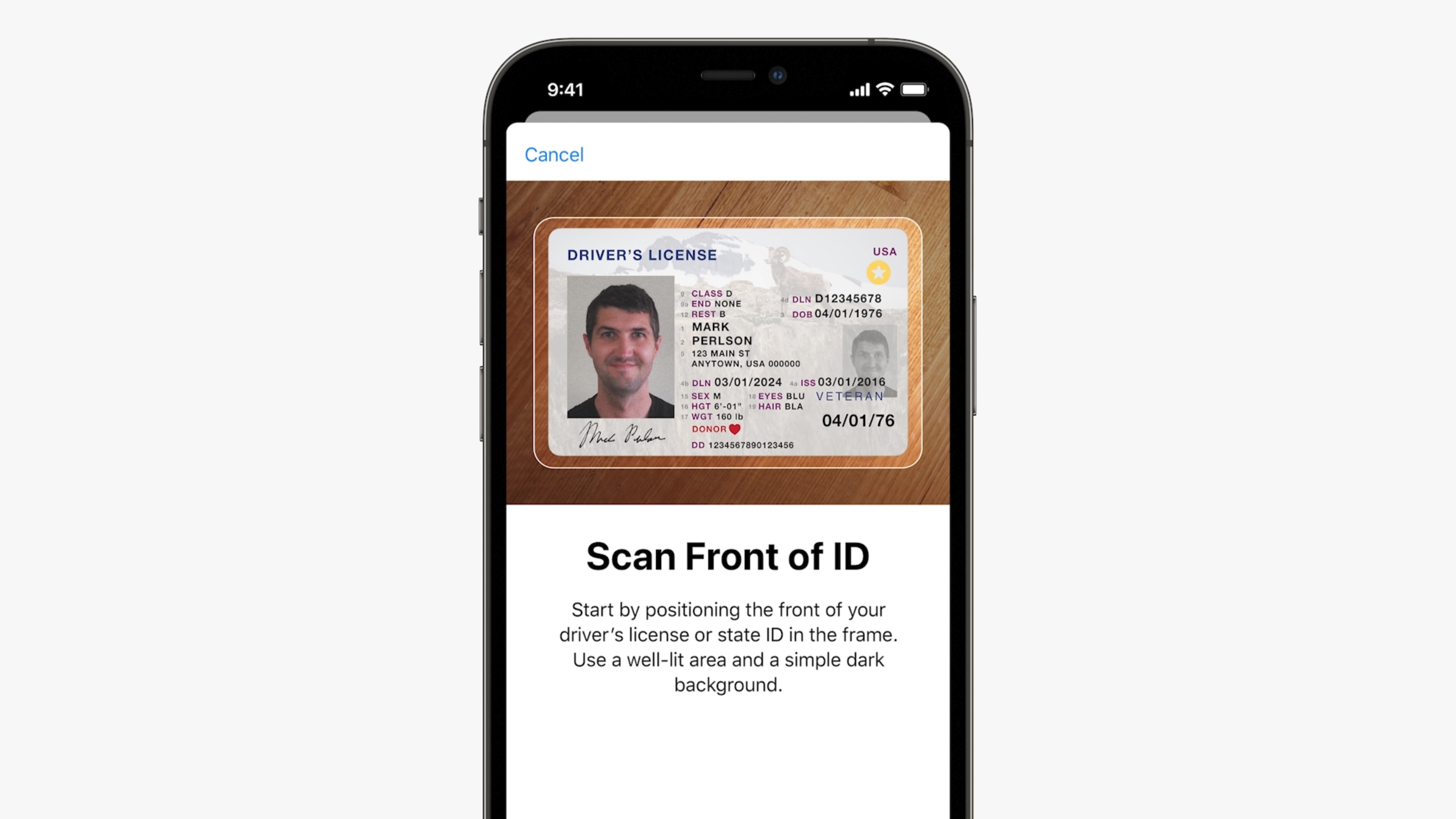
They’re also working with the TSA (in select states, at first) to put an encrypted copy of your state driver’s license (!) in Wallet that will be accepted at security screenings.

Apple Maps

Image Credits: Apple

Maps is getting a details-focused overhaul, with the addition of 3D elevation maps, 3D rendered landmarks, crosswalks, bikelanes, etc.

Apple Maps is also taking some cues from Google Maps, including a mode that has you use the camera to scan nearby buildings to more precisely orient the phone and help you figure out which direction you’re supposed to go at the beginning of a walk.

AirPods Updates

  • Conversation mode: AirPods Pro will now allow you to boost the volume of voices (and control the volume of ambient noise) of those around you when you’re having a face-to-face conversation in a noisy environment.
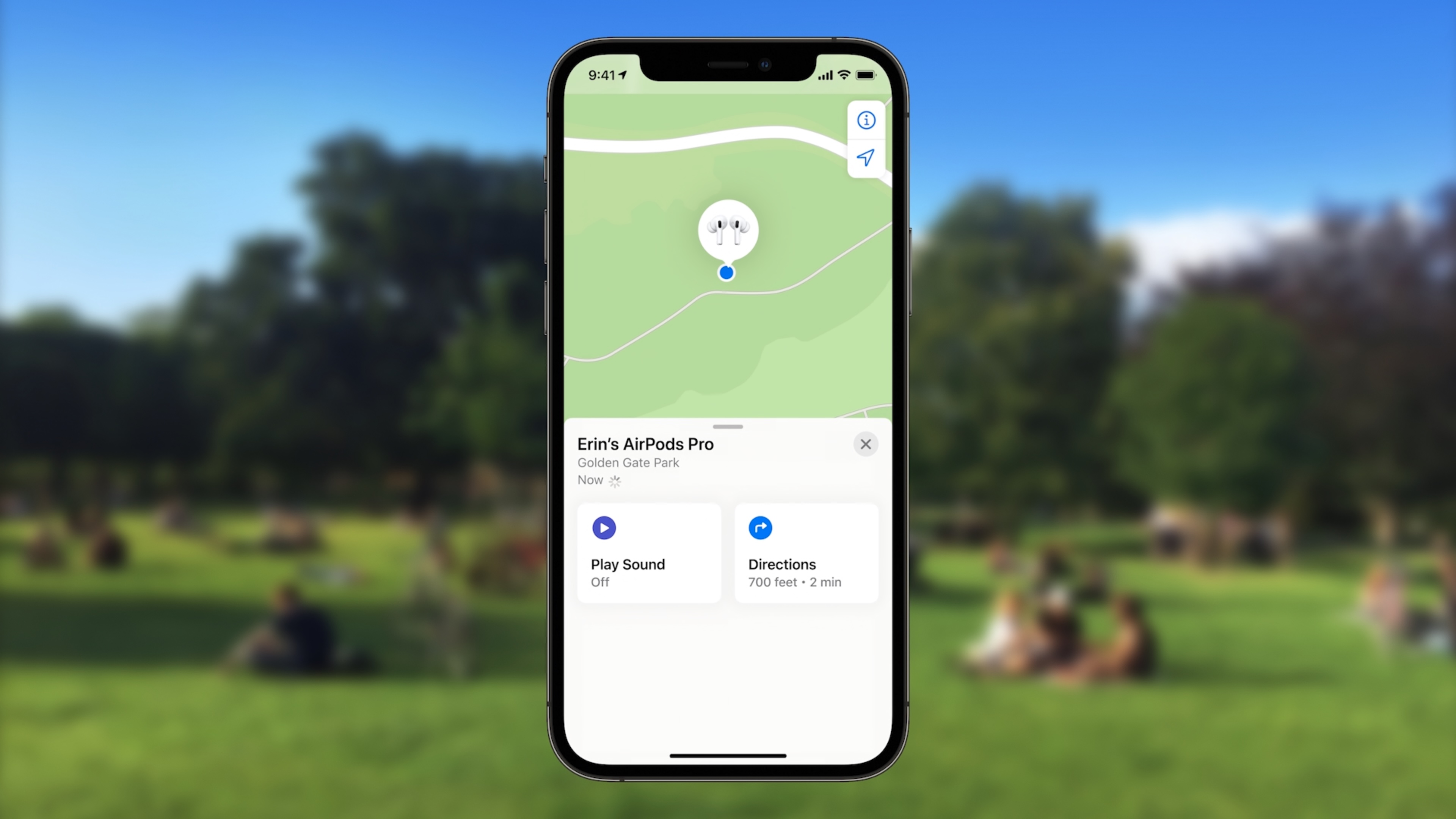
  • Find My: AirPods will now work with the Find My app even when they’re in the case, and will be able to alert you if you leave them behind.
  • Spatial audio is coming to tvOS and M1-powered Macs

iPadOS

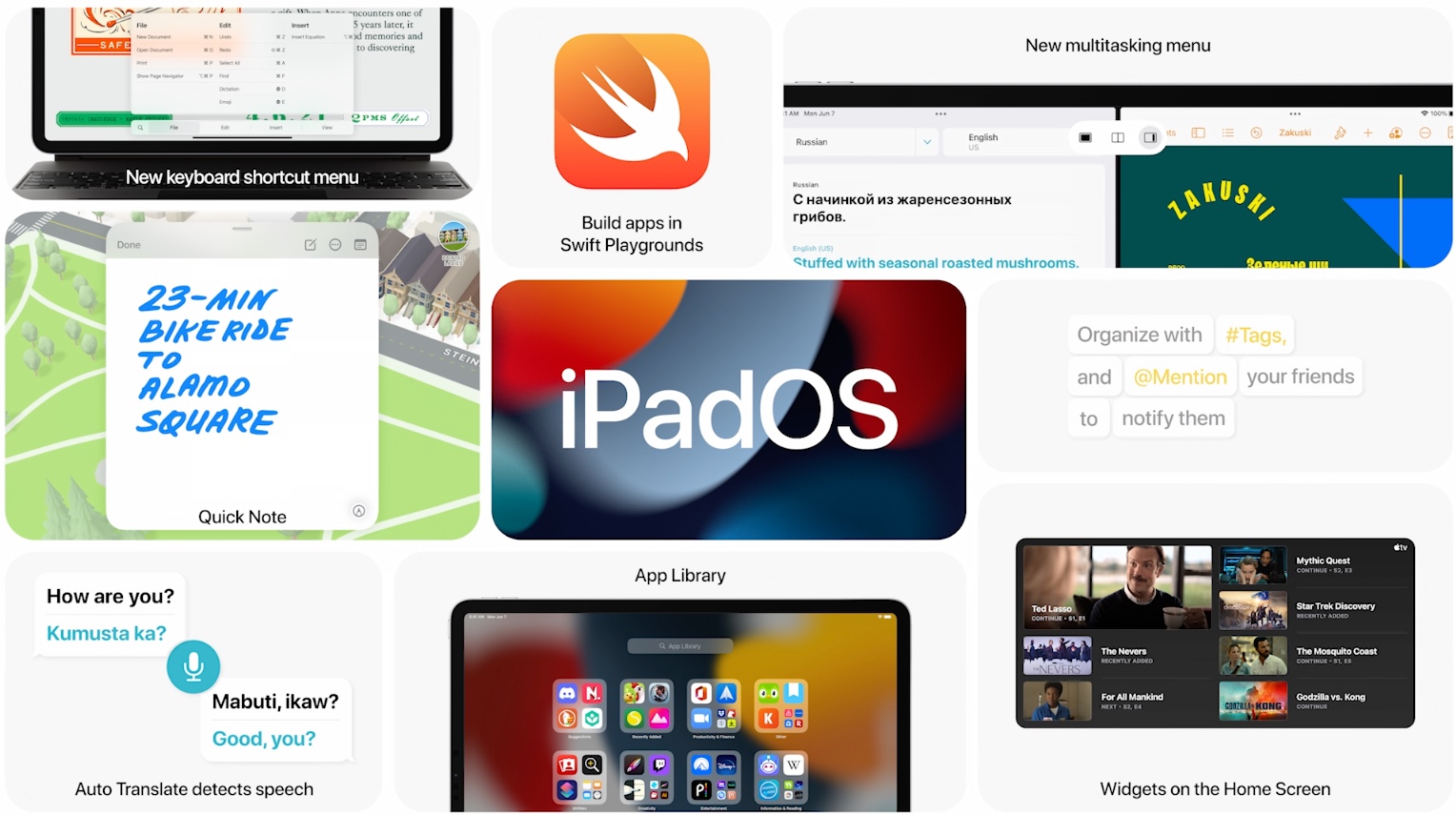
  • iPadOS will get home screen widgets. They’re pretty similar to the ones you’ve seen on iOS, with the addition of a much bigger widget option because, well, bigger screen.
  • The “App Library” concept is making its way from iOS to iPadOS, as well.
  • A new multitasking menu will (hopefully) simplify the way you handle multitasking on iPadOS, moving the system away from the easily-forgotten gestures currently required.
  • The Notes app will now let you @ mention someone in a shared note to get their attention on a change, and highlight changes when you come back to a shared doc
  • Translate: iPadOS will get a system-wide text translation option, along with an app for translating in-person conversations in real time.
  • Swift Playgrounds will now let you build apps on the iPad and submit them to the App Store.
  • Public beta in July, full release “this fall.”

Security Updates

  • Mail app will now automatically obscure your IP address/location from those invisible tracking pixels marketers love to tuck into emails
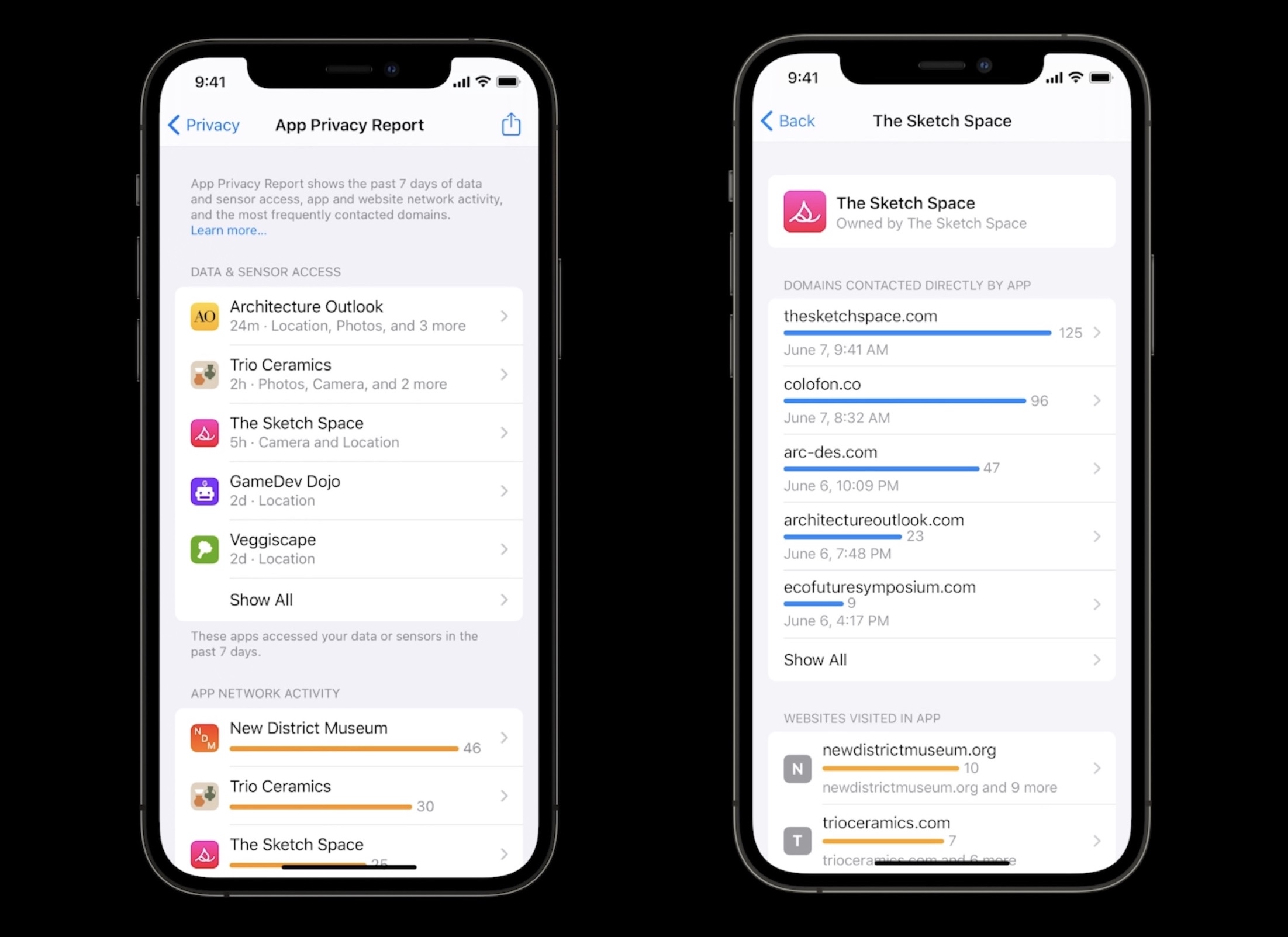
  • An “App Privacy Report” option in settings will now summarize how often any given app accesses your location, photos, etc to hopefully flag any unexpected behaviors.
  • Siri’s speech recognition will now happen on-device, keeping the audio recordings off of Apple’s servers and allowing for Siri commands without an internet connection
  • You’ll be able to add recovery contacts to your iCloud account, allowing you to select friends who can help you get back into your iCloud account if you get locked out. You’ll also be able to pick “Legacy” contacts who can request access to your iCloud data should you pass away.

Health updates

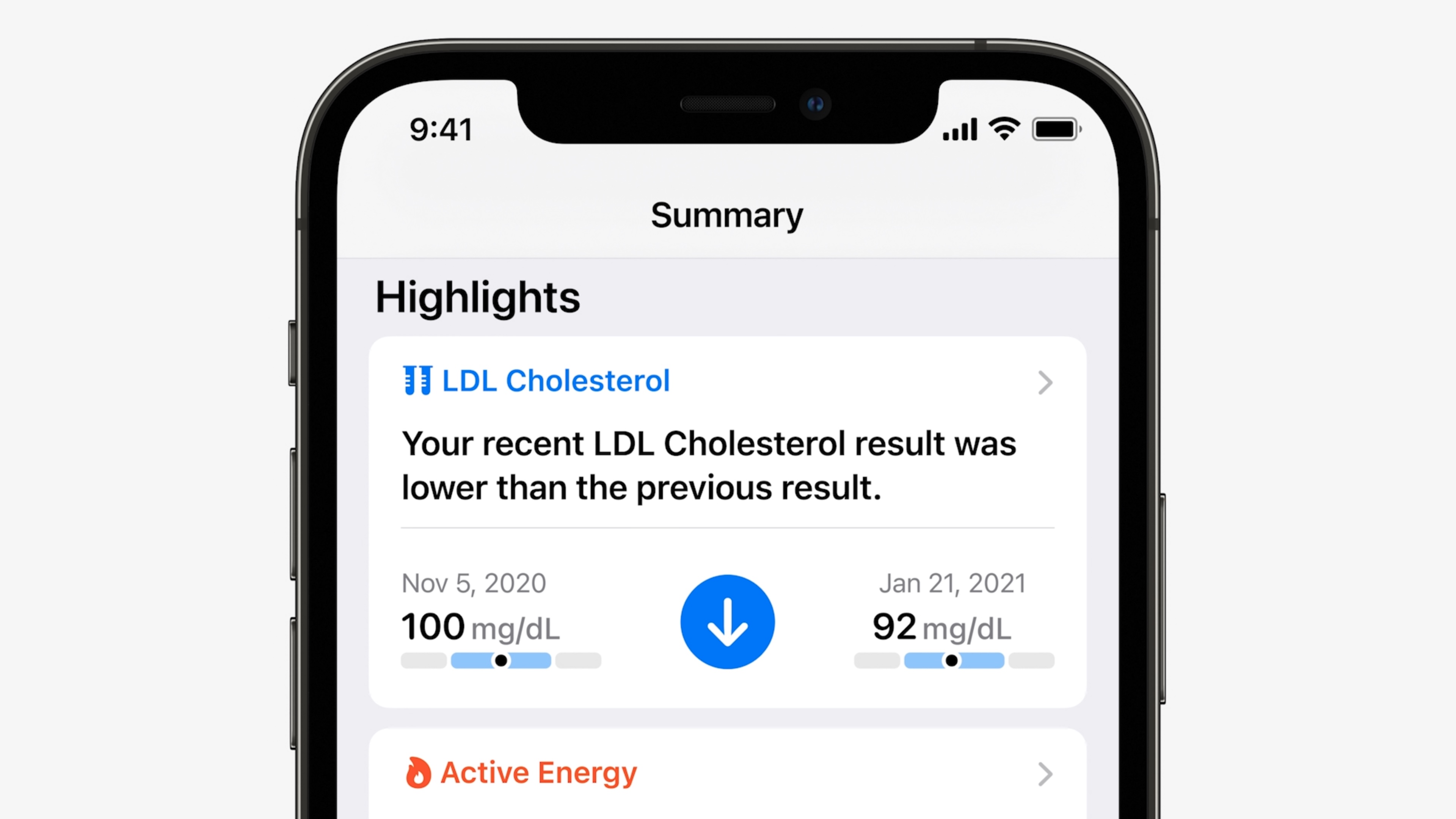
  • Your iPhone can now analyze your gait, step timing, etc to analyze your “walking steadiness” to hopefully flag if your fall risk is increasing over time.
  • A “Trends” summary in the health app will highlight patterns in your step counts, heart rate, etc
  • New “Health sharing” options will let you securely share health data with people you care about — like that of your parents, or your kids.

watchOS

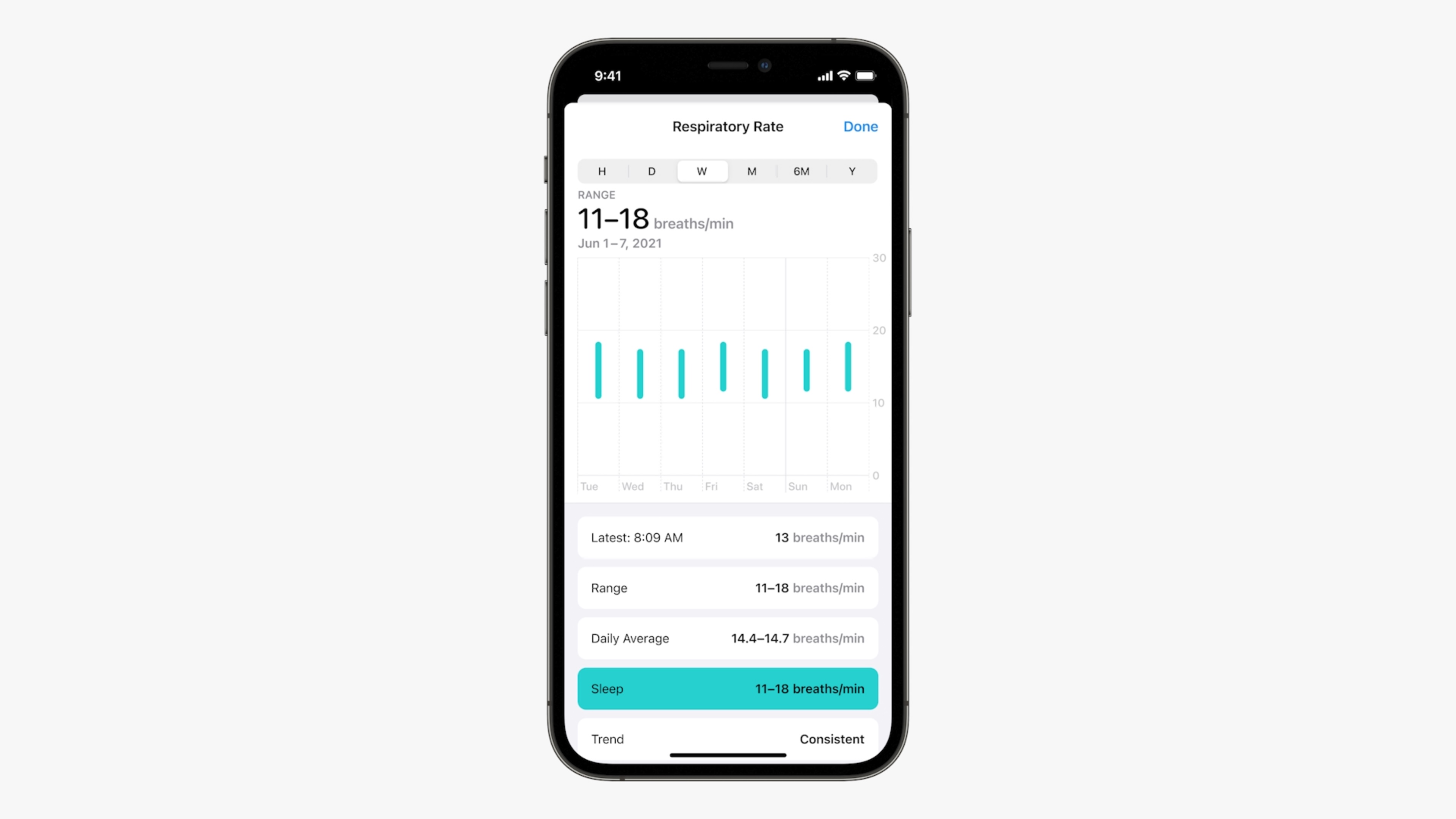
  • watchOS will now be able to help track your respiratory rate (how many breaths you take per minute), and note how you might breath differently throughout the day (like when you’re sleeping). They’re also adding new workout modes to the activity tracking engine, including Tai Chi and Pilates.
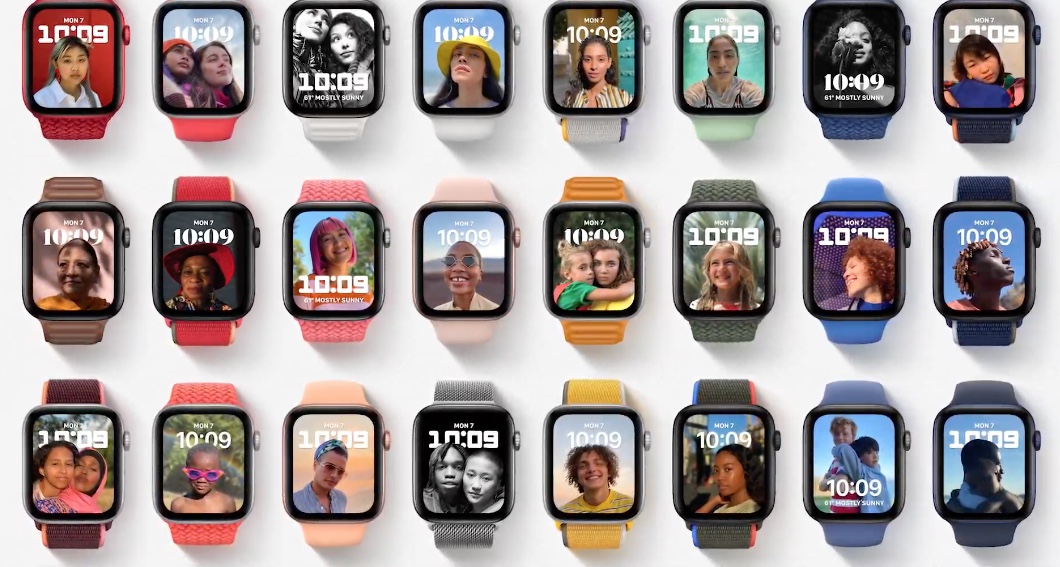
  • A new “Portraits” watchface will use your portrait-mode photos to create a neat, layered-looking clock layout

  • Text input is getting a subtle overhaul on watchOS, with the “Scribble” handwriting recognition being incorporated right into the text view. You use the crown to place the text cursor, then draw the letters/symbols you want right on top of your text.
  • Public beta in July, full release “this fall.”

Siri goes to third party devices

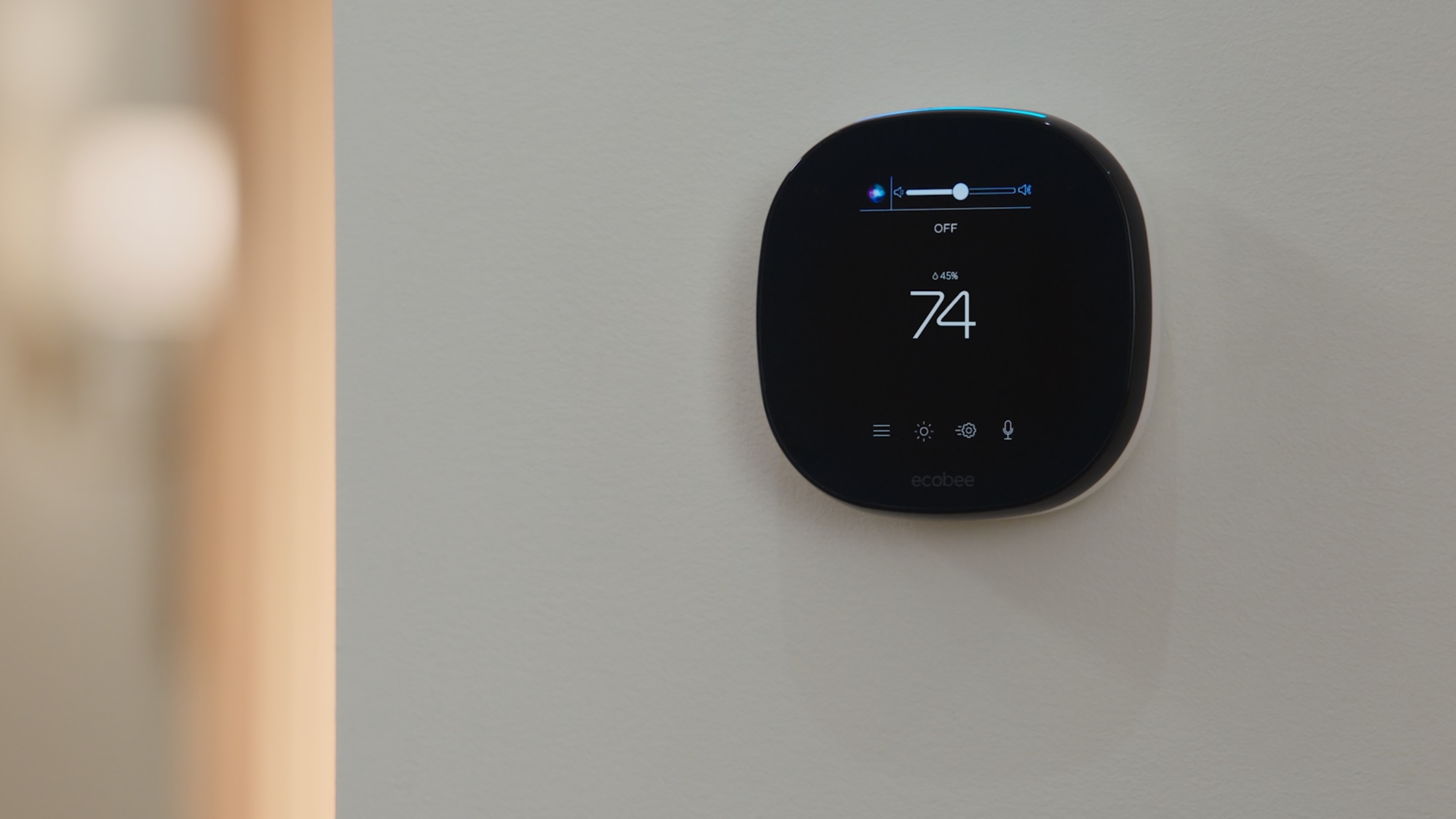
Apple says it’s opening up Siri to third party manufacturers and their devices, allowing Siri to live on things like ecobee thermostats beginning later this year.

macOS

  • The next major release of macOS will be called macOS Monterey
  • All of the aforementioned SharePlay stuff — which allows you to watch video and listen to music in sync with friends over FaceTime — is coming to macOS.
  • Universal control” will let you use one keyboard/mouse setup to control multiple macs and iPads, automatically recognizing when a new compatible device is placed nearby. Put an iPad next to your Macbook, and bam — it automatically extends, turning the two devices into one big canvas.
  • Macs are getting AirPlay, allowing you to send AirPlay content to your Mac’s display like you might an AppleTV.
  • The “Shortcuts” automation system from iOS is coming to macOS, allowing you to quickly drag-and-drop together scripts to do the things you find yourself doing often. (If you’re already using macOS’ automator system, it’ll still be supported for now.)
  • Safari is getting a UI overhaul; tabs are being made smaller, and they’re introducing a “tab groups” system to keep things organized. Tab groups will automatically sync between iCloud devices.
  • Public beta in July, full release “this fall.”

Dev stuff

Though its called the Worldwide Developer Conference, Apple tends to keep the keynote focused largely on the consumer-facing stuff and save the most technical bits for the week’s many breakout sessions. They did touch on a few developer highlights, though, including:

  • New APIs to hook into things like SharePlay, Focus, etc.
  • iOS is getting a built-in 3D object scanning system that developers can tie into their apps, allowing them to integrate 3D scanning-style functionality without having to reinvent that wheel.
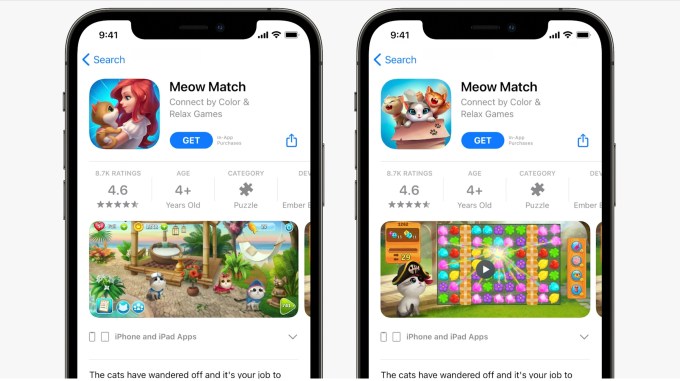
  • Devs will now be able to build multiple App Store product pages for the same app — with different icons, screenshots, etc — to see which one resonates best.
  • TestFlight — the service for privately distributing pre-release/beta apps on Apple’s phone/tablet/watch operating systems — is coming to macOS.

read more about Apple's WWDC 2021 on TechCrunch

07 Jun 2021

Apple to introduce A/B testing and in-app events to the App Store

Apple today announced a number of coming changes and improvements to the App Store that will help developers better target their apps to users, get their apps discovered by more people, and even highlight what sort of events are taking place inside their apps to entice new users to download the app and encourage existing users to return.

The company said its App Store today sees 600 million weekly users across 175 countries, and has paid out over $230 billion to developers since the App Store launched, highlighting the business opportunity for app developers.

However, as the App Store has grown, it’s become harder for app developers to market their apps to new users or get their apps found. The new features aim to address that.

Image Credits: Apple

One change involves the app’s product page. Starting this year, app developers will be able to create multiple custom product pages to showcase different features of their app for different users. For instance, they’ll be able to try out things like different screenshots, videos, and even different app icons to A/B test what users like the most.

They’ll also be able to advertise the dynamic things that are taking place inside their apps on an ongoing basis. Apple explained that apps and games are constantly rolling out new content and limited time events like film premieres on streaming services, events like Pokémon Go fests, or Nike fitness challenges. But these events were often only discoverable by those who already had the app installed and then opted in to push notifications.

Image Credits: Apple

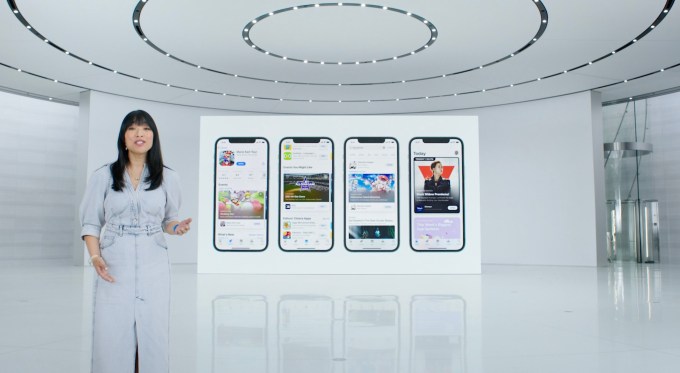
Apple will now allow developers to better advertise these events, with the launch in-app events “front and center on the App Store.” The events can be showcased on the app’s product page. Users can learn more about the events, sign up to be notified, or quickly join the event, if it’s happening now. They can also discover events with personalized recommendations and through App Store search.

App Store editors will curate the best events and the new App Store widget will feature upcoming events right on users’ homescreens, too.

Apple says the feature will be open to all developers, including those who already run events and those who are just getting started.

read more about Apple's WWDC 2021 on TechCrunch

07 Jun 2021

macOS 12 Monterey upgrades Continuity with Universal Control

During the WWDC conference today, Apple unveiled the new macOS 12 Monterey. A major feature in the macOS update is Universal Control, which builds upon the Continuity features first introduced in OS X Yosemite. For years, it’s been possible to open a news article on your iPhone and keep reading it on your MacBook, or to copy and paste a link from your iPad to your iMac. But Universal Control takes these features further.

With Universal Control, you can use a single mouse and keyboard to navigate across multiple Apple devices at once. This functionality works across more than two devices – in the demo video, the feature is used to seamlessly move across an iPad, MacBook, and iMac. Users can drag and drop files across multiple devices at once, making it possible, for example, to use a multi-screen setup while editing video on Final Cut Pro.

What’s possible in Universal Control isn’t necessarily new – this has been made possible before through third party apps. Plus, in 2019, Apple debuted Sidecar, which allowed users to connect their iPad as a second monitor for their MacBook or iMac. But, Universal Control improves upon Sidecar – and maybe renders it obsolete – by allowing users to link any Apple devices together, even if it’s not an iPad. Though this update may not be ground-breaking, it’s a useful upgrade to existing features.

read more about Apple's WWDC 2021 on TechCrunch

07 Jun 2021

Apple TV to support using HomePod Mini as speakers, among other updates

Apple didn’t announce that rumored combined Apple TV device that would combine the set-top box with a HomePod speaker during its WWDC keynote, but it did announce a few features that will improve the Apple TV experience — including one that involves a HomePod Mini. Starting this fall, Apple said you’ll be able to select the HomePod Mini as the speaker for your Apple TV 4K. It also introduced a handful of software updates for Apple TV users, including a new way to see shows everyone in the family will like, and support for co-watching shows through FaceTime.

The co-watching feature is actually a part of a larger FaceTime update, which will let users stream music, TV, and screen share through their FaceTime calls. The Apple TV app is one of those that’s supported through this new system, called SharePlay. It will now include a new “Shared with You” row that highlights the shows and movies your friends are sharing, as well.

Another feature called “For All of You” will display a collection of shows and movies based on everyone’s interests within Apple TV’s interface. This is ideal you’re planning to watch something as a family — like for movie night, for example. And you can fine tune the suggestions based on who’s watching.

A new Apple TV widget is also being made available, which now includes iPad support.

And the new support for HomePod Mini will help deliver “rich, balanced sound” and “crystal clear dialog,” when you’re watching Apple TV with the Mii set up as your speakers, Apple said.

read more about Apple's WWDC 2021 on TechCrunch

07 Jun 2021

Apple is bringing Shortcuts to the Mac and starts transition from Automator

Apple has announced the next major version of macOS at WWDC 2021 — macOS Monterey. Among other features, Apple is going to release Shortcuts on macOS. It’s going to look and work a lot like Shortcuts on iOS and iPadOS.

“The Mac has a long history of automation with command line, shell scripts, Apple scripts and Automator. And on iOS, we've made automation even easier with Shortcuts,” SVP of Software Engineering Craig Federighi said. “And this year we're bringing Shortcuts to the Mac.”

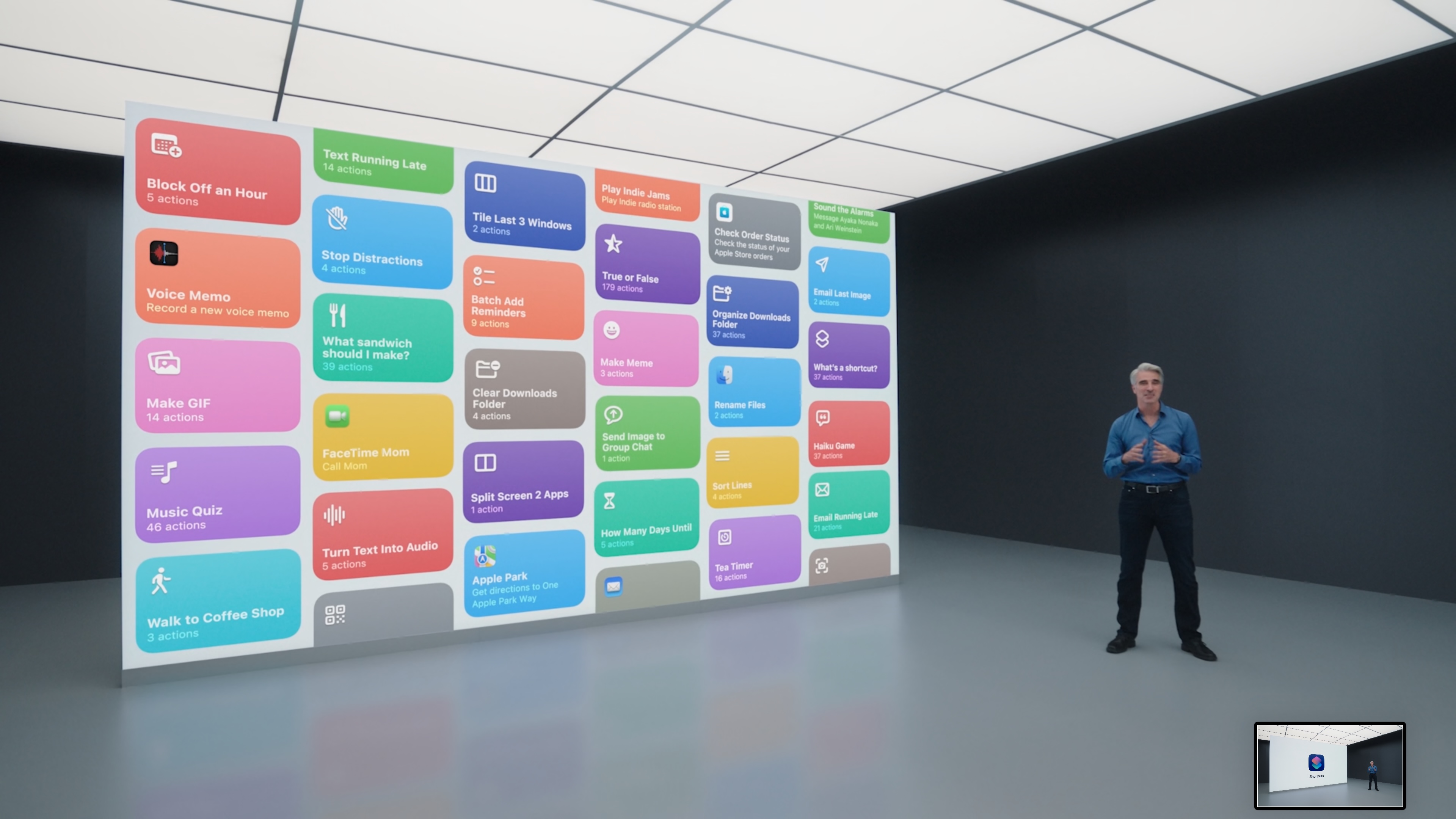
In the new Shortcuts app, you can see a gallery of popular shortcuts. It’s going to be interesting to see what exactly you can trigger with shortcuts, but you can expect to be able to launch apps, create GIFs, send a message, create an email, launch a website, etc.

After that, you can trigger your shortcuts in the right column of the Finder, in the menubar and in Spotlight. You can also trigger them with Siri.

With this announcement, Apple is also setting the stage for the end of Automator. “This is just the start of a multi-year transition Automator will continue to be supported, and you can import Automator workflows into beginning one with shortcuts,” Federighi said.

If you read between the lines, it sounds like Apple doesn’t plan to add new features to Automator. Shortcuts is the future of automation on macOS, iOS and iPadOS.

read more about Apple's WWDC 2021 on TechCrunch

07 Jun 2021

Apple unveils new iOS 15 privacy features at WWDC

Apple kicked off its global annual developer conference, WWDC, with a ton of new features and technologies. TechCrunch has all the coverage here from the keynote. As with previous years, Apple has dropped a number of new security and privacy features.

New privacy dashboard keeps tabs on app tracking requests

Apple is bringing a new privacy dashboard to iOS 15 to make it easier to see which apps are collecting your data and when. It’s a continuation of Apple’s App Tracking Transparency feature that it rolled out earlier this year to block apps from siphoning off and selling your data to advertisers and data brokers. In iOS 15, you will be able to see which apps you have given permission to access your data — such as your location, microphone, contacts, and photos — and how often it’s accessed.

(Image: TechCrunch / screenshot)

Mail will block invisible email trackers

Emails are not as private as you might think. Most marketing emails contain hidden pixel-sized images that know when you’ve opened an email. These trackers also collect information about you, including your IP address, which can be used to infer your location. Some browser extensions already block these invisible email trackers. But Apple said it’s bringing privacy features to the Mail app, which will make it more difficult for emails — and ad trackers — from knowing what emails you’ve opened.

Siri will process speech on the device

Siri, Apple’s voice assistant, requires the internet to work, but will soon work offline. Apple said Siri will soon process speech on the device so that audio never leaves the device. Apple said this will help prevent unwanted audio recording, but will also help make Siri respond to requests faster.

Apple also has a few new security and privacy features baked into its new iCloud+ premium service, including private relay, which encrypts your Safari internet traffic.

As part of its new premium iCloud+ service, Apple is also rolling out private relay browsing, which encrypts your Safari traffic and routes it so that it’s more difficult to track which websites you visit. TechCrunch’s Romain Dillet has more.

read more about Apple's WWDC 2021 on TechCrunch