Year: 2021

07 Jun 2021

Apple unveils macOS 12 Monterey

The past year has seen some of the most dramatic updates to Macs in recent memory. At last year’s WWDC, Apple announced its long-awaited move from Intel chip’s to its own first party silicon. By the end of the year, the company launched the first three M1 Macs, along with Big Sur, one of the biggest updates to macOS.

At this morning’s kickoff to WWDC, the company unveiled macOS 12 — named, you guessed it, Monterey. Universal Control is the top line new feature here, which further bridges the gap between desktop and tablet. Sticking the iPad next to a Mac, you can move the cursor between devices using the same trackpad and keyboard. The feature works on up to three devices at once.

AirPlay to Mac also blurs that let’s you cast content directly to your big desktop screen — that’s nice for weirdos like me who don’t have a TV. Shortcuts are also now available on macOS, allowing for simpler automation that the existing Automater. Users will be able to import Automater workflows directly to the desktop version of the popular mobile app. It will be a multi-year transition, but rip Automater — you will be missed (kind of).

Shortcuts will be coming to Siri, Spotlight, the menu bar and Finder to start.

Developing…


read more about Apple's WWDC 2021 on TechCrunch

07 Jun 2021

watchOS 8 brings new mindfulness features and respiratory tracking

You weren’t expecting to make it through this year’s WWDC without some big watchOS news, were you? Apple’s wearable isn’t quite doing iPhone numbers, but Watch has been massively successful for the company, utterly dominating the smartwatch market.

Surprising absolutely no one, the company is taking a more focused approach to mindfulness. Apple’s not ready to kill Calm or Headspace just yet, but the popular breathe feature is getting a much needed upgrade with new animations reminding users to reflect and be more mindful.

Also new is respiratory tracking, which thus far had been more of a background feature. It’s being surfaced in the watchOS experience, for tracking over time and more notifications.

It wouldn’t be a watchOS update without some new faces, of course. Here the company is adding a portrait mode to faces to offer more depth for shots as the lock screen. The Watch Photos app is getting a new layout, as well, along with the share images from the watch to first-party apps like Mail and Messages.

Fitness+ is getting a bunch of new content, as well, including artist musical spotlights for workouts including Alicia Keys, Lady Gaga and Keith Urban. Tai chi and pilates are also being added to the list of workouts tracked by the wearable.

And last, but certainly not least for many, watchOS is also getting GIF support.

read more about Apple's WWDC 2021 on TechCrunch

07 Jun 2021

Free month of Extra Crunch included with TC Sessions: Mobility tickets

TC Sessions: Mobility 2021 is coming up soon, and we’ve decided to sweeten the deal for what’s included with your event pass. Buy your ticket now and you’ll get a free month of access to Extra Crunch, our membership program focused on startups, founders and investors with more than 100 exclusive articles published per month.

Extra Crunch unlocks access to our weekly investor surveys, private market analysis, and in-depth interviews with experts on fundraising, growth, monetization and other core startup topics. Get feedback on your pitch deck through Extra Crunch Live, and stay informed with our members-only Extra Crunch newsletter. Other benefits include an improved TechCrunch.com experience and savings on software services from AWS, Crunchbase, and more.

Learn more about Extra Crunch benefits here, and buy your TC Sessions: Mobility 2021 tickets here.  

What is TC Sessions: Mobility 2021? 

TC Sessions: Mobility 2021 is where the transportation community gathers online for interactive discussions that break through the hype to understand the current state of the mobility revolution and reveal the future of transportation. The event will take place June 9, and we’d love to have you join. View the event agenda here, and purchase tickets here

Once you buy your TC Sessions: Mobility 2021 pass, you will be emailed a link and unique code you can use to claim the free month of Extra Crunch during the event.

Already bought your TC Sessions: Mobility 2021 ticket?

Existing ticket holders as well as any new purchasers will be emailed with information during the event on how to claim the free month of Extra Crunch membership. 

Already an Extra Crunch member?

We’re happy to extend a free month of access to existing users. Please contact extracrunch@techcrunch.com, and mention that you are an existing Extra Crunch member who bought a ticket to TC Sessions: Mobility 2021.

07 Jun 2021

Apple announces iCloud+ with privacy-focused features

Apple is rolling out some updates to iCloud under the name iCloud+. The company is announcing those features at its developer conference. Existing paid iCloud users are going to get those iCloud+ features for the same monthly subscription price.

In Safari, Apple is going to launch a new privacy feature called Private Relay. It sounds a bit like the new DNS feature that Apple has been developing with Cloudflare. Originally named Oblivious DNS-over-HTTPS, Private Relay could be a better name for something quite simple — a combination of DNS-over-HTTPS with proxy servers.

When Private Relay is turned on, nobody can track your browsing history — not your internet service provider, anyone standing in the middle of your request between your device and the server you’re requesting information from. We’ll have to wait a bit to learn more about how it works exactly.

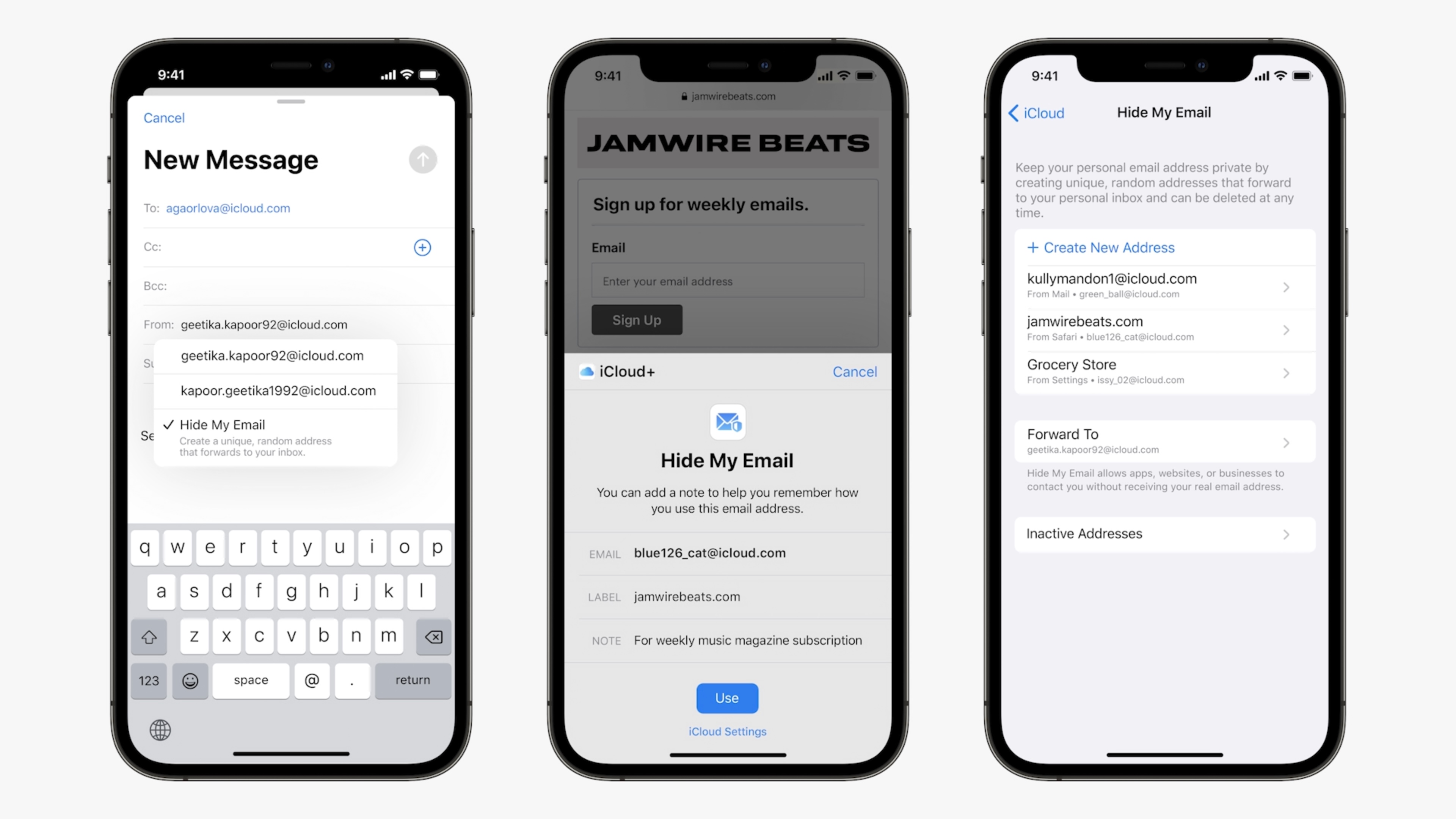
The second iCloud+ feature is ‘Hide my email’. It lets you generate random email addresses when you sign up to a newsletter or when you create an account on a website. If you’ve used ‘Sign in with Apple’, you know that Apple offers you the option to use fake iCloud email addresses. This works similarly, but for any app.

Finally, Apple is overhauling HomeKit Secure Video. With the name iCloud+, Apple is separating free iCloud users from paid iCloud users. Basically, you used to pay for more storage. Now, you pay for more storage and more features. Subscriptions start at $0.99 per month for 50GB (and iCloud+ features).

More generally, Apple is adding two much needed to iCloud accounts. Now, you can add a friend for account recovery. This way, you can request access to your data to your friend. But that doesn’t mean that your friend can access your iCloud data — it’s just a way to recover your account.

The last much-needed update is a legacy feature. You’ll soon be able to add one or several legacy contacts. Data can be passed along when you pass away. And this is a much needed feature as many photo libraries become inaccessible when someone close to you passes away.

read more about Apple's WWDC 2021 on TechCrunch

07 Jun 2021

iPadOS 15 announced at WWDC, features improved multitasking and surprising Swift Playgrounds features

Apple today introduced the next version iPadOS with more widgets and a better multitasking system. The announcement was by Apple SVP, Craig Federighi at Apple’s annual developer’s conference, WWDC. The features announced today are welcomed updates, but fall short from the major rework the iPad sorely deserves.The new iPad features come in addition to the bevy of features and updates found in iOS 15, which were also announced today.

“With iPad OS, we [want to] build distinct capabilities making it possible for the iPad to become whatever you need it to be,” said Apple SVP, Craig Federighi in a pre-recorded video.

iPadOS 15 retains the overall look and feel of the current iPad operating system. The updates in the new OS are mostly centered around multitasking. The iPad’s widget support gets a big update with iPadOS 15. The widgets are larger, more immersive, and dynamic. iOS’s App Library is finally available on the iPad where it tweaks the overall user experience. The feature, added to the iPhone in 2020, presents the user with an organized view of the apps on the iPad.

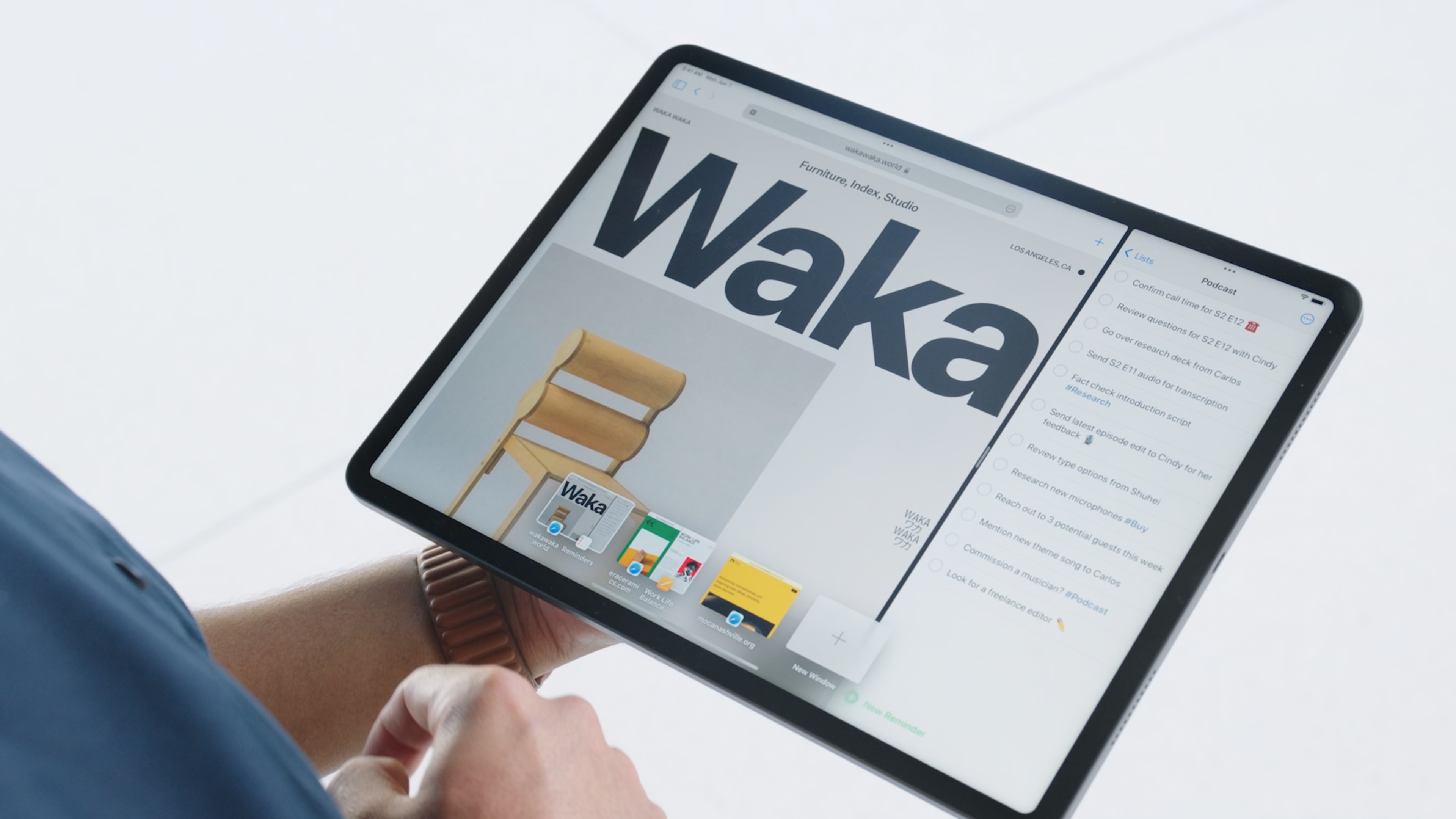
iPadOS 15 adds a new multitasking system. Called Split View, a drop-down menu at the top of the screen unlocks several multi-tasking, multi-window options. Called Split View, the system seems much smoother than the current multiscreen option on iPad OS, which is clunky and hidden. With Split View a feature called Shelf makes it easy to switch between different screens and screen grouping.

These new multitasking features will help our users be more productive, and do even more on their iPad,” said Federighi. “And what’s really cool is we now have a new set of keyboard shortcuts that let you do all of this without lifting a finger.”

Apple updated the note taking system in iPad OS to better take advantage of the iPad’s large screen. One new feature, called Quick Notes, allows users to float a note-taking window anywhere overtop of another app. That way, a user can take notes without

iPadOS 15 sports a new version of Swift Playgrounds that allows users to learn, build, and submit iPad and iPhone apps to the App Store. This represents a large step forward in Apple’s app development world. Now, a user can learn Swift and submit apps without the need of a Mac.

These features come just weeks after Apple started selling its more powerful iPad yet with many tech pundits calling on Apple to update the iPad’s operating system to better match the potential of the new hardware. iPad OS 15 is the evolution of the iPad and not the revolution many want.

07 Jun 2021

Apple (finally) updates its weather app with dynamic backgrounds, maps and way more data

Weather remains one of the most-used apps on mobile devices, and yet so often it’s also one of the least dynamic when it comes to updates and new features (ironic especially if you live in a country like the UK, like I do, where the weather is a near-national obsession and does really change within the course of an hour. Captive audience!). So today during WWDC it was great to see Apple finally giving its own native weather app some love with a significant update.

Possibly its biggest since long ago dropping Yahoo for Weather Channel as its key data provider?

The company has completely refreshed the interface with an animated layout that reflects what state the weather happens to be in at the moment and place you are searching, similar to what Apple displayed in its last update but significant more dynamic, with more wind, rain, sun and smog (sorry). There are now thousands of variations that Apple says more accurately represent sun position, clouds and rain.

In addition to this, Apple now shows off a pretty extensive dashboard of more datapoints — taking the information way beyond basics of temperature and precipitation. Graphics now include wind, UV index and barometric pressure. Alongside this you now get full-screen weather maps, high resolution images that animate the progress of rain and clouds, air quality, and temperature — sort of like your own personal weather assistant.

Some of this has been a long time coming but also unsurprising, and not just because of how perennially popular weather apps are.

Back in March 2020, it emerged that Apple made a key acquisition of a weather app startup, Dark Sky, easily one of the best weather apps on iOS and Android before Apple shut it down.

Again, given how surprisingly neglected weather apps tend to be, especially considering how passively popular they are, it was possibly always a low bar that was going to be bettered by someone. But Dark Sky, which began as a Kickstarter of all things, really did the effort justice.

It’s not clear why it too so long for Apple to make it rain on its weather app after that acquisition, but it’s good that it finally has.

Of course Apple’s still not magical enough to bring you guaranteed sunshine for that camping weekend you have coming up, but the update will mean that the data nerds among us might have a lot more fun figuring out what will happen next, and hopefully get a more accurate picture of the details that will help you decide whether you absolutely have to make room for wellies in the car or not.

07 Jun 2021

Tiger Global leads $30M investment into Briq, a fintech for the construction industry

Briq, which has developed a fintech platform used by the construction industry,  has raised $30 million dollars in a Series B funding round led by Tiger Global Management.

The financing is among the largest Series B fundraises by a construction software startup, according to the company, and brings Briq’s total raised to $43 million since its January 2018 inception. Existing backers Eniac Ventures and Blackhorn Ventures also participated in the round.

Briq CEO and co-founder Bassem Hamdy is a former executive at construction tech giant Procore (which recently went public and has a market cap of $10.4 billion) Canadian software giant CMIC. Wall Street veteran Ron Goldshmidt is co-founder and COO.

Briq describes its offering as a financial planning and workflow automation platform that “drastically reduces” the time to run critical financial processes, while increasing the accuracy of forecasts and financial plans.

Briq has developed a toolbox of proprietary technology that it says allows it to extract and manipulate financial data without the use of APIs. It also has developed construction-specific data models that allows it to build out projections and create models of how much a project might cost, and how much could conceivably be made. Currently, Briq manages or forecasts about $30 billion in construction volume.

Specifically, Briq has two main offerings: Briq’s Corporate Performance Management (CPM) platform, which models financial outcomes at the project and corporate level and BriqCash, a construction-specific banking platform for managing invoices and payments. 

Put simply, Briq aims to allow contractors “to go from plan to pay” in one platform with the goal of solving the age-old problem of construction projects (very often) going over budget. Its longer-term, ambitious mission is to “manage 80% of the money workflows in construction within 10 years.”

The company’s strategy, so far, seems to be working.

From January 2020 to today, ARR has climbed by 200%, according to Hamdy. Briq currently has about 100 employees, compared to 35 a year ago.

Briq has 150 customers, and serves general and specialty contractors from $10 million to $1 billion in revenue.  They include Cafco Construction Management, WestCor Companies and Choate Construction and Harper Construction. The company is currently focused on contractors in North America but does have long-term plans to address larger international markets, Hamdy told TechCrunch.  

Some context

Hamdy came up with the idea for Santa Barbara, California-based Briq after realizing the vast amount of inefficiencies on the financial side of the construction industry. His goal was to do for construction financials what Procore did to document management, and PlanGrid to construction drawing. He started Briq with his own cash, amassed through secondary sales as Procore climbed the ranks of startups to become a construction industry unicorn.

Briq CEO and co-founder Bassem Hamdy

“I wanted to figure out how to bring the best of fintech into a construction industry that really guesses every month what the financial outcomes are for projects,” Hamdy told me at the time of the company’s last raise – a $10 million Series A led by Blackhorn Ventures announced in May of 2020. “Getting a handle on financial outcomes is really hard. The vast majority of the time, the forecasted cost to completion is plain wrong. By a lot.”

In fact, according to McKinsey, an astounding 80 percent of projects run over budget, resulting in significant waste and profit loss.

So at the end of a project, contractors often find themselves having doled out more money and resources than originally planned. This can lead to negative cash flow and profit loss. Briq’s platform aims to help contractors identify outliers, and which projects are more at risk.

Throughout the COVID-19 pandemic, Briq has proven to be “extremely valuable” to contractors, Hamdy said.

“In an industry where margins are so thin, we have given contractors the ability to truly understand where they stand on cash, profit and labor,” he added.


07 Jun 2021

Apple Maps upgrade brings more detailed maps, transit features, AR view and more

Among many updates coming to iOS 15, Apple Maps will receive a number of upgrades that will bring more detailed maps, improvements for transit riders, AR experiences and other changes to the platform. The improvements build on the new map Apple begin rolling out two years ago, which had focused on offering richer details, and — in response to user feedback and complaints — more accurate navigation.

Since then, Apple Maps has steadily improved.

The new map experience has since launched in the U.S., U.K., Ireland and Canada and will now make its way to Spain and Portugal, starting today. I will then arrive in Italy and Australia later this year, Apple announced during its keynote address during its Worldwide Developer Conference on Monday.

maps driving

Image Credits: Apple

In addition, Apple said iOS 15 Maps will include new details for commercial districts, marinas, buildings, and more. Plus, Apple has added things like elevation, new road colors and labels, as well as hundreds of custom designed landmarks — for example, for places like the Golden Gate Bridge.

Apple also built a new nighttime mode for Maps with a “moonlit glow,” it said.


For drivers, Apple added new road details to the map, so it can help drivers as they move throughout a city to better see and understand important things like turn lanes, medians, bus and taxi lanes, and other things. The changes are competitive with some of the updates Google has been making as of late to its own Google Maps platform, which brought street-level details in select cities. These allowed people — including those navigating on foot, in a wheelchair, on a bike, or on a scooter, for example — to better see things like sidewalks and intersections.

Apple is now catching up, saying it, too, will show features like crosswalks and bike lanes.

It will also render things like overlapping complex interchanges in 3D space, making it easier to see upcoming traffic conditions or what lane to take. These features will come to CarPlay later in the year.

Image Credits: Apple

For transit riders, meanwhile, Maps has made improvements to help users find nearby stations.

Users can now pin their favorite lines to the top, and even keep track on their Apple Watch so they don’t have to pull out their phone. The updated Maps app will automatically follow your transit route and notify you when it’s time to disembark, making the app more competitive to third-party apps often favored by transit takers, like Citymapper, for instance.

maps train stop

Image Credits: Apple

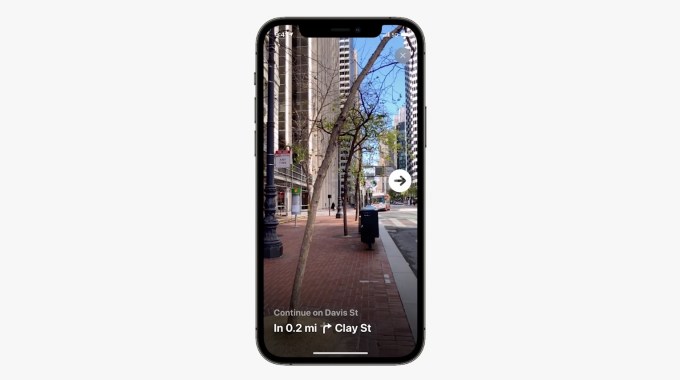
When you exit your station, you can also now hold up your iPhone to scan the buildings in the area and Maps will generate an accurate position, offering direction in augmented reality. This is similar to the Live View AR directions Google announced last year.

This feature is launching in select cities in 2021 with more to come in the year ahead, Apple said.

Image Credits: Apple


read more about Apple's WWDC 2021 on TechCrunch

07 Jun 2021

Apple’s Live Text lets you interact with text in your photos

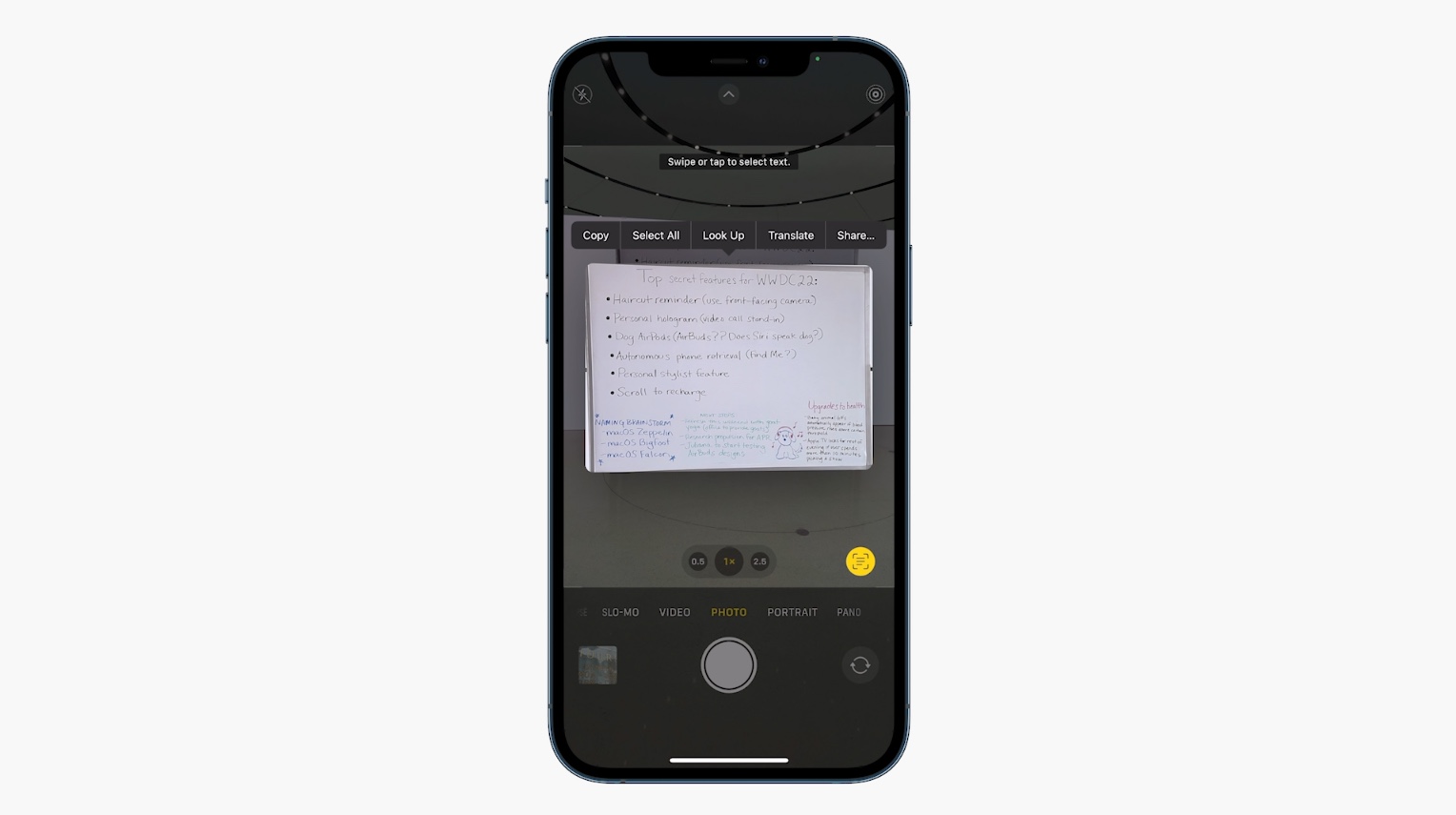
Apple has introduced a new feature to its camera system that automatically recognizes and transcribes text in your photos, from a phone number on a business card to a whiteboard full of notes. Live Text, as the feature is called, doesn’t need any prompting or special work from the user — just tap the icon and you’re good to go.

Announced by Craig Federighi on the virtual stage of WWDC, Live Text will be arriving on iPhones with iOS 15. He demonstrated it with a couple pictures, one of a whiteboard after a meeting, and a couple snapshots that included restaurant signs in the background.

Tapping the Live Text button in the lower right gave detected text a slight underline, and then a swipe allowed it to be selected and copied. In the case of the whiteboard, it collected several sentences of notes including bullet points, and with one of the restaurant signs it grabbed the phone number, which could be called or saved.

Screenshot of a phone selecting text in an image.

The feature is reminiscent of many found in Google’s long-developed Lens app, and the Pixel 4 added more robust scanning capability in 2019. The difference is that the text is captured more or less passively in every photo taken by an iPhone running the new system — you don’t have to enter scanner mode or launch a separate app.

This is a nice thing for anyone to have, but it could be especially helpful for people with visual impairments. A snapshot or two makes any text, otherwise difficult to read, able to be dictated or saved.

The process seems to take place entirely on the phone, so don’t worry that this info is being sent to a datacenter somewhere. That also means it’s fairly quick, though until we test it for ourselves we can’t say whether it’s instantaneous or, like some other machine learning features, something that happens over the next few seconds or minutes after you take a shot.

read more about Apple's WWDC 2021 on TechCrunch

07 Jun 2021

Apple announces FaceTime updates at WWDC 2021

Over a year into a global pandemic, Apple announced some major updates to its FaceTime app at WWDC 2021, which will be available in iOS 15.

Notably, Android users will now be able to join in on FaceTime calls, posing some competition to apps like Zoom and Google Meet, which have boomed during lockdown. This FaceTime makeover will also include links to join calls, which can be sent via Calendar invites in advance of your meeting. These links work across platforms, whether you’re on the web, an Android phone, or your iPhone.

Apple is also adding updates that make the experience of video chatting on FaceTime more closely resemble real life conversations.

“When talking in person, our brains process hundreds of social auditory and visual cues when talking on a video call. Many of those signals can get lost, leaving us feeling drained. So this year, we’ve set out to make FaceTime calls feel more natural, comfortable, and lifelike,” said Craig Federighi, Apple’s Senior Vice President of Software Engineering.

Through a spatial audio feature, FaceTime calls will sound like you’re sitting in the same room with your friends – that means if someone is on the left side of your screen, their audio will come through the left side of your speaker. This functionality might not translate well to smaller devices like an iPhone, but could be interesting on devices like an iMac. The person speaking will have a white ring appear around their video while they’re talking, and users will be able to select a grid view to see the other people on the call, which seems quite similar to Zoom.

Next, Apple announced voice isolation, which will improve the speaker’s audio quality when calling from a noisy area. The demo video that was shown during the WWDC announcement featured a child walking into the video frame with a leaf blower. In TechCrunch’s liveblog, Darrell Etherington pointed out that the video seemed heavily edited.

Finally, a feature called SharePlay will come to FaceTime, which makes it easier for friends to watch streaming videos together. SharePlay allows for group listening, watching, and screensharing, and Apple shared partners for SharePlay including Disney+, Hulu, HBO Max, NBA, Twitch, TikTok, MasterClass, ESPN+, Paramount+, and PlutoTV. The SharePlay API will be available so that all video app makers can access it and integrate their own apps.

read more about Apple's WWDC 2021 on TechCrunch